
If you have ever worked on a software project, you know the classic developer tragedy: you spend hours drawing a beautiful, detailed architecture diagram. A week later, the code changes. Two weeks later, a new feature is added. By month's end, the diagram is completely out of sync with the actual codebase, rendering it useless—or worse, misleading.
For decades, software teams have struggled to keep documentation and code aligned. But today, a powerful paradigm shift is solving this problem: Diagram-as-Code combined with Artificial Intelligence.
Instead of dragging and dropping boxes with a mouse, modern teams write diagrams using plain text (Diagram-as-Code) and use AI to generate the initial structures from simple prompts. When paired with a robust enterprise tool like Visual Paradigm, this approach transforms UML (Unified Modeling Language) from a tedious chore into a fast, version-controlled, and highly automated workflow.
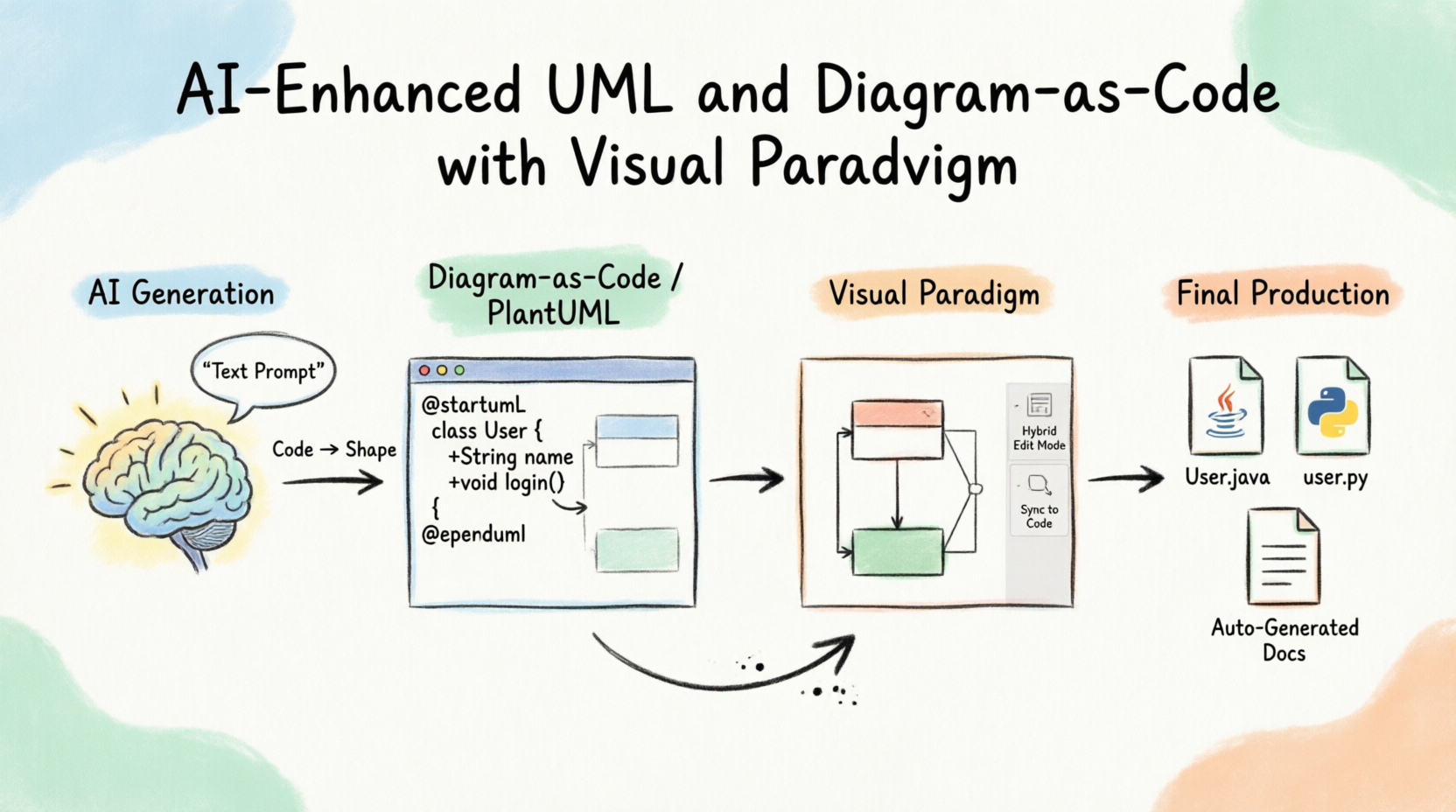
This tutorial will guide beginners through the foundations of this modern workflow. We will explore how to use AI to generate PlantUML code, import it into Visual Paradigm for visual refinement, and leverage hybrid code-visual editing to keep your designs and code perfectly in sync.
Before diving into the tools, let's briefly define the core concepts.
The Unified Modeling Language (UML) is the industry-standard visual language for specifying, visualizing, constructing, and documenting the artifacts of software systems. It provides standardized diagrams (Class, Use Case, Activity, etc.) so that architects and developers speak the same language.
Diagram-as-Code is the practice of defining diagrams using plain text scripts rather than graphical editors. PlantUML is the most popular open-source tool for this.
Why use it? Text files can be stored in Git, diffed, merged, and reviewed in Pull Requests just like actual software code. It eliminates the "drag-and-drop" alignment frustrations and ensures your diagrams are strictly compliant with UML standards.
While PlantUML is fantastic for writing diagrams, Visual Paradigm (VP) is the powerhouse that brings it all together. Visual Paradigm is a comprehensive modeling environment that supports UML, SysML, BPMN, and more.
Visual Paradigm has integrated AI capabilities that dramatically lower the learning curve for beginners:
AI Text-to-Diagram: You can describe a system in plain English, and the AI will generate the underlying UML structure.
Smart Formatting & Layout: AI assists in auto-routing lines and organizing complex diagrams so they are visually appealing.
Hybrid Editing: You can start with AI-generated PlantUML code, open it in Visual Paradigm's visual editor to tweak it, and then export it back to code or directly to Java/C#/Python.
In this section, we will walk through three realistic examples. The Workflow: We will use an AI prompt to generate PlantUML code, which you can then paste into Visual Paradigm (via its PlantUML integration) to render, edit visually, and generate code.
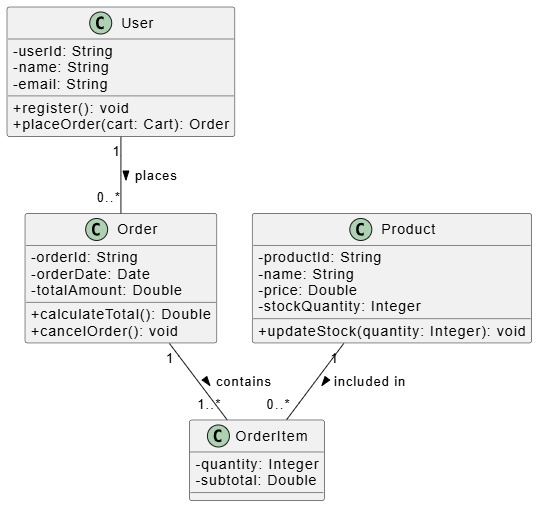
Class diagrams show the static structure of a system. Let's design a simple e-commerce backend.
The AI Prompt:
"Generate a PlantUML class diagram for an e-commerce system. Include a User class, an Order class, and a Product class. A user can place multiple orders. An order contains multiple products. Include basic attributes and methods."
The Generated PlantUML Code:
@startuml ECommerceClassDiagram
skinparam classAttributeIconSize 0

class User {
  - userId: String
  - name: String
  - email: String
  + register(): void
  + placeOrder(cart: Cart): Order
}

class Order {
  - orderId: String
  - orderDate: Date
  - totalAmount: Double
  + calculateTotal(): Double
  + cancelOrder(): void
}

class Product {
  - productId: String
  - name: String
  - price: Double
  - stockQuantity: Integer
  + updateStock(quantity: Integer): void
}

class OrderItem {
  - quantity: Integer
  - subtotal: Double
}

User "1" -- "0..*" Order : places >
Order "1" -- "1..*" OrderItem : contains >
Product "1" -- "0..*" OrderItem : included in >

@enduml
Visual Paradigm Workflow:
Import this code into Visual Paradigm. The tool will render a pristine UML Class diagram. You can now visually drag the OrderItem class to better illustrate the many-to-many resolution between Order and Product, and use VP’s Forward Engineering feature to instantly generate the Java or C# skeleton code for these classes.
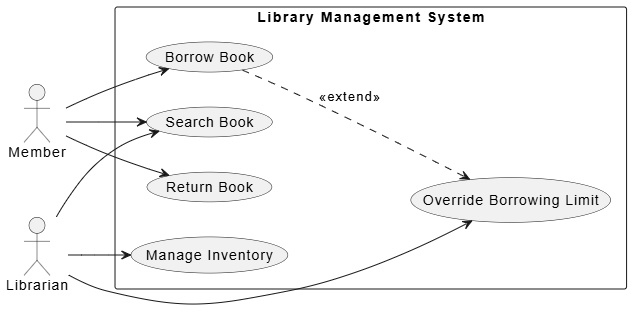
Use case diagrams capture the functional requirements and show how actors interact with the system.
The AI Prompt:
"Create a PlantUML use case diagram for a Library Management System. Actors are 'Member' and 'Librarian'. Use cases include 'Search Book', 'Borrow Book', 'Return Book', and 'Manage Inventory'. Librarian manages inventory and overrides borrowing limits."
The Generated PlantUML Code:
@startuml LibraryUseCase
left to right direction
skinparam packageStyle rectangle

actor Member as member
actor Librarian as librarian

rectangle "Library Management System" {
  usecase "Search Book" as UC1
  usecase "Borrow Book" as UC2
  usecase "Return Book" as UC3
  usecase "Manage Inventory" as UC4
  usecase "Override Borrowing Limit" as UC5
}

member --> UC1
member --> UC2
member --> UC3

librarian --> UC1
librarian --> UC4
librarian --> UC5

UC2 ..> UC5 : <<extend>>
@enduml
Visual Paradigm Workflow:
Once rendered in Visual Paradigm, you can use the visual editor to easily add stereotypes, adjust the layout, and attach detailed textual specifications to each Use Case. VP ensures the diagram strictly adheres to UML 2.5 standards, which is critical for formal documentation and compliance.
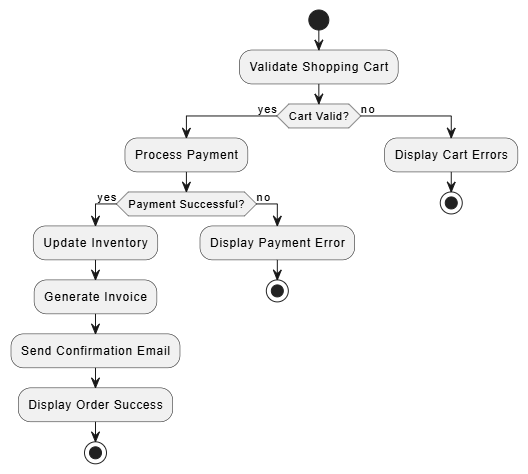
Activity diagrams model the dynamic, step-by-step flow of control or data.
The AI Prompt:
"Write PlantUML code for an activity diagram showing a user checkout process. Steps: Validate Cart, Process Payment. If payment fails, show error and end. If payment succeeds, update inventory, generate invoice, and send confirmation email."
The Generated PlantUML Code:
@startuml CheckoutActivity
start

:Validate Shopping Cart;

if (Cart Valid?) then (yes)
  :Process Payment;

  if (Payment Successful?) then (yes)
    :Update Inventory;
    :Generate Invoice;
    :Send Confirmation Email;
    :Display Order Success;
    stop
  else (no)
    :Display Payment Error;
    stop
  endif
else (no)
  :Display Cart Errors;
  stop
endif

@enduml
Visual Paradigm Workflow:
Visual Paradigm’s visual editor makes it incredibly easy to add swimlanes (e.g., separating the "User", "Payment Gateway", and "Inventory System" actions) to this activity diagram, adding a layer of architectural clarity that raw text struggles to convey.
The true magic of Visual Paradigm lies in its hybrid code+visual editing capabilities. Here is how the lifecycle works in a real-world team:
Drafting (AI + Code): A developer uses AI to quickly generate a PlantUML sequence or class diagram to brainstorm a feature.
Refining (Visual): The team opens the diagram in Visual Paradigm. Architects use the visual tools to refine relationships, add complex UML constraints, and ensure the design is robust.
Forward Engineering (Code Gen): With a few clicks, Visual Paradigm generates the actual code (Java, C#, Python, PHP, etc.) based on the Class diagrams.
Reverse Engineering (Sync): If developers write code directly in their IDE, they can import the code back into Visual Paradigm. The tool automatically updates the UML diagrams to reflect the new code structure, ensuring documentation is never out of date.
Adopting this AI-enhanced, Diagram-as-Code workflow with Visual Paradigm offers distinct advantages across the organization:
Precision & Compliance: Visual Paradigm enforces strict UML standards. You don't have to worry about team members drawing "non-standard" diagrams.
System-Level Views: Easily scale from high-level component diagrams down to detailed class structures without losing traceability.
Massive Productivity Gains: AI handles the boilerplate diagram creation. Code generation saves hours of manual typing for entity classes and interfaces.
Developer-Friendly: Because the underlying format is text-based (PlantUML), diagrams can be reviewed in standard code reviews (GitHub/GitLab) alongside the actual application code.
Single Source of Truth: The hybrid workflow ensures that the visual documentation and the actual codebase are always in sync.
Better Communication: Visual Paradigm allows you to export diagrams to Word, PDF, or HTML, making it easy to share progress with non-technical stakeholders.
Because your diagrams are stored as text (Diagram-as-Code), you are not locked into a proprietary binary file format. If your team decides to switch tools in five years, your diagrams can easily be migrated. Furthermore, as AI models improve, your text-based prompts will yield even better results, future-proofing your design process.
The days of spending hours manually aligning boxes and arrows are over. By combining the structural intelligence of AI, the version-control benefits of Diagram-as-Code (PlantUML), and the enterprise-grade visual editing of Visual Paradigm, software teams can achieve a state of flow where design and development happen seamlessly together.
For beginners, the transition might seem daunting, but the path is simple: start by using AI to generate basic PlantUML scripts for your next project. Import them into Visual Paradigm to see the visual magic, and experiment with generating code from your diagrams.
Ultimately, this workflow doesn't just make you faster; it makes your software architecture more resilient, communicable, and aligned with the actual code being shipped. Embrace the AI-enhanced UML workflow, and spend less time drawing diagrams and more time building great software.

