
Writing effective test cases from user stories is a critical skill in modern software development. This process ensures that what you build actually meets user needs and works as expected. Whether you're a product manager, business analyst, or QA professional, understanding this workflow will help you deliver higher quality products.
In this tutorial, we'll walk through the complete journey from writing a good user story to creating comprehensive test cases, with practical examples and visual diagrams using PlantUML. We'll also explore how tools like Visual Paradigm with AI features can streamline this process.
A user story is a simple, concise description of a feature told from the perspective of the person who desires the new capability, usually a user or customer of the system.
Standard Format:
As a [type of user],
I want [some goal],
So that [some reason/benefit].
User-Centric: Focuses on user value rather than technical implementation
Collaborative: Encourages conversation between stakeholders
Flexible: Easy to refine and reprioritize
Testable: Clear success criteria enable validation
Good user stories follow the INVEST principle:
| Letter | Principle | Description |
|---|---|---|
| I | Independent | Can be developed and tested separately |
| N | Negotiable | Open to discussion and refinement |
| V | Valuable | Delivers value to users or business |
| E | Estimable | Team can estimate effort required |
| S | Small | Can be completed in one sprint |
| T | Testable | Has clear acceptance criteria |
❌ Bad User Story:
As a user, I want a login page.
Problems: Vague, no clear value, not testable
✅ Good User Story:
As a registered customer,
I want to log in with my email and password,
So that I can access my personalized dashboard and order history.
Why it's better: Specific user type, clear action, defined benefit
Acceptance criteria define the conditions that must be met for a user story to be considered complete. They serve as the foundation for test cases.
Given I am on the login page
When I enter valid credentials
Then I should be redirected to my dashboard

Given I am on the login page
When I enter invalid credentials
Then I should see an error message
We'll cover this in detail in Section 4.
- Email field must accept valid email formats
- Password field must mask input characters
- Login button should be disabled until both fields are filled
- Error messages should display within 2 seconds
User Story:
As a shopping cart user,
I want to apply a discount code during checkout,
So that I can save money on my purchase.
Acceptance Criteria:
Discount code field is visible on the checkout page
System validates discount code format (alphanumeric, 6-12 characters)
Valid codes display the discounted amount
Invalid codes show appropriate error message
Expired codes are rejected with specific message
Only one discount code can be applied per order
Discount is reflected in order total before payment
BDD uses a structured language called Gherkin to write acceptance criteria in a way that's readable by both technical and non-technical stakeholders.
| Keyword | Purpose |
|---|---|
| Feature | Describes the functionality being tested |
| Scenario | A specific test case or situation |
| Given | Initial context or preconditions |
| When | The action or event being tested |
| Then | The expected outcome |
| And/But | Additional steps |
Feature: Apply Discount Code

  Scenario: Successfully apply a valid discount code
    Given I have items in my shopping cart
    And I am on the checkout page
    When I enter a valid discount code "SAVE20"
    And I click the "Apply" button
    Then I should see a 20% discount applied
    And the order total should be updated
    And I should see a success message "Discount applied successfully"

  Scenario: Attempt to apply an invalid discount code
    Given I have items in my shopping cart
    And I am on the checkout page
    When I enter an invalid discount code "INVALID123"
    And I click the "Apply" button
    Then I should see an error message "Invalid discount code"
    And the order total should remain unchanged

  Scenario: Attempt to apply an expired discount code
    Given I have items in my shopping cart
    And I am on the checkout page
    When I enter an expired discount code "EXPIRED2023"
    And I click the "Apply" button
    Then I should see an error message "This discount code has expired"
    And the order total should remain unchanged
Test cases are detailed, step-by-step instructions that verify whether the software behaves as expected according to the acceptance criteria.
A well-structured test case includes:
Test Case ID: Unique identifier
Test Case Title: Brief description
Priority: High/Medium/Low
Preconditions: What must be true before testing
Test Steps: Detailed actions to perform
Test Data: Specific data to use
Expected Result: What should happen
Actual Result: What actually happened (filled during execution)
Status: Pass/Fail/Blocked
Each acceptance criterion typically generates one or more test cases:
Acceptance Criterion → Positive Test Case
                    → Negative Test Case(s)
                    → Edge Case Test Case(s)
Verify the system works correctly with valid inputs.
Example:
Enter valid discount code → Discount applied successfully
Verify the system handles invalid inputs gracefully.
Examples:
Enter invalid discount code → Error message displayed
Leave discount field empty → No error, proceed normally
Enter special characters → Validation error
Test boundary conditions and unusual scenarios.
Examples:
Enter minimum length code (6 characters)
Enter maximum length code (12 characters)
Apply discount when cart total is $0
Apply discount to already discounted item
Verify interaction between multiple components.
Example:
Apply discount → Update cart total → Reflect in payment summary
Ensure new changes don't break existing functionality.
Example:
After adding discount feature, verify normal checkout still works
Let's work through a complete example from start to finish.
As a new visitor,
I want to create an account using my email address,
So that I can access premium features and save my preferences.
Feature: User Registration

  Scenario: Successfully register with valid information
    Given I am on the registration page
    When I enter a valid email "[email protected]"
    And I enter a password "SecurePass123!"
    And I confirm the password "SecurePass123!"
    And I check the terms and conditions checkbox
    And I click the "Register" button
    Then I should see a confirmation message "Registration successful"
    And I should receive a verification email
    And I should be redirected to the welcome page

  Scenario: Register with an existing email
    Given I am on the registration page
    And an account already exists with email "[email protected]"
    When I enter the email "[email protected]"
    And I enter a password "NewPass456!"
    And I confirm the password "NewPass456!"
    And I check the terms and conditions checkbox
    And I click the "Register" button
    Then I should see an error message "An account with this email already exists"
    And I should remain on the registration page

  Scenario: Register with weak password
    Given I am on the registration page
    When I enter a valid email "[email protected]"
    And I enter a weak password "123"
    And I confirm the password "123"
    And I check the terms and conditions checkbox
    And I click the "Register" button
    Then I should see an error message "Password must be at least 8 characters with uppercase, lowercase, number, and special character"
    And I should remain on the registration page

  Scenario: Register without accepting terms
    Given I am on the registration page
    When I enter a valid email "[email protected]"
    And I enter a password "ValidPass123!"
    And I confirm the password "ValidPass123!"
    And I do NOT check the terms and conditions checkbox
    And I click the "Register" button
    Then I should see an error message "You must accept the terms and conditions"
    And I should remain on the registration page

  Scenario: Register with mismatched passwords
    Given I am on the registration page
    When I enter a valid email "[email protected]"
    And I enter a password "Password123!"
    And I confirm the password "DifferentPass123!"
    And I check the terms and conditions checkbox
    And I click the "Register" button
    Then I should see an error message "Passwords do not match"
    And I should remain on the registration page
Now let's convert each scenario into detailed test cases.
Test Case 1: Successful Registration
| Field | Value |
|---|---|
| Test Case ID | TC-REG-001 |
| Title | Verify successful user registration with valid data |
| Priority | High |
| Preconditions | 1. User is on registration page 2. No existing account with test email |
| Test Steps | 1. Navigate to registration page 2. Enter email: "[email protected]" 3. Enter password: "SecurePass123!" 4. Confirm password: "SecurePass123!" 5. Check "I agree to Terms & Conditions" 6. Click "Register" button |
| Test Data | Email: [email protected] Password: SecurePass123! |
| Expected Result | 1. Success message "Registration successful" displayed 2. Verification email sent 3. User redirected to welcome page |
| Actual Result | [To be filled during execution] |
| Status | [Pass/Fail] |
Test Case 2: Duplicate Email Registration
| Field | Value |
|---|---|
| Test Case ID | TC-REG-002 |
| Title | Verify error message when registering with existing email |
| Priority | High |
| Preconditions | 1. User is on registration page 2. Account exists with email "[email protected]" |
| Test Steps | 1. Navigate to registration page 2. Enter email: "[email protected]" 3. Enter password: "NewPass456!" 4. Confirm password: "NewPass456!" 5. Check "I agree to Terms & Conditions" 6. Click "Register" button |
| Test Data | Email: [email protected] Password: NewPass456! |
| Expected Result | 1. Error message "An account with this email already exists" displayed 2. User remains on registration page 3. Form fields retain entered values |
| Actual Result | [To be filled during execution] |
| Status | [Pass/Fail] |
Test Case 3: Weak Password Validation
| Field | Value |
|---|---|
| Test Case ID | TC-REG-003 |
| Title | Verify password strength validation |
| Priority | High |
| Preconditions | User is on registration page |
| Test Steps | 1. Navigate to registration page 2. Enter email: "[email protected]" 3. Enter password: "123" 4. Confirm password: "123" 5. Check "I agree to Terms & Conditions" 6. Click "Register" button |
| Test Data | Email: [email protected] Password: 123 |
| Expected Result | 1. Error message about password requirements displayed 2. User remains on registration page 3. Password field highlighted in red |
| Actual Result | [To be filled during execution] |
| Status | [Pass/Fail] |
Test Case 4: Terms Not Accepted
| Field | Value |
|---|---|
| Test Case ID | TC-REG-004 |
| Title | Verify registration blocked without accepting terms |
| Priority | Medium |
| Preconditions | User is on registration page |
| Test Steps | 1. Navigate to registration page 2. Enter email: "[email protected]" 3. Enter password: "ValidPass123!" 4. Confirm password: "ValidPass123!" 5. Leave "Terms & Conditions" unchecked 6. Click "Register" button |
| Test Data | Email: [email protected] Password: ValidPass123! |
| Expected Result | 1. Error message "You must accept the terms and conditions" displayed 2. User remains on registration page 3. Checkbox highlighted |
| Actual Result | [To be filled during execution] |
| Status | [Pass/Fail] |
Test Case 5: Password Mismatch
| Field | Value |
|---|---|
| Test Case ID | TC-REG-005 |
| Title | Verify error when passwords don't match |
| Priority | High |
| Preconditions | User is on registration page |
| Test Steps | 1. Navigate to registration page 2. Enter email: "[email protected]" 3. Enter password: "Password123!" 4. Confirm password: "DifferentPass123!" 5. Check "I agree to Terms & Conditions" 6. Click "Register" button |
| Test Data | Email: [email protected] Password: Password123! Confirm Password: DifferentPass123! |
| Expected Result | 1. Error message "Passwords do not match" displayed 2. User remains on registration page 3. Confirm password field highlighted |
| Actual Result | [To be filled during execution] |
| Status | [Pass/Fail] |
Test Case 6: Empty Fields
| Field | Value |
|---|---|
| Test Case ID | TC-REG-006 |
| Title | Verify validation for empty required fields |
| Priority | Medium |
| Preconditions | User is on registration page |
| Test Steps | 1. Navigate to registration page 2. Leave all fields empty 3. Click "Register" button |
| Test Data | All fields empty |
| Expected Result | 1. Error messages for each required field 2. User remains on registration page |
| Actual Result | [To be filled during execution] |
| Status | [Pass/Fail] |
Test Case 7: Invalid Email Format
| Field | Value |
|---|---|
| Test Case ID | TC-REG-007 |
| Title | Verify email format validation |
| Priority | Medium |
| Preconditions | User is on registration page |
| Test Steps | 1. Navigate to registration page 2. Enter email: "invalid-email" 3. Enter password: "ValidPass123!" 4. Confirm password: "ValidPass123!" 5. Check "I agree to Terms & Conditions" 6. Click "Register" button |
| Test Data | Email: invalid-email Password: ValidPass123! |
| Expected Result | 1. Error message "Please enter a valid email address" 2. User remains on registration page |
| Actual Result | [To be filled during execution] |
| Status | [Pass/Fail] |
Visual diagrams help stakeholders understand the flow from user stories to test cases. Here are several useful diagram types.
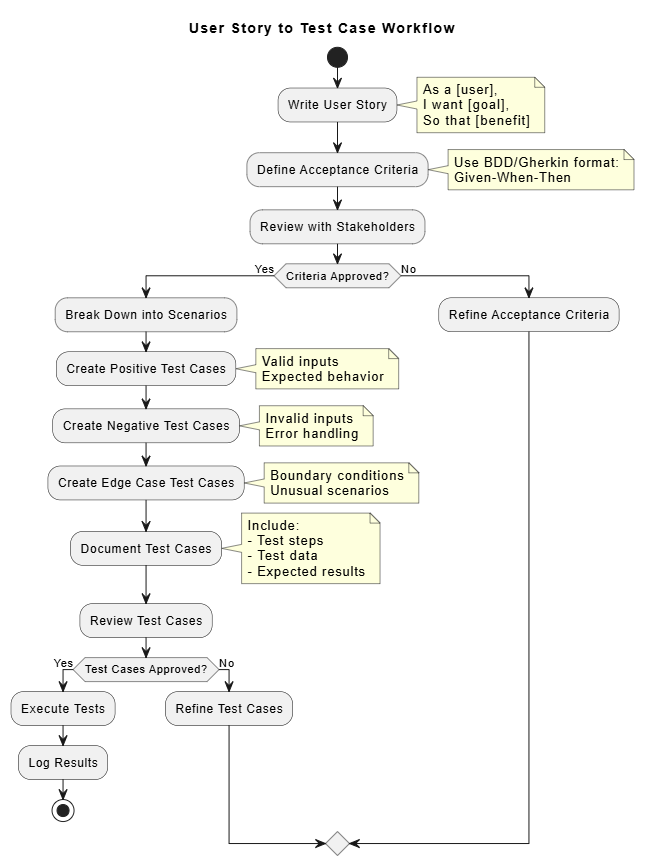
@startuml
title User Story to Test Case Workflow

start

:Write User Story;
note right
  As a [user],
  I want [goal],
  So that [benefit]
end note

:Define Acceptance Criteria;
note right
  Use BDD/Gherkin format:
  Given-When-Then
end note

:Review with Stakeholders;

if (Criteria Approved?) then (Yes)
  :Break Down into Scenarios;

  :Create Positive Test Cases;
  note right
    Valid inputs
    Expected behavior
  end note

  :Create Negative Test Cases;
  note right
    Invalid inputs
    Error handling
  end note

  :Create Edge Case Test Cases;
  note right
    Boundary conditions
    Unusual scenarios
  end note

  :Document Test Cases;
  note right
    Include:
    - Test steps
    - Test data
    - Expected results
  end note

  :Review Test Cases;

  if (Test Cases Approved?) then (Yes)
    :Execute Tests;
    :Log Results;
    stop
  else (No)
    :Refine Test Cases;
  endif
else (No)
  :Refine Acceptance Criteria;
endif

@enduml
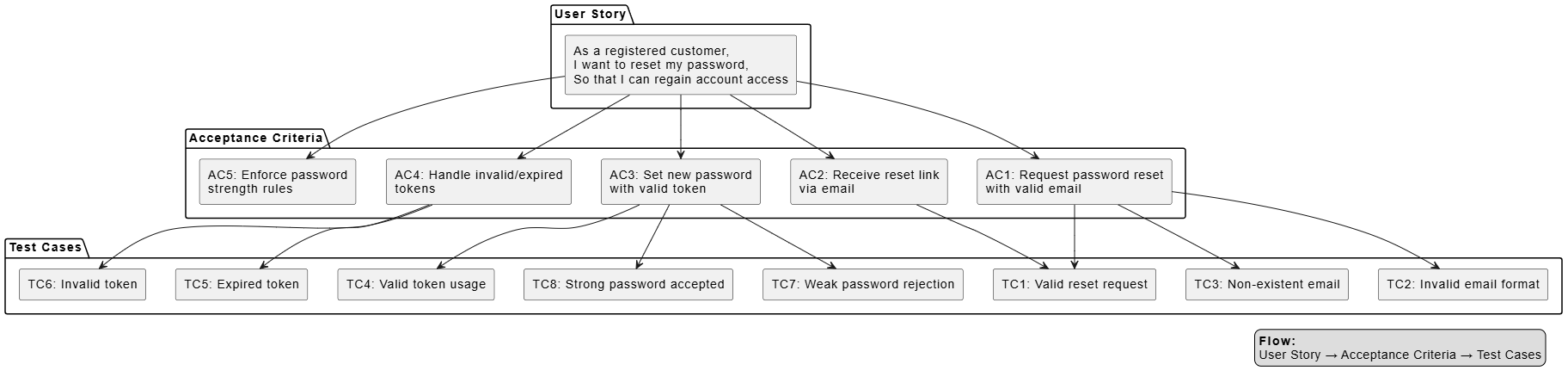
@startuml
skinparam componentStyle rectangle

package "User Story" {
  [As a registered customer,\nI want to reset my password,\nSo that I can regain account access] as US
}

package "Acceptance Criteria" {
  [AC1: Request password reset\nwith valid email] as AC1
  [AC2: Receive reset link\nvia email] as AC2
  [AC3: Set new password\nwith valid token] as AC3
  [AC4: Handle invalid/expired\ntokens] as AC4
  [AC5: Enforce password\nstrength rules] as AC5
}

package "Test Cases" {
  [TC1: Valid reset request] as TC1
  [TC2: Invalid email format] as TC2
  [TC3: Non-existent email] as TC3
  [TC4: Valid token usage] as TC4
  [TC5: Expired token] as TC5
  [TC6: Invalid token] as TC6
  [TC7: Weak password rejection] as TC7
  [TC8: Strong password accepted] as TC8
}

US --> AC1
US --> AC2
US --> AC3
US --> AC4
US --> AC5

AC1 --> TC1
AC1 --> TC2
AC1 --> TC3

AC2 --> TC1

AC3 --> TC4
AC3 --> TC7
AC3 --> TC8

AC4 --> TC5
AC4 --> TC6

legend right
  <b>Flow:</b>
  User Story → Acceptance Criteria → Test Cases
endlegend

@enduml
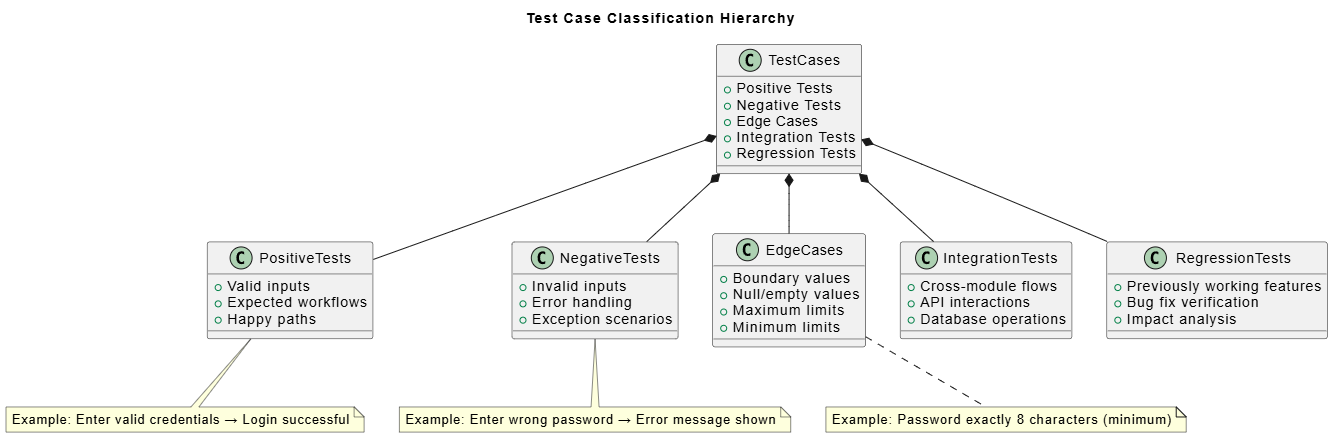
@startuml
title Test Case Classification Hierarchy

class TestCases {
  +Positive Tests
  +Negative Tests
  +Edge Cases
  +Integration Tests
  +Regression Tests
}

class PositiveTests {
  +Valid inputs
  +Expected workflows
  +Happy paths
}

class NegativeTests {
  +Invalid inputs
  +Error handling
  +Exception scenarios
}

class EdgeCases {
  +Boundary values
  +Null/empty values
  +Maximum limits
  +Minimum limits
}

class IntegrationTests {
  +Cross-module flows
  +API interactions
  +Database operations
}

class RegressionTests {
  +Previously working features
  +Bug fix verification
  +Impact analysis
}

TestCases *-- PositiveTests
TestCases *-- NegativeTests
TestCases *-- EdgeCases
TestCases *-- IntegrationTests
TestCases *-- RegressionTests

note bottom of PositiveTests
  Example: Enter valid credentials → Login successful
end note

note bottom of NegativeTests
  Example: Enter wrong password → Error message shown
end note

note bottom of EdgeCases
  Example: Password exactly 8 characters (minimum)
end note

@enduml
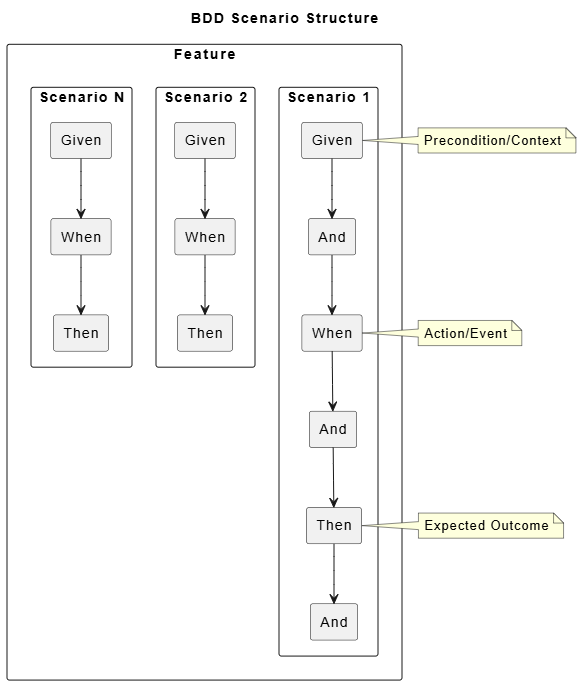
@startuml
title BDD Scenario Structure

rectangle "Feature" as Feature {
  rectangle "Scenario 1" as S1 {
    rectangle "Given" as G1
    rectangle "And" as A1
    rectangle "When" as W1
    rectangle "And" as A2
    rectangle "Then" as T1
    rectangle "And" as A3
  }

  rectangle "Scenario 2" as S2 {
    rectangle "Given" as G2
    rectangle "When" as W2
    rectangle "Then" as T2
  }

  rectangle "Scenario N" as SN {
    rectangle "Given" as GN
    rectangle "When" as WN
    rectangle "Then" as TN
  }
}

G1 --> A1
A1 --> W1
W1 --> A2
A2 --> T1
T1 --> A3

G2 --> W2
W2 --> T2

GN --> WN
WN --> TN

note right of G1
  Precondition/Context
end note

note right of W1
  Action/Event
end note

note right of T1
  Expected Outcome
end note

@enduml
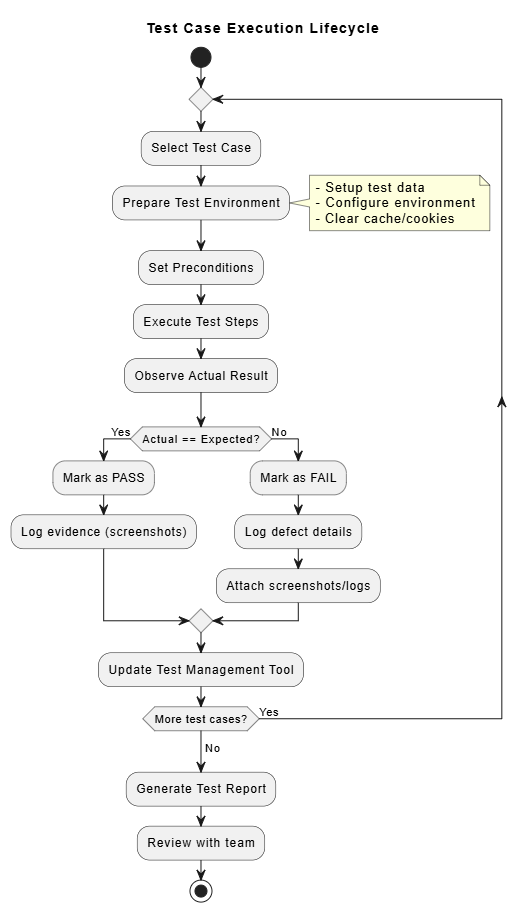
@startuml
title Test Case Execution Lifecycle

start

:Select Test Case;

:Prepare Test Environment;
note right
- Setup test data
- Configure environment
- Clear cache/cookies
end note

:Set Preconditions;

:Execute Test Steps;

:Observe Actual Result;

if (Actual == Expected?) then (Yes)
:Mark as PASS;
:Log evidence (screenshots);
else (No)
:Mark as FAIL;
:Log defect details;
:Attach screenshots/logs;
endif

:Update Test Management Tool;

if (More test cases?) then (Yes)
:Select next test case;
--> :Prepare Test Environment;
else (No)
:Generate Test Report;
:Review with team;
stop
endif

@enduml
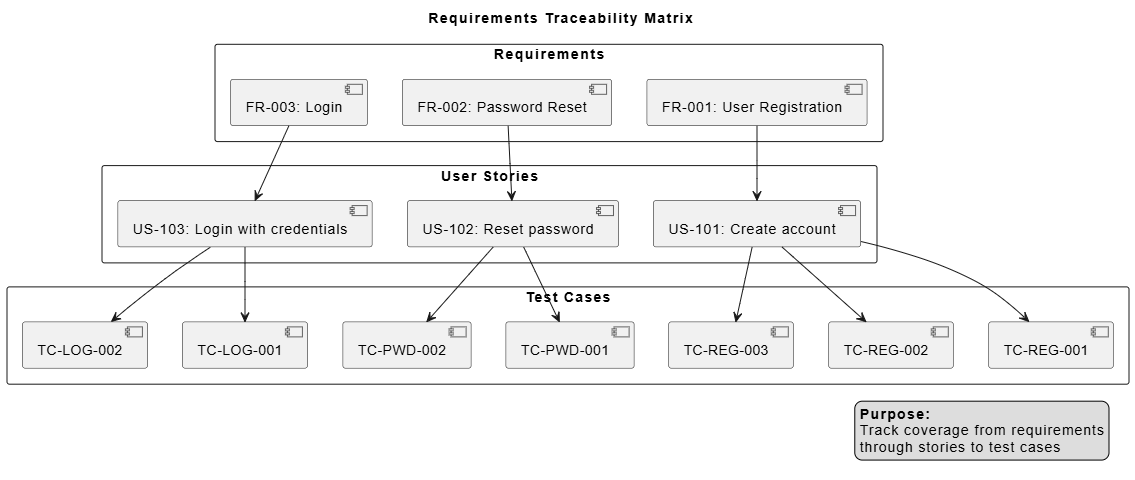
@startuml
title Requirements Traceability Matrix

skinparam packageStyle rectangle

package "Requirements" {
  [FR-001: User Registration] as FR1
  [FR-002: Password Reset] as FR2
  [FR-003: Login] as FR3
}

package "User Stories" {
  [US-101: Create account] as US1
  [US-102: Reset password] as US2
  [US-103: Login with credentials] as US3
}

package "Test Cases" {
  [TC-REG-001] as TC1
  [TC-REG-002] as TC2
  [TC-REG-003] as TC3
  [TC-PWD-001] as TC4
  [TC-PWD-002] as TC5
  [TC-LOG-001] as TC6
  [TC-LOG-002] as TC7
}

FR1 --> US1
FR2 --> US2
FR3 --> US3

US1 --> TC1
US1 --> TC2
US1 --> TC3

US2 --> TC4
US2 --> TC5

US3 --> TC6
US3 --> TC7

legend right
  <b>Purpose:</b>
  Track coverage from requirements
  through stories to test cases
endlegend

@enduml
Keep them small: One story = one sprint task
Focus on value: Always include the "so that" clause
Use personas: Be specific about who the user is
Collaborate: Write stories with developers and testers
Prioritize: Use MoSCoW method (Must, Should, Could, Won't)
Be specific: Avoid ambiguous language
Make them testable: Each criterion should be verifiable
Cover all scenarios: Positive, negative, and edge cases
Use consistent format: Stick to one format (checklist or BDD)
Review regularly: Update as requirements evolve
One assertion per test: Each test case should verify one thing
Use descriptive titles: Make it clear what's being tested
Include test data: Specify exact values to use
Document preconditions: What must be true before testing
Maintain independence: Tests shouldn't depend on each other
Keep them updated: Refactor tests when features change
Maintain traceability: Link tests back to requirements
Version control: Track changes to stories and tests
Use templates: Standardize format across teams
Regular reviews: Peer review stories and test cases
Automate where possible: Use tools to reduce manual effort
Too vague: "Make it faster" instead of "Reduce page load time to under 2 seconds"
Technical focus: "Add database index" instead of user-focused story
Missing value: No "so that" clause explaining the benefit
Too large: Epic-sized stories that can't fit in one sprint
No acceptance criteria: Stories without clear completion definition
Ambiguous language: "Should work properly" instead of specific behavior
Missing negative cases: Only testing happy path
Implementation details: Describing HOW instead of WHAT
Untestable criteria: "User should be happy with the experience"
Too many criteria: Overwhelming list that's hard to validate
Testing too much: One test case verifying multiple things
Hard-coded data: Using production data instead of test data
No cleanup: Tests leaving system in dirty state
Flaky tests: Tests that pass/fail inconsistently
Outdated tests: Not updating tests when requirements change
Siloed work: BA writes stories, QA writes tests, no collaboration
Late testing: Writing test cases after development starts
No traceability: Can't track which tests cover which requirements
Skipping reviews: Not getting stakeholder feedback
Ignoring automation opportunities: Manually executing repetitive tests
Writing effective test cases from user stories is a systematic process that bridges the gap between user needs and quality assurance. By following the workflow we've outlined—starting with well-crafted user stories, defining clear acceptance criteria, and creating comprehensive test cases—you ensure that your software delivers real value to users.
Start with strong user stories: Use the INVEST criteria and always include the "so that" benefit
Acceptance criteria are crucial: They're the bridge between stories and tests
BDD/Gherkin adds clarity: Structured scenarios improve communication
Test comprehensively: Include positive, negative, and edge cases
Maintain traceability: Link requirements → stories → tests for full coverage
Leverage tools: Visual Paradigm with AI features can accelerate the process
Collaborate continuously: Involve all stakeholders throughout the process
Iterate and improve: Regularly refine your approach based on lessons learned
User Story (INVEST)
    ↓
Acceptance Criteria (BDD/Gherkin)
    ↓
Test Scenarios (Positive/Negative/Edge)
    ↓
Detailed Test Cases (Steps/Data/Expected Results)
    ↓
Test Execution & Reporting
    ↓
Feedback Loop → Refinement
Practice: Apply this workflow to your current project
Tool exploration: Try Visual Paradigm's AI features
Team training: Share these techniques with your team
Automation: Identify test cases suitable for automation
Metrics: Track test coverage and defect detection rates
Continuous improvement: Regularly review and refine your process
Remember, the goal isn't just to create documentation—it's to build software that truly meets user needs. Well-written user stories and thorough test cases are your roadmap to achieving that goal.
As a [specific user type],
I want [specific action/feature],
So that [clear benefit/value].

Acceptance Criteria:
- [Criterion 1]
- [Criterion 2]
- [Criterion 3]
Feature: [Feature Name]

  Scenario: [Scenario Description]
    Given [precondition]
    And [additional precondition]
    When [action]
    And [additional action]
    Then [expected result]
    And [additional expected result]
Test Case ID: [Unique ID]
Title: [Brief description]
Priority: [High/Medium/Low]
Preconditions: [What must be true]
Test Steps:
  1. [Step 1]
  2. [Step 2]
  3. [Step 3]
Test Data: [Specific values]
Expected Result: [What should happen]
Actual Result: [What happened]
Status: [Pass/Fail/Blocked]
Happy testing! 🚀

