
As systems engineering continues to evolve, the industry's transition to SysML v2 represents more than just a version update—it's a fundamental reimagining of how complex systems are modeled, validated, and communicated. For practitioners navigating this shift, the choice of tooling can make or break adoption success. After extensive evaluation of emerging SysML v2 platforms, Visual Paradigm's newly launched SysML v2 Studio stands out as a compelling solution that thoughtfully bridges the gap between textual precision and graphical intuition. This review explores the platform from a practitioner's perspective, focusing on real-world usability, AI integration, and the tangible value it delivers to engineering teams embracing the new standard.
Before diving into tool-specific features, understanding core SysML v2 concepts is essential for effective modeling:
SysML v2 introduces a formal textual notation alongside traditional diagrams. Both representations are semantically equivalent—changes in one automatically reflect in the other. This duality supports diverse working styles: text for precision and version control, graphics for communication and exploration.
SysML v2 is designed from the ground up for MBSE workflows. Models are executable specifications, not just documentation. This enables simulation, automated analysis, and direct integration with downstream engineering tools.
SysML v2 builds on the Kernel Modeling Language (KerML), providing a rigorous mathematical foundation. This improves interoperability, reduces ambiguity, and enables advanced tooling capabilities like automated reasoning and consistency checking.
The new view/viewpoint framework allows stakeholders to see tailored representations of the same underlying model. A safety engineer, software architect, and project manager can each work with views optimized for their concerns while maintaining a single source of truth.
SysML v2 defines standard APIs for model access and manipulation. This enables integration with PLM systems, requirements tools, simulation environments, and custom engineering workflows—moving beyond siloed modeling.
Understanding the evolution from SysML v1 to v2 helps contextualize the value of modern tooling:
v1: Primarily graphical with informal textual supplements
v2: First-class textual language with precise grammar, enabling code-like workflows, version control friendliness, and automated processing
v1: Semantics sometimes ambiguous or tool-dependent
v2: Built on KerML with mathematically defined semantics, improving consistency and tool interoperability
v1: Requirements as passive documentation elements
v2: Requirements as executable, testable model elements with traceability and verification workflows
v1: Parametric diagrams were complex and rarely used
v2: Streamlined constraint modeling with better support for engineering analysis and simulation
v1: Limited support for model modularization
v2: Native package management, library mechanisms, and import/export capabilities for scalable model architectures
v1: Desktop-centric, file-based workflows
v2: Designed for cloud collaboration, REST APIs, and integration with modern DevOps/MBSE pipelines
Define what you want to achieve before opening the tool. Are you documenting architecture? Enabling simulation? Supporting requirements traceability? Clear goals prevent model sprawl and ensure your SysML v2 investment delivers value.
Use the textual editor for: precise definitions, bulk edits, version control operations, and learning language syntax
Use the graphical editor for: stakeholder communication, spatial reasoning, layout refinement, and collaborative reviews
Switch fluidly between both—don't force yourself into one mode
SysML v2 Studio's reliable validation engine is your learning partner. Run validation frequently during modeling sessions. Treat warnings as learning opportunities, not interruptions. Over time, you'll internalize patterns that prevent common errors.
With 500+ validated examples available, resist the urge to start every model from a blank page. Find a similar example, adapt its structure, and modify incrementally. This accelerates learning and reduces syntax errors.
Natural Language to View: Start with a rough description, then refine the generated model manually
Smart Re-contextualization: Use when project scope changes, but review AI suggestions critically
Insightful Reporting: Schedule regular model health checks to catch architectural drift early
SysML v2's flexibility requires discipline. Agree on naming conventions, package structures, viewpoint definitions, and documentation standards before scaling adoption. Document these in a team modeling guide.
Take advantage of SysML v2's API capabilities. Connect your models to requirements management tools, simulation environments, or CI/CD pipelines. The real power of MBSE emerges when models actively drive engineering workflows.
Ctrl+Space: Trigger AI suggestions or code completion
Ctrl+Click: Navigate between related model elements across text and diagram views
Ctrl+Shift+F: Quick search across packages, elements, and comments
Alt+Drag: Reposition diagram elements without breaking connections
Create reusable text snippets for frequently modeled structures:
// Standard port definition pattern
port def InputPort {
    flow in data: DataType;
}
Store these in a personal library for rapid insertion.
When working with large models, use viewpoint filters to hide irrelevant elements. This reduces cognitive load and helps stakeholders focus on what matters to their role.
Use the AI assistant's re-contextualization feature for bulk changes:
Select a package or subsystem
Describe the desired transformation in natural language
Review and approve AI-suggested changes
Validate the updated model
While SysML v2 Studio supports interactive diagrams, sometimes static exports are needed:
Use high-resolution PNG for presentations
Export SVG for editable vector graphics in documentation
Include model version and timestamp in exported images for traceability
Curate a subset of the 500+ examples that match your domain. Revisit them periodically as your expertise grows—you'll notice new patterns and techniques each time.
When the validator flags an issue:
Read the diagnostic message carefully
Click the "Learn More" link for contextual documentation
Apply the fix and observe how the diagram updates
Note the pattern for future reference
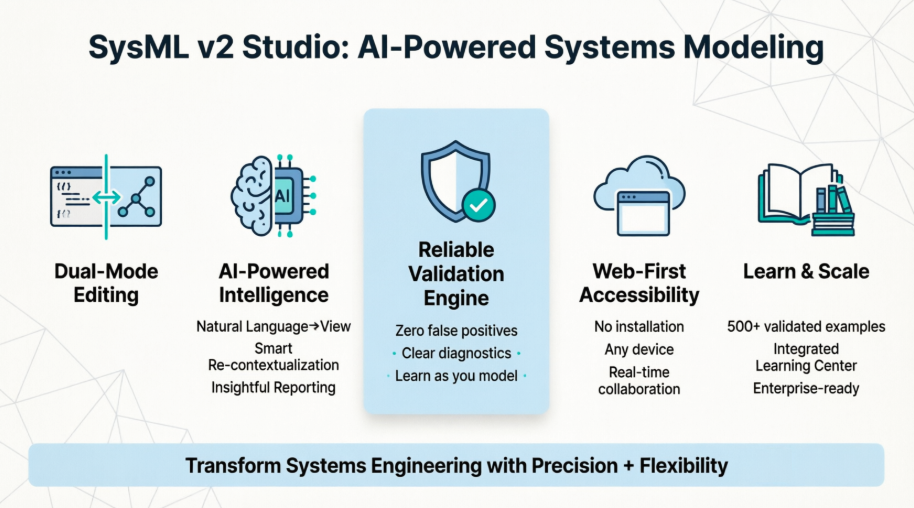
For engineers accustomed to the graphical-heavy workflows of SysML v1, the introduction of textual notation in SysML v2 can feel both liberating and daunting. Visual Paradigm's SysML v2 Studio addresses this tension head-on by offering a dual-pane environment where textual code and graphical diagrams coexist and stay synchronized in real-time. During hands-on testing, this bidirectional editing capability proved invaluable—changes made in the text editor instantly reflected in the diagram view, and vice versa, eliminating the frustrating disconnect often found in early-generation tools.
One of the most common pain points reported by early SysML v2 adopters is unreliable syntax validation. Many tools flag valid constructs as errors, creating noise that undermines confidence in the modeling process. SysML v2 Studio takes a different approach with a robust validation engine that prioritizes accuracy over aggressive highlighting.
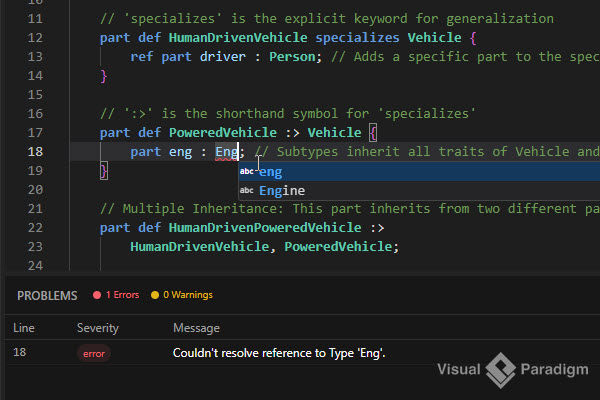
In practice, this means fewer false positives and clearer diagnostic messages that help engineers learn the language rather than debug the tool. For teams onboarding new members or transitioning from legacy workflows, this reliability reduces friction and accelerates proficiency.
Many SysML v2 tools treat diagrams as static outputs—visualizations generated from code that cannot be directly manipulated. SysML v2 Studio breaks this limitation by enabling full graphical editability. Engineers can rearrange elements, adjust layouts, and refine visual presentations without losing synchronization with the underlying textual model.
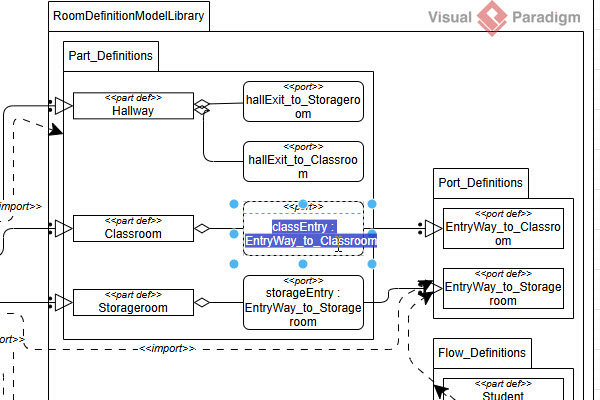
This flexibility is particularly valuable during stakeholder reviews or collaborative design sessions, where visual clarity often matters as much as technical precision. The ability to iteratively refine both code and diagram in a single environment streamlines the modeling workflow significantly.
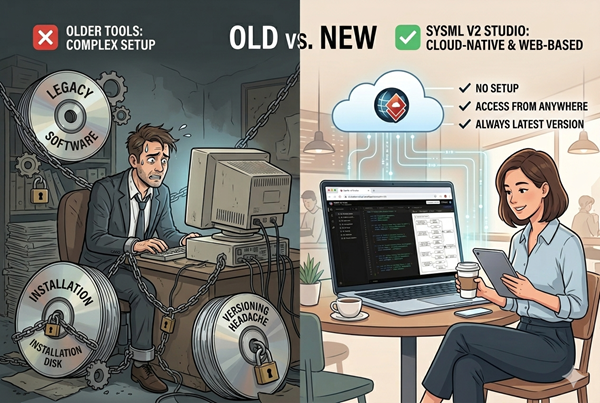
In an era of distributed teams and cloud-first workflows, the requirement for heavy desktop installations feels increasingly archaic. SysML v2 Studio's web-based architecture allows engineers to launch the full-featured editor directly in a browser—no local setup, no version conflicts, no machine-specific limitations. This accessibility proved especially useful during cross-location collaboration, where team members could instantly share and edit models without worrying about environment compatibility.
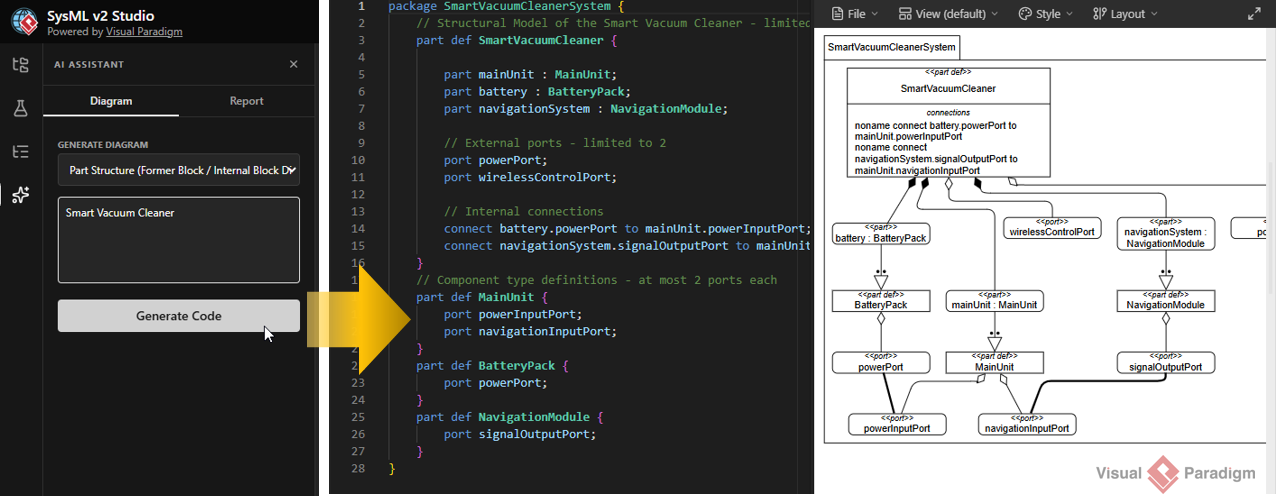
Artificial intelligence integration is a common marketing claim, but SysML v2 Studio implements AI in ways that deliver tangible engineering value:
Natural Language to View: Describing a system requirement in plain English generates a corresponding SysML v2 view, accelerating initial model creation.
Smart Re-contextualization: When project scope evolves, the AI assistant helps refactor existing models to align with new contexts, preserving valid structures while adapting to change.
Insightful Reporting: Automated analysis of model complexity, consistency, and health provides actionable insights for architecture reviews and quality assurance.
Unlike generic code-generation tools, these features demonstrate contextual awareness of systems engineering principles, making them genuinely useful rather than merely novel.
For engineers learning SysML v2, abstract documentation can only go so far. SysML v2 Studio includes a curated library of over 500 validated example files spanning domains from simple component structures to complex aerospace architectures. Having these real-world references readily accessible within the tool dramatically shortens the learning curve and provides reliable patterns for common modeling challenges.
Beyond the tool itself, Visual Paradigm supports adoption through its dedicated SysML v2 Learning Center. This resource offers structured pathways from foundational concepts to advanced modeling techniques, complementing the hands-on experience within SysML v2 Studio. For organizations scaling adoption, the option to bundle Learning Center access with enterprise licenses provides a cohesive training and tooling solution.
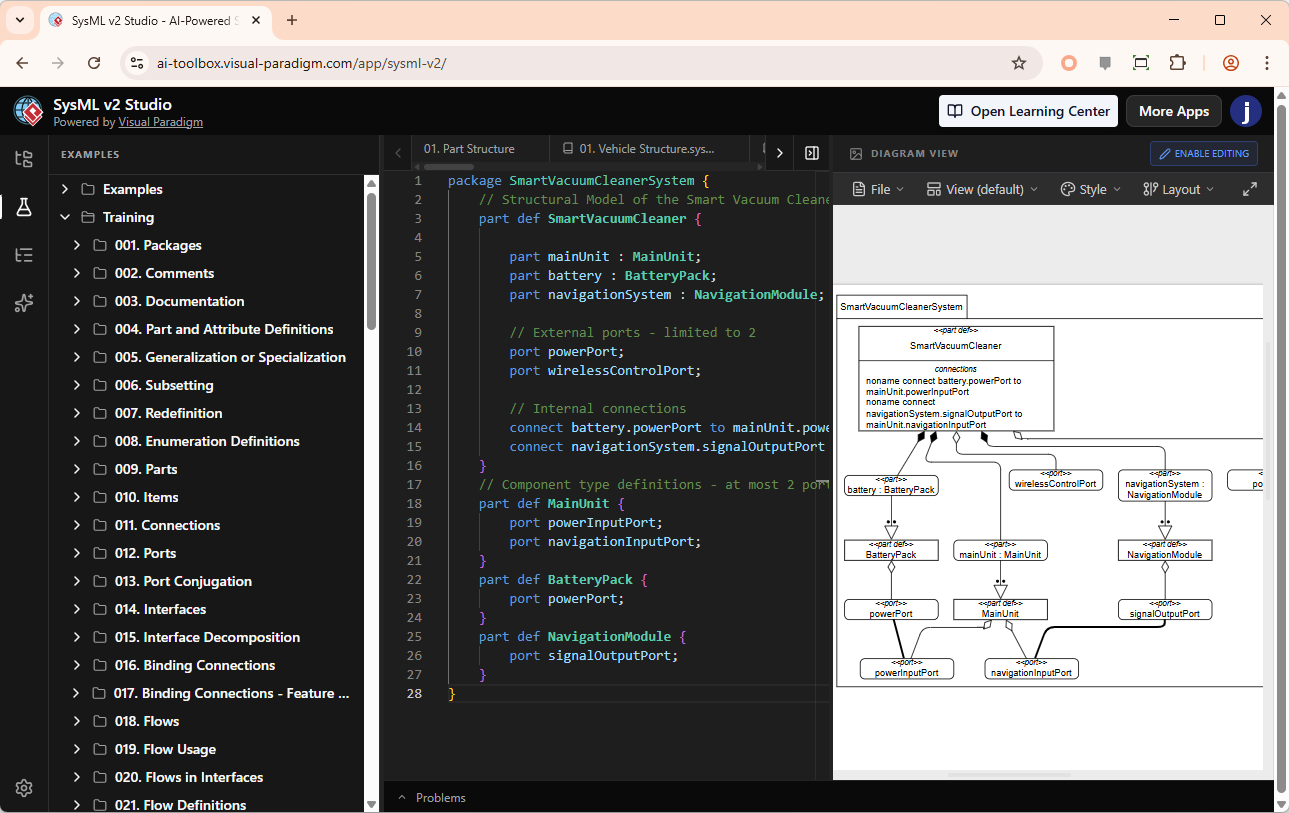
To illustrate the workflow, consider modeling a Smart Vacuum Cleaner System. The textual definition captures structural relationships concisely:
package SmartVacuumCleanerSystem {
    // Structural Model of the Smart Vacuum Cleaner - limited to 3 main parts
    part def SmartVacuumCleaner {
        part mainUnit : MainUnit;
        part battery : BatteryPack;
        part navigationSystem : NavigationModule;

        // External ports - limited to 2
        port powerPort;
        port wirelessControlPort;

        // Internal connections
        connect battery.powerPort to mainUnit.powerInputPort;
        connect navigationSystem.signalOutputPort to mainUnit.navigationInputPort;
    }

    // Component type definitions - at most 2 ports each
    part def MainUnit {
        port powerInputPort;
        port navigationInputPort;
    }

    part def BatteryPack {
        port powerPort;
    }

    part def NavigationModule {
        port signalOutputPort;
    }
}
The corresponding diagram renders automatically, providing an intuitive visual representation:
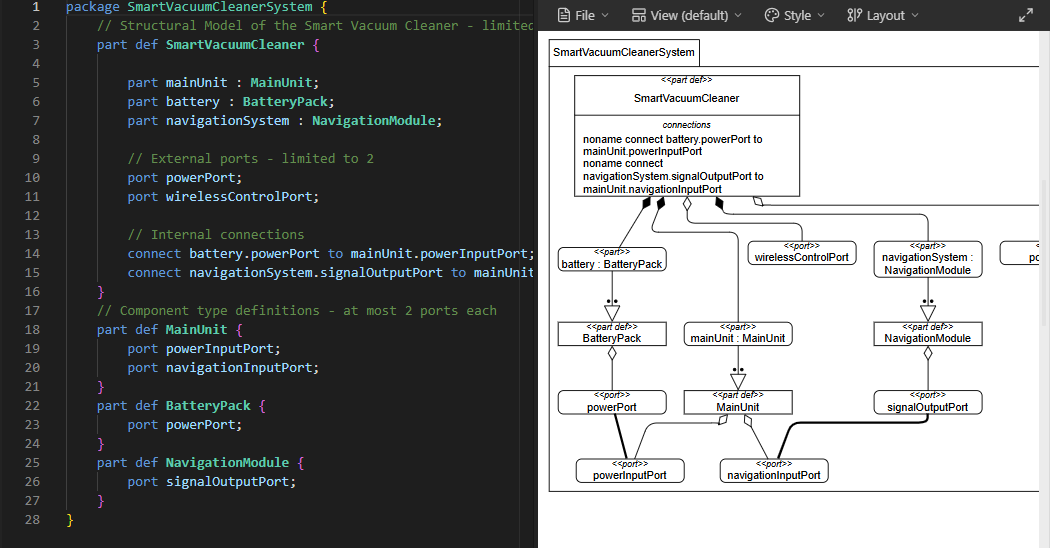
This seamless translation between text and graphics exemplifies the platform's core value proposition: empowering engineers to work in the mode that best suits their task while maintaining model integrity.
SysML v2 Studio is available to holders of Visual Paradigm Desktop Professional or Enterprise licenses. Access options include:
Web Browser: Launch directly at the online application portal
VP Desktop Integration: Access via the Tools menu within the desktop application
For teams evaluating the platform, the web-based access lowers the barrier to initial exploration, while desktop integration supports deeper workflow embedding for established users.
Visual Paradigm's SysML v2 Studio represents a mature, practitioner-focused response to the challenges of adopting SysML v2. By prioritizing reliable validation, bidirectional editing, web accessibility, context-aware AI, and integrated learning resources, the platform addresses the real-world friction points that often hinder standards adoption.
For systems engineering teams navigating the transition to SysML v2, this tool offers not just compliance with the new standard, but a genuinely enhanced modeling experience that balances precision with usability. The addition of clear guidelines, power-user tips, and foundational concept explanations empowers practitioners to move beyond tool mechanics to focus on engineering excellence.
While no tool can eliminate the inherent complexity of systems modeling, SysML v2 Studio thoughtfully reduces the cognitive load on engineers, allowing them to focus on design excellence rather than tooling limitations. As the ecosystem around SysML v2 continues to evolve, platforms that combine technical rigor with user-centric design—like SysML v2 Studio—will play a pivotal role in shaping the future of systems engineering practice.
Visual Paradigm SysML v2 Studio: Official product homepage featuring overview, capabilities, and access information for the AI-powered SysML v2 modeling environment.
SysML v2 Learning Center: Dedicated educational resource offering structured learning paths, tutorials, and certification preparation for mastering SysML v2.
SysML v2 Studio Web Application: Direct access point for the browser-based version of SysML v2 Studio, enabling immediate hands-on exploration without installation.
Visual Paradigm Desktop Download: Official download portal for Visual Paradigm Desktop editions, required for local integration of SysML v2 Studio features.
SysML v2 Studio Features Documentation: Comprehensive technical documentation detailing capabilities, workflows, and advanced features of the SysML v2 Studio platform.

