Introduction
In modern software development and systems engineering, visual documentation is no longer optional—it’s the backbone of clear communication and architectural planning. Yet, teams have long been caught in a frustrating trade-off: traditional drag-and-drop diagramming tools are rigid and time-consuming, while standalone AI generators often produce diagrams that are logically sound but visually inconsistent or lacking in professional polish.
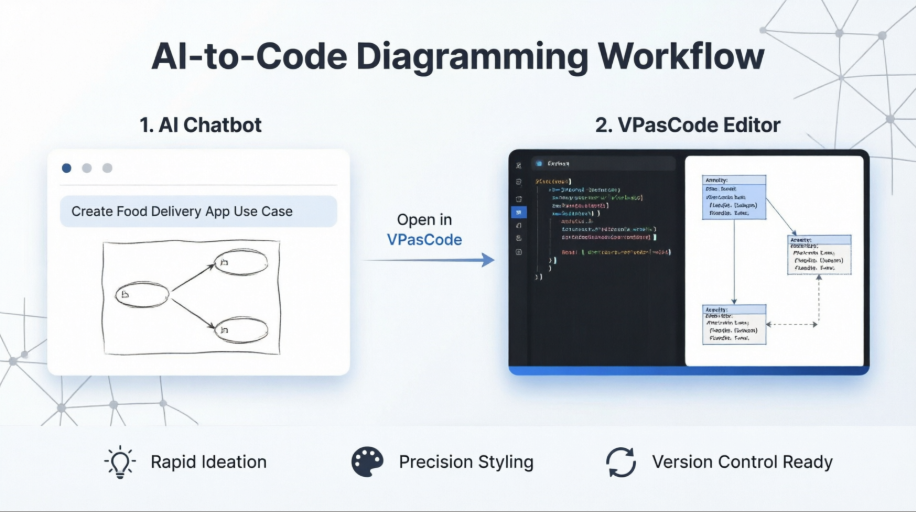
Visual Paradigm bridges this gap with a tightly integrated, two-phase workflow that pairs the AI Chatbot with VPasCode (Visual Paradigm as Code). This approach allows users to instantly transform natural language prompts into structured UML diagrams, then seamlessly transition into a code-driven environment for precise layout, styling, and architectural refinement. The following breakdown explores exactly how this pipeline operates, what each component brings to the table, why this hybrid model outperforms traditional methods, and when to apply each stage to optimize your diagramming workflow.
HOW they work together (The Workflow Mechanism)
The image below illustrates a seamless, two-stage workflow where the AI acts as the drafter and the Code Editor acts as the refiner.
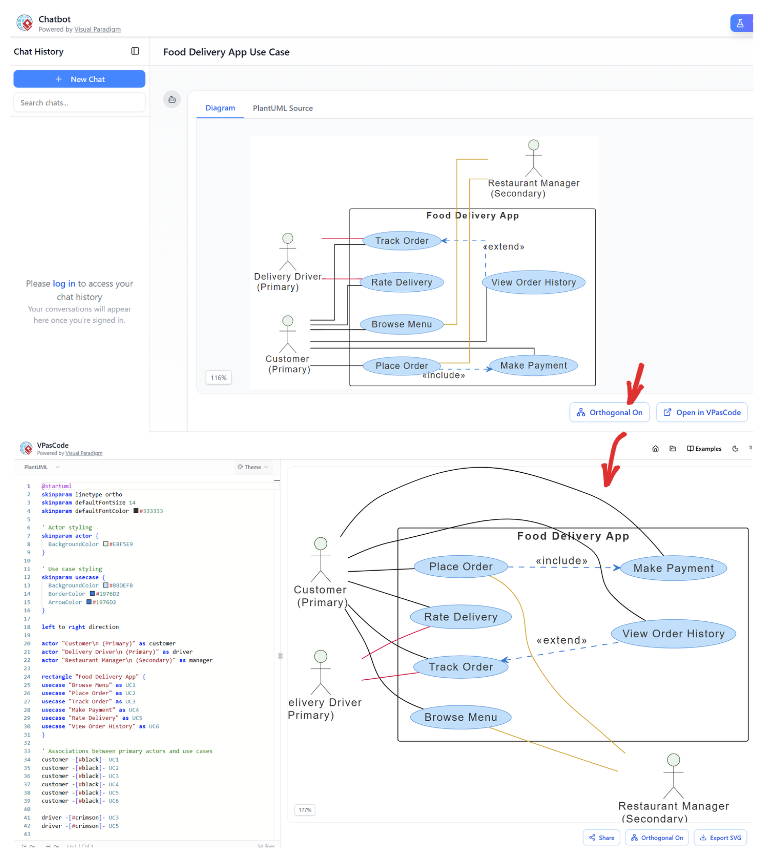
- Stage 1: Ideation & Generation (Top Panel - Chatbot)
- Action: The user interacts with the Chatbot (top left). Although the specific prompt isn't fully visible, the result is a generated Use Case Diagram for a "Food Delivery App."
- Mechanism: The AI interprets the user's intent and automatically generates the underlying diagram structure.
- The Bridge: The critical link is the button labeled "Open in VPasCode" (visible in the top panel, near the bottom right of the diagram area). This button exports the AI's internal logic into a readable, editable format.
- Stage 2: Refinement & Control (Bottom Panel - VPasCode)
- Action: Once "Open in VPasCode" is clicked, the interface transitions to the bottom view.
- The Code (Left Side): The system reveals the PlantUML source code that drives the diagram. The user can now manually edit lines of code (e.g., lines 1-41).
- Evidence of customization: You can see specific commands like
skinparam linetype ortho (Line 2) and left to right direction (Line 17). These commands dictate the visual style.
- The Result (Right Side): The diagram on the right updates in real-time based on the code.
- Comparison: Notice the difference between the top and bottom diagrams. The bottom diagram has orthogonal (straight) lines and a left-to-right layout, directly resulting from the code edits visible in the editor. The top diagram has curved lines and a different layout.
WHAT are the components?
- Visual Paradigm AI Chatbot:
- Role: The "Architect."
- Function: It lowers the barrier to entry. It allows users to create complex diagrams without knowing UML syntax or drawing tools. It handles the heavy lifting of structuring relationships (e.g., knowing that a "Customer" interacts with "Browse Menu").
- VPasCode (Visual Paradigm as Code):
- Role: The "Engineer."
- Function: It provides granular control. It exposes the PlantUML script. This allows for:
- Styling: Changing colors (
#1976D2), fonts, and line types.
- Logic: Defining explicit relationships (e.g.,
customer -- [black] : UC1).
Transform Text into Diagrams with Visual Paradigm VPasCode
Looking for a powerful, free diagram-as-code tool? Effortlessly render PlantUML, Mermaid, Graphviz, and 20+ programming languages in real time—powered by instant AI error fixing and automatic format detection.
WHY use this combined approach?
This integration solves the "Last Mile Problem" of AI generation.
- Speed vs. Precision:
- The Chatbot is fast but generic. It might generate a diagram that is logically correct but visually messy or hard to read.
- VPasCode is precise. It allows you to fix the "messiness." For example, in the screenshot, the user likely used the code editor to force the layout to
left to right direction (Line 17) to make the diagram cleaner, which might have been difficult to articulate in a chat prompt.
- Iterative Improvement:
- You don't have to start from scratch. The AI gives you a 90% complete draft. You use the code editor to perfect the final 10%.
- Accessibility for Developers:
- Developers often prefer writing code over dragging and dropping shapes. This tool allows them to "code" their diagrams using familiar text-based syntax (PlantUML) while still leveraging AI to jumpstart the process.
WHEN to use this workflow?
- Scenario A: Rapid Prototyping (Chatbot Phase)
- When: You are in a meeting and need to visualize a concept immediately.
- Action: Type "Create a use case diagram for a food delivery app" into the chat. Get an instant visual.
- Scenario B: Documentation & Standardization (VPasCode Phase)
- When: You need to include this diagram in official technical documentation that requires specific branding or layout standards.
- Action: Click "Open in VPasCode." Edit the code to change the background colors (
skinparam backgroundColor), force orthogonal lines (linetype ortho), and ensure the layout matches your company's style guide.
- Scenario C: Complex System Architecture
- When: The diagram becomes too complex for the AI to get perfectly right in one shot.
- Action: Use the AI to generate the base structure, then use the code editor to manually add specific aliases, stereotypes (like
<<extend>>), or grouping rectangles that the AI might have missed.
Conclusion
Ultimately, the synergy between Visual Paradigm’s AI Chatbot and VPasCode represents a maturation of AI-assisted design: moving beyond simple automation toward intelligent, human-in-the-loop collaboration. By leveraging the chatbot for rapid ideation and VPasCode for developer-grade precision, teams eliminate the friction between conceptualization and production-ready documentation. This workflow doesn’t just accelerate diagram creation; it ensures that outputs are consistent, version-controllable, and fully aligned with technical standards. As software architectures grow increasingly complex, the ability to iterate quickly while retaining granular control will become a decisive competitive advantage. Visual Paradigm’s integrated approach proves that the future of technical diagramming isn’t about replacing human expertise with AI—it’s about empowering both to work in tandem, turning abstract requirements into polished, maintainable visuals with unprecedented efficiency.


