
The C4 model is a powerhouse for describing the static structure of software. It excels at showing us that "Container A talks to Database B" or that "Service X depends on Service Y." However, architecture often fails not because we didn't know the pieces existed, but because we didn't document the complex choreography they perform under specific conditions.
By using Activity Diagrams as a supplemental behavioral layer, we move from showing a system’s "bones" (C4) to documenting its "nervous system" (Activities). This article provides a comprehensive methodology, key concepts, and a fully realized case study with production-ready C4-PlantUML code paired with behavioral supplements.
Structural diagrams (C4) and behavioral diagrams (Activity) are two sides of the same architectural coin. C4 is exceptional for onboarding, boundary definition, and infrastructure scoping. However, it suffers from "documentation rot" when complex business rules, retry policies, or state transitions are buried inside unlabeled arrows or overloaded component boxes.
The C4+1 approach proposes a pragmatic rule: For every structural level where logic becomes non-trivial, an Activity Diagram should act as the narrative guide. This ensures that the intent of the workflow is as visible as the infrastructure it runs on. When combined in a text-as-code workflow (PlantUML/Mermaid), these diagrams become version-controlled, reviewable, and automatically rendered alongside your codebase.
Before diving into code, understand how structural and behavioral layers align:
| C4 Level | Structural Focus | Behavioral Supplement (Activity Diagram) | Primary Audience |
|---|---|---|---|
| L1: System Context | System boundaries, external actors, high-level data flow | Business Journey: End-to-end user/system interaction, technology-agnostic | Product Owners, Stakeholders, Architects |
| L2: Container | Deployable units, runtime boundaries, communication protocols | Orchestration: Inter-container sequencing, retries, circuit breakers, async queues | DevOps, Backend Engineers, SREs |
| L3: Component | Internal modules, code boundaries, data access patterns | Algorithmic Logic: Branching rules, validation pipelines, state machines | Developers, QA, Code Reviewers |
Core Principles for Integration:
Traceability: Activity diagrams must reference exact names from C4 diagrams to avoid cognitive friction.
Bounded Scope: One Activity Diagram per non-trivial workflow. Never model the entire system in one activity flow.
Living Documentation: Store diagrams as .puml files in /docs/architecture/. Render via CI/CD or IDE plugins.
We'll model a fictional cross-border payment processor, Global Pay, demonstrating how C4 and Activity diagrams complement each other at Levels 1, 2, and 3.
Goal: Show the business journey without technical noise.
C4 Focus: Actors, external systems, high-level trust boundaries.
Activity Focus: Happy path, user decision points, external notifications.
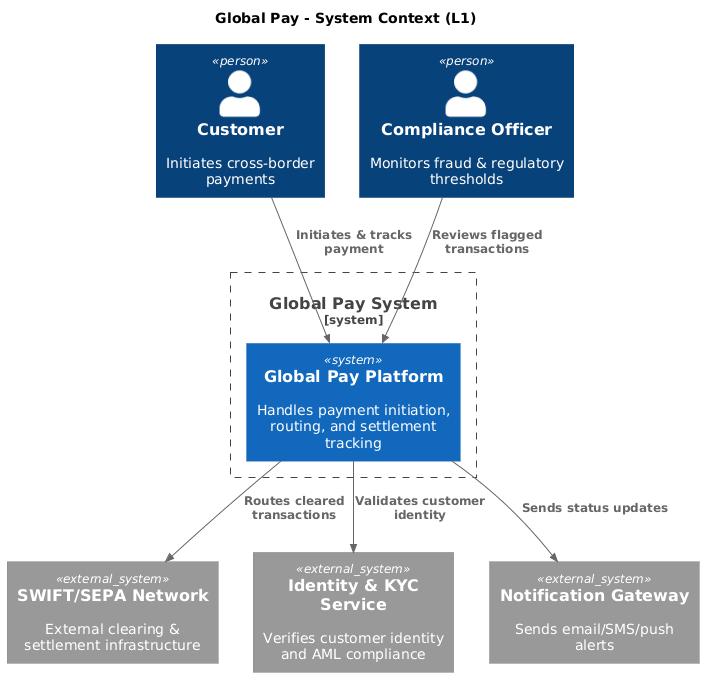
@startuml
!include https://raw.githubusercontent.com/plantuml-stdlib/C4-PlantUML/master/C4_Context.puml

title Global Pay - System Context (L1)

Person(customer, "Customer", "Initiates cross-border payments")
Person(admin, "Compliance Officer", "Monitors fraud & regulatory thresholds")

System_Boundary(globalPay, "Global Pay System") {
    System(globalPayApp, "Global Pay Platform", "Handles payment initiation, routing, and settlement tracking")
}

System_Ext(bankNetwork, "SWIFT/SEPA Network", "External clearing & settlement infrastructure")
System_Ext(kycProvider, "Identity & KYC Service", "Verifies customer identity and AML compliance")
System_Ext(notifyService, "Notification Gateway", "Sends email/SMS/push alerts")

Rel(customer, globalPayApp, "Initiates & tracks payment")
Rel(admin, globalPayApp, "Reviews flagged transactions")
Rel(globalPayApp, bankNetwork, "Routes cleared transactions")
Rel(globalPayApp, kycProvider, "Validates customer identity")
Rel(globalPayApp, notifyService, "Sends status updates")
@enduml
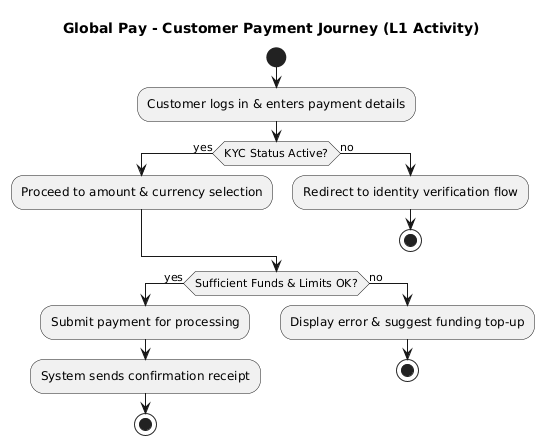
@startuml
title Global Pay - Customer Payment Journey (L1 Activity)
start
:Customer logs in & enters payment details;
if (KYC Status Active?) then (yes)
  :Proceed to amount & currency selection;
else (no)
  :Redirect to identity verification flow;
  stop
endif

if (Sufficient Funds & Limits OK?) then (yes)
  :Submit payment for processing;
  :System sends confirmation receipt;
  stop
else (no)
  :Display error & suggest funding top-up;
  stop
endif
@enduml
💡 Integration Note: The C4 diagram shows what talks to what. The Activity diagram shows when and under which business conditions the conversation happens.
Goal: Model runtime orchestration, resilience patterns, and async handoffs.
C4 Focus: Web App, API Gateway, Payment Engine, Ledger, Message Queue.
Activity Focus: Parallel processing, timeout handling, retry loops, circuit breakers.
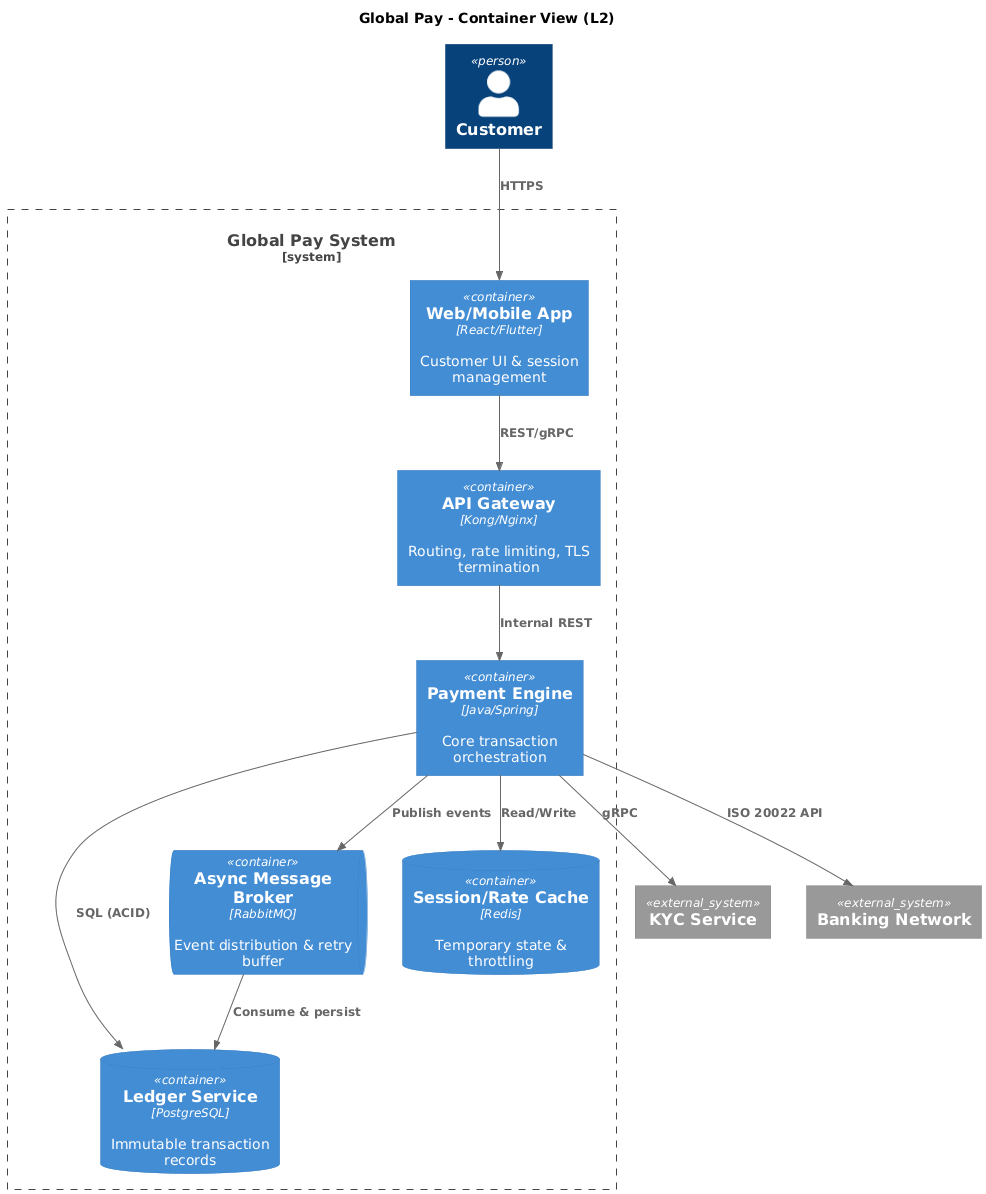
@startuml
!include https://raw.githubusercontent.com/plantuml-stdlib/C4-PlantUML/master/C4_Container.puml

title Global Pay - Container View (L2)

Person(customer, "Customer")

System_Boundary(globalPay, "Global Pay System") {
    Container(webApp, "Web/Mobile App", "React/Flutter", "Customer UI & session management")
    Container(apiGateway, "API Gateway", "Kong/Nginx", "Routing, rate limiting, TLS termination")
    Container(paymentEngine, "Payment Engine", "Java/Spring", "Core transaction orchestration")
    ContainerDb(ledger, "Ledger Service", "PostgreSQL", "Immutable transaction records")
    ContainerQueue(msgQueue, "Async Message Broker", "RabbitMQ", "Event distribution & retry buffer")
    ContainerDb(cache, "Session/Rate Cache", "Redis", "Temporary state & throttling")
}

System_Ext(kycProvider, "KYC Service")
System_Ext(bankNetwork, "Banking Network")

Rel(customer, webApp, "HTTPS")
Rel(webApp, apiGateway, "REST/gRPC")
Rel(apiGateway, paymentEngine, "Internal REST")
Rel(paymentEngine, ledger, "SQL (ACID)")
Rel(paymentEngine, cache, "Read/Write")
Rel(paymentEngine, msgQueue, "Publish events")
Rel(msgQueue, ledger, "Consume & persist")
Rel(paymentEngine, kycProvider, "gRPC")
Rel(paymentEngine, bankNetwork, "ISO 20022 API")
@enduml
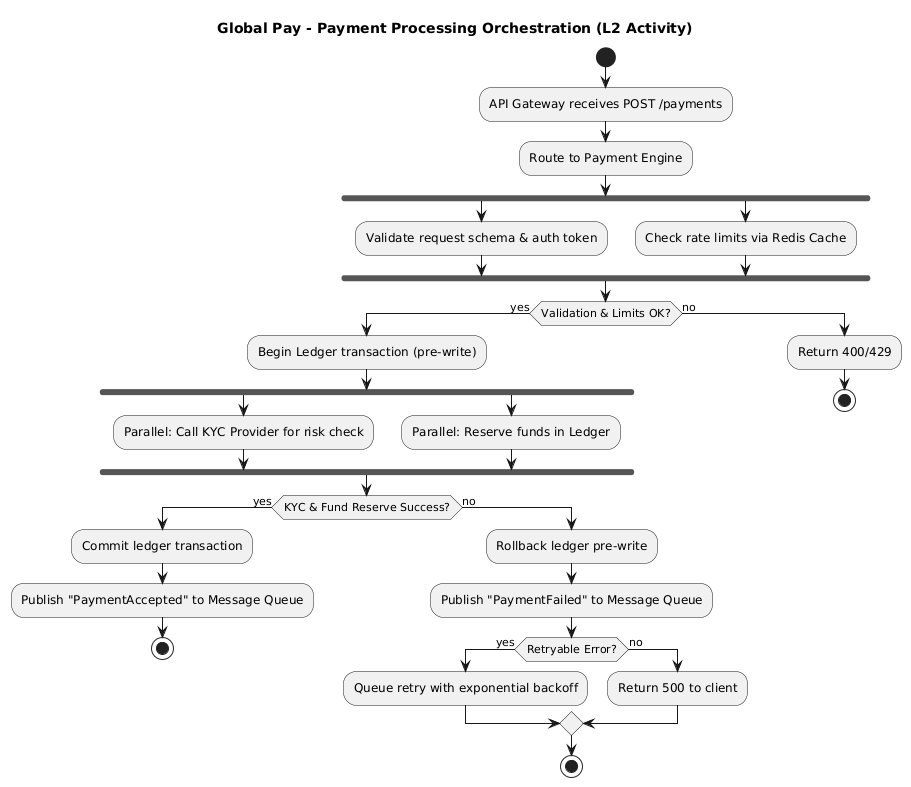
@startuml
title Global Pay - Payment Processing Orchestration (L2 Activity)
start
:API Gateway receives POST /payments;
:Route to Payment Engine;
fork
  :Validate request schema & auth token;
fork again
  :Check rate limits via Redis Cache;
end fork

if (Validation & Limits OK?) then (yes)
  :Begin Ledger transaction (pre-write);
  fork
    :Parallel: Call KYC Provider for risk check;
  fork again
    :Parallel: Reserve funds in Ledger;
  end fork

  if (KYC & Fund Reserve Success?) then (yes)
    :Commit ledger transaction;
    :Publish "PaymentAccepted" to Message Queue;
    stop
  else (no)
    :Rollback ledger pre-write;
    :Publish "PaymentFailed" to Message Queue;
    if (Retryable Error?) then (yes)
      :Queue retry with exponential backoff;
    else (no)
      :Return 500 to client;
    endif
    stop
  endif
else (no)
  :Return 400/429;
  stop
endif
@enduml
💡 Integration Note: The C4 L2 diagram shows the Queue, Engine, and Ledger. The Activity diagram reveals how they collaborate: parallel checks, transactional boundaries, retry logic, and fallback paths.
Goal: Document intricate business logic inside a single container.
C4 Focus: Internal components like Risk Analyzer, Routing Optimizer, Currency Converter.
Activity Focus: Sequential rule evaluation, scoring algorithms, decision thresholds.
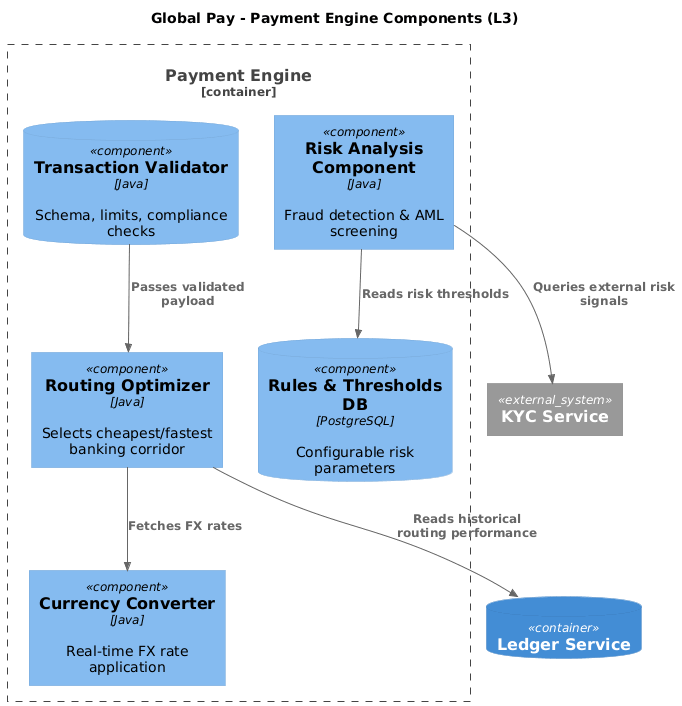
@startuml
!include https://raw.githubusercontent.com/plantuml-stdlib/C4-PlantUML/master/C4_Component.puml

title Global Pay - Payment Engine Components (L3)

Container_Boundary(engine, "Payment Engine") {
    Component(router, "Routing Optimizer", "Java", "Selects cheapest/fastest banking corridor")
    Component(riskAnalyzer, "Risk Analysis Component", "Java", "Fraud detection & AML screening")
    Component(currencyConv, "Currency Converter", "Java", "Real-time FX rate application")
    ComponentDb(txValidator, "Transaction Validator", "Java", "Schema, limits, compliance checks")
    ComponentDb(ruleEngineDB, "Rules & Thresholds DB", "PostgreSQL", "Configurable risk parameters")
}

ContainerDb(ledger, "Ledger Service")
System_Ext(kycProvider, "KYC Service")

Rel(router, currencyConv, "Fetches FX rates")
Rel(router, ledger, "Reads historical routing performance")
Rel(riskAnalyzer, ruleEngineDB, "Reads risk thresholds")
Rel(riskAnalyzer, kycProvider, "Queries external risk signals")
Rel(txValidator, router, "Passes validated payload")
@enduml
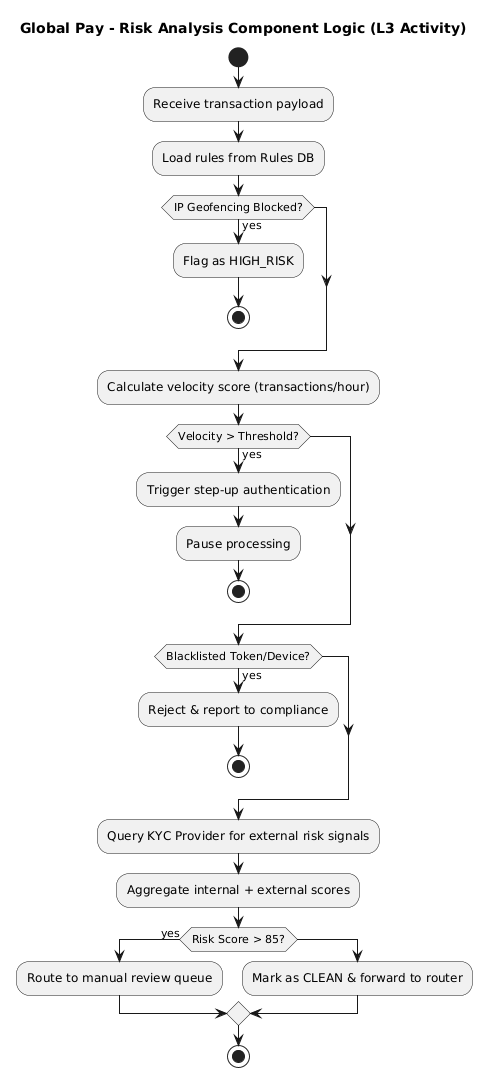
@startuml
title Global Pay - Risk Analysis Component Logic (L3 Activity)
start
:Receive transaction payload;
:Load rules from Rules DB;

if (IP Geofencing Blocked?) then (yes)
  :Flag as HIGH_RISK;
  stop
endif

:Calculate velocity score (transactions/hour);
if (Velocity > Threshold?) then (yes)
  :Trigger step-up authentication;
  :Pause processing;
  stop
endif

if (Blacklisted Token/Device?) then (yes)
  :Reject & report to compliance;
  stop
endif

:Query KYC Provider for external risk signals;
:Aggregate internal + external scores;

if (Risk Score > 85?) then (yes)
  :Route to manual review queue;
else
  :Mark as CLEAN & forward to router;
endif
stop
@enduml
💡 Integration Note: A C4 L3 diagram would just show Risk Analysis Component connected to Rules DB. The Activity diagram exposes the exact evaluation order, early-exit conditions, and how scores compound—critical for auditors and developers alike.
Don't over-model. Use this decision matrix:
| ✅ Supplement When | 🚫 Avoid When |
|---|---|
| Concurrency exists: Parallel tasks, fork/join patterns, or async event publishing. | Linear CRUD: Simple POST -> DB -> 200 OK flows. |
>3 Decision Branches: Complex if/else or state transitions clutter C4 arrows. |
Pure Infrastructure: Network topologies, VPC layouts, or DNS routing. |
| Cross-Team Handoffs: Flow moves between bounded contexts or third-party APIs. | Ephemeral Logic: One-off scripts, migration steps, or temporary feature flags. |
| Regulatory/Audit Requirements: Business rules must be explicitly documented and versioned. | Highly Volatile UI/UX: Frontend state management (use sequence or component diagrams instead). |
Anti-Pattern Warning: Never put implementation details (variable names, exact SQL queries, framework annotations) in Activity diagrams. Keep them at the behavioral abstraction level.
/docs/architecture/
  ├── c4/
  │   ├── 01-system-context.puml
  │   ├── 02-container-view.puml
  │   └── 03-component-view.puml
  ├── activities/
  │   ├── 01-customer-journey.puml
  │   ├── 02-payment-orchestration.puml
  │   └── 03-risk-analysis-flow.puml
  └── README.md (Links C4 to Activities with traceability tags)
Use exact C4 element names in Activity nodes: Persist to Ledger Service, not Save to DB.
Prefix Activity files with the C4 level they supplement: L2-orchestration.puml.
Add PlantUML note blocks to explicitly link diagrams:
note right of paymentEngine
  See L2 Activity: payment-orchestration.puml
  for retry & circuit breaker logic.
end note
Use plantuml-stdlib in GitHub Actions/GitLab CI to auto-render PNG/SVG on merge.
Embed diagrams in Markdown via relative paths or data URIs.
Consider Structurizr or C4-PlantUML + Docsify for interactive navigation between structural and behavioral views.
A C4 model tells you where to go; an Activity Diagram tells you how to behave once you get there. By strategically placing behavioral maps at the Context, Container, and Component levels, you eliminate the "black box" syndrome, reduce onboarding time, and create architecture documentation that actually survives code changes.
In modern cloud-native systems, resilience, async communication, and business rule complexity are the norm. Static diagrams alone cannot capture the dynamics of these systems. Pairing C4 with Activity diagrams transforms your documentation from a snapshot into a living manual for operation.
Next Steps:
Pick one existing C4 diagram in your codebase.
Identify the single most complex workflow it touches.
Draft an Activity Diagram using the C4+1 naming conventions.
Store it alongside the C4 model, link them, and review with your team.
Architecture isn't just about drawing boxes. It's about documenting the dance.

