
When designing software systems, developers often start with object-oriented class diagrams and then need to translate those designs into database schemas. Understanding how to map class diagrams to Entity-Relationship Diagrams (ERDs) is crucial for building efficient, well-structured databases. This guide will walk you through the process step by step, with practical examples using PlantUML.
A class diagram represents the structure of a system using classes, their attributes, methods, and relationships (associations, inheritance, composition).
An Entity-Relationship Diagram represents the logical structure of a database using entities (tables), attributes (columns), and relationships between entities.
Object-Relational Impedance Mismatch: Objects and relational databases have different structures
Persistence Layer Design: Ensures your database supports your application's object model
Data Integrity: Proper mapping maintains relationships and constraints
Rule: Not every class becomes a table. Generally:
✅ Regular classes → Entities/Tables
❌ Utility/helper classes → No table needed
❌ Abstract classes (usually) → No direct table
⚠️ Interface implementations → Depends on strategy
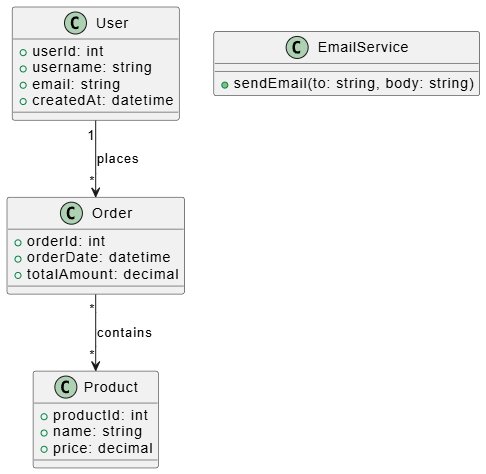
@startuml
' Original Class Diagram
class User {
    +userId: int
    +username: string
    +email: string
    +createdAt: datetime
}

class Order {
    +orderId: int
    +orderDate: datetime
    +totalAmount: decimal
}

class Product {
    +productId: int
    +name: string
    +price: decimal
}

class EmailService {
    +sendEmail(to: string, body: string)
}

User "1" --> "*" Order : places
Order "*" --> "*" Product : contains
@enduml
Mapping Result: User, Order, and Product become tables. EmailService does not.
Rules:
Simple data types (int, string, date) → Direct column mapping
Complex objects → May need separate tables or serialization
Collections → Usually require separate relationship tables
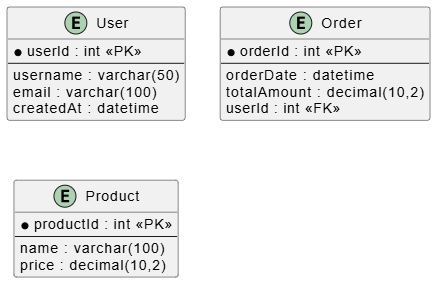
@startuml
' ERD Representation
entity User {
    * userId : int <<PK>>
    --
    username : varchar(50)
    email : varchar(100)
    createdAt : datetime
}

entity Order {
    * orderId : int <<PK>>
    --
    orderDate : datetime
    totalAmount : decimal(10,2)
    userId : int <<FK>>
}

entity Product {
    * productId : int <<PK>>
    --
    name : varchar(100)
    price : decimal(10,2)
}
@enduml
Class Diagram: One class has a collection of another
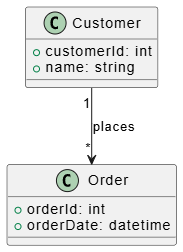
@startuml
' Class Diagram - One-to-Many
class Customer {
    +customerId: int
    +name: string
}

class Order {
    +orderId: int
    +orderDate: datetime
}

Customer "1" --> "*" Order : places
@enduml
ERD Mapping: Add foreign key to the "many" side
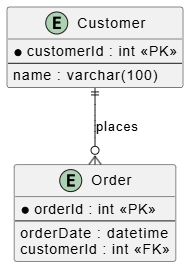
@startuml
' ERD - One-to-Many
entity Customer {
    * customerId : int <<PK>>
    --
    name : varchar(100)
}

entity Order {
    * orderId : int <<PK>>
    --
    orderDate : datetime
    customerId : int <<FK>>
}

Customer ||--o{ Order : places
@enduml
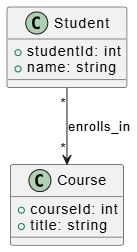
Class Diagram: Both classes have collections of each other
@startuml
' Class Diagram - Many-to-Many
class Student {
    +studentId: int
    +name: string
}

class Course {
    +courseId: int
    +title: string
}

Student "*" --> "*" Course : enrolls_in
@enduml
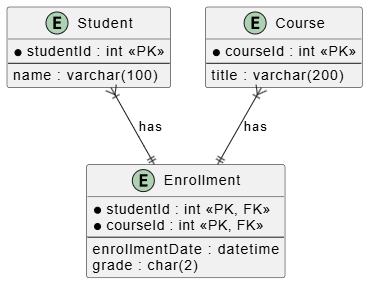
ERD Mapping: Create a junction/join table
@startuml
' ERD - Many-to-Many with Junction Table
entity Student {
    * studentId : int <<PK>>
    --
    name : varchar(100)
}

entity Course {
    * courseId : int <<PK>>
    --
    title : varchar(200)
}

entity Enrollment {
    * studentId : int <<PK, FK>>
    * courseId : int <<PK, FK>>
    --
    enrollmentDate : datetime
    grade : char(2)
}

Student }|--|| Enrollment : has
Course }|--|| Enrollment : has
@enduml
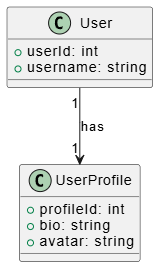
Class Diagram: Each instance relates to exactly one instance
@startuml
' Class Diagram - One-to-One
class User {
    +userId: int
    +username: string
}

class UserProfile {
    +profileId: int
    +bio: string
    +avatar: string
}

User "1" --> "1" UserProfile : has
@enduml
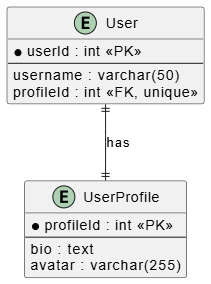
ERD Mapping Options:
Option A: Foreign key in either table
@startuml
' ERD - One-to-One (FK approach)
entity User {
    * userId : int <<PK>>
    --
    username : varchar(50)
    profileId : int <<FK, unique>>
}

entity UserProfile {
    * profileId : int <<PK>>
    --
    bio : text
    avatar : varchar(255)
}

User ||--|| UserProfile : has
@enduml
Option B: Merge into single table (if tightly coupled)
Three common strategies:
All classes in hierarchy share one table with a discriminator column
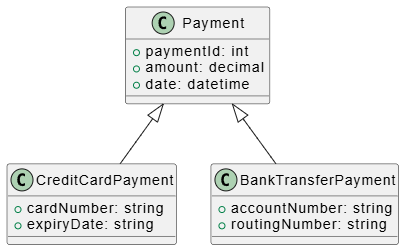
@startuml
' Class Diagram - Inheritance
class Payment {
    +paymentId: int
    +amount: decimal
    +date: datetime
}

class CreditCardPayment {
    +cardNumber: string
    +expiryDate: string
}

class BankTransferPayment {
    +accountNumber: string
    +routingNumber: string
}

Payment <|-- CreditCardPayment
Payment <|-- BankTransferPayment
@enduml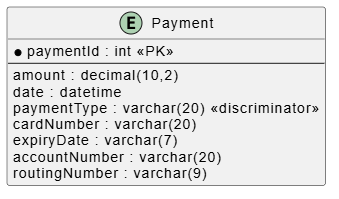
@startuml
' ERD - Single Table Inheritance
entity Payment {
    * paymentId : int <<PK>>
    --
    amount : decimal(10,2)
    date : datetime
    paymentType : varchar(20) <<discriminator>>
    cardNumber : varchar(20)
    expiryDate : varchar(7)
    accountNumber : varchar(20)
    routingNumber : varchar(9)
}
@enduml
Each class gets its own table
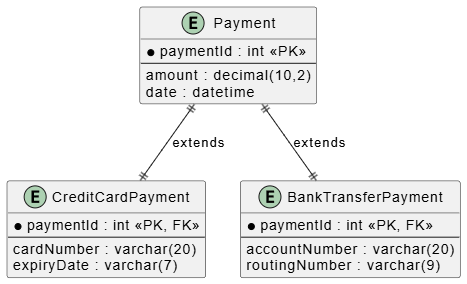
@startuml
' ERD - Class Table Inheritance
entity Payment {
    * paymentId : int <<PK>>
    --
    amount : decimal(10,2)
    date : datetime
}

entity CreditCardPayment {
    * paymentId : int <<PK, FK>>
    --
    cardNumber : varchar(20)
    expiryDate : varchar(7)
}

entity BankTransferPayment {
    * paymentId : int <<PK, FK>>
    --
    accountNumber : varchar(20)
    routingNumber : varchar(9)
}

Payment ||--|| CreditCardPayment : extends
Payment ||--|| BankTransferPayment : extends
@enduml
Only concrete classes get tables (no parent table)
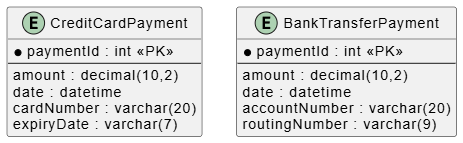
@startuml
' ERD - Concrete Table Inheritance
entity CreditCardPayment {
    * paymentId : int <<PK>>
    --
    amount : decimal(10,2)
    date : datetime
    cardNumber : varchar(20)
    expiryDate : varchar(7)
}

entity BankTransferPayment {
    * paymentId : int <<PK>>
    --
    amount : decimal(10,2)
    date : datetime
    accountNumber : varchar(20)
    routingNumber : varchar(9)
}
@enduml
The contained object cannot exist without the container
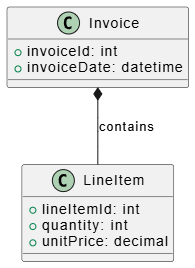
@startuml
' Class Diagram - Composition
class Invoice {
    +invoiceId: int
    +invoiceDate: datetime
}

class LineItem {
    +lineItemId: int
    +quantity: int
    +unitPrice: decimal
}

Invoice *-- LineItem : contains
@enduml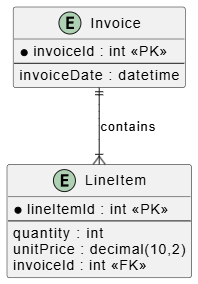
@startuml
' ERD - Composition
entity Invoice {
* invoiceId : int <<PK>>
--
invoiceDate : datetime
}

entity LineItem {
* lineItemId : int <<PK>>
--
quantity : int
unitPrice : decimal(10,2)
invoiceId : int <<FK>>
}

Invoice ||--|{ LineItem : contains
@enduml
When associations themselves have attributes, create a separate entity
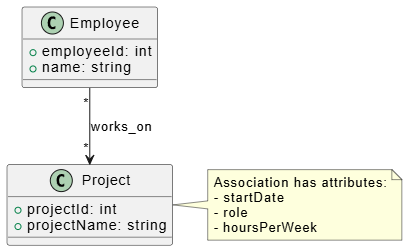
@startuml
' Class Diagram - Association with Attributes
class Employee {
    +employeeId: int
    +name: string
}

class Project {
    +projectId: int
    +projectName: string
}

Employee "*" --> "*" Project : works_on
note right: Association has attributes:\n- startDate\n- role\n- hoursPerWeek
@enduml
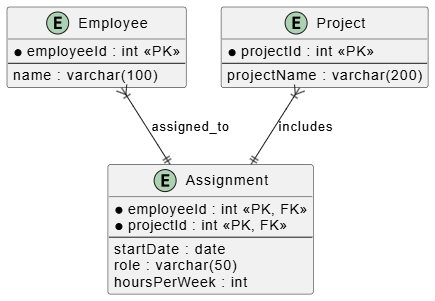
@startuml
' ERD - Association as Entity
entity Employee {
    * employeeId : int <<PK>>
    --
    name : varchar(100)
}

entity Project {
    * projectId : int <<PK>>
    --
    projectName : varchar(200)
}

entity Assignment {
    * employeeId : int <<PK, FK>>
    * projectId : int <<PK, FK>>
    --
    startDate : date
    role : varchar(50)
    hoursPerWeek : int
}

Employee }|--|| Assignment : assigned_to
Project }|--|| Assignment : includes
@enduml
Let's map a complete class diagram to an ERD:
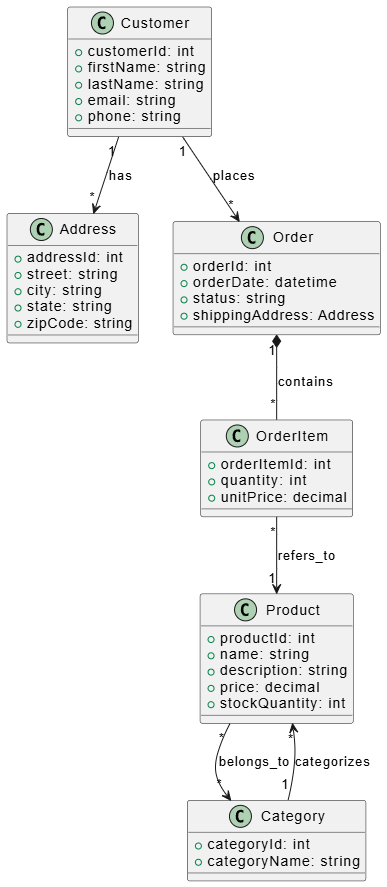
@startuml
' Complete Class Diagram
class Customer {
    +customerId: int
    +firstName: string
    +lastName: string
    +email: string
    +phone: string
}

class Address {
    +addressId: int
    +street: string
    +city: string
    +state: string
    +zipCode: string
}

class Order {
    +orderId: int
    +orderDate: datetime
    +status: string
    +shippingAddress: Address
}

class OrderItem {
    +orderItemId: int
    +quantity: int
    +unitPrice: decimal
}

class Product {
    +productId: int
    +name: string
    +description: string
    +price: decimal
    +stockQuantity: int
}

class Category {
    +categoryId: int
    +categoryName: string
}

Customer "1" --> "*" Address : has
Customer "1" --> "*" Order : places
Order "1" *-- "*" OrderItem : contains
OrderItem "*" --> "1" Product : refers_to
Product "*" --> "*" Category : belongs_to
Category "1" --> "*" Product : categorizes
@enduml
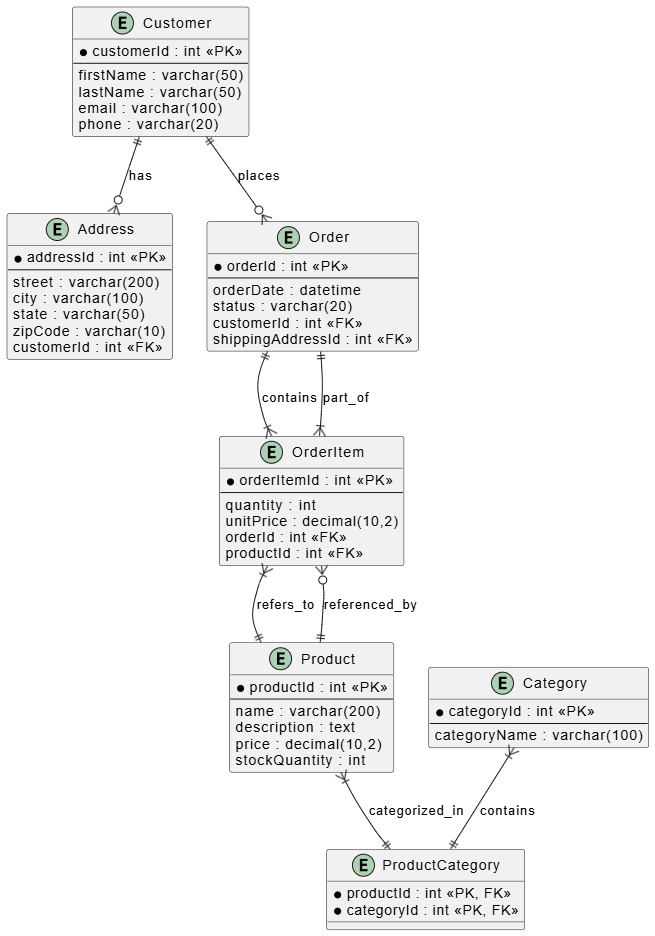
@startuml
' Complete ERD
entity Customer {
* customerId : int <<PK>>
--
firstName : varchar(50)
lastName : varchar(50)
email : varchar(100)
phone : varchar(20)
}

entity Address {
* addressId : int <<PK>>
--
street : varchar(200)
city : varchar(100)
state : varchar(50)
zipCode : varchar(10)
customerId : int <<FK>>
}

entity Order {
* orderId : int <<PK>>
--
orderDate : datetime
status : varchar(20)
customerId : int <<FK>>
shippingAddressId : int <<FK>>
}

entity OrderItem {
* orderItemId : int <<PK>>
--
quantity : int
unitPrice : decimal(10,2)
orderId : int <<FK>>
productId : int <<FK>>
}

entity Product {
* productId : int <<PK>>
--
name : varchar(200)
description : text
price : decimal(10,2)
stockQuantity : int
}

entity Category {
* categoryId : int <<PK>>
--
categoryName : varchar(100)
}

entity ProductCategory {
* productId : int <<PK, FK>>
* categoryId : int <<PK, FK>>
}

Customer ||--o{ Address : has
Customer ||--o{ Order : places
Order ||--|{ OrderItem : contains
Product ||--o{ OrderItem : referenced_by
OrderItem }|--|| Order : part_of
OrderItem }|--|| Product : refers_to
Product }|--|| ProductCategory : categorized_in
Category }|--|| ProductCategory : contains
@enduml
Tables: Use plural nouns (e.g., users, orders)
Columns: Use snake_case (e.g., user_id, created_at)
Foreign Keys: Follow pattern [table_name]_id (e.g., customer_id)
| Class Type | Database Type | Notes |
|---|---|---|
| int/Integer | INT | Consider BIGINT for large datasets |
| long/Long | BIGINT | For very large numbers |
| String | VARCHAR(n) | Choose appropriate length |
| Text/long string | TEXT | For unlimited length |
| boolean/Boolean | BOOLEAN/TINYINT | Database dependent |
| Date | DATE | Date only |
| DateTime | DATETIME/TIMESTAMP | Date and time |
| Decimal/BigDecimal | DECIMAL(p,s) | Specify precision and scale |
| Double/Float | FLOAT/DOUBLE | Be aware of precision issues |
Always index primary keys (automatic)
Index foreign keys for join performance
Index columns used in WHERE clauses frequently
Consider composite indexes for multi-column queries
1NF: Atomic values, no repeating groups
2NF: Remove partial dependencies
3NF: Remove transitive dependencies
Balance normalization with performance needs
❌ Creating tables for every class
Utility classes, services, and interfaces typically don't need tables
❌ Ignoring cardinality
Misunderstanding 1:1 vs 1:N vs M:N leads to incorrect schema
❌ Forgetting about referential integrity
Always define foreign key constraints
❌ Over-normalizing or under-normalizing
Find the right balance for your use case
❌ Not considering query patterns
Design with actual usage in mind
When mapping class diagrams to ERDs:
✅ Identify which classes become entities
✅ Map simple attributes to columns
✅ Determine relationship cardinalities
✅ Add foreign keys for 1:N relationships
✅ Create junction tables for M:N relationships
✅ Choose inheritance strategy
✅ Handle composition/aggregation appropriately
✅ Create entities for associations with attributes
✅ Define primary and foreign keys
✅ Add appropriate indexes
✅ Validate against query requirements
✅ Review for normalization
Mapping class diagrams to ERDs is a systematic process that requires understanding both object-oriented design and relational database principles. By following these steps and guidelines, you can create database schemas that accurately represent your application's domain model while maintaining data integrity and performance.
Remember:
Start with clear class diagrams
Understand relationship cardinalities
Choose appropriate inheritance strategies
Balance normalization with practical needs
Always consider your actual query patterns
With practice, this mapping process becomes intuitive, enabling you to design robust database schemas that support your application's object model effectively.
This guide provides foundational knowledge for beginners. As you gain experience, you'll encounter more complex scenarios requiring advanced techniques like polymorphic associations, soft deletes, and denormalization for performance optimization.

