
Business Process Model and Notation (BPMN) is the global standard for business process modeling. While basic flowcharts can map out simple tasks, real-world business processes require a more nuanced language to handle timing, messaging, and complex decision-making. This is where Events and Gateways come into play.
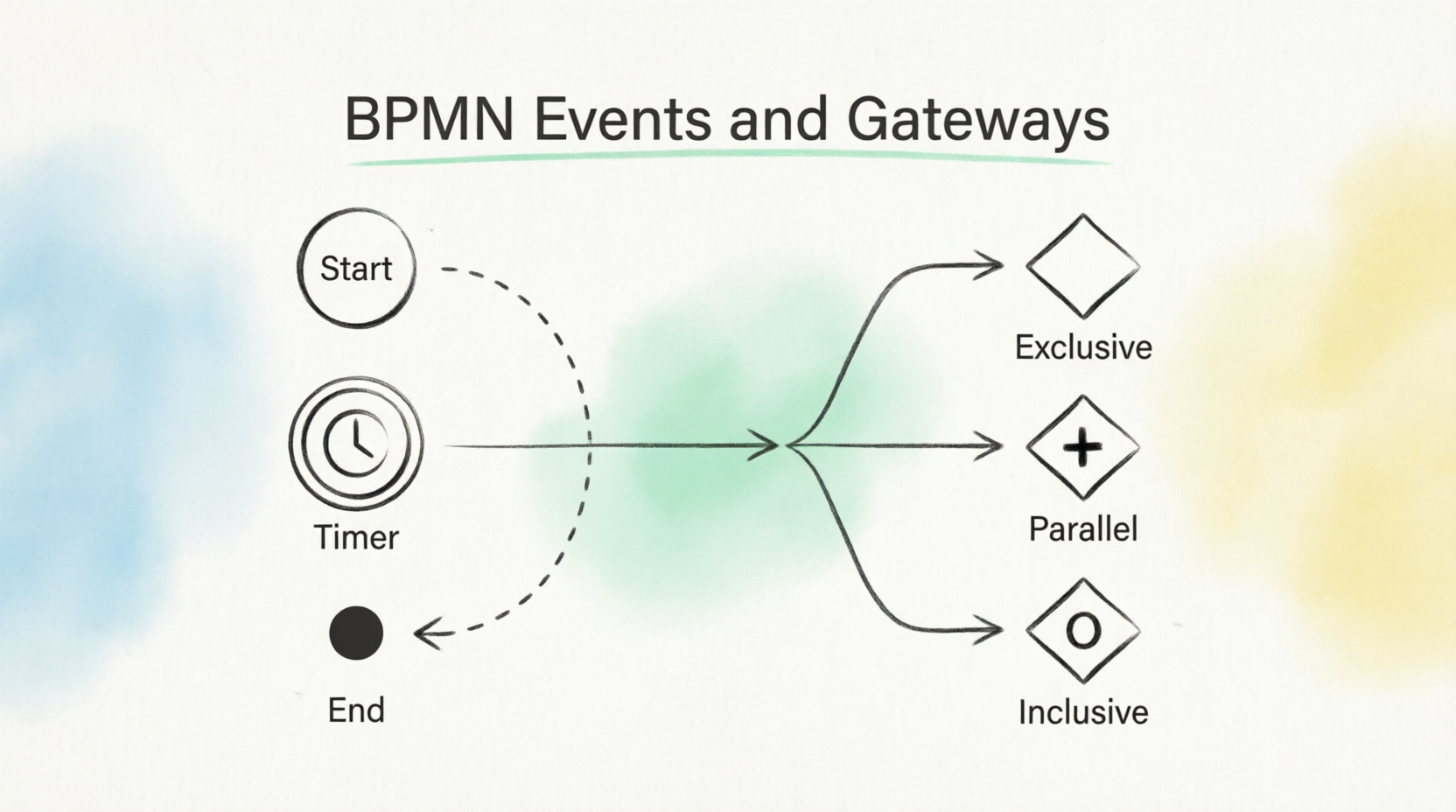
In this comprehensive guide, we will dive deep into the mechanics of BPMN Events and Gateways. Whether you are mapping a simple customer journey or a complex supply chain operation, mastering these graphical elements will allow you to create process diagrams that are not only visually clear but logically bulletproof.
In BPMN, an Event represents "something that happens" during the lifecycle of a business process. Events affect the flow of the process and usually have a trigger or a result.
Events are categorized by when they occur in the process, which is visually indicated by the thickness of their circular borders:
Start Events (Thin Border): Indicates where the process begins.
Basic: A simple thin circle.
Message: Triggers when a message is received from another participant (e.g., receiving a customer payment).
Timer: Triggers the process at a specific date/time or cycle (e.g., a daily batch job starting at 9:00 AM).
Intermediate Events (Double-Line Border): Occurs between the start and the end. It shows where something happens that pauses, delays, or alters the flow.
Basic: A double-lined circle with no icon.
Message: Represents a message being sent or received mid-process.
Timer (Clock Icon): The most common intermediate event. It suspends the process for a specific duration, until a certain date, or based on a time-out.
End Events (Thick Border): Indicates where the process terminates.
Basic: A thick solid circle (the final outcome is unspecified).
Message: A message is sent to another participant as the final act of the process.
Imagine a "Process Order" workflow for a bicycle store. If a customer orders a bike that is out of stock, the store must order it from a supplier. The process cannot move forward until the bike arrives.
Application: You would place a Timer Intermediate Event (clock icon) immediately after the "Place order with supplier" task. This visually communicates to the reader: "The process is suspended here until the delivery time is met."
Secondary Application: After the "Deliver goods" task, you can use another Timer Intermediate Event to represent a mandatory waiting period (e.g., 3 days) before triggering the final task: "Contact customer for feedback."
While Events dictate when things happen, Gateways dictate how the process flows. Gateways control the divergence (splitting) and convergence (merging) of sequence flows. They are always represented by a diamond shape, differentiated by the marker inside.
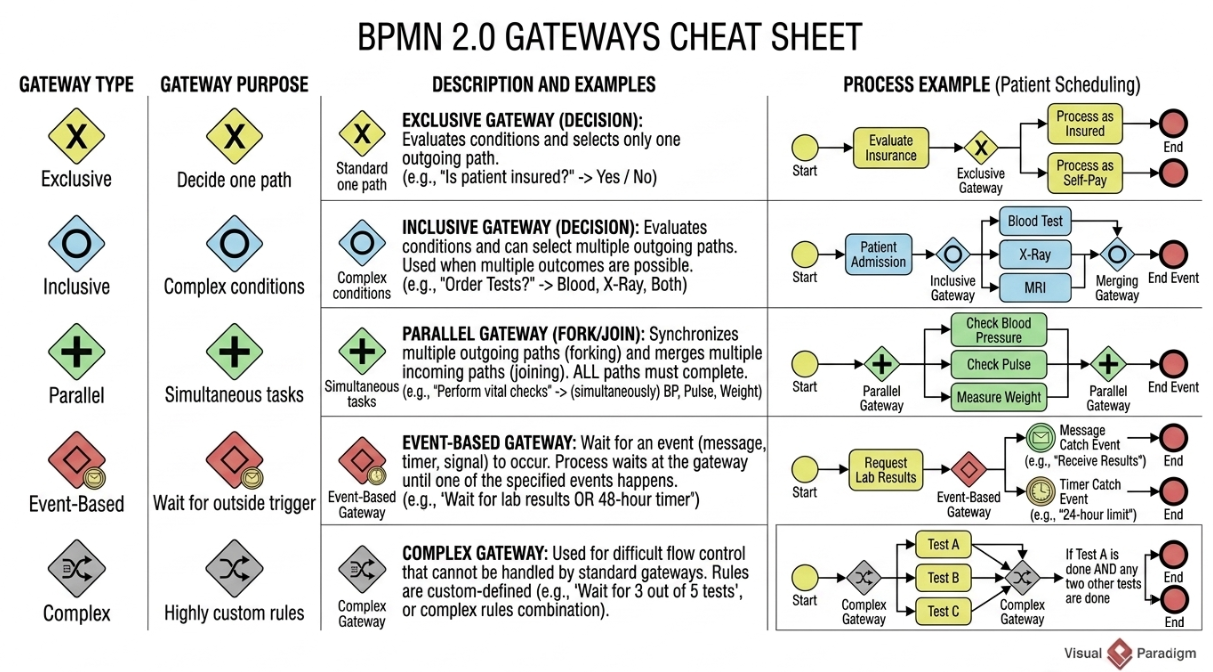
Visual: A diamond with no internal marker (sometimes an 'X' is used in older software, but standard BPMN 2.0 leaves it blank).
Function: Splits the flow into mutually exclusive paths. Only one path can be taken based on evaluated conditions. It can also merge paths, though it doesn't wait for all paths to complete.
Example: In the bicycle store, an Exclusive Gateway asks: "Will the customer buy or rent?"
Path A: "Fill in purchase form"
Path B: "Fill in rental form"
Note: The process cannot do both simultaneously.
Visual: A diamond with a plus sign (+) inside.
Function: Splits the flow into all outgoing paths simultaneously, without evaluating any conditions. When used to merge paths, it acts as a synchronizer—it will not let the process proceed until all incoming paths are completed.
Example: If a bike is out of stock, the store must "Place an order with supplier" AND "Inform the customer about the delay." A Parallel Gateway splits the flow to execute both tasks concurrently. A second Parallel Gateway later merges the flow, ensuring the process only moves forward once both tasks are finished.
Visual: A diamond with a circle (O) inside.
Function: A hybrid of Exclusive and Parallel. It evaluates conditions on outgoing paths. It can trigger one or more paths. If multiple conditions are met, those paths execute in parallel. Like the Parallel Gateway, it waits for all active incoming paths to complete before merging.
Example (The Gift Scenario): The store offers promotional gifts based on complex conditions:
Condition A: Bicycle costs > $500 (Adds Gift 1).
Condition B: Additional goods purchased > $100 (Adds Gift 2).
Outcome: If both conditions are true, the Inclusive Gateway triggers both paths in parallel (adding two gifts). If only Condition A is true, it triggers only that path.
To ensure your BPMN diagrams are professional, readable, and technically accurate, adhere to the following best practices:
Never leave the sequence flows exiting an Exclusive or Inclusive Gateway unlabeled. Always write the condition directly on the flow line (e.g., [In Stock], [Out of Stock], [Price > $500]). This eliminates ambiguity for the reader.
If your diagram has too many crossing lines and nested gateways, it is too complex.
Best Practice: Break complex sub-processes into their own separate diagrams and use a Sub-Process element (a rectangle with a + icon) in the main diagram to keep the top-level view clean.
If you split a process using a Parallel or Inclusive Gateway, you should almost always merge those paths back together using a corresponding Parallel or Inclusive Gateway. Failing to synchronize parallel paths can lead to logical errors where subsequent tasks are executed multiple times or skipped entirely.
When using a Timer Intermediate Event, don't just drop the clock icon on the diagram. Use the properties panel to define the exact time cycle (e.g., PT72H for 72 hours, or a specific date). In the visual diagram, add a text annotation or name the event (e.g., "Wait 3 Days for Delivery") so the business reader understands the exact delay.
Use Exclusive when paths are mutually exclusive (A or B).
Use Parallel when tasks must happen at the exact same time regardless of conditions (A and B).
Use Inclusive when tasks might happen concurrently based on specific, non-mutually exclusive conditions (A and/or B).
Tip: If you find yourself putting contradictory conditions on an Inclusive Gateway (e.g., "Age > 18" and "Age < 18"), you should actually be using an Exclusive Gateway.
Events and Gateways are the engine and the steering wheel of any BPMN diagram. Events provide the temporal and interactive context—telling us when a process starts, where it pauses, and how it concludes. Gateways provide the logical routing—dictating whether a process takes a single exclusive path, multiple parallel paths, or a conditional mix of both.
By understanding the distinct visual markers of these elements and applying them correctly to your business scenarios, you transform simple flowcharts into robust, executable process models. As you continue your BPMN journey, practice mapping out real-world workflows using these tools, and always keep the perspective of the business reader in mind: clarity, logic, and precision are the hallmarks of a masterfully designed process.

