
Business Process Model and Notation (BPMN) has become the industry standard for visualizing, analyzing, and optimizing business processes. While basic BPMN diagrams can map simple workflows, real-world business processes require sophisticated customization elements to accurately represent organizational structures, role assignments, and task variations.
This guide explores three critical customization elements in BPMN: Pools, Swimlanes, and Task elements. Understanding these components is essential for creating detailed, actionable process models that reflect the complexity of modern organizational workflows. Whether you're modeling inter-departmental collaborations or automating routine tasks, these elements provide the flexibility and precision needed to capture every nuance of your business processes.
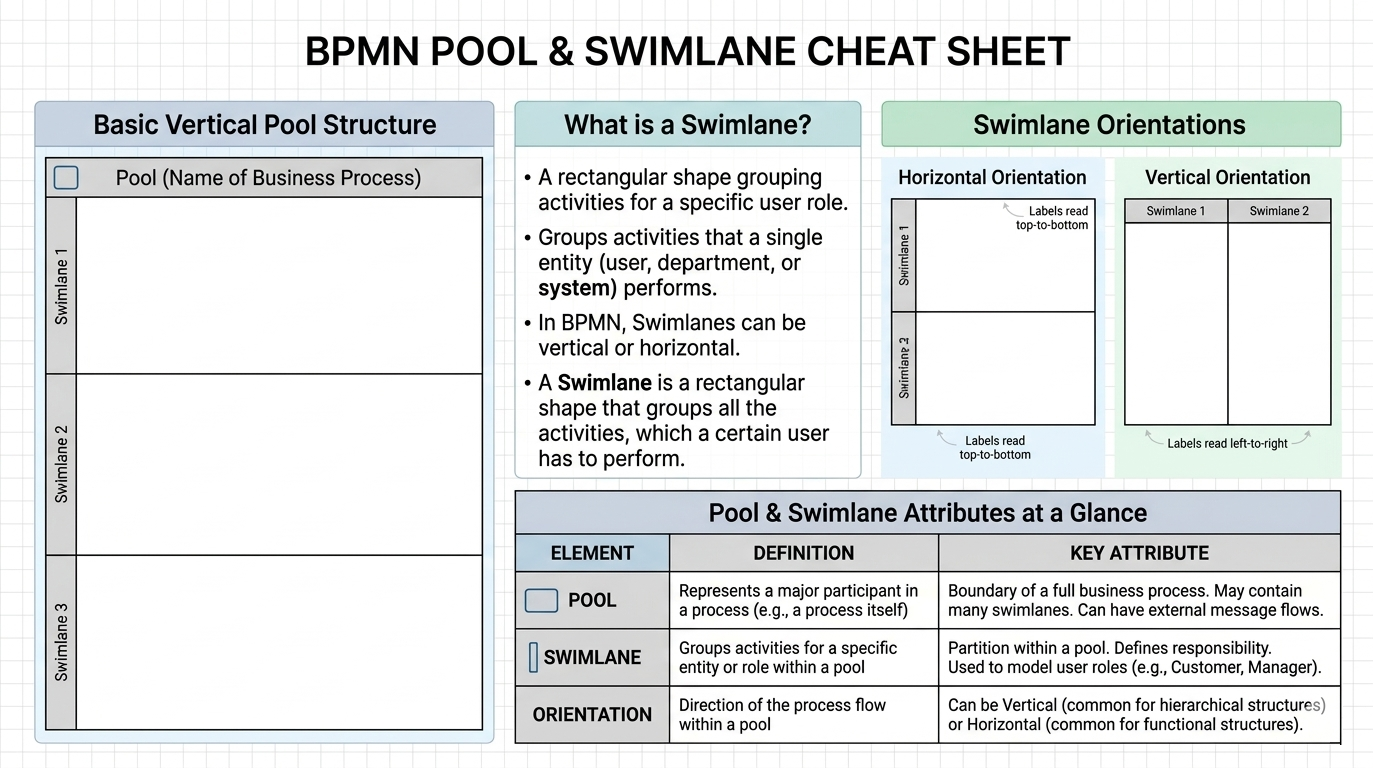
In BPMN, a Pool serves as a container for an entire business process, representing all process activities and their executors. In Business Process Management (BPM) systems, the Pool defines the boundaries of a process and encapsulates everything that happens within it.
Key Characteristics:
Represents a single business process from start to finish
Acts as the primary container for all process elements
May or may not be visualized, depending on the BPM system's approach
When processes are modeled on separate sheets, the Pool is often implicit rather than explicitly shown
Swimlanes are subdivisions within a Pool that represent internal business roles and assign duties to process participants. They provide a clear visual representation of who is responsible for what within a process.
Key Features:
Represent specific organizational roles (e.g., Chief Finance Officer, General Manager, Accountant)
One Pool can contain multiple Swimlanes
Can be oriented vertically (as columns) or horizontally (as rows)
Group all activities that a particular user or role must perform
The process flow determines the sequence, timing, and executors of tasks
Consider a typical order processing scenario with two Swimlanes:
Secretary Swimlane:
Responsible for registering and processing orders
Handles initial customer interactions
Manages documentation and data entry
Sales Person Swimlane:
Dynamic type (represents a role rather than a specific individual)
Can be filled by any qualified sales person in the organization
Takes over once the secretary completes registration
Process Flow:
The sequence flow crosses from the Secretary's Swimlane to the Sales Person's Swimlane, clearly indicating the transfer of responsibility. Tasks in the first swimlane are completed by the secretary, while subsequent tasks fall to the sales person.
Advantages of This Approach:
Unlimited number of Swimlanes can be included
Clear accountability and role definition
Easy to identify bottlenecks and handoff points
Facilitates process optimization and resource allocation
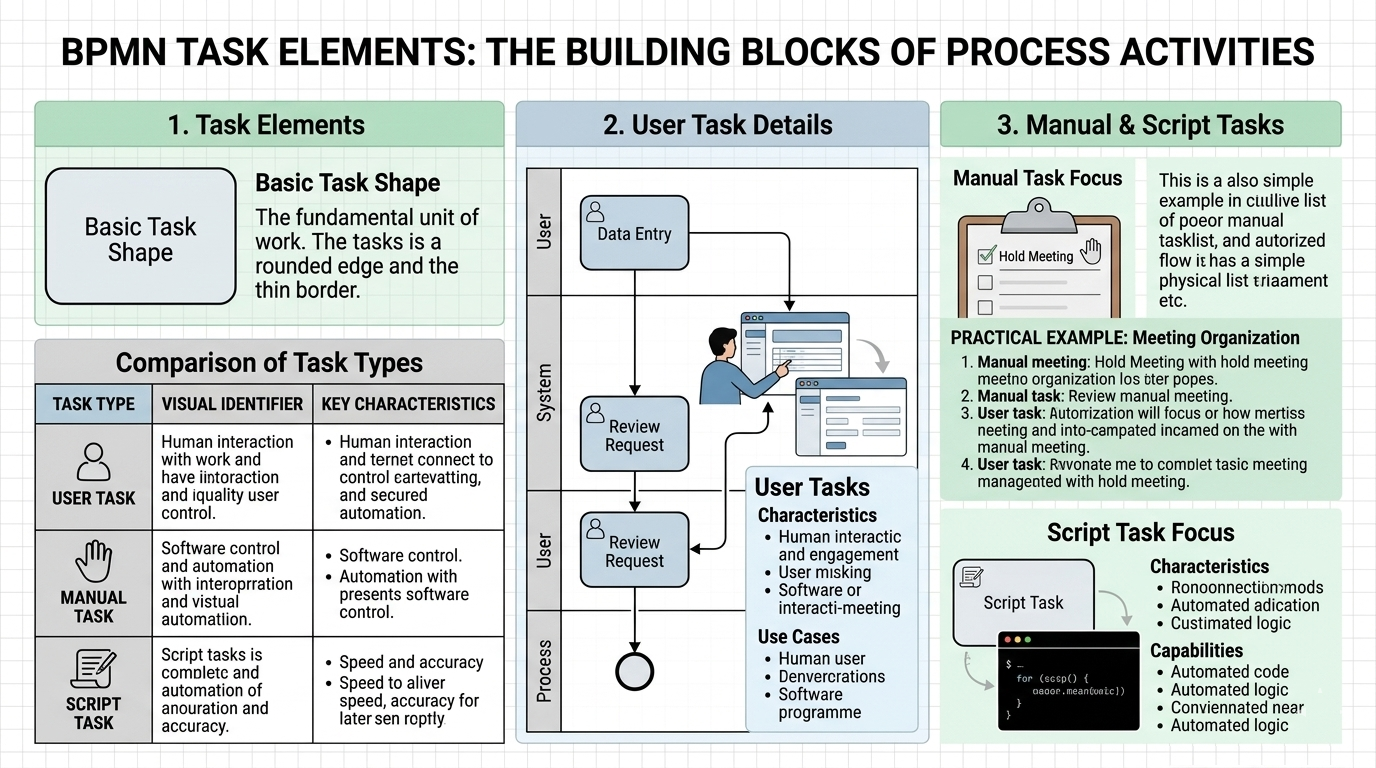
A Task is the fundamental unit of work in BPMN, represented as a rectangular shape with rounded edges and a single thin border. Different Task types are distinguished by specific markers in the upper left corner of the icon.
Definition: A User Task is a typical workflow task executed by a human user with the help of software applications or other users.
Visual Identifier: Person icon in the upper left corner
Characteristics:
Requires human interaction
Supported by workflow or BPM software
Represents tasks where users interact with systems
Most common task type in business processes
Use Cases:
Reviewing and approving documents
Data entry and validation
Customer communication
Decision-making activities
Definition: A Manual Task is a non-automated task performed entirely by a user without control from workflow or BPM software.
Visual Identifier: Hand icon in the upper left corner
Characteristics:
No software automation or workflow control
Performed entirely outside the BPM system
Represents real-world activities that cannot be automated
The BPM system tracks the task but doesn't control its execution
Practical Example: Meeting Organization Process
Head of Marketing Department fills in meeting details (date, time, subject, participants)
Marketing Specialist prepares necessary documents
Manual Task: Holding the meeting (performed by Head of Department)
Marketing Specialist draws up a report
Process ends
This example demonstrates how Manual Tasks represent activities that occur in the physical world, outside digital systems, yet remain integral to the overall process flow.
Definition: A Script Task performs automated activities executed by the BPM system itself without human participation.
Visual Identifier: Script/code marker in the upper left corner
Characteristics:
Fully automated execution
No human performer required
Executed by the BPM system
Fast, accurate, and consistent results
Can handle complex logic beyond simple arithmetic
Capabilities:
Data processing and transformation
Calculations and validations
Automated decision-making based on rules
System integrations and API calls
Report generation
Use Case 1: Automated Sales Person Assignment
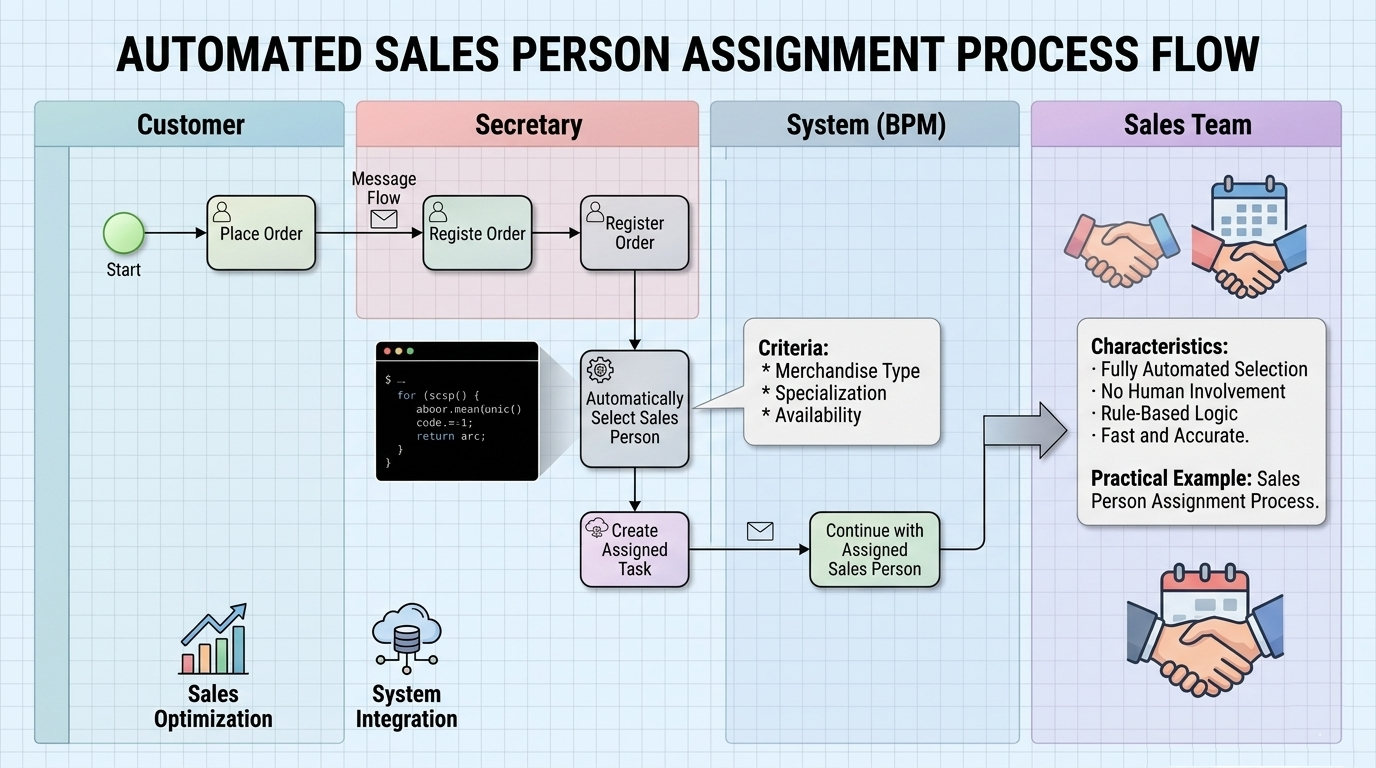
Process Flow:
Customer places an order
Secretary registers the order
Script Task automatically selects a sales person based on:
Type of merchandise
Sales person specialization
Availability
System creates a task for the assigned sales person
Process continues with the sales person
Use Case 2: Billable Hours Collection
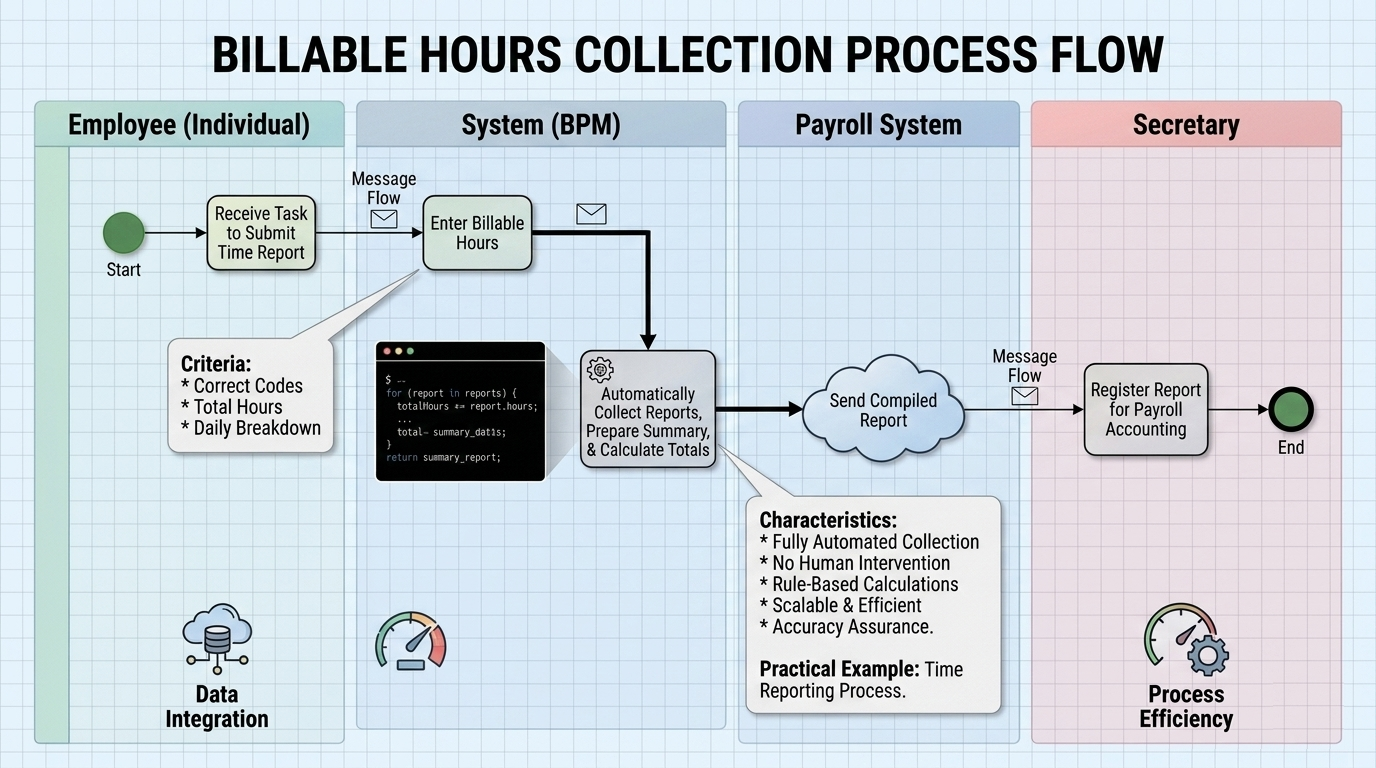
Process Flow:
Each employee receives a task to submit time reports
Employees enter their billable hours
Script Task automatically:
Collects all employee reports
Prepares a summary report
Calculates totals
Sends the compiled report to the secretary
Secretary registers the report for payroll accounting
Benefits of Script Tasks:
Eliminates manual data aggregation
Reduces human error
Speeds up processing time
Ensures consistency
Frees up human resources for higher-value activities
A Sub-Process is a BPMN element represented as a rectangle with rounded corners and a plus sign (+) in the lower center. It allows you to encapsulate complex activities within a single element, maintaining diagram clarity while preserving detail.
Key Features:
Collapses detailed activities into a single visual element
Can be expanded to show internal flow
Helps manage diagram complexity
Promotes reusability of process fragments
Appears in various process diagrams as a best practice for organization
Note: Sub-Processes will be covered in greater detail in advanced lessons, but recognizing them is important for understanding complete BPMN diagrams.
Do:
Use Pools to represent separate organizational entities or major process boundaries
Create Swimlanes for each distinct role or department involved in the process
Keep Swimlane orientation consistent throughout your diagrams
Use dynamic Swimlanes when multiple people can fulfill a role
Clearly label Swimlanes with role titles, not individual names
Don't:
Create too many Swimlanes that make the diagram cluttered
Use Swimlanes for temporary assignments or exceptions
Mix vertical and horizontal orientations in the same diagram
Choosing the Right Task Type:
| Task Type | Use When... | Example |
|---|---|---|
| User Task | Human needs software assistance | Approving a purchase order in a system |
| Manual Task | Activity happens outside any system | Conducting a face-to-face meeting |
| Script Task | Activity can be fully automated | Calculating totals, sending automated emails |
Decision Framework:
Does it require human judgment? → User Task or Manual Task
Is it controlled by the BPM system? → User Task
Does it happen completely outside digital systems? → Manual Task
Can a computer do it autonomously? → Script Task
Pools: Customer, Bank, Regulatory Authority
Swimlanes within Bank Pool:
Front Desk Officer
Compliance Officer
Account Manager
IT Systems (for Script Tasks)
Task Distribution:
User Tasks: Document verification, customer interviews
Manual Tasks: Physical document collection, in-person meetings
Script Tasks: Credit score calculation, automated background checks
Pools: Development Team, Quality Assurance, Marketing
Swimlanes:
Product Manager
Developer
QA Tester
Marketing Specialist
Task Types:
User Tasks: Code review, test case creation
Manual Tasks: User testing sessions, stakeholder presentations
Script Tasks: Automated testing, build deployment, performance metrics collection
Mastering BPMN customization elements—Pools, Swimlanes, and Task types—is essential for creating accurate, actionable business process models. These elements transform simple flowcharts into sophisticated representations of organizational workflows that account for:
Organizational Structure: Pools and Swimlanes clearly delineate who does what, establishing accountability and clarifying handoffs between roles and departments.
Task Diversity: Understanding the distinctions between User Tasks, Manual Tasks, and Script Tasks allows you to accurately model the blend of human judgment, physical activities, and automation that characterizes modern business processes.
Scalability and Clarity: Proper use of these elements ensures your diagrams remain comprehensible even as processes grow in complexity, while Sub-Processes help manage that complexity through abstraction.
Key Takeaways:
Use Pools to define process boundaries and Swimlanes to assign responsibilities
Choose Task types based on the level of automation and system involvement required
Leverage Script Tasks for efficiency and consistency in repetitive, rule-based activities
Maintain clarity by using dynamic Swimlanes for roles rather than individuals
Remember that the process flow determines sequence, timing, and execution responsibilities
By applying these principles, you'll create BPMN diagrams that not only document current processes but also serve as blueprints for optimization, automation, and digital transformation initiatives. The investment in learning these customization elements pays dividends in improved process visibility, better stakeholder communication, and more effective process management.
Further Learning:
To deepen your BPMN expertise, explore advanced topics such as:
Gateway types for decision modeling
Event types and their triggers
Message flows between Pools
Detailed Sub-Process modeling
BPMN execution semantics in BPM systems
Master these fundamentals, and you'll be well-equipped to model processes of any complexity with precision and clarity.

