
Business Process Model and Notation (BPMN) is the global standard for modeling business processes. At the heart of every effective BPMN diagram are Connecting Objects, commonly referred to as "Flows." These flows define how elements in a process diagram relate to one another, dictating execution sequences, communication across organizational boundaries, and data dependencies.
Understanding the distinct types of flows—Sequence, Message, Association, and Data Association—is critical for creating clear, compliant, and actionable process models. This guide provides a deep dive into each flow type, complete with visual representations, rules, and practical examples. Whether you are using Visual Paradigm for your modeling or leveraging an AI Chatbot to assist in diagram generation, mastering these fundamentals will ensure your processes are both syntactically correct and semantically meaningful.

In BPMN, Connecting Objects are the glue that holds the process logic together. They fall into four primary categories, each with specific visual representations and strict usage rules.
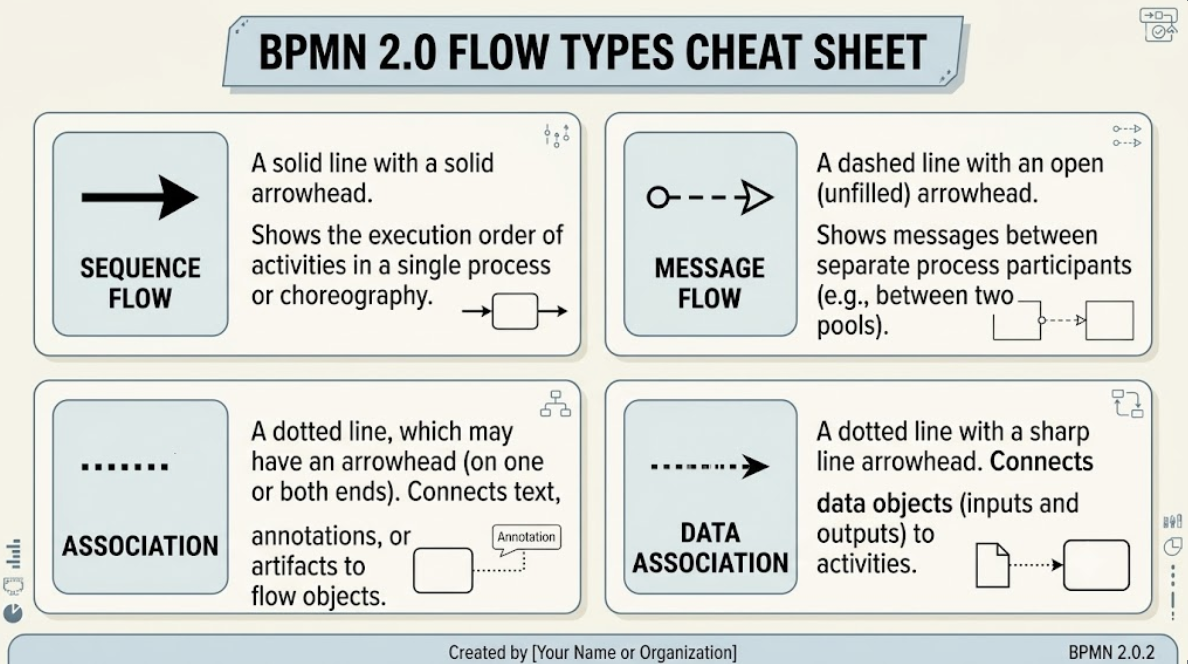
| Flow Type | Visual Representation | Key Purpose & Rules |
|---|---|---|
| Sequence Flow | Solid line with a solid arrowhead | • Connects activities, gateways, and events within a single process/pool. • Defines execution order. • Rule: Cannot cross pool boundaries. |
| Message Flow | Dashed line with a circle at the start and an open arrowhead | • Represents communication between two separate process participants (pools). • Shows messages sent/received. • Rule: Must cross pool boundaries (or connect to a black-box pool). |
| Association | Dotted line (optional line arrowhead) | • Links text annotations or non-data artifacts to flow objects. • Does not affect process execution logic. |
| Data Association | Dotted line with a line arrowhead | • Connects data objects/inputs/outputs with flow objects. • Shows how data flows into or out of activities. |
Description:
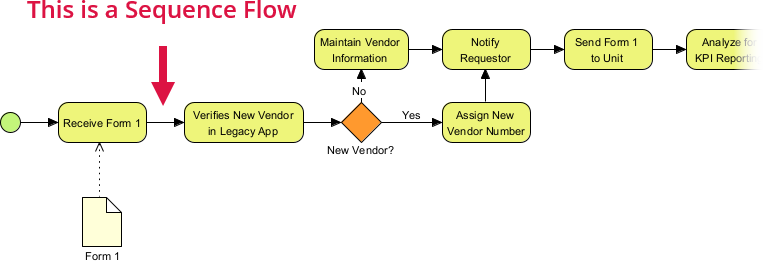
The Sequence Flow represents the order in which steps or activities are executed. It is the primary driver of control flow within a process.
Usage:
Used inside a single pool or lane to link events, tasks, sub-processes, and gateways. It defines the path the process token takes from start to end.
Behavior:
When an activity finishes, execution moves along the sequence flow to the next node. If multiple sequence flows emerge from a gateway, the gateway’s type (exclusive, parallel, etc.) determines which path is taken.
Visual Paradigm Tip: In Visual Paradigm, dragging a connector from one shape to another within the same pool automatically creates a Sequence Flow. Ensure you do not accidentally drag this across pool lines, as it will result in a validation error.
Description:
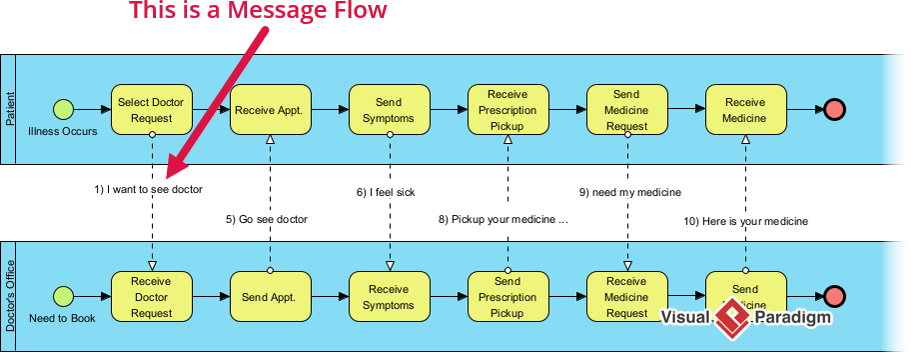
Message Flow represents communication or message exchanges between distinct process participants. It illustrates how different entities (e.g., Customer ↔ Vendor, Service A ↔ Service B) interact.
Usage:
Connects two separate Pools or elements inside different pools. It is essential for modeling collaborative processes where handoffs occur between different organizations or departments.
Behavior:
Shows external communication pathways, such as sending an email, making an API call, or sending an invoice. Unlike Sequence Flow, Message Flow does not carry a "process token"; it signifies the transmission of information.
AI Chatbot Assistance: When asking an AI to generate a BPMN diagram, specify: "Include Message Flows between the Customer Pool and the Vendor Pool to show order requests and confirmations." This ensures the AI distinguishes between internal logic and external communication.
Description:
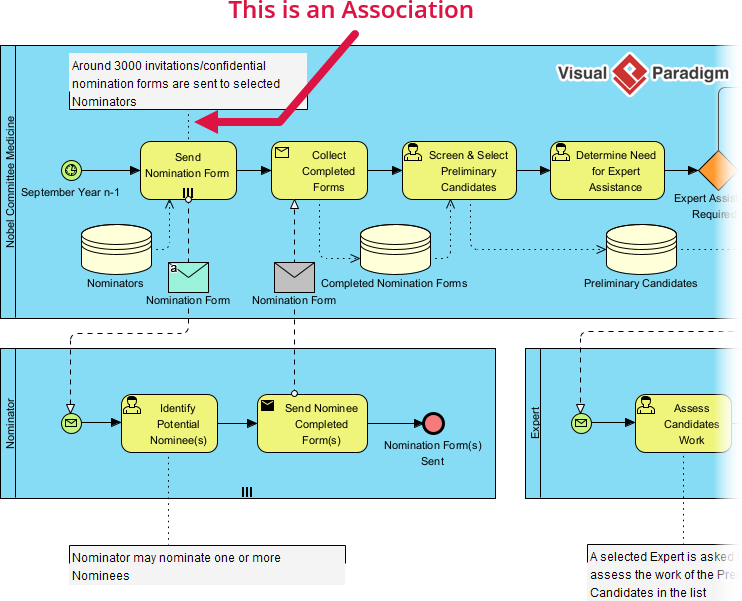
Association links supplementary information or visual artifacts (like text annotations, comments, or groups) to process elements.
Usage:
Helps document or clarify workflow steps without influencing the execution path. It is purely informational and has no impact on the process engine’s behavior.
Behavior:
Associations can be undirected (no arrowhead) or directed (with an arrowhead), but they never dictate the order of operations.
Description:
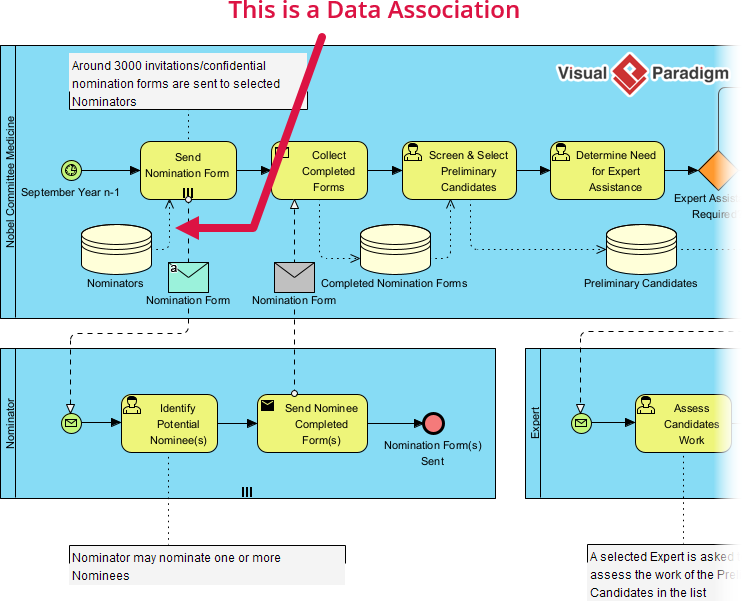
Data Association specifies how data (documents, database objects, physical files) is passed into or produced by an activity.
Usage:
Input Data Association: Points from a Data Object to an Activity (data required to perform the task).
Output Data Association: Points from an Activity to a Data Object (data produced by the task).
Behavior:
While Sequence Flow dictates what happens next, Data Associations dictate what data is needed or created. This separation is crucial for maintaining clean diagrams.
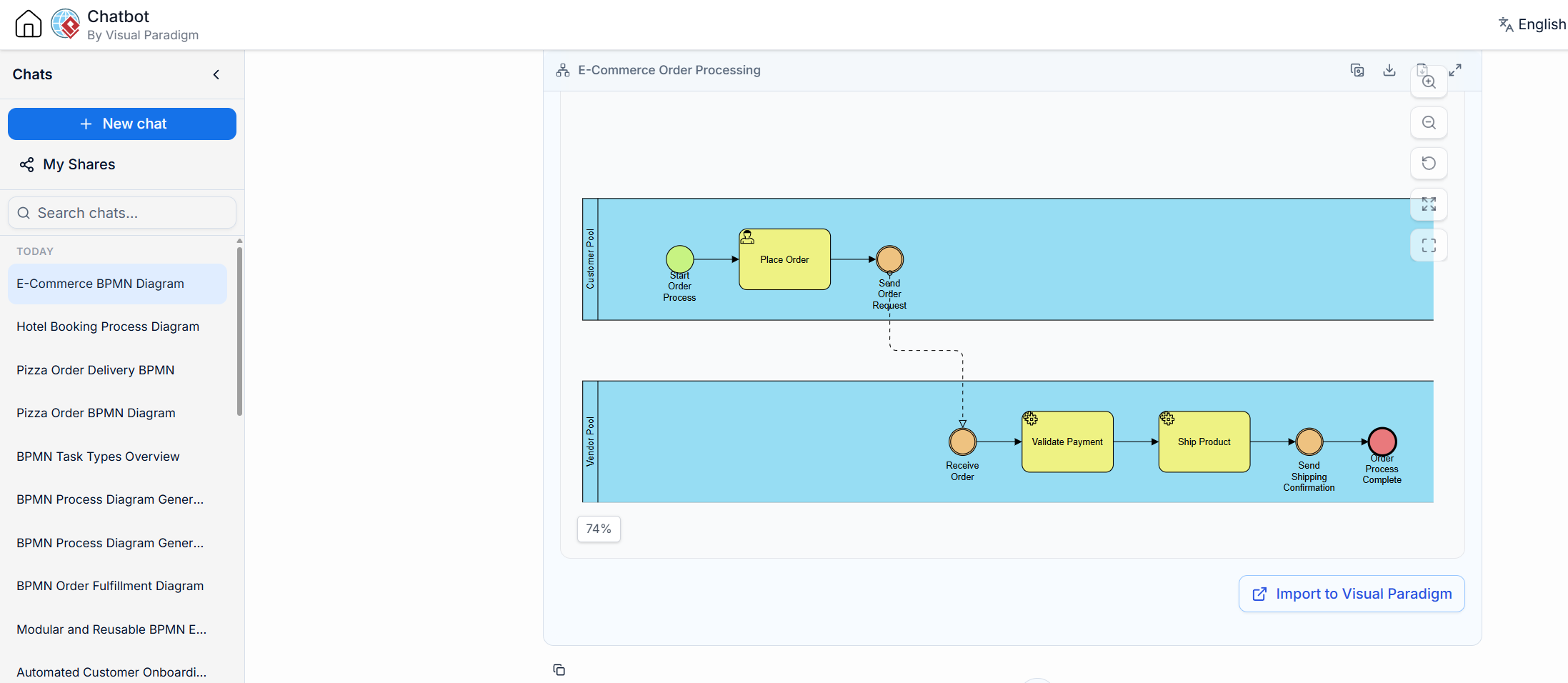
To see these flow types in action, consider a customer placing an order online with a seller. This scenario involves two participants: the Customer and the Vendor.
Sequence Flow:
Moves the Vendor's internal process from Receive Order Event → Validate Payment → Ship Product. This solid line shows the internal step-by-step logic of the vendor’s system.
Message Flow:
The Customer sends an Order Request message to the Vendor. This is depicted as a dashed line crossing the pool boundary.
The Vendor sends a Shipping Confirmation message back to the Customer. This completes the communication loop.
Data Association:
Input: The Validate Payment task reads data from the Customer Credit Record data object. This is shown as a dotted line pointing from the data object to the task.
Output: The Ship Product task outputs the generated Shipping Manifest data object. This is shown as a dotted line pointing from the task to the data object.
Creating accurate BPMN diagrams requires adherence to strict syntax rules. Here are the key guidelines to avoid common errors, especially when using tools like Visual Paradigm.
Do not cross Pools with Sequence Flows. A process inside a pool runs independently. Crossing pool boundaries with a solid sequence flow violates BPMN syntax.
Correction: If you need to show interaction between pools, use a Message Flow instead.
Message Flows cannot connect two objects inside the same Pool. They exist exclusively for inter-pool communication.
Common Error: Accidentally using a Message Flow to connect two tasks within the same department. This should always be a Sequence Flow.
Sequence Flows direct what happens next (control flow).
Data Associations direct what data is needed/produced (data flow).
Pitfall: Conflating the two often leads to overly crowded and confusing diagrams. Keep data objects attached via dotted associations, and let solid lines handle the execution order.
Tooling Insight: Visual Paradigm includes built-in validation checks. If you attempt to draw a Sequence Flow across a pool boundary, the tool will typically highlight the error in red. Use this feature to ensure compliance before sharing your diagrams with stakeholders.
Mastering BPMN flow types is foundational to creating clear, executable, and communicative business process models. By distinguishing between Sequence Flows for internal logic, Message Flows for external communication, and Associations for data and documentation, you ensure your diagrams are both syntactically correct and easy to understand.
Whether you are manually crafting diagrams in Visual Paradigm or using an AI Chatbot to accelerate the modeling process, keeping these rules in mind will help you avoid common pitfalls and produce professional-grade BPMN artifacts. Remember: clarity in flow definition leads to clarity in business execution.

