
In the world of Business Process Model and Notation (BPMN), modeling the internal steps of a single process is only half the battle. In the real world, business processes rarely exist in a vacuum; they constantly interact with external partners, customers, and other internal departments. To accurately model these interactions, BPMN provides a robust set of tools for defining how information is exchanged across boundaries.
This guide is dedicated to demystifying Message Flows, Messages, and the Send/Receive Message activities. Whether you are mapping out a simple vendor-customer relationship or designing a complex, multi-organizational supply chain, understanding these core concepts is essential for creating accurate, executable, and analytical BPMN diagrams.
To understand inter-process communication, we must first distinguish between the content of the communication and the channel through which it travels.
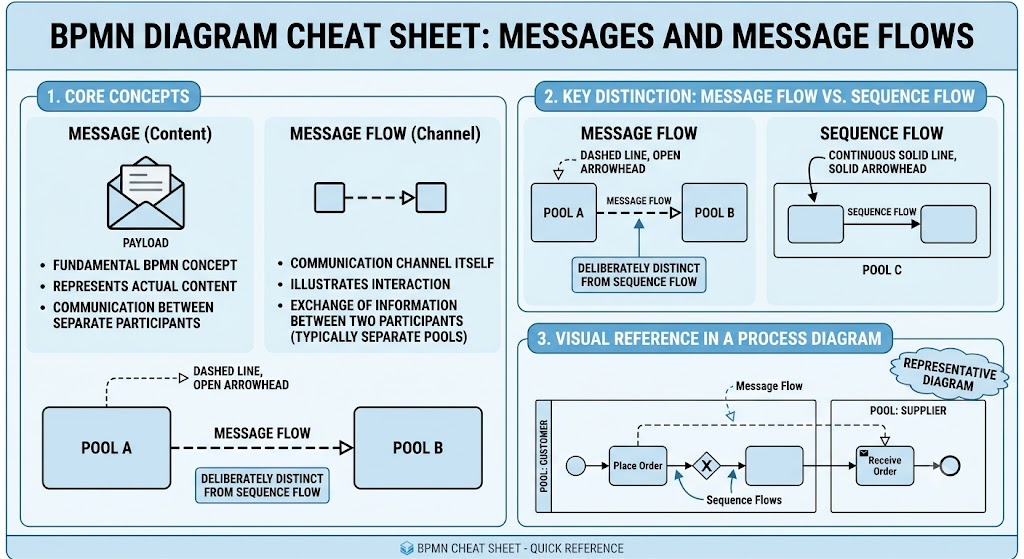
Message: A fundamental BPMN concept representing the actual content or payload of the communication between separate process participants.
Message Flow: The communication channel itself. It illustrates the interaction and exchange of information between two participants, who are typically represented by two separate Pools.
🖼️ Visual Reference: Message Flow in a Process Diagram
Imagine a graphical representation showing a Message Flow as a dashed black line with an open arrowhead. This is deliberately designed to distinguish it from a Sequence Flow, which is depicted as a continuous solid line with a solid, filled arrowhead.
Because Message Flows represent interactions across boundaries, BPMN enforces strict rules on how they can be drawn to prevent logical errors in your process models.
Cross-Boundary Only: A Message Flow must connect either two separate Pools, or an object within one Pool to an object in a different Pool.
No Intra-Pool Connections: A Message Flow cannot connect two objects within the same Pool. (Internal process steps are connected using Sequence Flows).
Graphically, a Message Flow is represented as a dashed black line with an open (hollow) arrowhead. This visual distinction is critical:
Message Flow: Dashed line, open arrowhead (Cross-pool communication).
Sequence Flow: Solid line, solid arrowhead (Internal process sequence).
To see Message Flows in action, let’s look at a classic "Receive Order" process involving communication between a Customer and a Vendor.
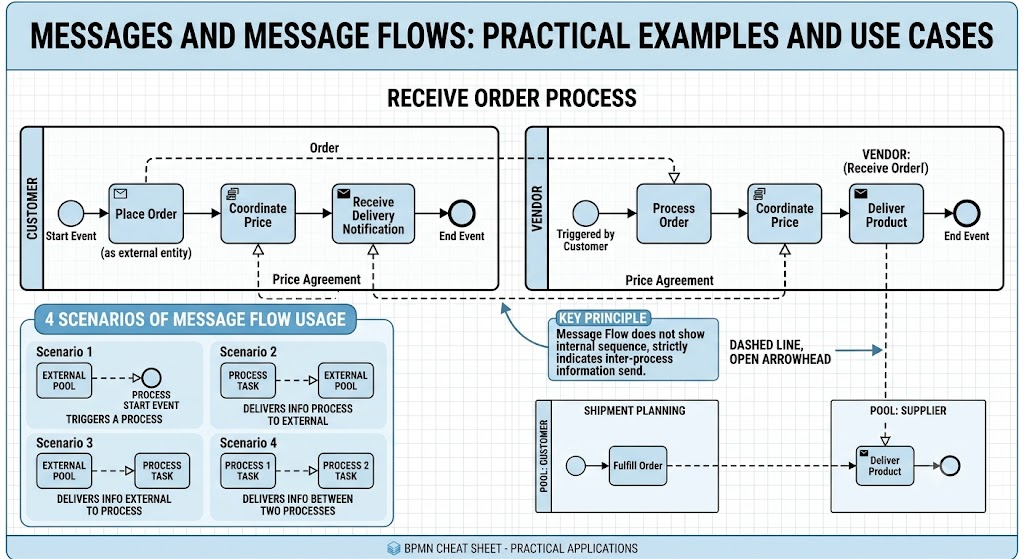
🖼️ Visual Reference: Message Flow Between Pools
Picture a BPMN diagram illustrating the "Receive Order" process. It features two distinct, side-by-side pools: "Customer" and "Vendor". Dashed Message Flow lines connect the two pools, indicating the exchange of information—such as order placement, price coordination, and delivery notifications—between these separate participants.
It is crucial to remember that a Message Flow does not show the internal flow or sequence of a process. Instead, it strictly indicates that information is being sent between two distinct processes, or between a process and an external entity (a participant outside your internal BPM system).
Message Flows are highly versatile and can be used in four primary scenarios:
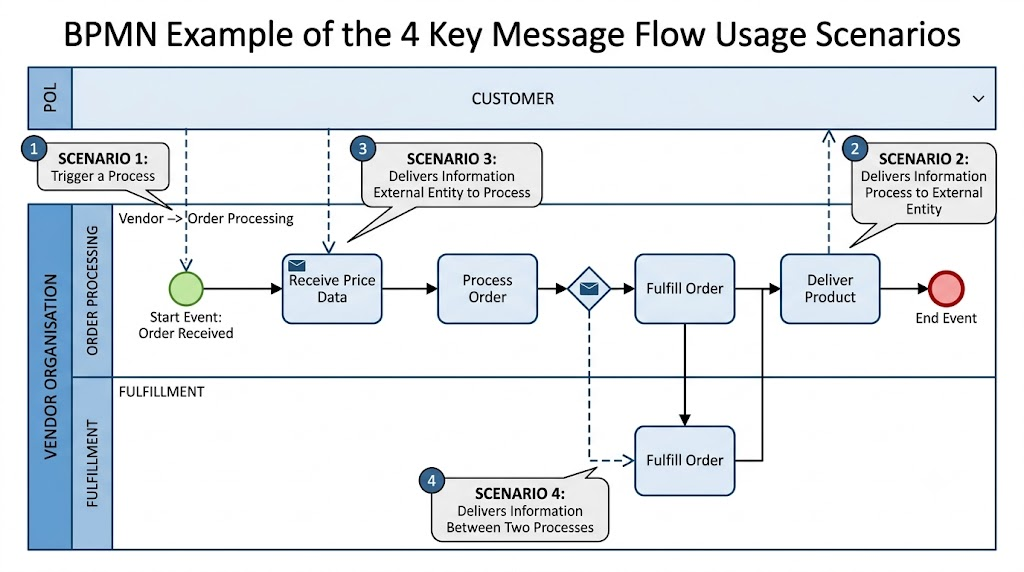
Triggers a Process: The Message Flow originates from an external entity and connects to the Start Event of a process. (e.g., A Customer places an order on a website, triggering the Vendor's "Process Order" Start Event).
Delivers Information from a Process to an External Entity: The Message Flow originates from a task within a process and goes to an external participant's pool. (e.g., The Vendor's "Deliver product" task sends a notification to the Customer).
Delivers Information from an External Entity to a Process: The Message Flow originates from an external participant and connects to a specific task within a process. (e.g., The Customer sends price agreement data to the Vendor's "Coordinate price" task).
Delivers Information Between Two Processes: The Message Flows connect tasks of two different, distinct internal processes. (e.g., Communication between the "Process Order" task in one pool and the "Fulfill order" task in another).
💡 Important Note on Executability: Scenarios 1, 2, and 3 (which involve an external Customer Pool) are typically used only in analytical, non-executable diagrams. This is because the external Customer does not belong to your internal, executable BPM system.
While a Message Flow shows that communication is happening, you can optionally extend the Message Flow with a Message object to specify what information is being sent.
A Message object represents the specific data payload or content of the dialogue between the two participants. Graphically, this is represented by attaching an envelope icon directly onto the dashed Message Flow line.
🖼️ Visual Reference: Message Flow with an Attached Message
Visualize a dashed Message Flow line connecting two participant pools. Attached directly to the middle of this dashed line is a Message object (represented by an envelope icon). This symbolizes the specific content, data, or payload being exchanged in the dialogue between the two participants.
The dialogue represented by Message Flows is executed by means of special BPMN tasks: Send Message and Receive Message. These are simple tasks designed to handle external communication.
This is a task that pauses the process, waiting for a message to arrive from an external participant.
Completion Criteria: The task is considered completed the moment the Message is received at least once.
Graphical Representation: A standard rounded rectangle (BPMN Task shape) distinguished by an empty (outlined) envelope marker inside.
🖼️ Visual Reference: Receive Message Activity
A standard BPMN task shape (rounded rectangle) containing an empty, outlined envelope icon in the top-left corner. This visually indicates that the task is in a waiting state, requiring a message from an external participant to proceed.
This is a task that initiates the sending of a message to an external participant.
Completion Criteria: The task is considered completed once the message is successfully sent at least once.
Graphical Representation: A standard rounded rectangle (BPMN Task shape) distinguished by a filled (solid) envelope marker inside.
🖼️ Visual Reference: Send Message Activity
A standard BPMN task shape (rounded rectangle) containing a solid, filled envelope icon in the top-left corner. This visually indicates that the task's primary purpose is to dispatch a message to an external participant.
Mastering Message Flows, Messages, and the Send/Receive activities is a critical step in advancing your BPMN modeling skills. While Sequence Flows handle the internal logic of a single process, Message Flows provide the vital connective tissue that allows multiple processes, departments, and organizations to interact seamlessly.
By strictly adhering to the rules of Message Flows—ensuring they only cross pool boundaries—and utilizing the correct visual markers for Send and Receive tasks, you can create diagrams that are not only visually clear but also logically sound. Whether you are building high-level analytical models to map out customer journeys or designing executable workflows for enterprise integration, a solid grasp of inter-process communication will ensure your BPMN models accurately reflect the complexities of the real-world business environment.

