
In the world of Business Process Model and Notation (BPMN), one of the most common challenges modelers face is balancing detail with readability. When a business process contains dozens of activities, decision points, and events, a single flat diagram can quickly become a tangled, unreadable web.
Enter the Sub-Process.
A Sub-Process is a fundamental BPMN element that represents multiple activities working together to perform a specific part of a total process. By encapsulating complex workflows into manageable blocks, Sub-Processes allow you to maintain a high-level overview while preserving the ability to drill down into granular details.
This comprehensive guide will explore the mechanics of Sub-Processes, their primary use cases, and the specialized types available in BPMN to help you design cleaner, more maintainable, and highly professional process models.
In BPMN, a Sub-Process can be visualized in two distinct ways, depending on the level of detail you wish to convey at a given moment:
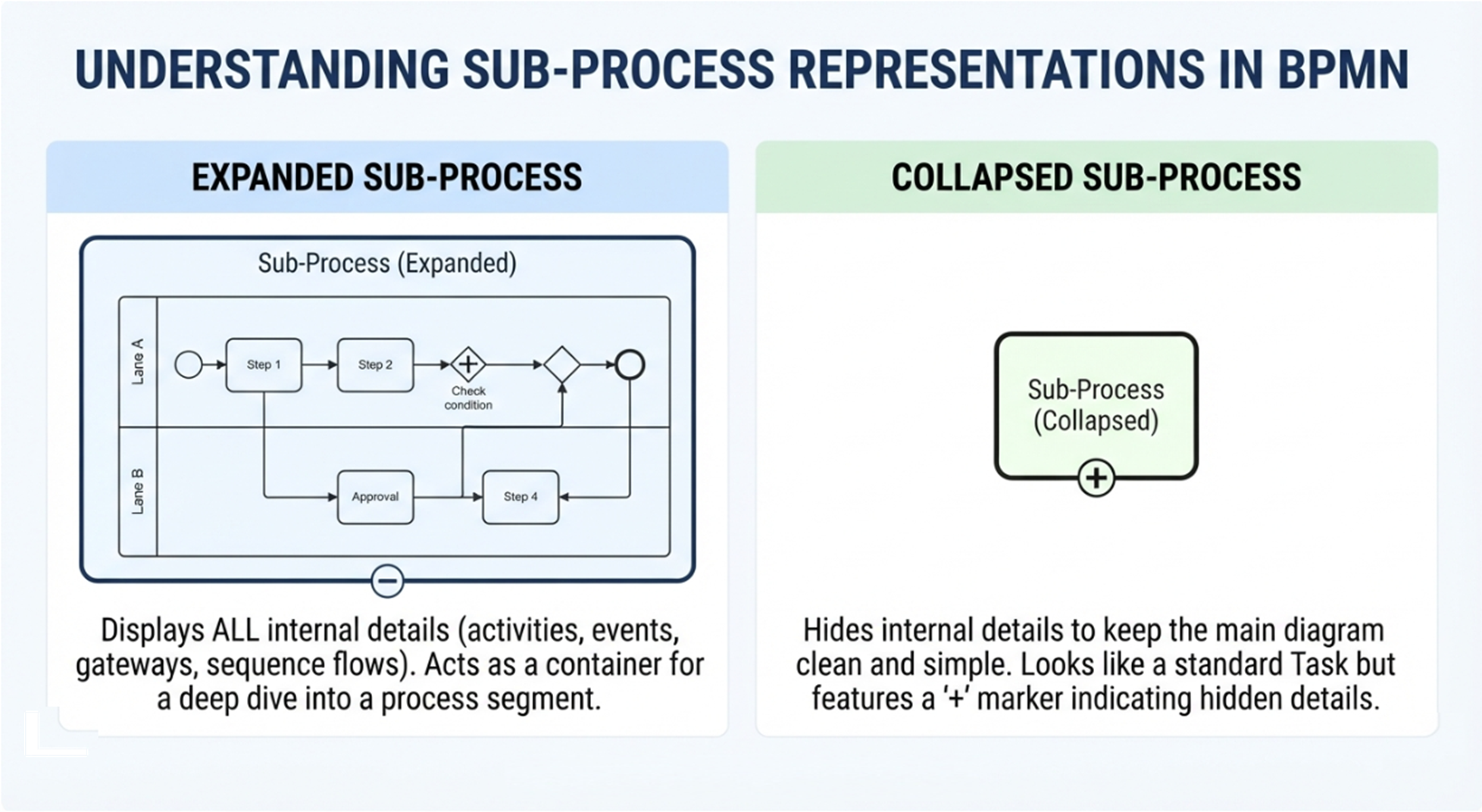
An expanded Sub-Process displays all of its internal details—activities, events, gateways, and sequence flows—within its boundaries.
🖼️ Visual Context: Imagine a large rounded rectangle acting as a container. Inside, you can see the complete, detailed workflow, including swimlanes and connecting arrows, illustrating a deep dive into a specific segment of the process.
The collapsed representation is the most commonly used format. It hides the internal details to keep the main process diagram clean and easy to read. Graphically, it looks like a standard Task (a rectangle with rounded corners) but features a small plus sign (+) in the lower center, indicating that more details are hidden inside.
🖼️ Visual Context: A single, standard BPMN Task shape with a
+marker centered at the bottom edge. This visually communicates to the reader that this task is actually a container for a more detailed process that is currently hidden.
Sub-Processes are not just visual tricks; they serve critical architectural purposes in process modeling. They are primarily used in two scenarios: Process Decomposition and Describing Repeated Activities.
When a process has a massive number of activities, displaying them all on one level makes the diagram nearly impossible to read or model. Process decomposition involves breaking the main process down into top-level Sub-Processes.
The top-level diagram displays only the core, high-level flow, while the Sub-Processes contain the granular details (executors, specific conditions, and micro-tasks).
Consider an "Employee Recruitment" process. If modeled flat, it would include everything from posting a job to setting up IT equipment. By decomposing it, the top-level diagram becomes beautifully simple and understandable to any business user:
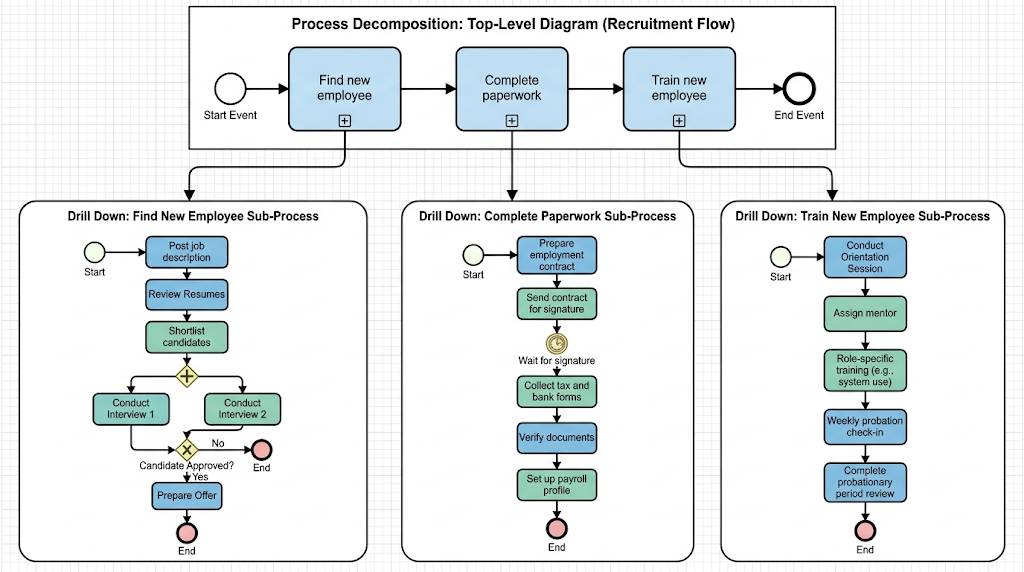
🖼️ Visual Context (Top-Level): A simplified diagram showing sequential, collapsed sub-processes: Find new employee ➔ Complete paperwork ➔ Train new employee.
When you need to see the details, you "drill down" into each Sub-Process:
Find new employee: Includes tasks like posting the job, reviewing resumes, and conducting interviews, complete with decision gateways for candidate approval.
Complete paperwork: Details the administrative onboarding phase, such as preparing contracts, collecting tax documents, and setting up payroll.
Train new employee: Maps out the onboarding workflow, including orientation, role-specific training, and probation reviews.
The Benefit: You can easily modify a specific phase (e.g., updating the paperwork process) without having to navigate or alter the entire, massive recruitment diagram.
Many organizations have standard procedures that occur across multiple different business processes. Instead of redrawing these steps every time, BPMN utilizes Reusable Sub-Processes.
A reusable Sub-Process identifies a point in a process where a pre-defined, standalone process is called. It acts as a centralized reference.
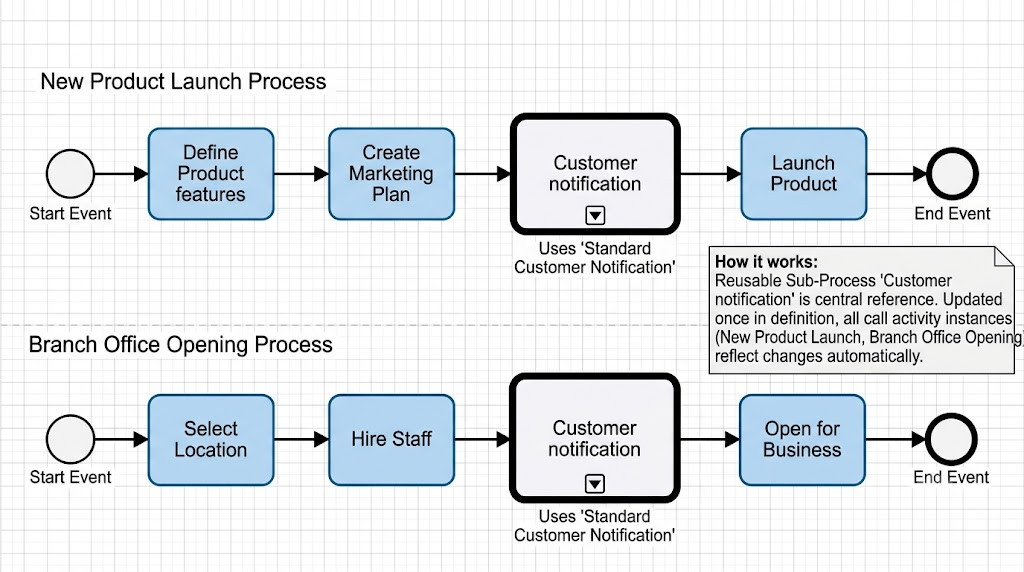
Imagine a standard "Customer notification" process. This exact same sequence of events might be required in both a New Product Launch process and a Branch Office Opening process.
🖼️ Visual Context: Two separate main process flows (New Product Launch and Branch Office Opening). Both contain a call to the same collapsed Sub-Process labeled "Customer notification" (often indicated by a thick border).
The Benefit: If the company adopts a new email tool or adds a new SMS step to the notification process, the modeler only updates the "Customer Notification" Sub-Process once. Both the New Product Launch and Branch Office Opening diagrams are automatically updated, ensuring absolute consistency and minimizing the chance of human error.
Beyond standard and reusable Sub-Processes, BPMN includes several specialized types designed to handle unique business scenarios, exceptions, and flexible workflows.
Unlike a regular Sub-Process that is triggered by a standard sequence flow, an Event Sub-Process is triggered by a specific Event (such as an error, a message arrival, or a timer). It can be configured to interrupt the main flow or run parallel to it.
Visual Marker: A rounded rectangle with a thin, dashed-line border.
🖼️ Visual Context: The dashed border signifies that this sub-process lies dormant until a specific triggering event occurs, at which point it interrupts or accompanies the main process flow to handle the exception.
A Transaction is a Sub-Process whose behavior is strictly controlled through a transaction protocol. It operates on an "all-or-nothing" basis. If any part of the transaction fails, the entire transaction is canceled, and compensation events are triggered to undo any completed steps.
Visual Marker: A rounded rectangle with a double-line border.
🖼️ Visual Context: The double-lined border signifies a strict transactional unit, visually communicating that the enclosed activities are tightly coupled and subject to complex rollback/compensation rules.
An Ad-Hoc Sub-Process is used when a set of activities must be completed, but they have no required sequence relationship. The performer has the flexibility to execute the tasks in any order, skip certain tasks, or repeat them as necessary based on real-time conditions.
Visual Marker: A rounded rectangle containing a tilde (~) marker in the lower center.
🖼️ Visual Context: Inside the box, you will see a collection of tasks without connecting sequence flows between them. The tilde marker visually communicates to the reader that the workflow is non-linear and highly flexible.
Sub-Processes are the unsung heroes of effective BPMN modeling. They provide the crucial bridge between high-level strategic overviews and low-level operational details. By mastering the use of collapsed and expanded views, you can create diagrams that are digestible for business stakeholders while remaining technically rigorous for developers and analysts.
Furthermore, by leveraging Process Decomposition, you keep your diagrams clean and readable. By utilizing Reusable Sub-Processes, you enforce organizational consistency and drastically reduce maintenance overhead. Finally, by understanding specialized types like Event, Transaction, and Ad-Hoc Sub-Processes, you equip yourself to model even the most complex, exception-driven, and flexible real-world business scenarios.
Ultimately, a well-structured use of Sub-Processes transforms a chaotic flowchart into a professional, scalable, and easily maintainable business process model.

