
In the realm of business analysis and systems engineering, understanding what a business does for its customers is just as critical as understanding how it does it. This is where Business Use Cases come into play.
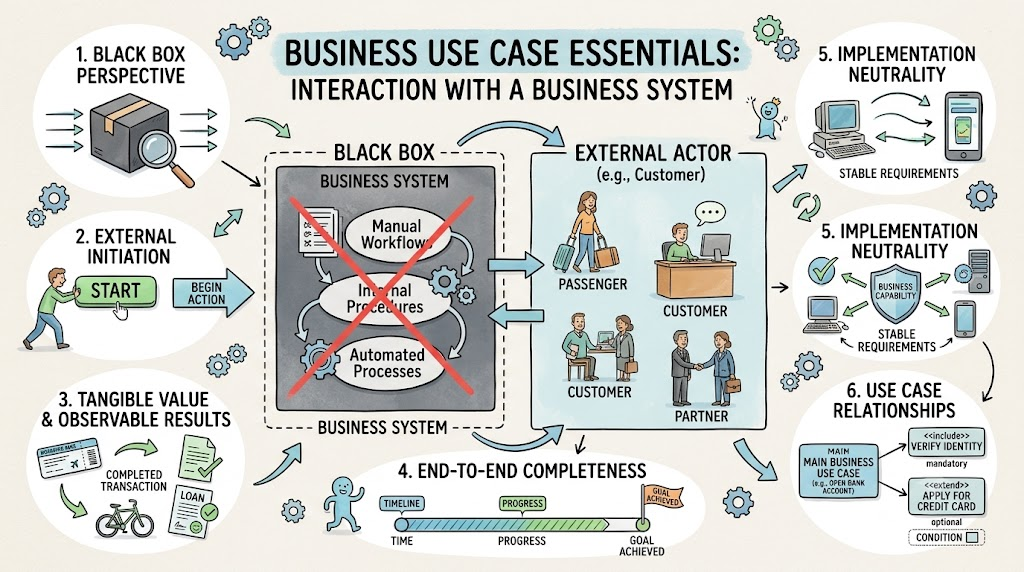
A business use case describes the interaction between an external actor (such as a customer or partner) and a business system. Unlike technical system use cases that delve into internal software mechanics, a business use case treats the underlying business system as a "black box." The internal procedures, manual workflows, and automated processes remain hidden from the actor. The sole focus is on the tangible benefit, value, or observable result delivered to the external party.
This guide provides a comprehensive overview of business use cases, exploring their core concepts, analyzing real-world case studies, and demonstrating how to visualize them using PlantUML.
To effectively model and understand business use cases, it is essential to grasp the foundational characteristics that define them.
The business system is viewed from the outside in. The actor does not need to know if a task is performed by a human clerk, an automated kiosk, or a backend algorithm. The focus is strictly on the input provided by the actor and the output returned by the system.
Every business use case is initiated by an external Actor. This is the primary beneficiary of the process (e.g., a Passenger, a Customer, or a Partner). The actor triggers the interaction to achieve a specific goal.
A business use case must deliver a specific, measurable result that holds value for the user. It is not merely a series of tasks; it culminates in a tangible outcome, such as receiving a boarding pass, acquiring a hired bicycle, or securing a loan approval.
Business use cases represent complete, end-to-end business processes. A use case is only considered "complete" when the primary goal is fully achieved and the tangible value is delivered (e.g., the transaction is processed, and the receipt/product is provided).
Business use cases focus on the business capability rather than the technical implementation. This neutrality ensures that the business requirements remain stable even if the underlying technology or manual procedures change in the future.
Complex business processes often share common sub-processes.
Include: A mandatory sub-process that is always executed as part of the main use case (e.g., "Verify Identity" included in "Open Bank Account").
Extend: An optional sub-process that only occurs under specific conditions (e.g., "Process Insurance" extending "Rent Car").
To illustrate these concepts, let us examine two practical examples drawn from standard business case studies.
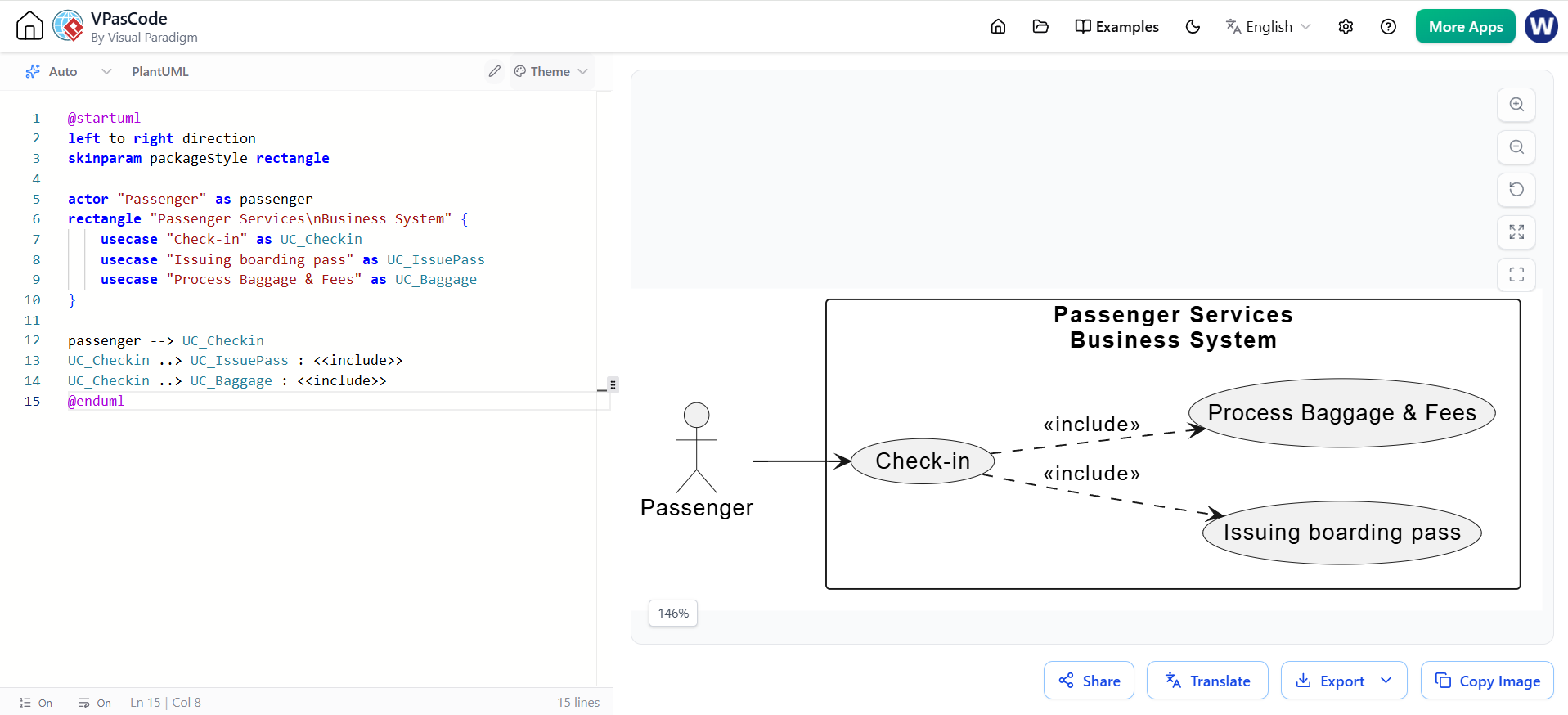
This use case describes a core service provided by the "Passenger Services" business system to a traveler.
Business Use Case: Check-in
Actor: Passenger (Initiator/Beneficiary)
Goal: Successfully check in for a flight and receive a boarding pass.
Key Interactions:
The passenger presents a valid plane ticket to the business system.
The system verifies the ticket, processes checked baggage, and inquires about seat preferences.
The system identifies any excess baggage weight and collects the required fees.
Included Use Case: The system performs the "Issuing boarding pass" business use case, a common functionality shared across various check-in methods (kiosk, counter, mobile).
Result: The passenger receives a boarding pass containing their reserved seat and gate information.
This use case focuses on the core revenue-generating service of a bicycle hire shop named "Wheels".
Business Use Case: Issue bike
Actor: Customer (Initiator/Beneficiary)
Goal: To hire a bicycle for a specified period.
Typical Scenario Steps:
The customer chooses a specific bike (e.g., a mountain bike).
The business system identifies the bike number and confirms its details (type, daily rate, deposit).
The customer specifies the hire duration.
The system calculates and displays the total cost (hire rate + deposit).
The customer provides personal details (name, address, telephone).
The customer pays the required amount.
The system records the transaction and prints a receipt.
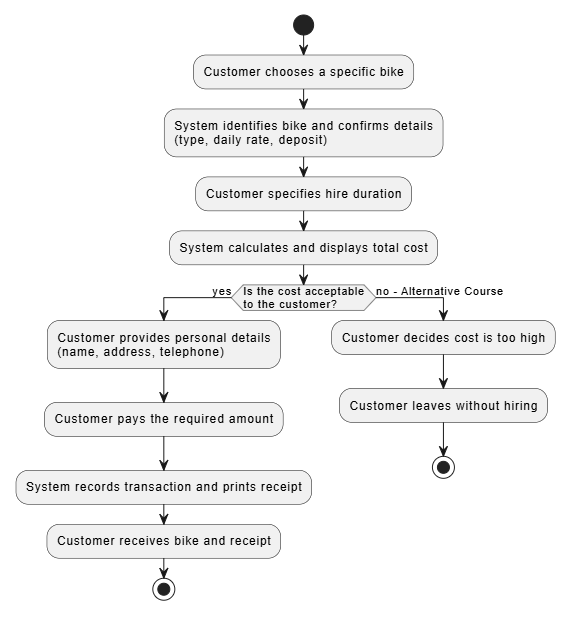
Alternative Course: If the customer determines the calculated cost is too high, they may choose to leave without hiring the bike. In this scenario, the use case goal is not achieved, and the process terminates early.
Visual modeling is crucial for communicating business use cases to stakeholders. Below are PlantUML code examples that translate the case studies into standardized UML diagrams.
This diagram illustrates the primary actor, the business system boundary, the main use case, and the <<include>> relationship with a shared sub-process.
@startuml
left to right direction
skinparam packageStyle rectangle

actor "Passenger" as passenger
rectangle "Passenger Services\nBusiness System" {
    usecase "Check-in" as UC_Checkin
    usecase "Issuing boarding pass" as UC_IssuePass
    usecase "Process Baggage & Fees" as UC_Baggage
}

passenger --> UC_Checkin
UC_Checkin ..> UC_IssuePass : <<include>>
UC_Checkin ..> UC_Baggage : <<include>>
@enduml
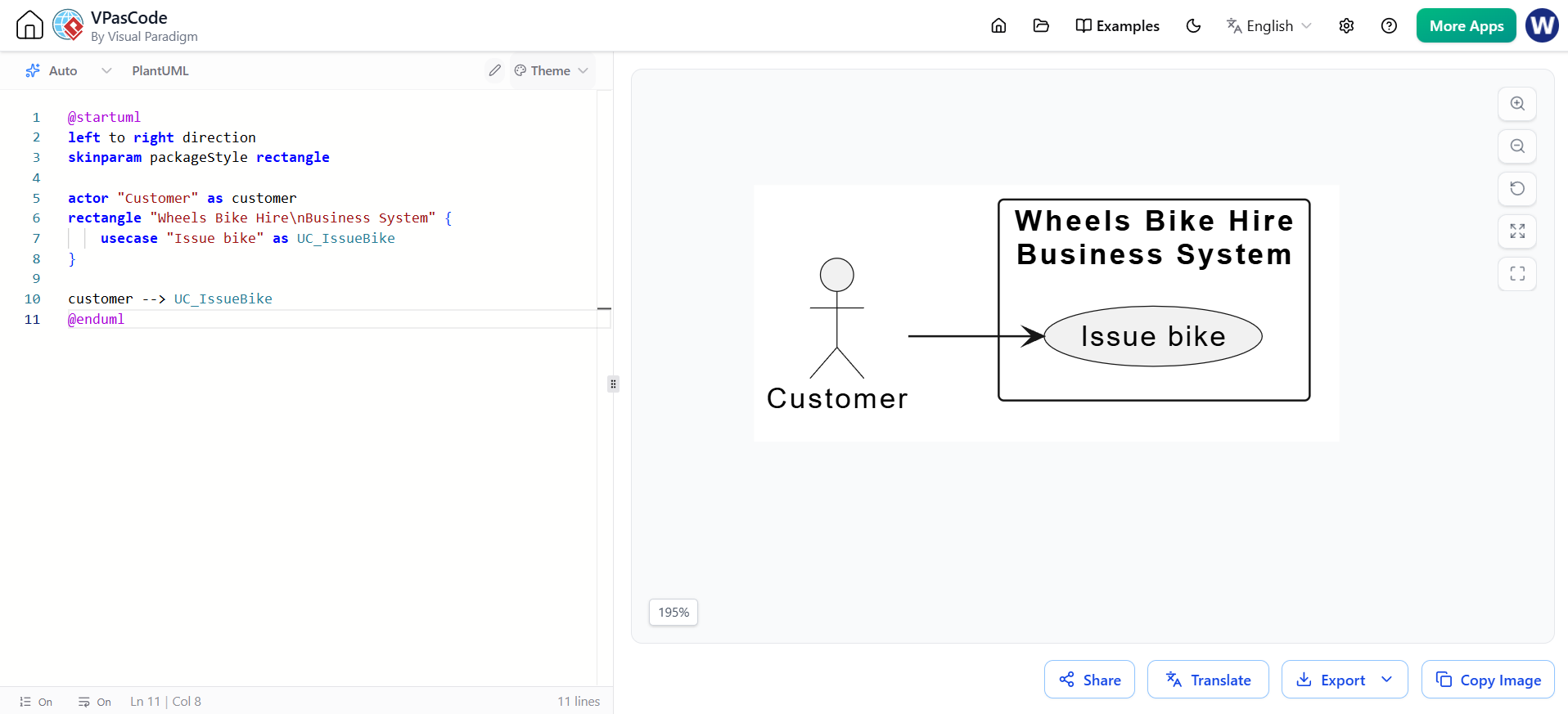
This diagram provides a high-level view of the "Issue bike" business use case, highlighting the simplicity of the external interaction.
@startuml
left to right direction
skinparam packageStyle rectangle

actor "Customer" as customer
rectangle "Wheels Bike Hire\nBusiness System" {
    usecase "Issue bike" as UC_IssueBike
}

customer --> UC_IssueBike
@enduml
While Use Case Diagrams show who does what, Activity Diagrams are excellent for showing the step-by-step flow of the business process, including alternative courses.
@startuml
start

:Customer chooses a specific bike;
:System identifies bike and confirms details\n(type, daily rate, deposit);
:Customer specifies hire duration;
:System calculates and displays total cost;

if (Is the cost acceptable\nto the customer?) then (yes)
    :Customer provides personal details\n(name, address, telephone);
    :Customer pays the required amount;
    :System records transaction and prints receipt;
    :Customer receives bike and receipt;
    stop
else (no - Alternative Course)
    :Customer decides cost is too high;
    :Customer leaves without hiring;
    stop
endif

@enduml
Business use cases are an indispensable tool in the business analyst's toolkit. By treating the internal workings of a business system as a "black box," they force organizations to focus on what truly matters: the tangible value delivered to the external customer or partner.
As demonstrated by the Airport Check-in and Wheels Bike Hire examples, well-defined business use cases ensure that processes are complete, neutral to implementation, and strictly aligned with customer goals. Whether you are mapping out existing operations or designing a new digital transformation strategy, modeling your business use cases provides a clear, unambiguous blueprint of how your organization creates value in the real world.

