
In the complex world of software development, understanding the structural foundation of a system is paramount to its success. Before writing a single line of code, architects and developers must create a clear blueprint that defines how different components interact, what data they hold, and how they relate to one another. This is where class diagrams come into play—a powerful visual tool in the Unified Modeling Language (UML) that captures the static "skeleton" of your software system.
Class diagrams serve as the backbone of object-oriented design, providing a comprehensive view of the system's structure at a point in time. Unlike behavioral diagrams that show how systems change over time, class diagrams focus on the permanent aspects: the classes, their attributes, operations, and the relationships between them. This tutorial explores the fundamental concepts of class diagrams, demonstrates practical implementation using PlantUML, and introduces professional tooling through the Visual Paradigm ecosystem to help you master this essential modeling technique.
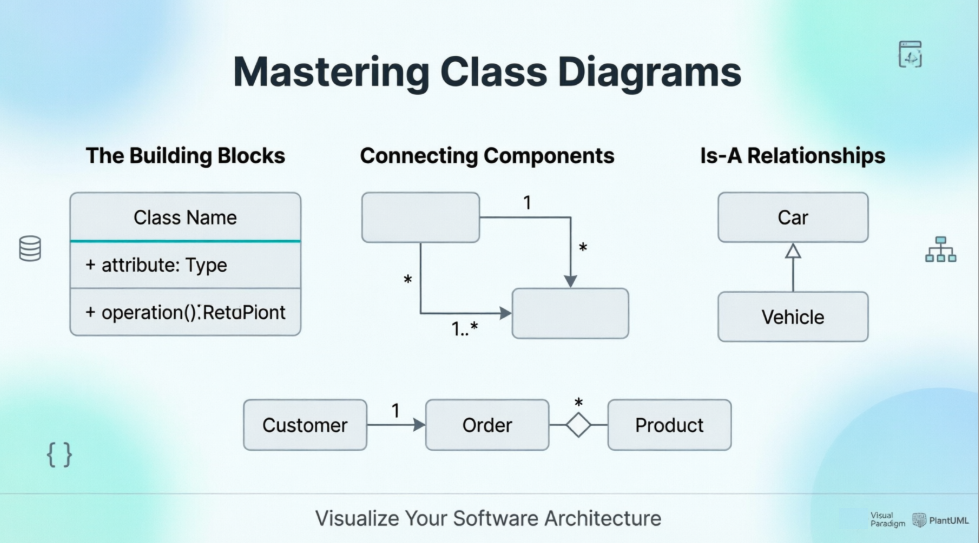
Whether you're a seasoned architect designing enterprise systems or a developer looking to improve your design documentation skills, understanding class diagrams will enhance your ability to communicate complex system structures clearly and effectively.
Classes represent the fundamental "nouns" of your system—the entities that encapsulate both data and behavior. In UML notation, a class is depicted as a rectangle divided into three compartments:
For example, a Customer class might have attributes like name, email, and customerId, along with operations such as placeOrder() and updateProfile().
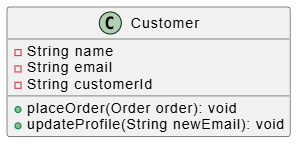
PlantUML Class Example:
@startuml
class Customer {
  -String name
  -String email
  -String customerId
  +placeOrder(Order order): void
  +updateProfile(String newEmail): void
}
@enduml
Associations represent structural relationships between classes, indicating how objects of different classes are connected. These relationships often include multiplicity constraints that specify how many instances of one class can be associated with instances of another class.
Common association types include:
Multiplicity is typically shown at the ends of association lines, helping clarify the cardinality of relationships.
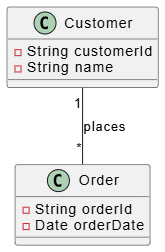
PlantUML: Class Assoication:
@startuml
class Order {
  -String orderId
  -Date orderDate
}

class Customer {
  -String customerId
  -String name
}

Customer "1" -- "*" Order : places
@enduml
Generalization models "is-a-kind-of" relationships, representing inheritance hierarchies where specialized classes inherit attributes and operations from more general parent classes. This relationship is depicted with a solid line ending in a hollow triangle pointing toward the parent class.
For instance, a PremiumCustomer class might generalize from a base Customer class, inheriting common attributes while adding premium-specific features.
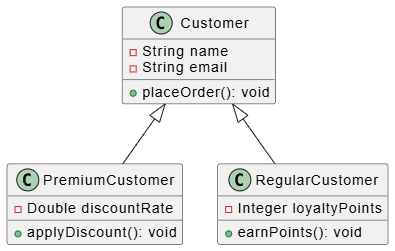
PlantUML Generalization Example:
@startuml
class Customer {
  -String name
  -String email
  +placeOrder(): void
}

class PremiumCustomer {
  -Double discountRate
  +applyDiscount(): void
}

class RegularCustomer {
  -Integer loyaltyPoints
  +earnPoints(): void
}

Customer <|-- PremiumCustomer
Customer <|-- RegularCustomer
@enduml
PlantUML provides an excellent text-based approach to creating UML diagrams, making it easy to version control and maintain your designs alongside your code. Here's a comprehensive example demonstrating all the key concepts:
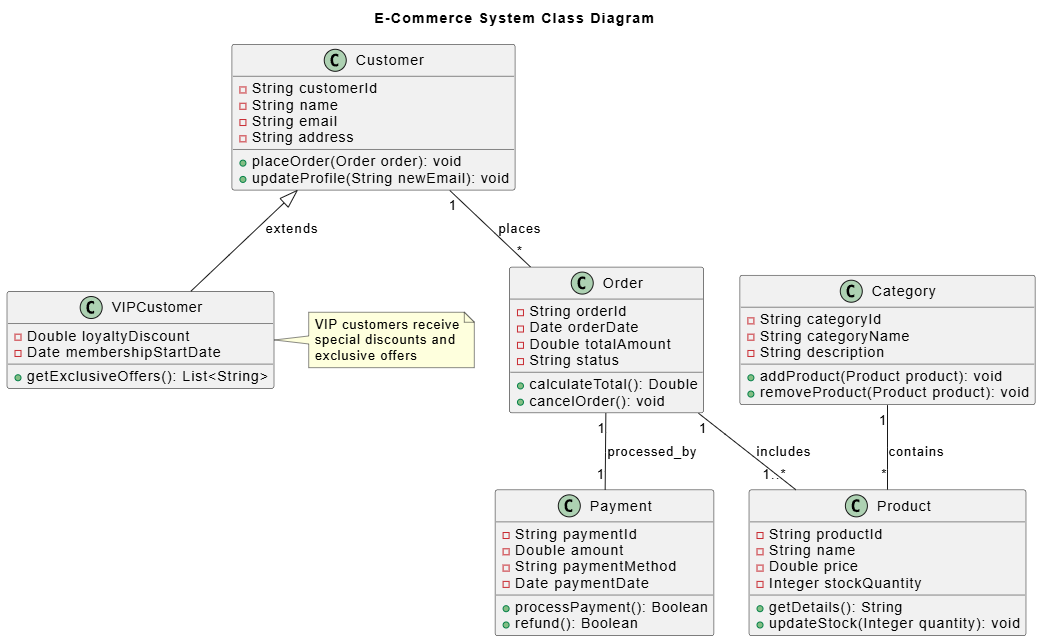
PlantUML Detailed Implementation Class Diagram
@startuml
title E-Commerce System Class Diagram

' Define the main classes
class Product {
  -String productId
  -String name
  -Double price
  -Integer stockQuantity
  +getDetails(): String
  +updateStock(Integer quantity): void
}

class Category {
  -String categoryId
  -String categoryName
  -String description
  +addProduct(Product product): void
  +removeProduct(Product product): void
}

class Order {
  -String orderId
  -Date orderDate
  -Double totalAmount
  -String status
  +calculateTotal(): Double
  +cancelOrder(): void
}

class Customer {
  -String customerId
  -String name
  -String email
  -String address
  +placeOrder(Order order): void
  +updateProfile(String newEmail): void
}

class Payment {
  -String paymentId
  -Double amount
  -String paymentMethod
  -Date paymentDate
  +processPayment(): Boolean
  +refund(): Boolean
}

' Define relationships
Category "1" -- "*" Product : contains
Customer "1" -- "*" Order : places
Order "1" -- "1..*" Product : includes
Order "1" -- "1" Payment : processed_by

' Add generalization example
class VIPCustomer {
  -Double loyaltyDiscount
  -Date membershipStartDate
  +getExclusiveOffers(): List<String>
}

Customer <|-- VIPCustomer : extends

note right of VIPCustomer
  VIP customers receive
  special discounts and
  exclusive offers
end note

@enduml
This diagram illustrates a complete e-commerce system with proper associations, multiplicities, and inheritance relationships, providing a clear overview of the system's static structure.
While PlantUML offers excellent capabilities for text-based diagramming, the Visual Paradigm ecosystem provides a comprehensive platform for professional UML modeling with additional features:
The Visual Paradigm platform integrates seamlessly with popular IDEs and development tools, allowing you to maintain synchronization between your design models and actual code implementation. This bidirectional engineering capability ensures that your architectural documentation remains current throughout the development lifecycle.
Class diagrams remain an indispensable tool in the software architect's toolkit, providing clarity and structure to complex systems before implementation begins. By mastering the core concepts of classes, associations, and generalization, you gain the ability to visualize and communicate the static architecture of your software effectively.
Whether you choose the lightweight, text-based approach of PlantUML or the comprehensive features of the Visual Paradigm ecosystem, the key is consistency and clarity in your modeling practice. These diagrams serve not only as design documents but also as living artifacts that evolve with your system, ensuring that all stakeholders share a common understanding of the system's structure.
As software systems continue to grow in complexity, the ability to create clear, accurate class diagrams becomes increasingly valuable. By applying the principles and techniques outlined in this tutorial, you'll be well-equipped to design robust, maintainable systems that stand the test of time. Remember that good design documentation is an investment that pays dividends throughout the entire software development lifecycle, from initial conception through maintenance and evolution.

