
In Object-Oriented Programming (OOP) and Unified Modeling Language (UML) design, building a robust system is not just about defining what objects exist; it is about defining how those objects interact. The cornerstone of this interaction is encapsulation—the practice of hiding internal state and requiring all interaction to be performed through an object's methods.
In UML 2.0, visibility is the formal mechanism used to specify the degree to which an attribute or operation is encapsulated. By applying visibility modifiers, architects and developers establish strict boundaries, determining exactly which objects can "see" and interact with specific elements of a class. This guide provides a comprehensive breakdown of UML visibility levels, complete with practical examples and PlantUML diagramming techniques to help you design secure, maintainable, and well-structured systems.
Visibility modifiers are the gatekeepers of your object-oriented architecture. They prevent unauthorized access, reduce system complexity, and protect the internal invariants of a class. UML 2.0 defines four distinct levels of visibility, each represented by a specific symbol placed at the beginning of an attribute or operation declaration.
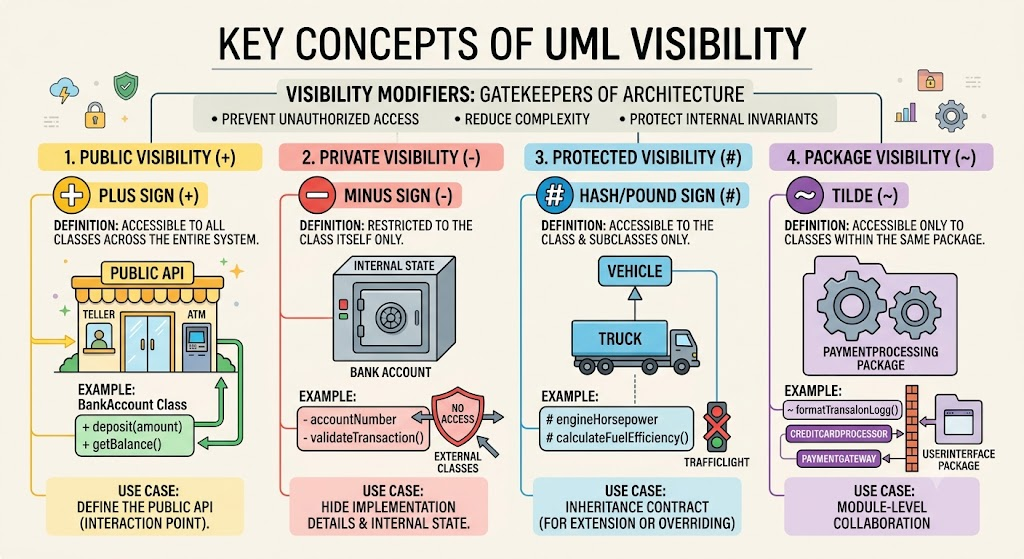
Symbol: Plus sign (+)
Definition: The element is accessible to objects belonging to any class across the entire system.
Use Case: Public modifiers define the Application Programming Interface (API) of a class. These are the methods and properties that other classes must use to interact with the object.
Example: In a BankAccount class, deposit(amount) and getBalance() should be public so that the Teller or ATM classes can interact with the account.
Symbol: Minus sign (-)
Definition: The element is strictly restricted. Only objects belonging to the class itself can access it.
Use Case: Private modifiers are used for internal state and helper methods. They hide the implementation details from the outside world, ensuring that the object's data cannot be corrupted by external classes.
Example: In the BankAccount class, the accountNumber attribute and a validateTransaction() method should be private. External classes don't need to know how validation works, nor should they be able to directly alter the account number.
Symbol: Hash/Pound sign (#)
Definition: The element is accessible only to objects that belong to subclasses of the given class (at any level below it in the inheritance hierarchy), as well as the class itself.
Use Case: Protected modifiers are used to create a contract for inheritance. They allow a parent class to expose certain features to its children for extension or overriding, while still hiding them from the rest of the system.
Example: In a Vehicle class, engineHorsepower or a calculateFuelEfficiency() method might be protected. A subclass like Truck might need to access or override this calculation, but a completely unrelated class like TrafficLight does not.
Symbol: Tilde (~)
Definition: The element is accessible only to objects belonging to any class within the same package (or namespace/module) as the given class.
Use Case: Package visibility is used for module-level collaboration. It allows classes within the same logical grouping to share helper methods or state without exposing them to the broader application. (Note: This maps to "default" visibility in Java or internal in C#).
Example: In a PaymentProcessing package, a PaymentGateway class might have a ~formatTransactionLog() method. Other classes in the same package (like CreditCardProcessor) can use it, but classes in a UserInterface package cannot.
Start Private, Expose as Needed: Always default to private (-) for attributes. Only make an attribute public (+) if it is a constant or if there is a compelling architectural reason to bypass getters/setters.
Design the Public API First: Think about how other classes will use your class. The public (+) operations should be intuitive and comprehensive enough that external classes never need to access private (-) data.
Use Protected Sparingly: Overusing protected (#) can lead to fragile base class problems. Only use it when you explicitly intend for a class to be subclassed and require the child classes to access specific internal mechanics.
Below are PlantUML examples demonstrating how to properly format and apply visibility modifiers in your class diagrams.
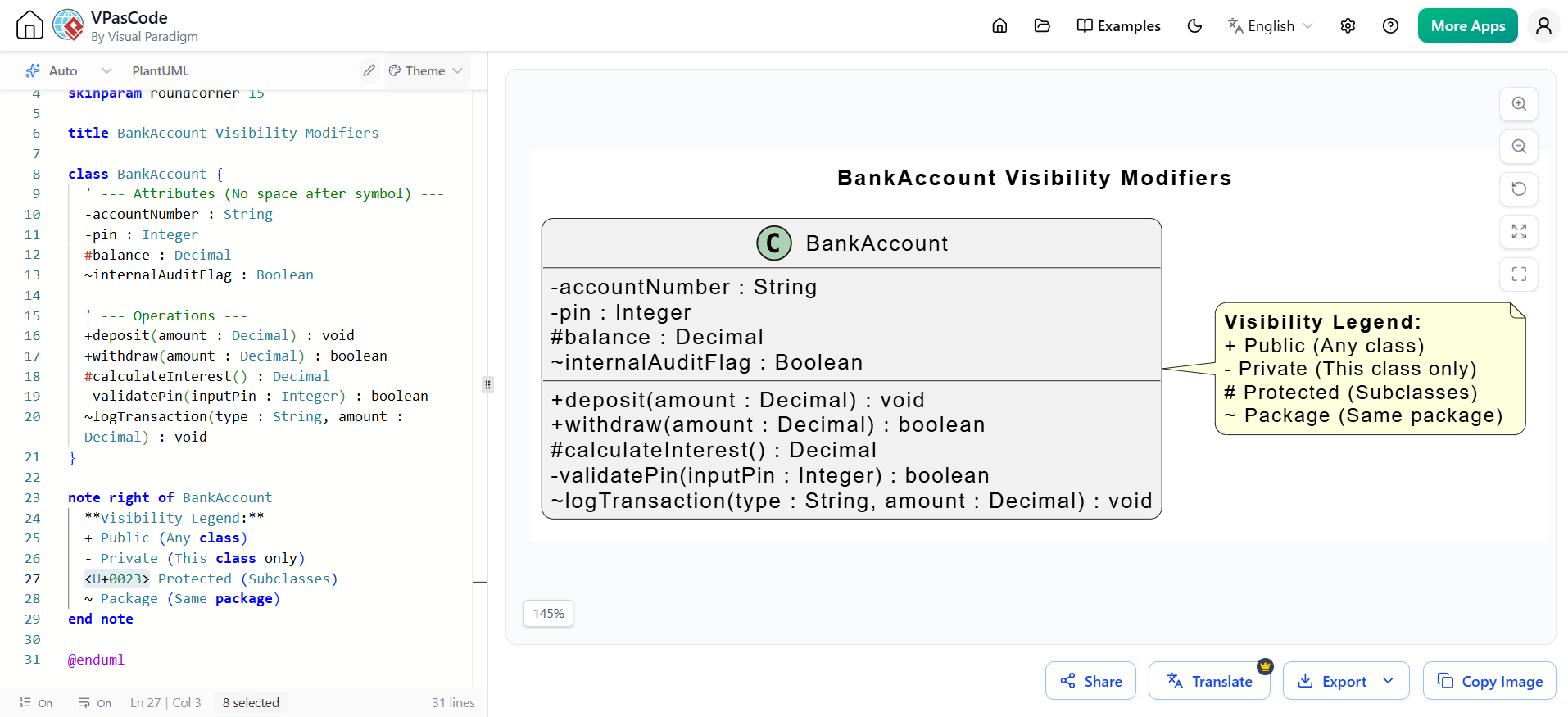
This diagram illustrates a single class (BankAccount) utilizing all four visibility modifiers to demonstrate the syntax and structural layout.
@startuml
skinparam classAttributeIconSize 0
skinparam shadowing false
skinparam roundcorner 15

title BankAccount Visibility Modifiers

class BankAccount {
  ' --- Attributes ---
  - accountNumber : String
  - pin : Integer
  # balance : Decimal
  ~ internalAuditFlag : Boolean

  ' --- Operations ---
  + deposit(amount : Decimal) : void
  + withdraw(amount : Decimal) : boolean
  # calculateInterest() : Decimal
  - validatePin(inputPin : Integer) : boolean
  ~ logTransaction(type : String, amount : Decimal) : void
}

note right of BankAccount
  **Visibility Legend:**
  + Public (Any class)
  - Private (This class only)
  <U+0023> Protected (Subclasses)
  ~ Package (Same package)
end note

@enduml
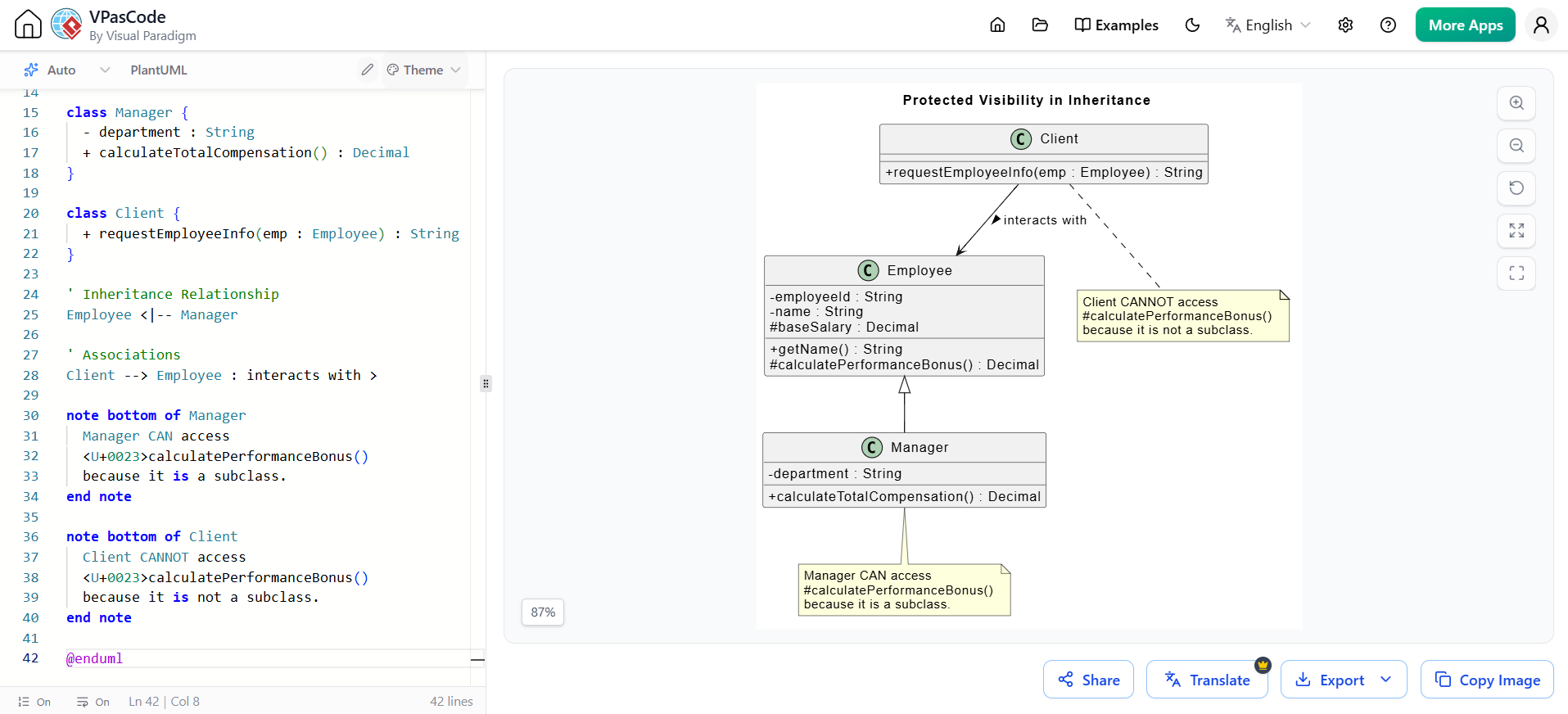
This diagram demonstrates why protected visibility is crucial in inheritance hierarchies. The Employee class exposes a protected method that the Manager subclass can utilize, while keeping it hidden from the Client class.
@startuml
skinparam classAttributeIconSize 0
skinparam shadowing false

title Protected Visibility in Inheritance

class Employee {
  - employeeId : String
  - name : String
  # baseSalary : Decimal
  + getName() : String
  # calculatePerformanceBonus() : Decimal
}

class Manager {
  - department : String
  + calculateTotalCompensation() : Decimal
}

class Client {
  + requestEmployeeInfo(emp : Employee) : String
}

' Inheritance Relationship
Employee <|-- Manager

' Associations
Client --> Employee : interacts with >

note bottom of Manager
  Manager CAN access
  <U+0023>calculatePerformanceBonus()
  because it is a subclass.
end note

note bottom of Client
  Client CANNOT access
  <U+0023>calculatePerformanceBonus()
  because it is not a subclass.
end note

@enduml
Understanding and correctly applying UML 2.0 visibility modifiers is essential for designing object-oriented systems that are secure, modular, and easy to maintain. By strictly defining what is public, private, protected, or package-scoped, you enforce encapsulation and ensure that your software architecture remains resilient to change. The symbols +, -, #, and ~ are not just notational conveniences; they are the blueprint for your system's data protection and interaction boundaries.
However, designing these models is only half the battle; communicating them effectively to your team requires robust software. To bring your visibility designs to life, Visual Paradigm is highly recommended. As a premier UML modeling tool, Visual Paradigm offers intuitive drag-and-drop interfaces, automatic code generation, and seamless collaboration features. It allows you to easily apply and visualize visibility modifiers, ensuring that your architectural intent is perfectly translated into the final software product.

