
If you are stepping into the world of software engineering, you have likely heard of UML (Unified Modeling Language). For decades, UML has been the universal language for visualizing, specifying, and documenting software systems. However, the way we create these diagrams has undergone a massive transformation.
Gone are the days when designing a system meant spending hours dragging and dropping boxes on a rigid canvas, only to lose your work to a corrupted file. Today, the industry is shifting toward Diagram-as-Code (writing text to generate diagrams) and AI-Accelerated Modeling (using natural language prompts to design systems instantly).
This comprehensive tutorial is designed for beginners. We will explore the evolution of UML, demystify code-based diagramming using PlantUML, and show you how modern tools like Visual Paradigm leverage Artificial Intelligence to bridge the gap between manual modeling and instant, prompt-driven design. By the end of this guide, you will be equipped with a modern, frictionless workflow for software design.
Before we look at the future, we must understand the foundation. UML provides a standardized way to visualize a system. The most common diagrams include:
Class Diagrams: Show the static structure of a system (classes, attributes, relationships).
Sequence Diagrams: Show how objects interact with each other over time.
Use Case Diagrams: Show the interaction between users (actors) and the system.
The Problem with the "Old Way":
Traditionally, UML was created using heavy, drag-and-drop GUI tools. While visual, these tools created files (often XML or proprietary binaries) that were impossible to track in version control systems like Git. If two developers edited a diagram at the same time, merging their work was a nightmare. Furthermore, updating a diagram required clicking through menus, which slowed down the agile development process.
To solve the version control and speed issues, the developer community embraced Diagram-as-Code. Instead of drawing boxes, you write plain text using a specific syntax. A rendering engine then reads this text and generates the visual diagram.
The two industry leaders in this space are PlantUML and Mermaid.js.
Version Control Friendly: Text files can be easily tracked, diffed, and merged in Git.
Speed: Typing is faster than clicking and dragging.
Automation: Diagrams can be automatically generated during your CI/CD pipeline.
Consistency: The rendering engine handles the layout, ensuring diagrams always look clean and uniform.
Let’s model a simple E-commerce system. Instead of drawing boxes, we write the following PlantUML code:
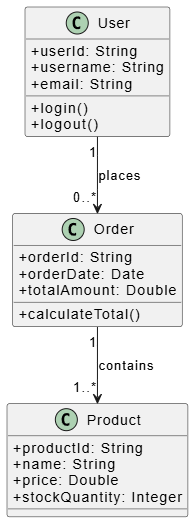
@startuml E-Commerce Class Diagram
skinparam classAttributeIconSize 0

class User {
  + userId: String
  + username: String
  + email: String
  + login()
  + logout()
}

class Order {
  + orderId: String
  + orderDate: Date
  + totalAmount: Double
  + calculateTotal()
}

class Product {
  + productId: String
  + name: String
  + price: Double
  + stockQuantity: Integer
}

User "1" --> "0..*" Order : places
Order "1" --> "1..*" Product : contains

@enduml
Notice how readable the relationships are at the bottom: User "1" --> "0..*" Order : places. The code is self-documenting.
Now, let’s map out the flow of a user checking out.
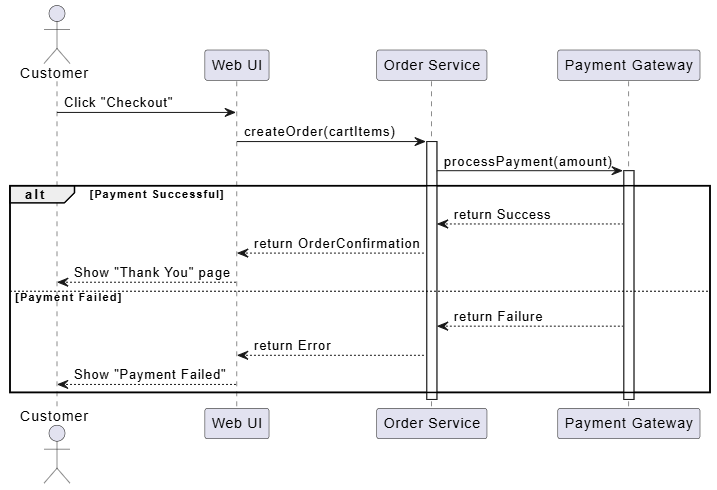
@startuml Checkout Sequence Diagram
actor Customer
participant "Web UI" as UI
participant "Order Service" as OS
participant "Payment Gateway" as PG

Customer -> UI : Click "Checkout"
UI -> OS : createOrder(cartItems)
activate OS

OS -> PG : processPayment(amount)
activate PG

alt Payment Successful
  PG --> OS : return Success
  OS --> UI : return OrderConfirmation
  UI --> Customer : Show "Thank You" page
else Payment Failed
  PG --> OS : return Failure
  OS --> UI : return Error
  UI --> Customer : Show "Payment Failed"
end

deactivate PG
deactivate OS
@enduml
While Diagram-as-Code solved the version control problem, it introduced a new hurdle: you have to learn the syntax. If you forget how to draw a dashed arrow in PlantUML, your workflow breaks.
Enter Artificial Intelligence. AI has revolutionized modeling by introducing Prompt-Driven Generation.
Natural Language to Diagram: You can simply type, "Create a sequence diagram for a user logging in via OAuth," and the AI will write the PlantUML or Mermaid code for you.
Code-to-UML: AI can scan your existing Java, Python, or C# codebase and automatically generate accurate, up-to-date UML class diagrams.
Intelligent Refactoring: AI can suggest missing relationships or point out design flaws (like circular dependencies) in your model.
To truly harness the power of traditional UML, Diagram-as-Code, and AI, you need a tool that unifies them. Visual Paradigm is an industry-leading modeling tool that has perfectly bridged this gap.
While you can use VS Code with PlantUML plugins, Visual Paradigm offers a comprehensive, enterprise-grade environment that caters to both hardcore coders and visual thinkers, supercharged by AI.
Visual Paradigm AI (Prompt-to-Diagram):
You don't need to memorize PlantUML syntax. You can use VP's built-in AI assistant to describe your system in plain English. The AI instantly generates the UML diagram, which you can then visually tweak.
Seamless Diagram-as-Code Integration:
Visual Paradigm allows you to import and export PlantUML and Mermaid code. You can write code in a text editor, paste it into VP, and it instantly renders as a visual diagram.
Round-Trip Engineering (Code & UML):
VP can generate UML diagrams from your existing source code, and conversely, generate boilerplate code (Java, C#, Python, etc.) directly from your UML class diagrams.
Collaborative & Cloud-Native:
With Visual Paradigm Online (SaaS), teams can collaborate on diagrams in real-time, leaving comments and tracking changes, much like Google Docs for software design.
Let’s put this all together into a practical workflow using Visual Paradigm and AI.
Download and install Visual Paradigm (Desktop) or sign up for Visual Paradigm Online.
Ensure you have access to the AI features (usually integrated directly into the modern UI).
Instead of starting from scratch, let's use AI to do the heavy lifting.
Open Visual Paradigm and create a new project.
Open the AI Assistant / Prompt-to-Diagram tool.
Enter the following prompt:
"Design a Class Diagram for a Library Management System. Include classes for Book, Member, and Loan. A Member can borrow multiple Books, creating a Loan record. Include basic attributes and methods for each class."Result: The AI will instantly generate the PlantUML code and render the visual Class Diagram on your canvas.
Now you have a base diagram. You have two choices:
The Visual Way: Click and drag the boxes, change colors, and add missing details using Visual Paradigm's intuitive GUI.
The Code Way: Open the PlantUML editor pane within VP, tweak the text (e.g., adding a fineAmount attribute to the Loan class), and watch the diagram update in real-time.
Let's map the logic of borrowing a book.
Ask the AI: "Generate a Sequence Diagram showing a Member borrowing a Book. Check if the book is available, create a Loan record, and update the Book's status."
Review the generated diagram. Use Visual Paradigm's validation tools to ensure the UML adheres to standard syntax.
Once your design is complete:
Export the diagrams as high-res PNGs or SVGs for your presentation.
Export the underlying PlantUML code to save in your project's Git repository alongside your source code.
Use Visual Paradigm's documentation generator to automatically create a PDF or HTML design document from your models.
The evolution of UML from rigid, drag-and-drop canvas tools to fluid, code-based, and AI-driven workflows represents a massive leap forward for software developers. We have moved from fighting with our tools to collaborating with them.
By embracing Diagram-as-Code with tools like PlantUML, you gain the benefits of version control and automation. By adopting AI-powered platforms like Visual Paradigm, you remove the friction of syntax memorization, allowing you to focus on what truly matters: system architecture and logical design.
As a beginner, you no longer need to be intimidated by complex modeling software. Start with a simple prompt, let AI generate the structure, refine it using code or visual tools, and integrate it into your development pipeline. The future of software design is here, and it is faster, smarter, and more accessible than ever before. Happy modeling!

