
Welcome to the modern era of software architecture. If you’ve been in the tech space recently, you’ve likely heard the chorus: “Diagrams as code are the future!” Tools like PlantUML and Mermaid, supercharged by Generative AI, allow developers to generate complex architecture diagrams simply by typing text or prompting an AI. It feels like magic. It’s fast, it’s version-controlled, and it keeps developers in their favorite IDEs.
But as a beginner stepping into enterprise architecture, you might fall into a common trap: believing that diagram-as-code is all you will ever need.
Here is the honest reality check. While code-first diagramming is incredible for developer-to-developer communication, it often hits a brick wall when you need to present to non-technical stakeholders, manage complex enterprise requirements, or produce boardroom-ready documentation. This is where mature, commercial heavyweights like Visual Paradigm (VP) step in.
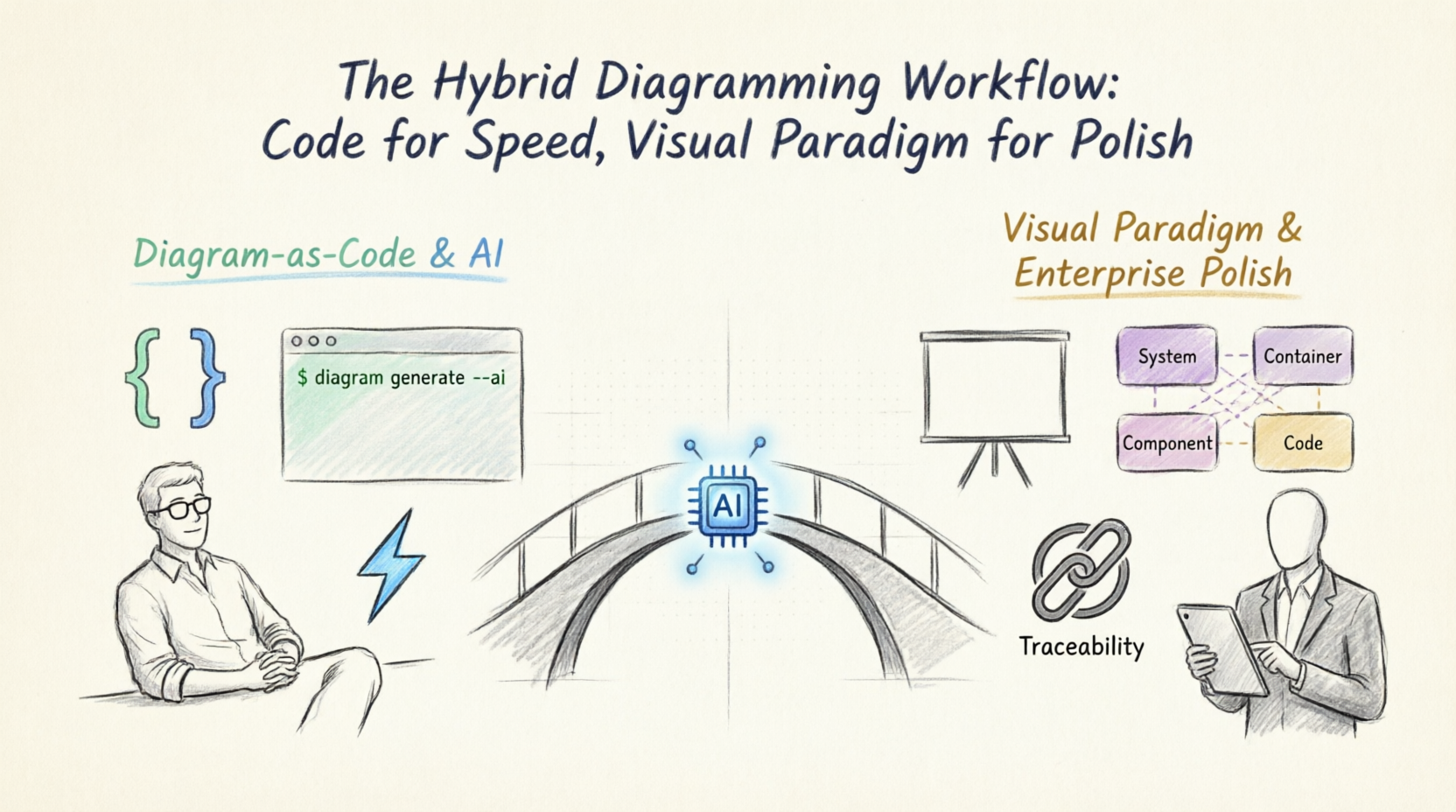
This article serves as your practical reality check. We will explore why you still need a tool like Visual Paradigm in the age of AI, how to build a pragmatic hybrid workflow, and walk through the 4 levels of the C4 model using PlantUML. By the end, you’ll know exactly when to code your diagrams, when to use Visual Paradigm, and how to combine both for maximum impact.
To understand why Visual Paradigm still matters, we first need to acknowledge the limits of the "Diagram-as-Code" (DaC) approach.
Despite these benefits, DaC tools struggle with the "last mile" of enterprise documentation:
Visual Paradigm isn't just a drawing tool; it’s a comprehensive modeling and architecture platform. Here is why it remains indispensable for professional architects:
Visual Paradigm has built-in, rigorously defined support for the C4 model. It enforces the correct notation, ensuring your System Context, Container, and Component diagrams are architecturally sound and standardized across your organization.
VP’s rendering engine is top-tier. With built-in themes, custom styling, and high-fidelity rendering, your diagrams look like they were crafted by a professional design team.
Unlike basic code-renderers, VP features advanced auto-layout algorithms. It intelligently routes connection lines, minimizes cross-overs, and aligns elements perfectly, saving you hours of manual tweaking.
This is VP’s superpower. You can link diagram elements directly to requirements, use cases, and glossaries. If a requirement changes, VP’s traceability matrices show you exactly which diagrams and components are impacted. It also supports real-time team collaboration and version control.
Need to generate a 50-page architecture document for a compliance audit? VP can automatically generate comprehensive Word, PDF, or PowerPoint reports directly from your models, complete with consistent styling, table of contents, and diagram cross-references.
You don't have to choose just one. The most mature architects use a Hybrid Workflow, leveraging the strengths of both paradigms.
To understand what we are modeling, let's use a realistic scenario: An E-Commerce Order Processing System. We will map this out using the 4 levels of the C4 model in PlantUML.
Shows the big picture: the system, the users, and external dependencies.
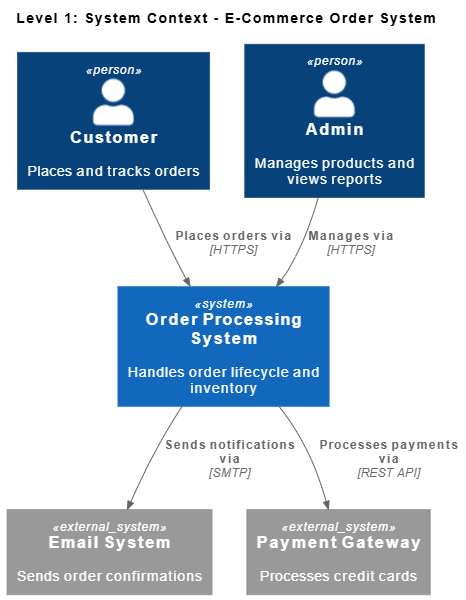
@startuml
!include https://raw.githubusercontent.com/plantuml-stdlib/C4-PlantUML/master/C4_Context.puml

title Level 1: System Context - E-Commerce Order System

Person(customer, "Customer", "Places and tracks orders")
Person(admin, "Admin", "Manages products and views reports")

System_Ext(email, "Email System", "Sends order confirmations")
System_Ext(payment, "Payment Gateway", "Processes credit cards")

System(orderSys, "Order Processing System", "Handles order lifecycle and inventory")

Rel(customer, orderSys, "Places orders via", "HTTPS")
Rel(admin, orderSys, "Manages via", "HTTPS")
Rel(orderSys, payment, "Processes payments via", "REST API")
Rel(orderSys, email, "Sends notifications via", "SMTP")
@enduml
Zooms into the system to show the high-level technical building blocks (apps, databases, microservices).
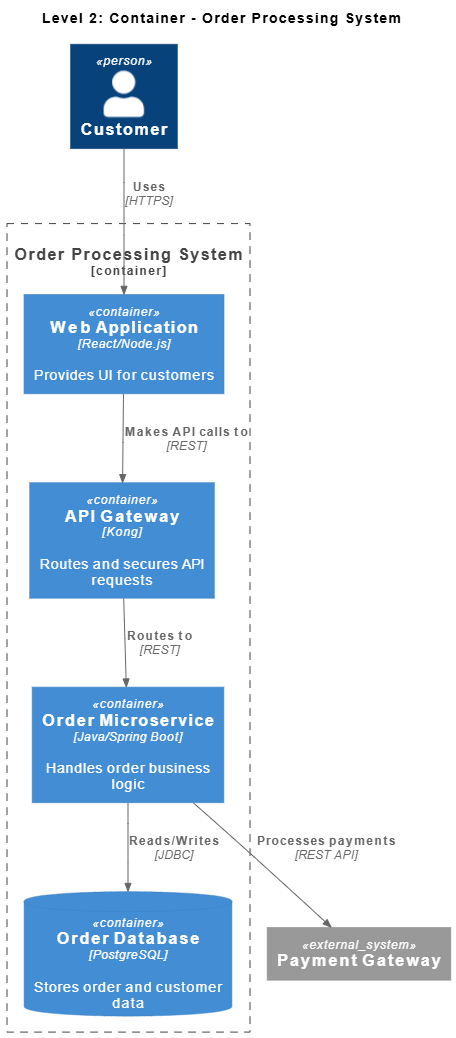
@startuml
!include https://raw.githubusercontent.com/plantuml-stdlib/C4-PlantUML/master/C4_Container.puml

title Level 2: Container - Order Processing System

Person(customer, "Customer")
System_Ext(payment, "Payment Gateway")

Container_Boundary(orderSys, "Order Processing System") {
    Container(web, "Web Application", "React/Node.js", "Provides UI for customers")
    Container(api, "API Gateway", "Kong", "Routes and secures API requests")
    Container(orderSvc, "Order Microservice", "Java/Spring Boot", "Handles order business logic")
    ContainerDb(db, "Order Database", "PostgreSQL", "Stores order and customer data")
}

Rel(customer, web, "Uses", "HTTPS")
Rel(web, api, "Makes API calls to", "REST")
Rel(api, orderSvc, "Routes to", "REST")
Rel(orderSvc, db, "Reads/Writes", "JDBC")
Rel(orderSvc, payment, "Processes payments", "REST API")
@enduml
Zooms into a specific container (the Order Microservice) to show its internal components and how they interact.
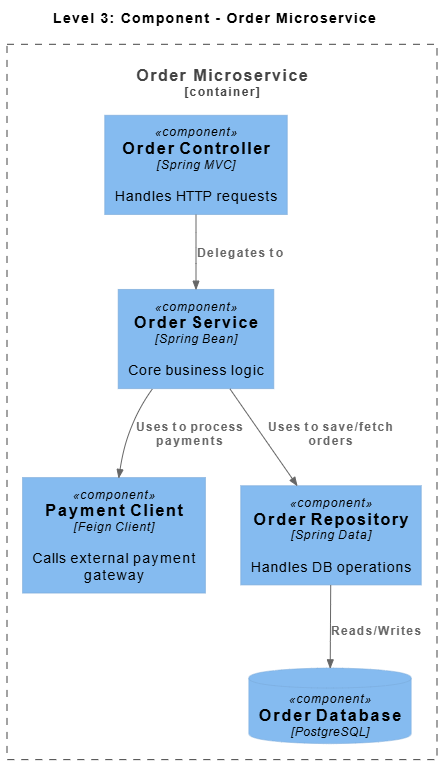
@startuml
!include https://raw.githubusercontent.com/plantuml-stdlib/C4-PlantUML/master/C4_Component.puml

title Level 3: Component - Order Microservice

Container_Boundary(orderSvc, "Order Microservice") {
    Component(controller, "Order Controller", "Spring MVC", "Handles HTTP requests")
    Component(service, "Order Service", "Spring Bean", "Core business logic")
    Component(paymentClient, "Payment Client", "Feign Client", "Calls external payment gateway")
    Component(repo, "Order Repository", "Spring Data", "Handles DB operations")

    ComponentDb(db, "Order Database", "PostgreSQL")
}

Rel(controller, service, "Delegates to")
Rel(service, paymentClient, "Uses to process payments")
Rel(service, repo, "Uses to save/fetch orders")
Rel(repo, db, "Reads/Writes")
@enduml
Zooms into a specific component (Order Service) to show the actual code-level implementation details, classes, and relationships.
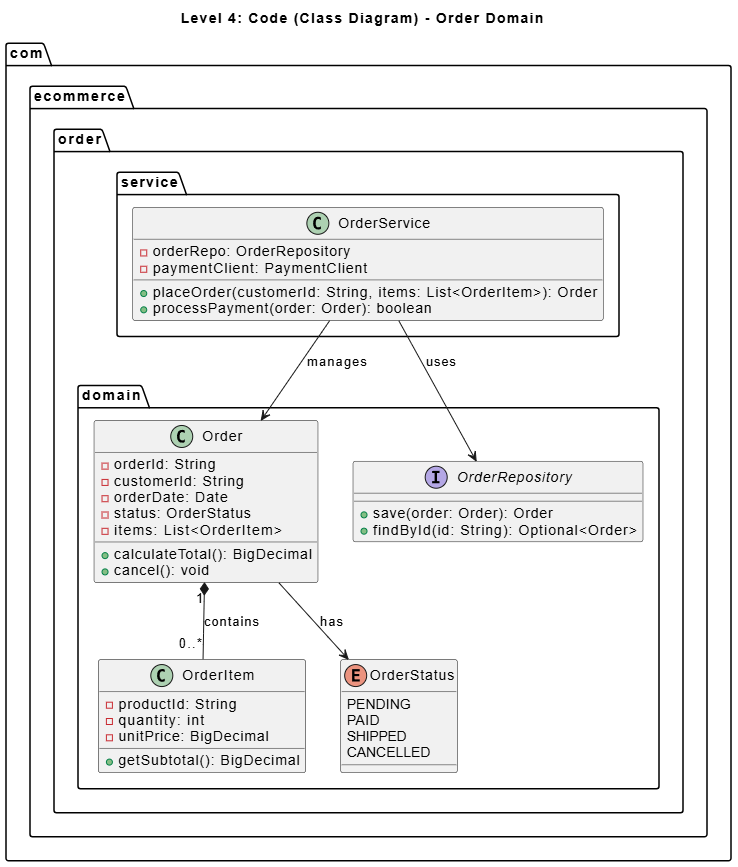
@startuml
title Level 4: Code (Class Diagram) - Order Domain

package "com.ecommerce.order.domain" {
    class Order {
        - orderId: String
        - customerId: String
        - orderDate: Date
        - status: OrderStatus
        - items: List<OrderItem>
        + calculateTotal(): BigDecimal
        + cancel(): void
    }

    class OrderItem {
        - productId: String
        - quantity: int
        - unitPrice: BigDecimal
        + getSubtotal(): BigDecimal
    }

    enum OrderStatus {
        PENDING
        PAID
        SHIPPED
        CANCELLED
    }

    interface OrderRepository {
        + save(order: Order): Order
        + findById(id: String): Optional<Order>
    }
}

package "com.ecommerce.order.service" {
    class OrderService {
        - orderRepo: OrderRepository
        - paymentClient: PaymentClient
        + placeOrder(customerId: String, items: List<OrderItem>): Order
        + processPayment(order: Order): boolean
    }
}

Order "1" *-- "0..*" OrderItem : contains
Order --> OrderStatus : has
OrderService --> OrderRepository : uses
OrderService --> Order : manages
@enduml
You might be thinking: "If I have to use Visual Paradigm for the final polish, doesn't that defeat the speed of AI and code-first?"
Not anymore. Visual Paradigm has heavily integrated AI features to bridge this exact gap:
By using VP's AI features, you get the speed of AI with the enterprise polish of a commercial tool.
As a beginner, how do you decide which tool to open? Use this quick cheat sheet:
| Scenario | Recommended Approach | Why? |
|---|---|---|
| Daily Dev Sync / Whiteboarding | Diagram-as-Code (PlantUML/Mermaid) | Fast, disposable, keeps devs in the IDE. |
| CI/CD Auto-Documentation | Diagram-as-Code | Easily generated from code repositories on every commit. |
| C-Suite / Board Presentations | Visual Paradigm | Requires high-fidelity, polished, visually stunning exports. |
| Complex Enterprise Architecture | Visual Paradigm | Needs strict C4 enforcement, advanced auto-layout, and traceability. |
| Compliance & Audit Documentation | Visual Paradigm | Requires linking diagrams to requirements and generating formal PDF/Word reports. |
| Rapid Prototyping with AI | Hybrid (AI + VP) | Use AI to generate the base model in VP, then refine manually. |
The rise of AI and Diagram-as-Code is a massive win for software development. It has democratized architecture, allowing anyone to quickly visualize their ideas without fighting with clunky drag-and-drop interfaces. However, as your systems grow in complexity and your audience shifts from fellow developers to business stakeholders, auditors, and clients, the limitations of code-first tools become glaringly obvious.
Visual Paradigm remains an essential tool in the modern architect's toolkit not because it replaces diagram-as-code, but because it completes it. It provides the professional polish, rigorous traceability, and high-fidelity presentation capabilities that enterprise environments demand.
By adopting a pragmatic hybrid workflow—using PlantUML and AI for speed and agility during development, and switching to Visual Paradigm for formal reviews, stakeholder presentations, and enterprise documentation—you get the best of both worlds.
Remember, the goal of architecture isn't just to write code or draw diagrams; it's to communicate complex ideas clearly and effectively. Choose the tool that best serves your message for the specific audience you are addressing. Happy architecting!

