
The Unified Modeling Language (UML) is the universal visual language of software engineering, and the Class Diagram is its most fundamental and widely used component. At the heart of every class diagram is the UML class box—a simple yet powerful visual representation of a software entity.
Whether you are architecting a massive enterprise system or sketching a quick microservice, understanding how to properly structure and customize the UML class box is essential for clear communication. This guide breaks down the standard notation for a UML class, explores how to adapt its level of detail to fit your audience, and provides practical examples using PlantUML.
Before diving into the visual notation, it is important to understand the core terminology associated with UML classes:
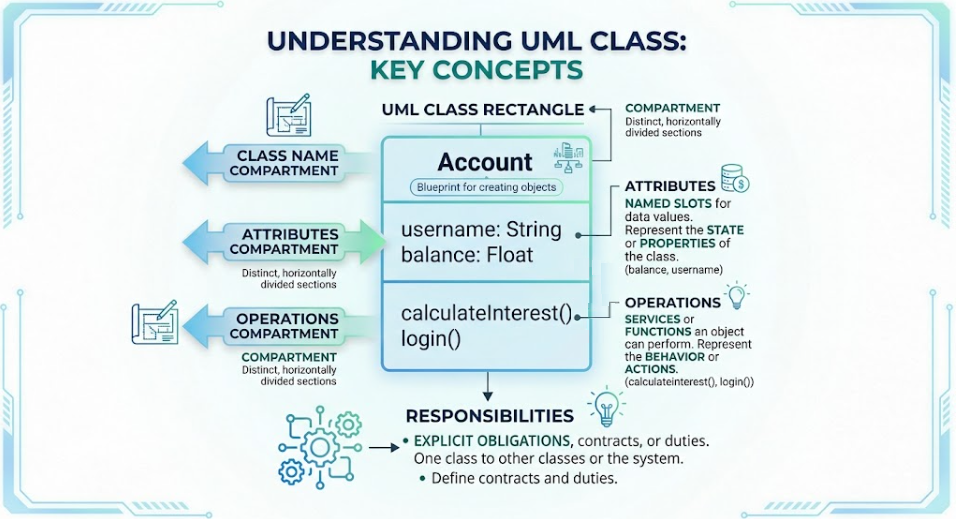
Class: A blueprint or template for creating objects. It defines the properties and behaviors that the objects created from the class will have.
Compartment: A distinct, horizontally divided section within the UML class rectangle used to separate different types of information (e.g., name, data, behavior).
Attributes: The named slots for data values. They represent the state or properties of the class (e.g., balance, username).
Operations: The services or functions that an object of the class can perform. They represent the behavior or actions the class can execute (e.g., calculateInterest(), login()).
Responsibilities: The explicit obligations, contracts, or duties that one class has toward other classes or the system as a whole.
By default, the standard UML notation for a class is represented as a single rectangle divided into three distinct compartments, stacked vertically from top to bottom.
Content: Contains the name of the class.
Formatting Rule: The class name must always be written in boldface type to make it stand out as the primary identifier of the box.
Purpose: Instantly tells the reader what entity is being modeled.
Content: Lists the attributes that belong to the class.
Purpose: Defines the data structure and state. Attributes are essentially named slots for data values that the object will hold in memory (e.g., variables, properties, or fields in code).
Content: Lists the class's operations.
Purpose: Defines the behavior. Operations represent the services that an object of that class can request or execute to affect its behavior or interact with other classes (e.g., methods or functions in code).
While the three-compartment box is the gold standard, UML is designed to be a flexible communication tool. You should tailor the level of detail in your class boxes based on your audience and the specific goal of the diagram.
When designing high-level architectural diagrams, showing every attribute and operation can create visual clutter. You can choose to show a class box with less detail:
Name Only: Useful for showing the overall structure and relationships between many classes without getting bogged down in implementation details.
Name and Operations Only: Useful when the behavior and public API of the class are more important to the discussion than its internal data state.
Conversely, a class box can be extended with additional compartments (a fourth section below operations) to show specialized information.
Explicit Responsibilities: Adding a compartment for responsibilities is highly effective for clarifying the "contract" of a class. It explicitly states the obligations the class has toward others (e.g., "Must validate user input," "Must log all transactions"), which is incredibly useful during the design and code-review phases.
Below are examples demonstrating how to implement these concepts using PlantUML, a popular text-to-UML tool.
This is the default, fully detailed view showing the name, attributes, and operations.
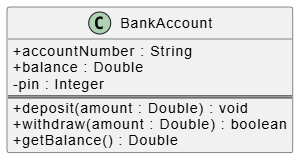
@startuml
' Hide attribute icons for a cleaner look
skinparam classAttributeIconSize 0

class "BankAccount" {
  + accountNumber : String
  + balance : Double
  - pin : Integer
  ==
  + deposit(amount : Double) : void
  + withdraw(amount : Double) : boolean
  + getBalance() : Double
}
@enduml
(Note: Standard UML renderers will automatically display "BankAccount" in boldface).
Here we show a class with only its name, and another with only its name and operations.

@startuml
skinparam classAttributeIconSize 0

' Name only - great for high-level context diagrams
class "PaymentGateway"

' Name and Operations only - great for API/Interface design
class "TransactionProcessor" {
  + processPayment(card : CreditCard, amount : Double) : Receipt
  + refund(transactionId : String) : boolean
  + getStatus() : String
}
@enduml
Here we use PlantUML's == separator to create a distinct fourth compartment dedicated to the class's explicit responsibilities.
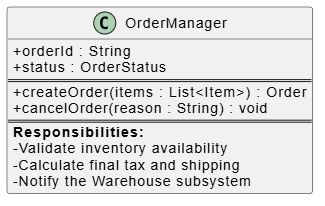
@startuml
skinparam classAttributeIconSize 0

class "OrderManager" {
  + orderId : String
  + status : OrderStatus
  ==
  + createOrder(items : List<Item>) : Order
  + cancelOrder(reason : String) : void
  ==
  <b>Responsibilities:</b>
  - Validate inventory availability
  - Calculate final tax and shipping
  - Notify the Warehouse subsystem
}
@enduml
The UML class box is much more than a rigid set of rules; it is a versatile communication tool. By mastering the standard three-compartment notation—bold class name, attributes, and operations—you establish a strong foundation for your software designs.
However, the true power of UML lies in its flexibility. By knowing when to strip away details for a high-level architectural overview, or when to add an extra compartment to explicitly define a class's responsibilities, you can create diagrams that perfectly match the needs of your audience. Tools like PlantUML make it easier than ever to treat these diagrams as code, allowing you to rapidly prototype, iterate, and maintain clear, comprehensive visual documentation for your software projects.

