
When transitioning from high-level conceptual domain models to detailed software design, the level of abstraction must decrease while the level of precision increases. While early-stage UML diagrams focus on capturing business concepts and relationships, detailed design work requires technical specifications that map directly to implementation.
This guide explores the precision-level elements of UML 2.0 modeling: visibility, multiplicity, and default values. Often omitted in high-level diagrams to maintain simplicity, these elements are the bedrock of robust software architecture. They define how data is protected, how objects relate in quantity, and how systems initialize, ultimately bridging the gap between abstract design and executable code.
Before diving into the technical syntax, it is essential to understand the core principles these elements enforce:
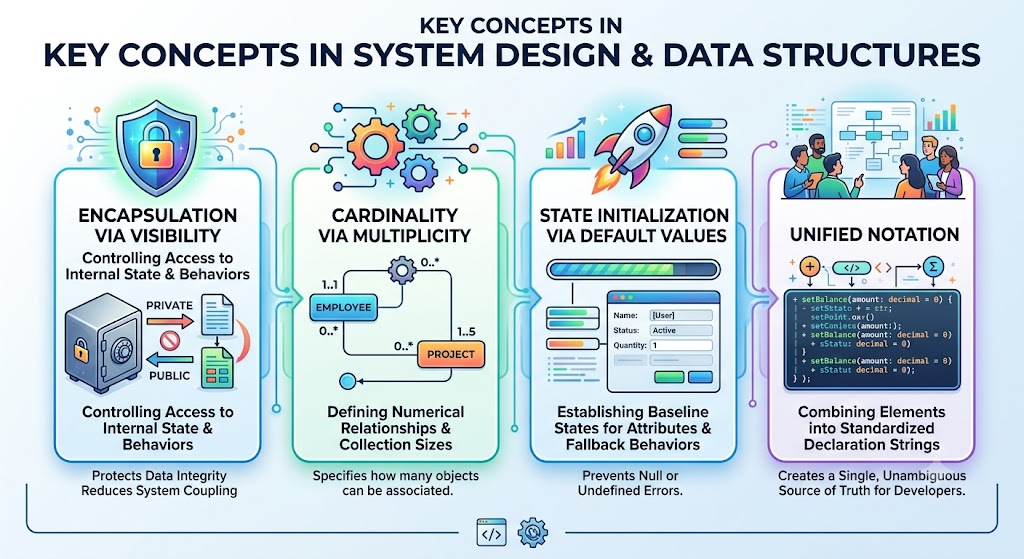
Encapsulation via Visibility: Controlling access to an object's internal state and behaviors to protect data integrity and reduce system coupling.
Cardinality via Multiplicity: Defining the exact numerical relationships and collection sizes between objects and attributes.
State Initialization via Default Values: Establishing baseline states for attributes and fallback behaviors for operations to prevent null or undefined errors.
Unified Notation: Combining these elements into standardized declaration strings to create a single, unambiguous source of truth for developers.
Visibility is the primary mechanism for encapsulation—the foundational object-oriented principle of hiding an object's internal data from the rest of the system. It dictates whether model elements (like attributes and operations) can be "seen" and accessed by objects of other classes.
UML 2.0 supports four distinct levels of visibility, each denoted by a specific symbol:
Public (+): Accessible to any object from any class in the system. This is typically used for the class's public API (e.g., + calculateTotal()).
Private (-): Restricted exclusively to objects belonging to the class itself. For instance, password and emailAddress in an Account class are typically private to ensure data integrity and prevent unauthorized external modification.
Protected (#): Accessible only to the class itself and its subclasses at any level of the inheritance hierarchy. For example, a record() operation in a general Review class might be protected so it can be utilized by specialized subclasses like CustomerReview, but hidden from unrelated classes.
Package (~): Visible to any object belonging to a class within the same package (or namespace). This is useful for grouping related classes that need to share internal data without exposing it to the entire system.
Multiplicity indicates the quantity of one model element relative to another, defining how many instances of a thing can exist or be linked.
Indicates how many instances of a specific attribute exist for each instance of the class. It is shown in square brackets after the attribute name.
Example: emailAddress [1..3] dictates that every object must have at least one, but no more than three, email addresses.
Placed on association lines between classes, it shows how many objects of one class can be linked to a single object of another.
Example: One Account might be associated with many (*) Billing Info objects.
Fixed value: A specific, exact number (e.g., 1 or 3).
Many: Represented by an asterisk (*), meaning zero to infinity.
Range: Expressed as lower..upper (e.g., 0..1 for optional, or 3..* for three or more).
Set: A specific, discrete list of allowed values (e.g., {1, 3, 5} or {Small, Medium, Large}).
A default value provides a predefined initial state for an element when no other value is explicitly provided during instantiation or execution.
For Attributes: Every new instance of a class starts with this value. For example, a password attribute might have a default of "temp1234" to serve as a temporary credential until the user resets it, preventing the system from handling null passwords.
For Parameters: In an operation, a default value means the call to that operation will automatically use that value unless the caller explicitly specifies a different one. This simplifies method calls by making certain arguments optional.
In detailed class diagrams, these precision elements are combined into standard declaration strings. Note that in the syntax formulas below, rectangular brackets [] indicate optional items.
Syntax: [visibility] [/] name [: type] [multiplicity] [= default] [{property-string}]
Note: The / indicates a derived attribute (calculated, not stored).
Example 1: - emailAddress [1..3] : String
Example 2: + / totalAmount : Double = 0.0 {readOnly}
Syntax: [direction] name : type [multiplicity] [= default-value]
Note: Directions include in (default), out, or inout.
Example: in b: Book or in timeout: Int = 30
Syntax: [visibility] name [(parameter-list)] [{property-string}]
Example 1: + assignRating(rating: Int)
Example 2: # checkAvailability(in b: Book) : OrderStatus
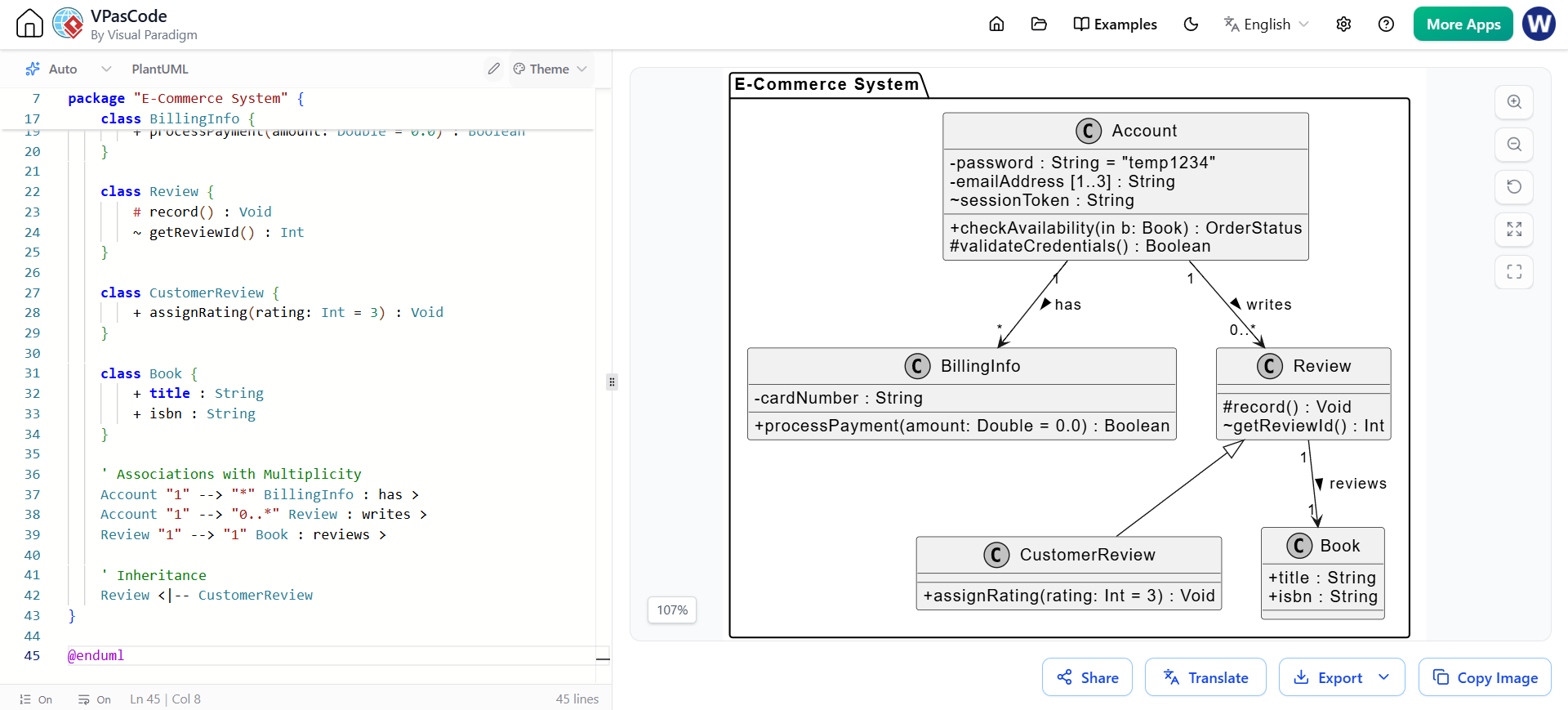
Below is a comprehensive PlantUML class diagram that integrates all the precision-level concepts discussed above.
@startuml
' Hide default UML visibility icons to rely on text symbols (+, -, #, ~)
skinparam classAttributeIconSize 0
skinparam classFontSize 14
skinparam monochrome true

package "E-Commerce System" {

    class Account {
        - password : String = "temp1234"
        - emailAddress [1..3] : String
        ~ sessionToken : String
        + checkAvailability(in b: Book) : OrderStatus
        # validateCredentials() : Boolean
    }

    class BillingInfo {
        - cardNumber : String
        + processPayment(amount: Double = 0.0) : Boolean
    }

    class Review {
        # record() : Void
        ~ getReviewId() : Int
    }

    class CustomerReview {
        + assignRating(rating: Int = 3) : Void
    }

    class Book {
        + title : String
        + isbn : String
    }

    ' Associations with Multiplicity
    Account "1" --> "*" BillingInfo : has >
    Account "1" --> "0..*" Review : writes >
    Review "1" --> "1" Book : reviews >

    ' Inheritance
    Review <|-- CustomerReview
}

@enduml
Visibility: Notice the - (private) on password, the # (protected) on validateCredentials() and record(), and the ~ (package) on sessionToken.
Multiplicity: The emailAddress has an attribute multiplicity of [1..3]. The association between Account and BillingInfo shows 1 to * (one account to many billing infos).
Default Values: The password attribute defaults to "temp1234". The processPayment operation has a parameter default of 0.0, and assignRating defaults to a rating of 3.
While high-level UML diagrams are excellent for communicating broad business logic and system architecture, they are insufficient for guiding actual software construction. By incorporating visibility, multiplicity, and default values into your UML 2.0 models, you transform abstract concepts into precise, actionable blueprints.
Mastering these precision-level elements ensures that your design accurately reflects encapsulation rules, enforces strict data cardinality, and establishes reliable initial states. Ultimately, this level of detail minimizes ambiguity, reduces implementation errors, and creates a seamless transition from the design board to the final compiled code.

