
In the realm of object-oriented design and software engineering, building robust and maintainable systems relies heavily on the principle of encapsulation. Encapsulation, often referred to as "data hiding," ensures that an object's internal state is protected from unintended or unauthorized external manipulation. But how do we visually communicate these boundaries in our system designs?
Enter UML 2.0 Visibility.
In visual modeling, visibility is the mechanism that dictates whether model elements—such as attributes and operations—can be "seen" or accessed by objects belonging to other classes. This comprehensive guide will explore the concept of visibility in UML 2.0, break down its four distinct levels, detail the standard notation, and provide practical PlantUML examples to help you master encapsulation in your class diagrams.
Before diving into the specific levels of visibility, it is essential to understand the foundational concepts that govern them:
Encapsulation: The bundling of data (attributes) and methods (operations) within a single unit (class), while restricting direct access to some of the object's components.
Visibility: The UML mechanism that enforces encapsulation by defining the scope of access for class members.
Notation Symbols: UML uses specific symbols (+, -, #, ~) placed immediately before an element's name to denote its visibility level.
Analysis vs. Design Phase: In high-level "domain" or "analysis" diagrams, visibility details are often omitted to maintain simplicity and focus on business concepts. However, during detailed design work, visibility becomes strictly required to define precise object boundaries for developers.
Interfaces: In UML interface definitions, all operations are inherently public by default, as they represent services intentionally offered to the external environment.
UML 2.0 supports four distinct levels of visibility. Each level serves a specific architectural purpose, allowing modelers to finely tune how classes interact with one another.
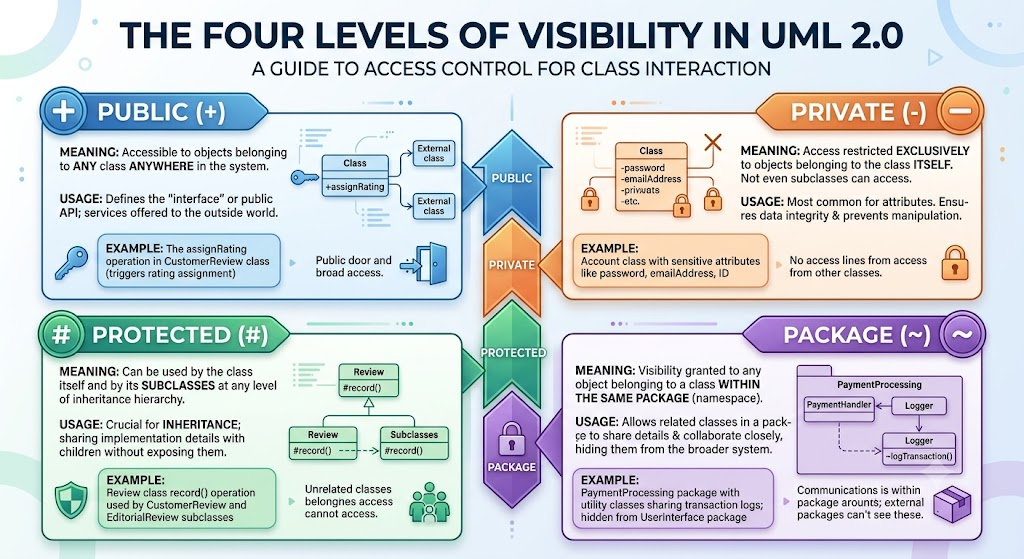
Meaning: Elements marked as public are accessible to objects belonging to any class anywhere in the system.
Usage: Public visibility is used to define the "interface" or the public API of a class. These are the services the class offers to the outside world.
Example: The assignRating operation in a CustomerReview class is public, allowing any part of the system to trigger a rating assignment.
Meaning: Access is restricted exclusively to objects belonging to the class itself. No other class, not even subclasses, can directly access private elements.
Usage: This is the default and most common visibility for attributes. Keeping data private ensures data integrity and prevents outside manipulation.
Example: In an Account class, sensitive attributes like password, emailAddress, and ID are kept private. Only the Account object itself can read or modify these directly.
Meaning: These elements can be used by the class itself and by its subclasses at any level of the inheritance hierarchy. They remain hidden from unrelated classes.
Usage: Protected visibility is crucial in inheritance scenarios. It allows a base class to share implementation details or helper methods with its children without exposing them to the rest of the system.
Example: A general Review class might have a record() operation marked as protected. Specific subclasses like CustomerReview and EditorialReview can use record() to log their specific data, but unrelated classes cannot.
Meaning: Visibility is granted to any object belonging to a class within the same package (or namespace) as the defined class.
Usage: This allows related classes grouped together in a package to share internal details and collaborate closely, while keeping those details hidden from the rest of the broader system.
Example: Internal utility classes within a PaymentProcessing package can share transaction logs via package-level visibility without exposing those logs to the UserInterface package.
Visibility levels are displayed as adornments in the middle (attributes) and bottom (operations) compartments of a standard UML class box. Understanding the exact syntax is crucial for detailed design.
[visibility] [/] name [: type] [multiplicity] [= default]
visibility: +, -, #, or ~
/ (Optional): Indicates a derived attribute (its value is calculated from other attributes).
name: The name of the attribute.
type: The data type (e.g., String, Integer).
multiplicity: How many instances of the attribute exist (e.g., [0..*]).
default: The initial or default value.
[visibility] name [(parameter-list)] [{property-string}]
visibility: +, -, #, or ~
name: The name of the operation/method.
parameter-list: Inputs required by the operation (e.g., rating : Integer).
property-string: Optional properties like {query} (indicating the operation doesn't change the object's state).
Below are practical PlantUML examples demonstrating how to apply these visibility rules in real-world modeling scenarios.
This example demonstrates an Account class where sensitive data is hidden (Private), and controlled access is provided via a public API.
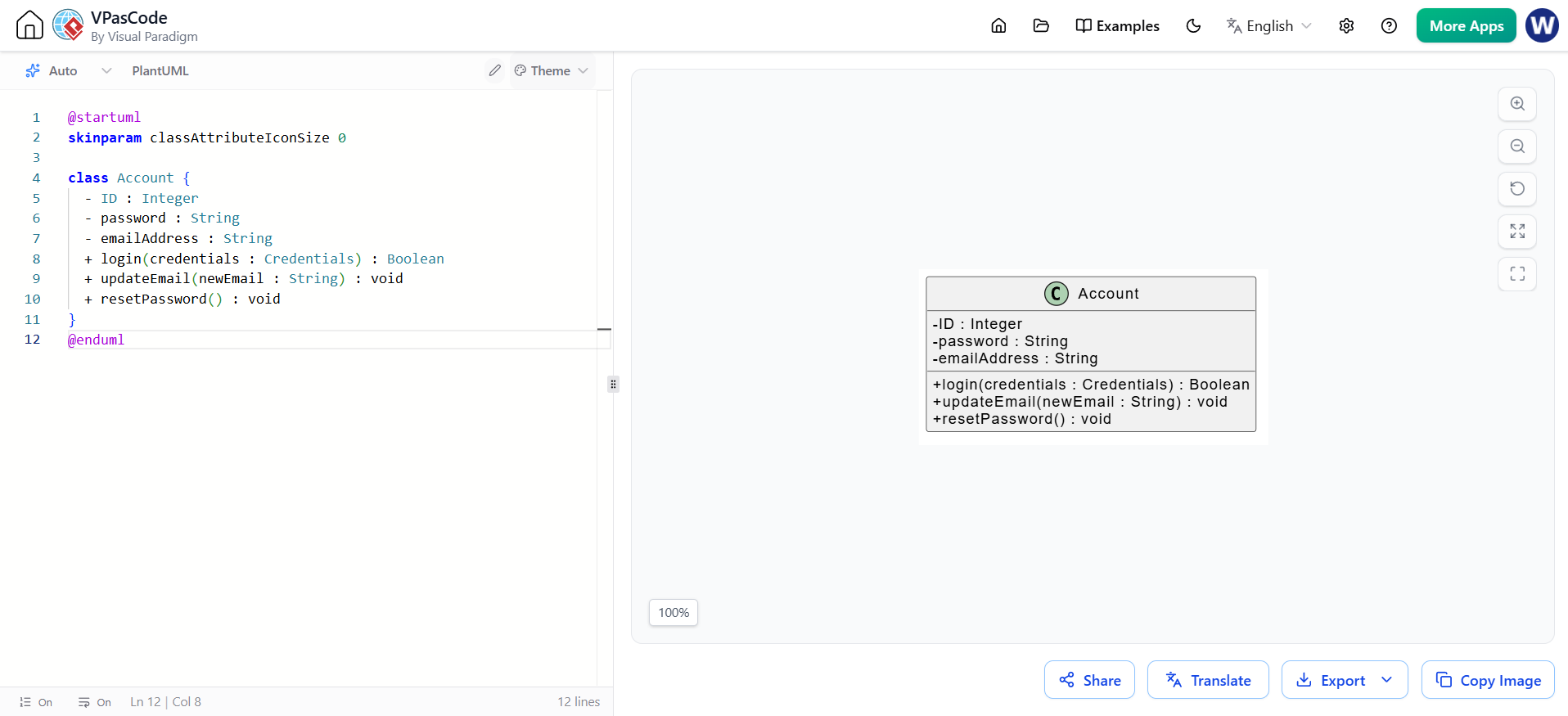
@startuml
skinparam classAttributeIconSize 0

class Account {
  - ID : Integer
  - password : String
  - emailAddress : String
  + login(credentials : Credentials) : Boolean
  + updateEmail(newEmail : String) : void
  + resetPassword() : void
}
@enduml
This example shows a Review hierarchy. The base class uses Protected visibility to allow subclasses to use the record() method, while keeping it hidden from the outside world.
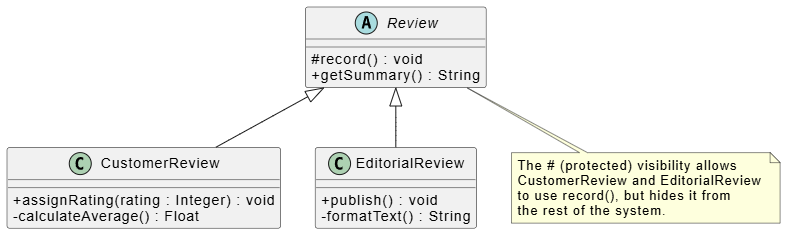
@startuml
skinparam classAttributeIconSize 0

abstract class Review {
  # record() : void
  + getSummary() : String
}

class CustomerReview extends Review {
  + assignRating(rating : Integer) : void
  - calculateAverage() : Float
}

class EditorialReview extends Review {
  + publish() : void
  - formatText() : String
}

note bottom of Review
  The # (protected) visibility allows
  CustomerReview and EditorialReview
  to use record(), but hides it from
  the rest of the system.
end note
@enduml
This example illustrates how classes within the same package can use Package (~) visibility to share internal states securely.
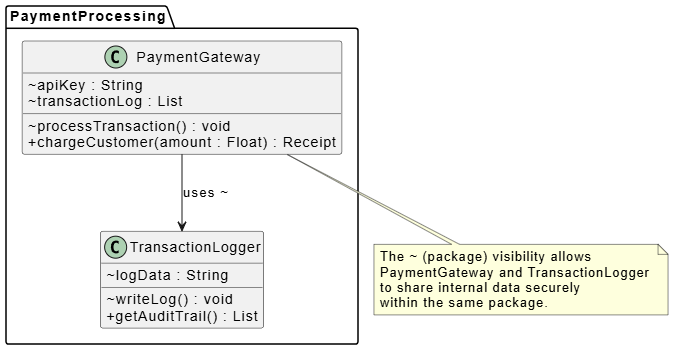
@startuml
skinparam classAttributeIconSize 0

package "PaymentProcessing" {
  class PaymentGateway {
    ~ apiKey : String
    ~ transactionLog : List
    ~ processTransaction() : void
    + chargeCustomer(amount : Float) : Receipt
  }

  class TransactionLogger {
    ~ logData : String
    ~ writeLog() : void
    + getAuditTrail() : List
  }

  PaymentGateway --> TransactionLogger : uses ~
}

note bottom of PaymentGateway
  The ~ (package) visibility allows
  PaymentGateway and TransactionLogger
  to share internal data securely
  within the same package.
end note
@enduml
Visibility in UML 2.0 is far more than just a set of syntactical symbols; it is the visual representation of your system's security, architecture, and design philosophy. By correctly applying Public, Private, Protected, and Package visibility, you enforce encapsulation, protect data integrity, and create clear boundaries between different components of your software.
While it is perfectly acceptable to omit visibility markers during early-stage analysis to focus on business domains, transitioning to detailed design requires strict adherence to these rules. Mastering UML visibility ensures that your class diagrams are not just pretty pictures, but precise, actionable blueprints that guide developers in building robust, maintainable, and secure object-oriented systems.

