
In Unified Modeling Language (UML) and requirements engineering, Use Case diagrams provide a high-level visual representation of system interactions. However, the true depth of a use case lies in its textual description. To ensure a system is robust, resilient, and user-friendly, modelers must meticulously document not just how the system behaves when everything goes right, but also how it handles deviations and errors.
This guide explores the core components of use case textual descriptions: the Main Flow of Events, Alternate Courses, and Exceptional Flows. By mastering these concepts, you can bridge the gap between abstract requirements and concrete, testable system behaviors.
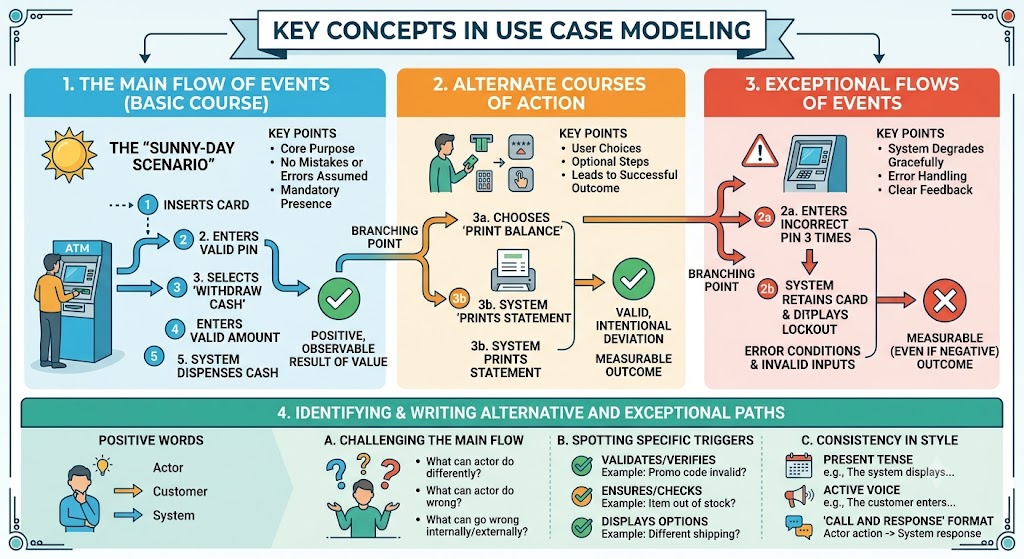
The Main Flow of Events is the primary, start-to-finish path through a use case that an actor and the system follow under normal circumstances. It is the foundation upon which all other flows are built.
Key Characteristics:
The "Sunny-Day Scenario": It represents the ideal interaction where everything goes exactly as planned.
Core Assumptions: It assumes that the primary actor makes no mistakes and that the system generates no internal errors.
Mandatory Presence: A use case always has a main flow of events; without it, the use case has no core purpose.
Result of Value: It describes the sequence of actions that leads to a positive, observable result of value for the actor.
Examples of Main Flows:
ATM Withdrawal: A customer inserts a card, enters a valid PIN, selects "Withdraw Cash," enters a valid amount, and the system dispenses cash.
Library Book Return: A patron hands a book to the librarian, the librarian scans the barcode, the system updates the catalog, and a return receipt is printed.
E-Commerce Checkout: A shopper adds an item to the cart, proceeds to checkout, enters valid shipping and payment info, and the system processes the order successfully.
Alternate courses are valid, intentional deviations from the main flow. They represent less frequent but entirely acceptable paths that still lead to a successful outcome or a measurable result of value.
Key Characteristics:
Deviation from the Norm: Captures behavior that occurs under less frequent, yet valid, circumstances (e.g., user choices, optional steps).
Measurable Outcome: Like the main flow, every alternate course must conclude with an observable result of value.
Branching Points: The text must clearly indicate where they branch off from the main flow (e.g., "At step 3...").
Examples of Alternate Courses:
ATM Withdrawal: At the main menu, the customer chooses "Print Balance" instead of "Withdraw Cash."
E-Commerce Checkout: At the shipping step, the customer selects a "Saved Address" from a dropdown instead of typing a new one.
User Registration: During sign-up, the user chooses to "Register with Google" instead of creating a new password.
Exceptional flows handle error conditions, invalid inputs, or system failures. They ensure the system degrades gracefully and provides clear feedback when things go wrong.
Key Characteristics:
Error Handling: Captures behavior when an actor makes a mistake or the system encounters an internal/external failure.
Measurable Outcome: Must conclude with an observable result, even if that result is negative (e.g., an error message, a system lockout, or a prompt to retry).
Branching Points: Clearly linked to the specific step in the main flow where the failure occurred.
Examples of Exceptional Flows:
ATM Withdrawal: The customer enters an incorrect PIN three times, resulting in the system retaining the card and displaying a lockout message.
E-Commerce Checkout: The payment gateway declines the credit card, resulting in the system displaying a "Payment Failed" message and prompting for a new card.
File Upload: A user attempts to upload a file that exceeds the 5MB size limit, resulting in the system rejecting the file and displaying a size constraint warning.
To ensure a robust system design, modelers must be exhaustive when identifying these paths.
A highly effective method is to "challenge" every sentence of the basic course by asking:
"What can the actor do differently at this point?" (Identifies Alternate Flows)
"What can the actor do wrong at this point?" (Identifies Exceptional Flows)
"What can go wrong internally/externally at this point?" (Identifies Exceptional Flows)
Certain verbs in the main flow serve as surefire signals that an associated alternate or exceptional course is needed:
"Validates" / "Verifies": Example: "The system validates the promo code." -> Trigger for Exception Flow: What if the promo code is expired or invalid?
"Ensures" / "Checks": Example: "The system ensures inventory is available." -> Trigger for Exception Flow: What if the item is out of stock?
"Displays options": Example: "The system displays shipping options." -> Trigger for Alternate Flow: What if the user selects expedited shipping instead of standard?
Like the main flow, these paths should be written with strict consistency:
Present Tense: "The system displays..." (Not "will display").
Active Voice: "The customer enters..." (Not "is entered by").
"Call and Response" Format: The actor does X (call), the system responds with Y (response).
While Use Case diagrams provide the visual scope, Activity Diagrams and Use Case Notes are excellent for visualizing and documenting the flows. Below are two PlantUML examples demonstrating these concepts.
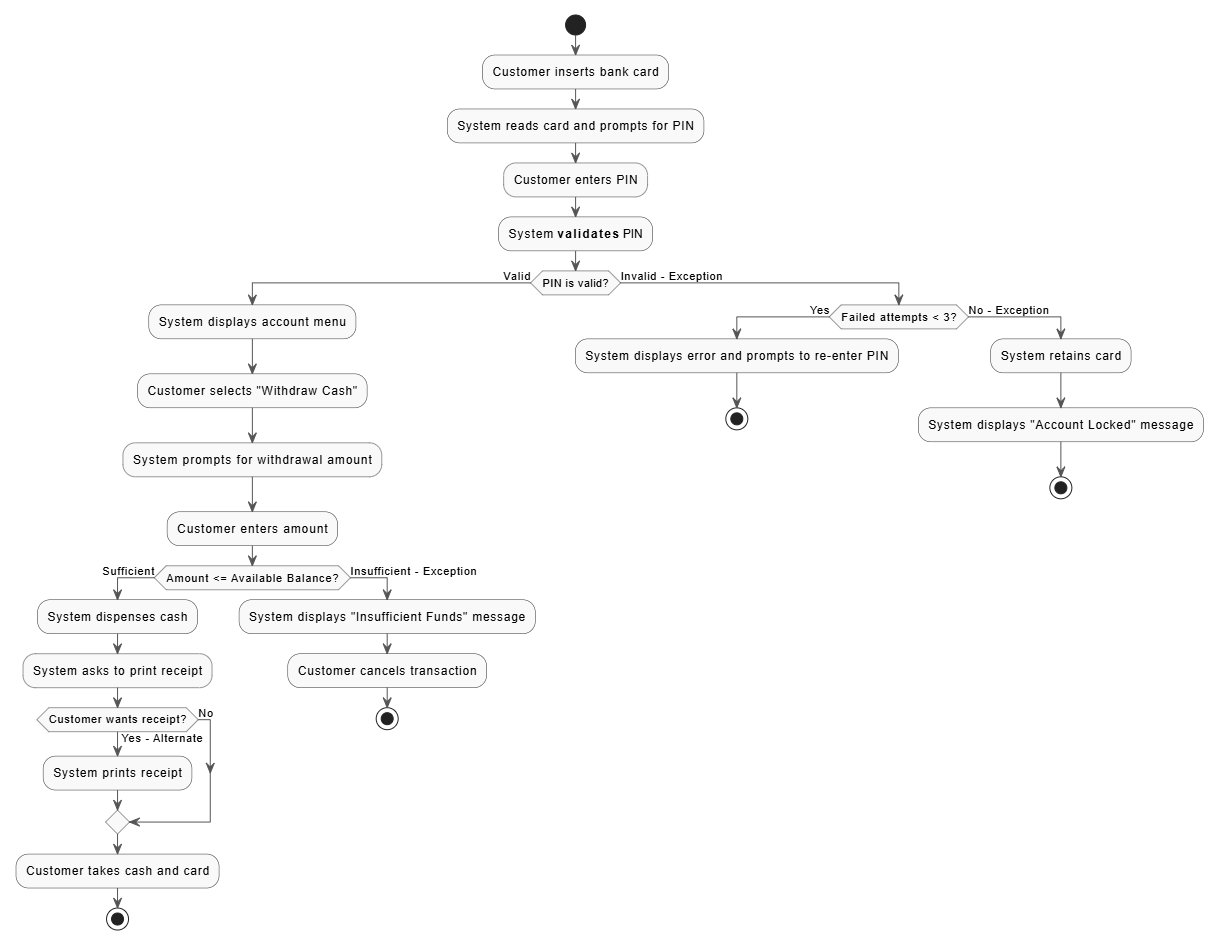
This diagram visually maps the Main Flow, an Alternate Flow (printing a receipt), and Exceptional Flows (invalid PIN, insufficient funds).
@startuml ATM_Activity_Flows
skinparam ActivityBackgroundColor #F9F9F9
skinparam ActivityBorderColor #333333
skinparam ArrowColor #555555
skinparam NoteBackgroundColor #FFFDE7

start
:Customer inserts bank card;
:System reads card and prompts for PIN;
:Customer enters PIN;
:System **validates** PIN;

if (PIN is valid?) then (Valid)
  :System displays account menu;
  :Customer selects "Withdraw Cash";
  :System prompts for withdrawal amount;
  :Customer enters amount;

  if (Amount <= Available Balance?) then (Sufficient)
    :System dispenses cash;
    :System asks to print receipt;

    if (Customer wants receipt?) then (Yes - Alternate)
      :System prints receipt;
    else (No)
    endif

    :Customer takes cash and card;
    stop
  else (Insufficient - Exception)
    :System displays "Insufficient Funds" message;
    :Customer cancels transaction;
    stop
  endif
else (Invalid - Exception)
  if (Failed attempts < 3?) then (Yes)
    :System displays error and prompts to re-enter PIN;
    stop
  else (No - Exception)
    :System retains card;
    :System displays "Account Locked" message;
    stop
  endif
endif
@enduml
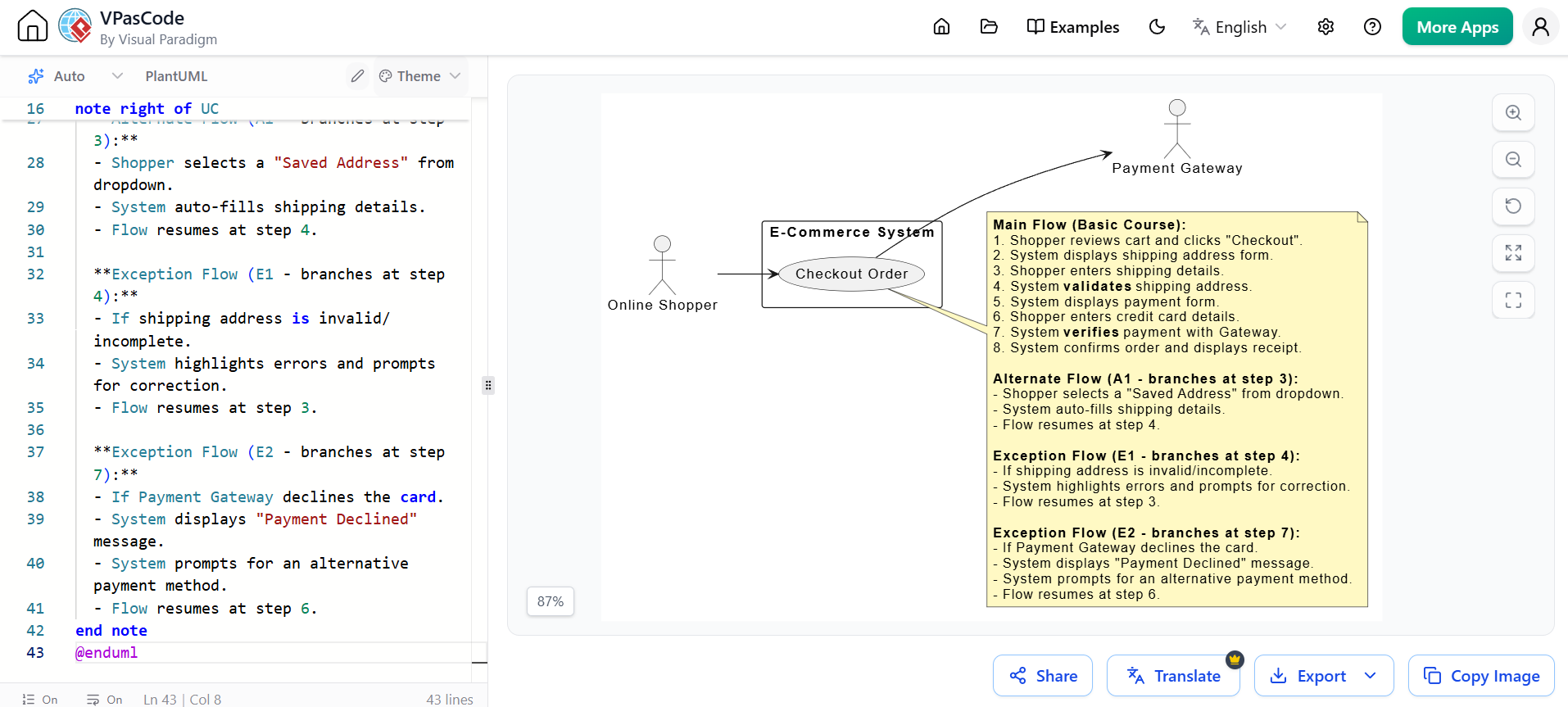
This example uses a standard Use Case diagram supplemented by a detailed note, which is the industry standard for documenting the textual flows directly alongside the visual model.
@startuml Login_UseCase_with_Notes
left to right direction
skinparam packageStyle rectangle
skinparam NoteBackgroundColor #FFF9C4

actor "Online Shopper" as shopper
actor "Payment Gateway" as gateway

rectangle "E-Commerce System" {
  usecase "Checkout Order" as UC
}

shopper --> UC
UC --> gateway

note right of UC
  **Main Flow (Basic Course):**
  1. Shopper reviews cart and clicks "Checkout".
  2. System displays shipping address form.
  3. Shopper enters shipping details.
  4. System **validates** shipping address.
  5. System displays payment form.
  6. Shopper enters credit card details.
  7. System **verifies** payment with Gateway.
  8. System confirms order and displays receipt.

  **Alternate Flow (A1 - branches at step 3):**
  - Shopper selects a "Saved Address" from dropdown.
  - System auto-fills shipping details.
  - Flow resumes at step 4.

  **Exception Flow (E1 - branches at step 4):**
  - If shipping address is invalid/incomplete.
  - System highlights errors and prompts for correction.
  - Flow resumes at step 3.

  **Exception Flow (E2 - branches at step 7):**
  - If Payment Gateway declines the card.
  - System displays "Payment Declined" message.
  - System prompts for an alternative payment method.
  - Flow resumes at step 6.
end note
@enduml
Defining the Main Flow of Events is only the beginning of effective use case modeling. By rigorously identifying and documenting Alternate Courses and Exceptional Flows, you ensure that your system design is comprehensive, resilient, and ready for the complexities of the real world. Challenging every step of the basic course and paying close attention to trigger words like validates and verifies will drastically reduce edge-case failures during development and testing.
To efficiently create, manage, and document these complex flows, utilizing robust UML tooling is highly recommended. Visual Paradigm is an excellent choice for this task, offering intuitive interfaces for drafting use case diagrams, writing detailed textual flows, and generating activity diagrams that visually map out your main, alternate, and exceptional paths. By leveraging tools like Visual Paradigm, teams can ensure perfect alignment between business requirements and technical implementation, ultimately delivering a higher quality software product.

