
In UML (Unified Modeling Language) modeling, Use Cases are fundamental for capturing the functional requirements of a system from the user's perspective. At the heart of every Use Case is the Basic Course of Action (often called the "sunny-day" or "happy-path" scenario). This describes the ideal flow where everything goes perfectly: the user inputs the right data, the system processes it flawlessly, and the goal is achieved without a hitch.
However, software rarely operates in a "sunny day" forever. Users make mistakes, input malicious data, or encounter edge cases. If a system is only designed for the basic flow, it will inevitably fail in production.
To build resilient software, business analysts and system architects must identify Alternate and Exception Flows. The sources recommend a "highly effective, if sometimes exhausting" method to achieve this: challenging every single sentence of the basic course of action. This guide explores this technique, providing key concepts, practical examples, and UML modeling strategies to ensure your system is robust from day one.
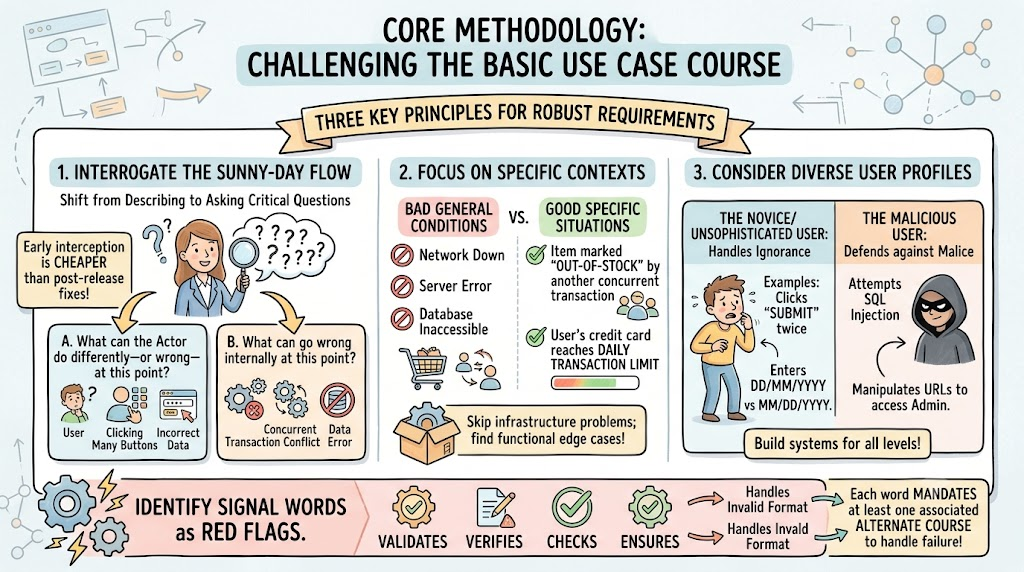
The process of identifying alternate courses requires a shift in mindset from describing the system to interrogating it. For every sentence in the sunny-day scenario, you must repeatedly ask two critical questions:
"What can the actor do differently—or wrong—at this point?"
"What can go wrong internally at this point?"
By applying this relentless interrogation, you uncover hidden requirements, edge cases, and necessary error-handling mechanisms early in the project lifecycle, which is significantly cheaper than addressing them during development or post-release.
To ensure the alternate courses you discover are robust, relevant, and actionable, adhere to the following guidelines when challenging the basic flow.
When asking "what can go wrong internally," avoid generic, catch-all failure conditions.
Bad Example: "The database is inaccessible" or "The network is down." (These apply to almost every system and should be handled by global infrastructure requirements, not specific use cases).
Good Example: "The specific item the user is trying to buy has just been marked as out-of-stock by another concurrent transaction," or "The user's credit card has reached its daily transaction limit."
Challenge the basic flow by adopting the personas of different types of users. This ensures your system handles both ignorance and malice.
The Novice/Unsophisticated User: What mistakes might someone make if they are unfamiliar with the system?
Example: They might enter a date as DD/MM/YYYY instead of MM/DD/YYYY, or they might click the "Submit" button twice because they didn't see a loading spinner.
The Malicious User: What might a person try to do intentionally to break the system, bypass rules, or steal data?
Example: They might attempt SQL injection in the "Search" field, try to manipulate the URL to access an admin page, or attempt to bypass the payment gateway by altering the client-side HTML.
Certain verbs in your basic flow act as red flags that mandate an alternate course. Look for words like validates, verifies, checks, or ensures.
The Rule: Each time these signal words appear, there must be at least one associated alternate course to handle what happens if the system cannot validate, verify, or ensure that specific condition.
Example: "The system validates the user's email address." -> Alternate Flow: The system detects an invalid email format and prompts the user to correct it.
Let’s look at a step-by-step example of how to apply this technique to a single sentence in a basic flow.
Basic Course Step 3: "The system validates the entered promotional code and applies the discount to the cart."
Applying the Challenge:
Actor doing it wrong (Novice): What if they type the code with a typo? What if they include trailing spaces?
Actor doing it wrong (Malicious): What if they try to guess the code 1,000 times a second (brute force)? What if they inject a script into the promo code field?
Internal failure (Context-specific): What if the promo code is valid, but it has expired yesterday? What if the items in the cart are excluded from this specific promotion?
Resulting Alternate Flows Generated:
3a. Invalid Promo Code (Typo/Not found)
3b. Expired Promo Code
3c. Cart Items Ineligible for Promotion
3d. Malformed/Malicious Input Detected in Promo Field
3e. Brute-Force Attempt Throttled
In UML, alternate flows can be represented both textually (in the Use Case Specification) and graphically. Graphically, they are modeled using <<extend>> relationships in Use Case Diagrams, and alt fragments in Sequence Diagrams.
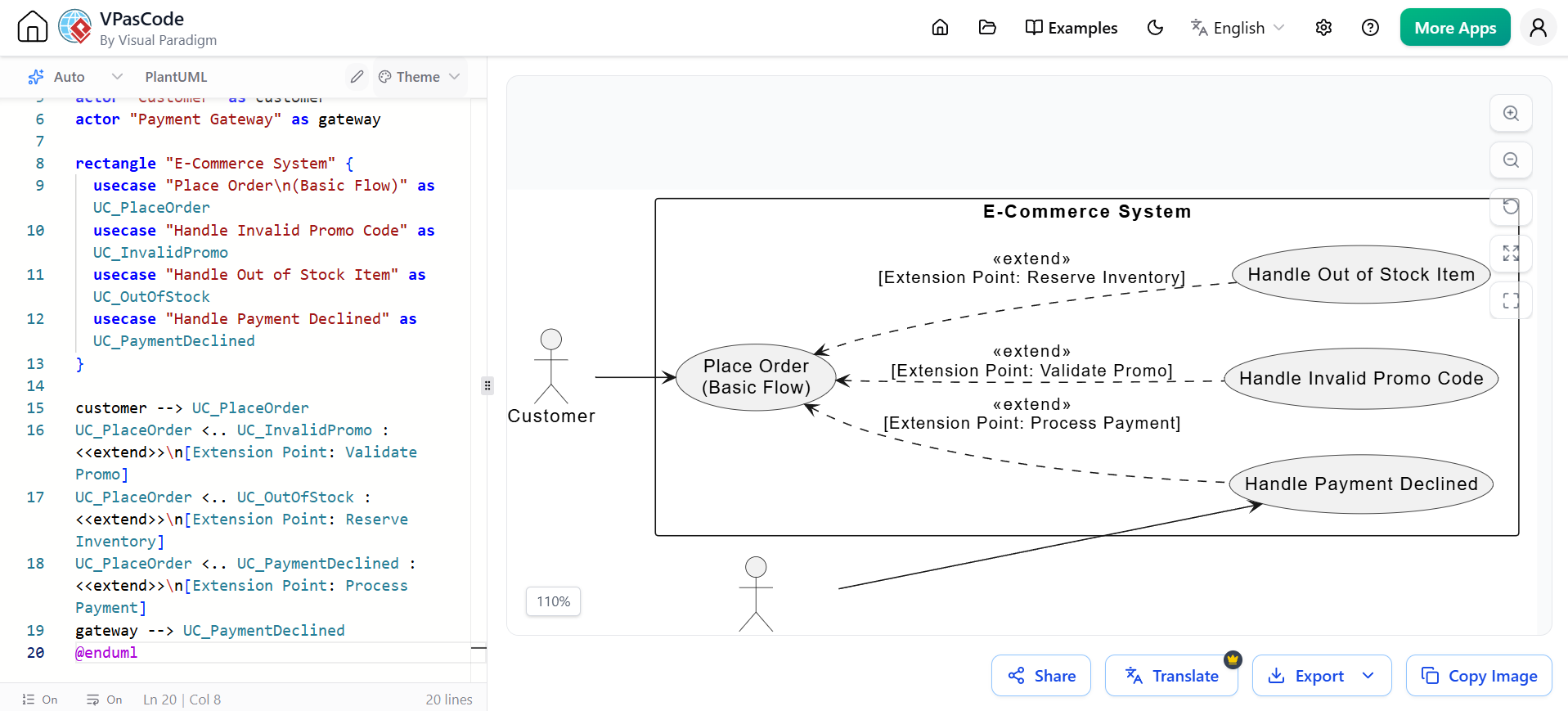
In a Use Case diagram, significant alternate flows that represent distinct sub-functions are modeled as separate Use Cases connected to the base Use Case via an <<extend>> relationship. The extension point defines where in the basic flow the alternate behavior kicks in.
@startuml
left to right direction
skinparam packageStyle rectangle

actor "Customer" as customer
actor "Payment Gateway" as gateway

rectangle "E-Commerce System" {
  usecase "Place Order\n(Basic Flow)" as UC_PlaceOrder
  usecase "Handle Invalid Promo Code" as UC_InvalidPromo
  usecase "Handle Out of Stock Item" as UC_OutOfStock
  usecase "Handle Payment Declined" as UC_PaymentDeclined
}

customer --> UC_PlaceOrder
UC_PlaceOrder <.. UC_InvalidPromo : <<extend>>\n[Extension Point: Validate Promo]
UC_PlaceOrder <.. UC_OutOfStock : <<extend>>\n[Extension Point: Reserve Inventory]
UC_PlaceOrder <.. UC_PaymentDeclined : <<extend>>\n[Extension Point: Process Payment]
gateway --> UC_PaymentDeclined
@enduml
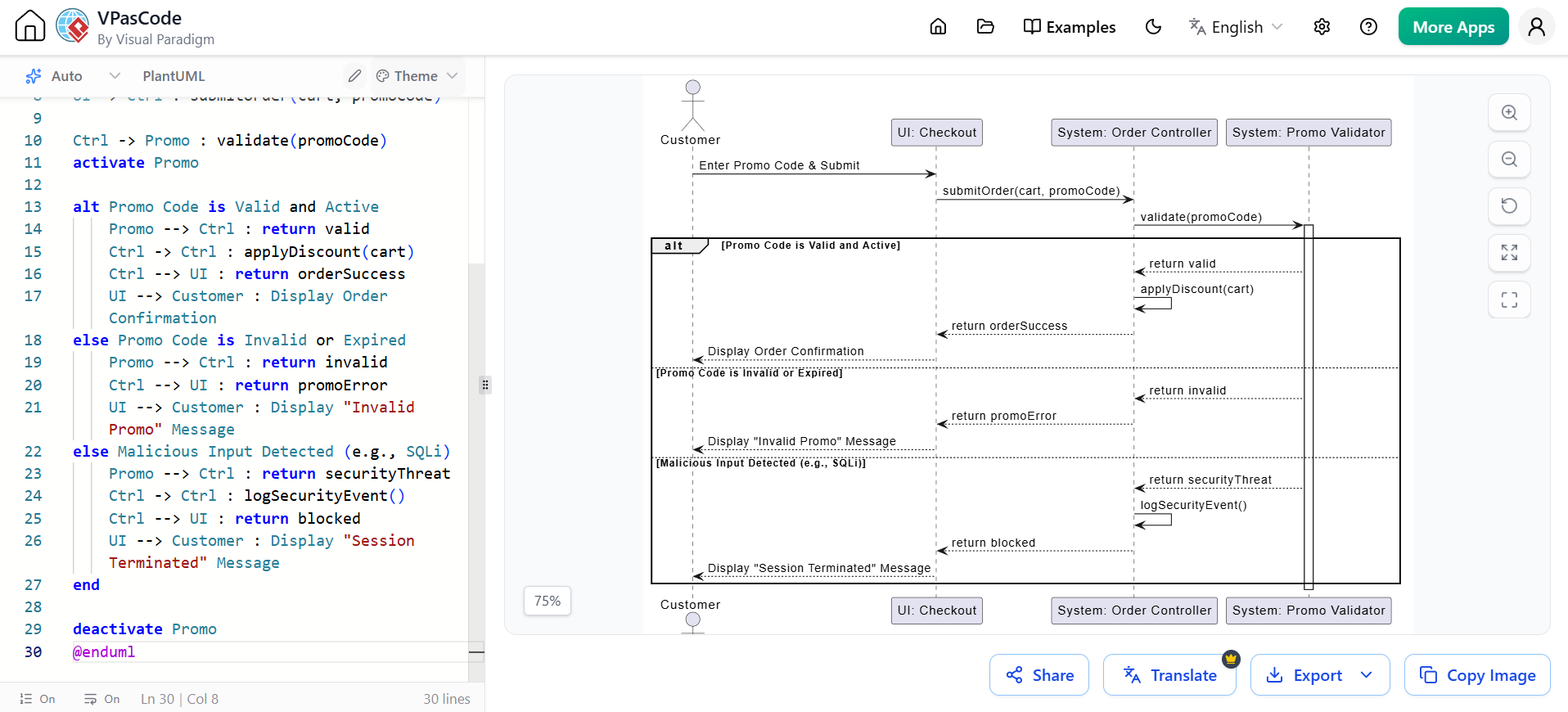
While Use Case diagrams show the structure of extensions, Sequence Diagrams are excellent for modeling the behavioral flow of the challenged sentences, specifically using the alt (alternative) and opt (optional) fragments.
@startuml
actor Customer
participant "UI: Checkout" as UI
participant "System: Order Controller" as Ctrl
participant "System: Promo Validator" as Promo

Customer -> UI : Enter Promo Code & Submit
UI -> Ctrl : submitOrder(cart, promoCode)

Ctrl -> Promo : validate(promoCode)
activate Promo

alt Promo Code is Valid and Active
    Promo --> Ctrl : return valid
    Ctrl -> Ctrl : applyDiscount(cart)
    Ctrl --> UI : return orderSuccess
    UI --> Customer : Display Order Confirmation
else Promo Code is Invalid or Expired
    Promo --> Ctrl : return invalid
    Ctrl --> UI : return promoError
    UI --> Customer : Display "Invalid Promo" Message
else Malicious Input Detected (e.g., SQLi)
    Promo --> Ctrl : return securityThreat
    Ctrl -> Ctrl : logSecurityEvent()
    Ctrl --> UI : return blocked
    UI --> Customer : Display "Session Terminated" Message
end

deactivate Promo
@enduml
Identifying alternate and exception flows is not merely a box-checking exercise; it is the difference between a fragile prototype and a production-ready system. By adopting the "challenging" technique—relentlessly questioning every sentence of the basic course, focusing on context-specific failures, profiling diverse users, and reacting to signal words—you uncover critical system behaviors early. This exhaustive approach prevents costly rework during the development and testing phases.
To effectively manage, document, and visualize these complex Use Cases and their alternate flows, robust tooling is essential. Visual Paradigm is highly recommended for this task. As a comprehensive UML tool, Visual Paradigm allows business analysts and architects to seamlessly draft Use Case Specifications, map out <<extend>> relationships in Use Case Diagrams, and model detailed behavioral flows using Sequence Diagrams. With its intuitive interface, automated PlantUML generation, and strong traceability features, Visual Paradigm ensures that every challenged sentence and alternate flow is meticulously captured, managed, and communicated to the development team.

