
In Unified Modeling Language (UML) and software engineering, Use Cases are the cornerstone of functional requirements gathering. While a Use Case Diagram provides a high-level visual overview of system interactions, the true depth, clarity, and value lie in the Use Case Description (the textual narrative).
A poorly written use case can lead to ambiguous requirements, scope creep, and development errors. Conversely, a robust use case description acts as a precise contract between stakeholders, business analysts, and developers. This guide provides a comprehensive framework for writing effective use case descriptions, structuring the content, integrating UML terminology, and organizing complex logic, complete with practical examples and PlantUML diagrams.
To ensure your use case descriptions are clear, actionable, and unambiguous, adhere to the following foundational writing rules.
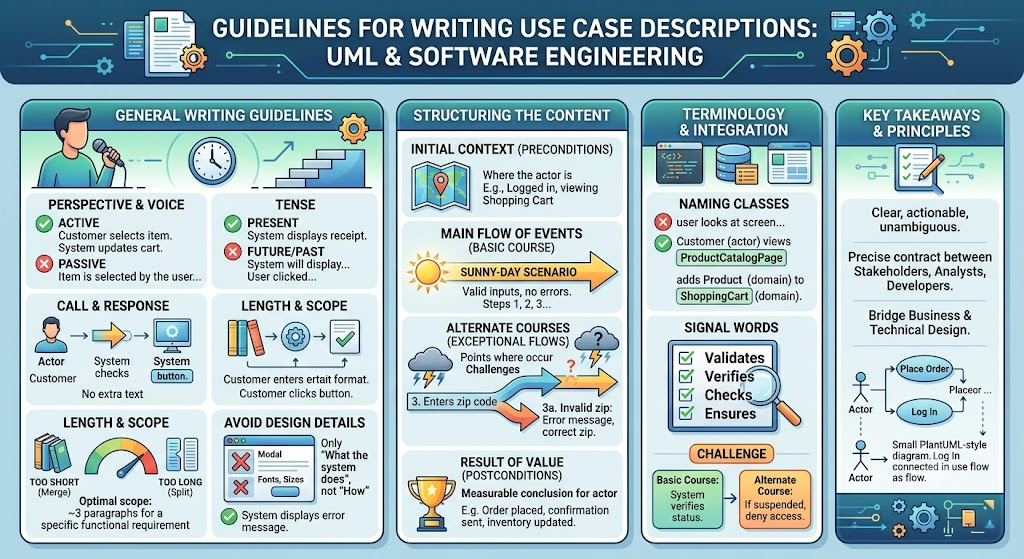
Always use the active voice and write strictly from the perspective of the actor. Avoid the passive voice, which obscures responsibility and makes the text harder to read.
❌ Poor (Passive): The item is selected by the user, and the cart is updated.
✅ Robust (Active): The Customer selects the item. The System updates the Shopping Cart.
Write every sentence in the present tense. This applies to the main flow, alternate courses, and preconditions. Present tense helps readers trace the chronological path of the interaction as if it is happening right now.
❌ Poor (Future/Past): The system will display the receipt. The user clicked submit.
✅ Robust (Present): The System displays the receipt. The Customer clicks Submit.
Structure the text as a strict dialogue between the actor and the system. Step 1 is an actor action, Step 2 is a system response, Step 3 is an actor action, and so on. Eliminate all extraneous text.
Example:
The Customer enters their email address.
The System checks the email format.
The Customer clicks the "Next" button.
A use case description should generally be no more than three paragraphs of narrative text (excluding the numbered step-by-step flows). It must address a single functional requirement or a very tightly coupled set of them.
Note: If your use case has only one or two sentences, it likely lacks substance and should be merged with another use case. If it spans ten pages, it needs to be broken down into smaller, child use cases.
Focus strictly on what the system does (requirements), not how it does it (implementation). Avoid describing UI layouts, specific colors, or internal database processes.
❌ Poor (Design-heavy): The system opens a 400x300 pixel modal window with a red border and a 12px Arial font error message.
✅ Robust (Requirement-focused): The System displays an error message indicating the login failed.
A well-structured use case follows a predictable format, making it easy for developers and testers to read.
Specify exactly where the actor is and what they are looking at when the use case begins. This sets the stage.
Example: Precondition: The Customer is logged in and is currently viewing the Shopping Cart page.
This is the "sunny-day scenario." Describe the path where the actor makes no mistakes, provides valid input every time, and the system generates no errors.
Example:
The Customer clicks the "Proceed to Checkout" button.
The System displays the Shipping Information form.
The Customer enters valid shipping details and clicks "Continue".
These paths represent error conditions, validations failing, or less frequent actions. Modelers must "challenge" every sentence of the basic course to find potential failures.
Example (Challenging Step 3 above):
3a. If the Customer enters an invalid zip code:
3a1. The System highlights the zip code field and displays an error message.
3a2. The Customer corrects the zip code and clicks "Continue". (Use case resumes at Step 4).
Every use case must end with a measurable result of value for at least one actor. Even if the result is negative (e.g., the system locking a user out), it must be a definitive conclusion.
Example: Postcondition/Result: The Order is successfully placed, inventory is decremented, and an Order Confirmation is emailed to the Customer.
Bridging the gap between business requirements and technical design requires precise terminology.
Use specific names for classes from the domain model (business entities) and boundary classes (UI elements like windows, screens, or HTML pages). This provides immediate clarity for system designers.
❌ Vague: The user looks at the screen and adds the thing to the list.
✅ Precise: The Customer views the ProductCatalogPage (boundary) and adds the Product (domain) to the ShoppingCart (domain).
Words such as validates, verifies, checks, and ensures in the basic course are reliable indicators that an alternate course is required. If the system "validates" something, you must write the alternate course for what happens when that validation fails.
Example:
Basic Course: 2. The System verifies the Customer's account status.
Alternate Course: 2a. If the account is suspended, the System denies access and displays a suspension notice.
In UML, complex systems require organizing use cases to avoid redundancy. We use three primary relationships: Include, Extend, and Generalization.
Use <<include>> to factor out common behavior that appears in multiple use cases into a separate, reusable unit. The included use case is mandatory for the base use case to complete.
Example: Both "Place Order" and "View Profile" require the user to be logged in. We extract "Authenticate User" and include it in both.
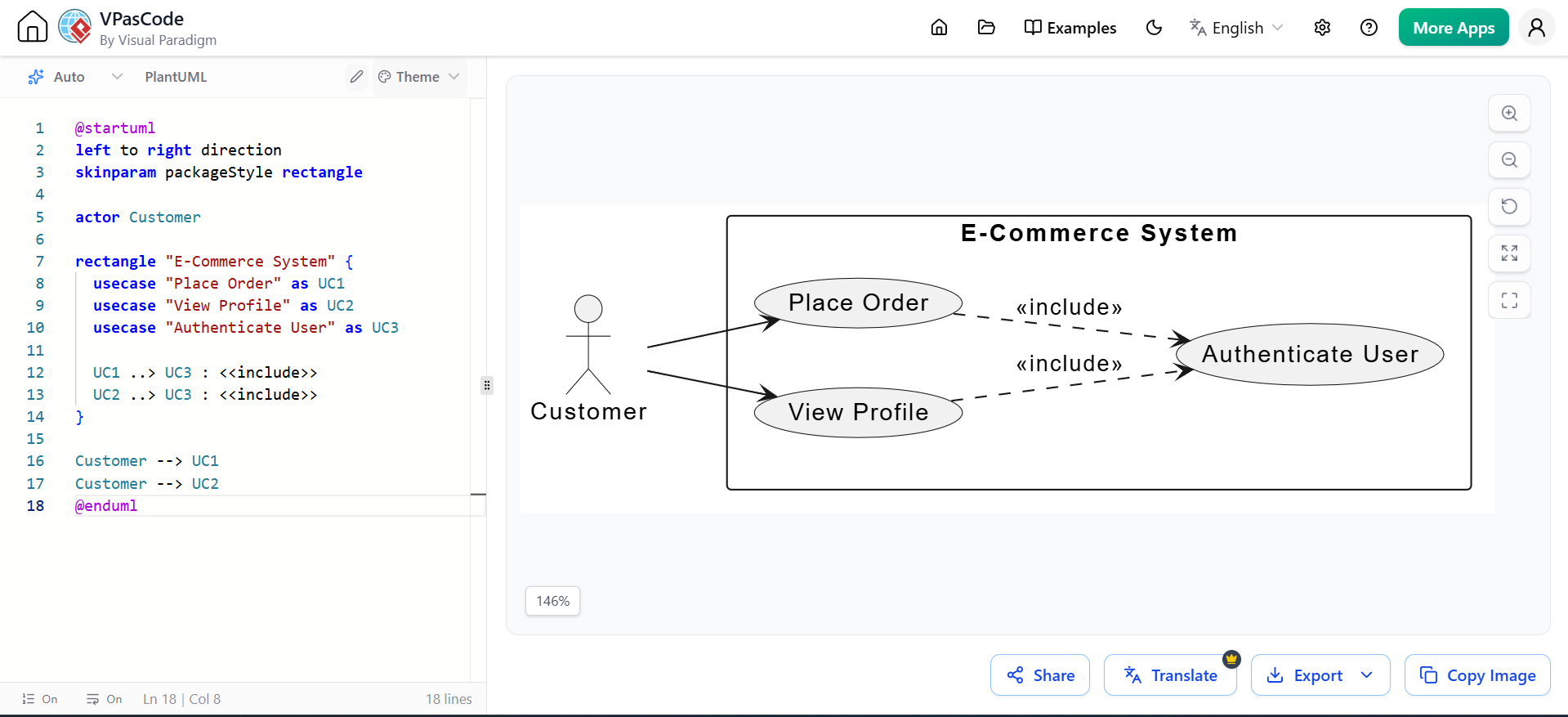
@startuml
left to right direction
skinparam packageStyle rectangle

actor Customer

rectangle "E-Commerce System" {
  usecase "Place Order" as UC1
  usecase "View Profile" as UC2
  usecase "Authenticate User" as UC3

  UC1 ..> UC3 : <<include>>
  UC2 ..> UC3 : <<include>>
}

Customer --> UC1
Customer --> UC2
@enduml
Use <<extend>> for optional behavior or actions that only occur under certain conditions. It is often used to move a complex alternate course into its own use case to keep the main use case clean.
Example: "Apply Discount Code" is not required to place an order, but if the user chooses to do it, it extends the "Place Order" use case.
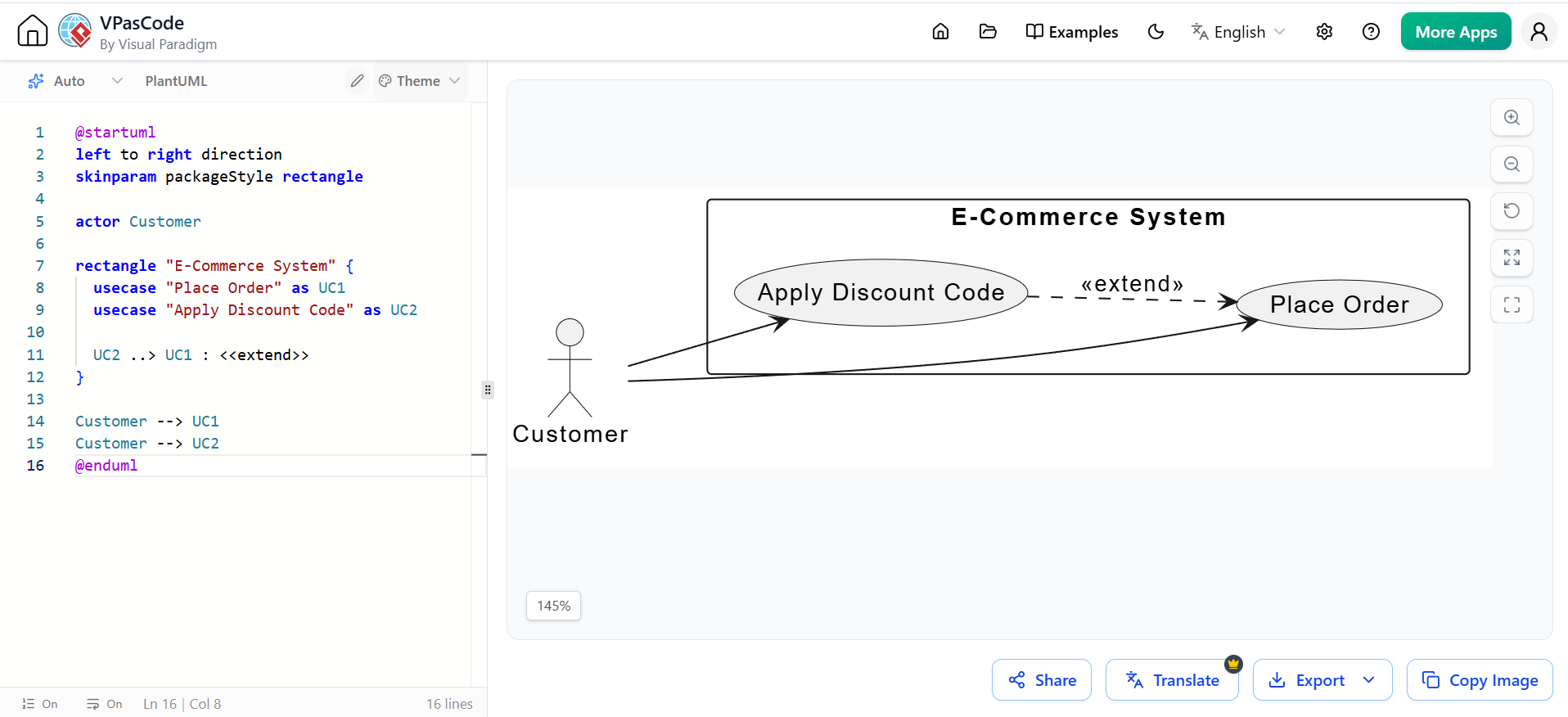
@startuml
left to right direction
skinparam packageStyle rectangle

actor Customer

rectangle "E-Commerce System" {
  usecase "Place Order" as UC1
  usecase "Apply Discount Code" as UC2

  UC2 ..> UC1 : <<extend>>
}

Customer --> UC1
Customer --> UC2
@enduml
Similar to class generalization in object-oriented design, a parent use case can define common behavior that "child" use cases inherit and refine. The child use cases represent specific variations of the parent.
Example: "Make Payment" is the parent. "Pay by Credit Card" and "Pay by PayPal" are children that inherit the general payment flow but refine the specific steps.
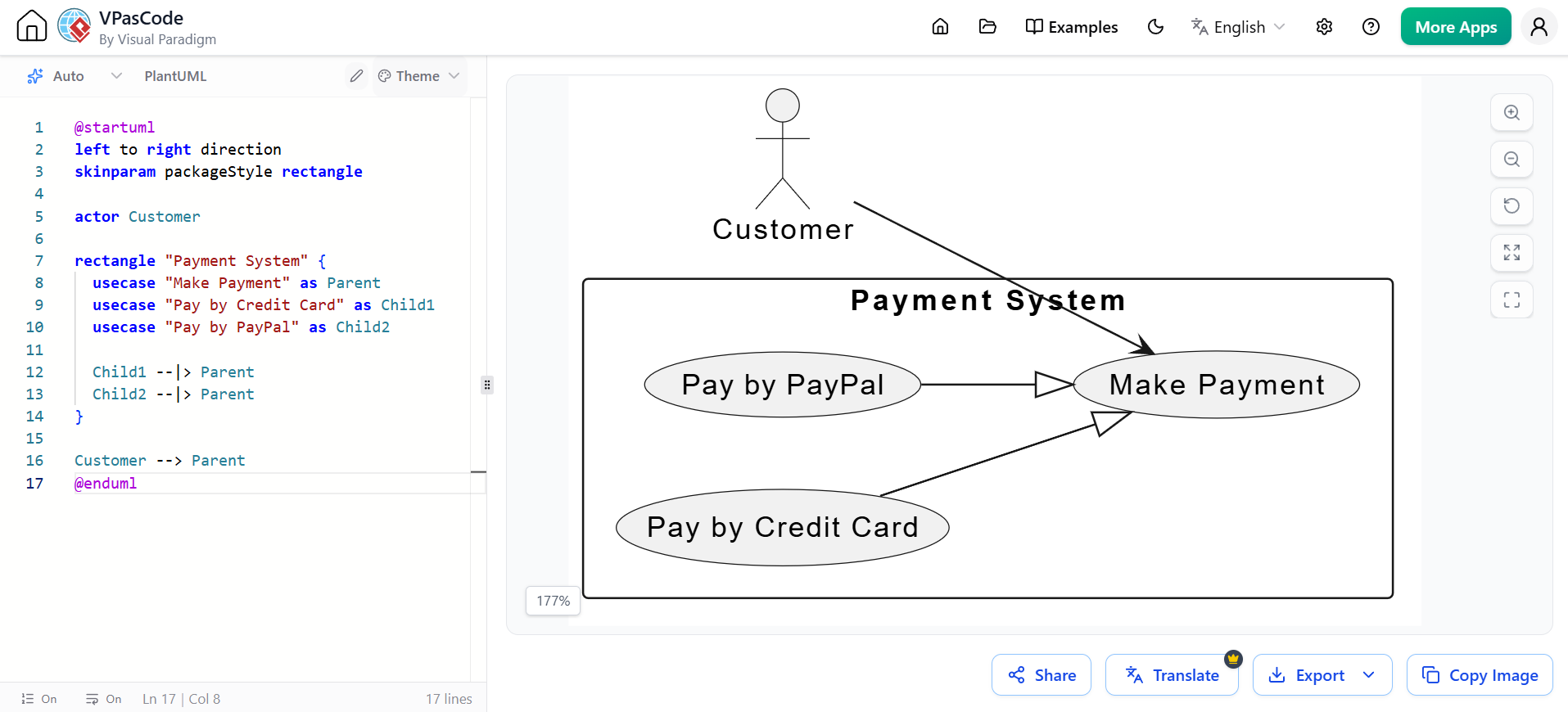
@startuml
left to right direction
skinparam packageStyle rectangle

actor Customer

rectangle "Payment System" {
  usecase "Make Payment" as Parent
  usecase "Pay by Credit Card" as Child1
  usecase "Pay by PayPal" as Child2

  Child1 --|> Parent
  Child2 --|> Parent
}

Customer --> Parent
@enduml
Below is a complete, robust use case description applying all the guidelines, followed by its UML representation.
Actor: Customer, System
Precondition: The Customer is logged in and is viewing the OrderHistoryPage (boundary).
Main Flow of Events:
The Customer selects a PurchasedItem (domain) and clicks "Return Item".
The System displays the ReturnReasonPage (boundary).
The Customer selects a reason from the dropdown and clicks "Submit".
The System validates the ReturnWindow (domain) for the item.
The System generates a ReturnShippingLabel (domain) and displays it on the ConfirmationPage (boundary).
Alternate Courses:
4a. If the item is outside the 30-day ReturnWindow:
4a1. The System displays an "Item ineligible for return" error message.
4a2. The use case terminates.
Result of Value:
The ReturnShippingLabel is successfully generated, and the PurchasedItem status is updated to "Return Initiated".
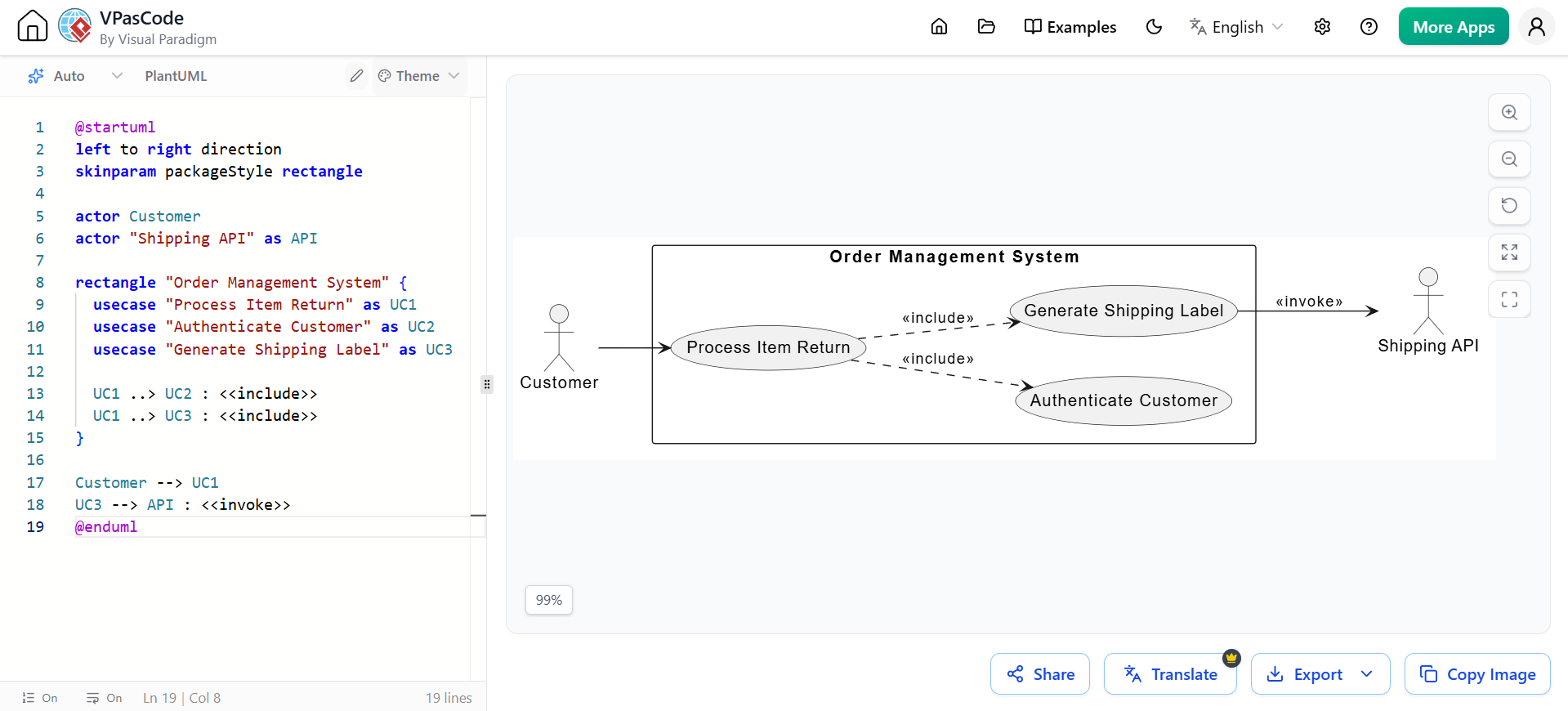
@startuml
left to right direction
skinparam packageStyle rectangle

actor Customer
actor "Shipping API" as API

rectangle "Order Management System" {
  usecase "Process Item Return" as UC1
  usecase "Authenticate Customer" as UC2
  usecase "Generate Shipping Label" as UC3

  UC1 ..> UC2 : <<include>>
  UC1 ..> UC3 : <<include>>
}

Customer --> UC1
UC3 --> API : <<invoke>>
@enduml
Writing robust use case descriptions is a disciplined practice that bridges the gap between abstract business needs and concrete software development. By adhering to strict writing guidelines—such as using the active voice, maintaining the present tense, and enforcing a call-and-response structure—you eliminate ambiguity. Furthermore, by properly structuring the content with clear preconditions, sunny-day main flows, and challenged alternate courses, you ensure that edge cases are caught during the design phase rather than in production. Finally, leveraging UML relationships like Include, Extend, and Generalization allows you to model complex system logic cleanly and efficiently.
To bring these textual descriptions and visual models to life, utilizing the right tooling is essential. Visual Paradigm is highly recommended for this task. It offers a comprehensive suite of UML modeling tools that allow you to seamlessly create Use Case Diagrams, map <<include>> and <<extend>> relationships, and write detailed, formatted use case descriptions all within a single, integrated environment. By combining rigorous writing practices with a powerful tool like Visual Paradigm, your team will be well-equipped to deliver robust, error-free software requirements.

