
In today's fast-paced software development landscape, the gap between code and documentation continues to widen. Developers spend countless hours maintaining architectural diagrams that quickly become outdated, while teams struggle with fragmented toolchains and incompatible syntax standards. Enter Visual Paradigm's VPasCode—Visual Paradigm's revolutionary browser-based Diagram-as-Code (DaC) platform that bridges this critical divide.
VPasCode represents a paradigm shift in how technical teams create, manage, and share architectural documentation. By combining the power of multiple industry-standard diagramming engines (PlantUML, Mermaid.js, and Graphviz) with cutting-edge AI capabilities and a zero-setup cloud environment, VPasCode eliminates the traditional friction points that have plagued software documentation for decades.
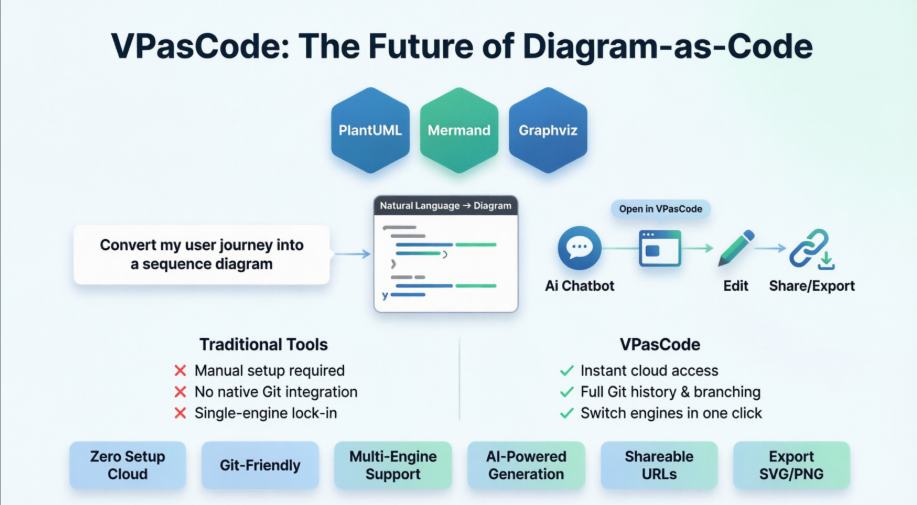
This comprehensive tutorial will guide you through VPasCode's unique advantages, demonstrate how to leverage its AI-powered Chatbot for instant diagram generation, and show you how to seamlessly transition from natural language descriptions to production-ready architectural visuals—all without writing a single line of diagram code manually.
VPasCode (pronounced "V-P-as-code") is Visual Paradigm's unified, cloud-native Diagram-as-Code platform designed specifically for modern development teams. Unlike traditional visual modeling tools that require drag-and-drop interfaces or local installations, VPasCode operates entirely in your browser, allowing you to create professional-grade diagrams through text-based syntax.
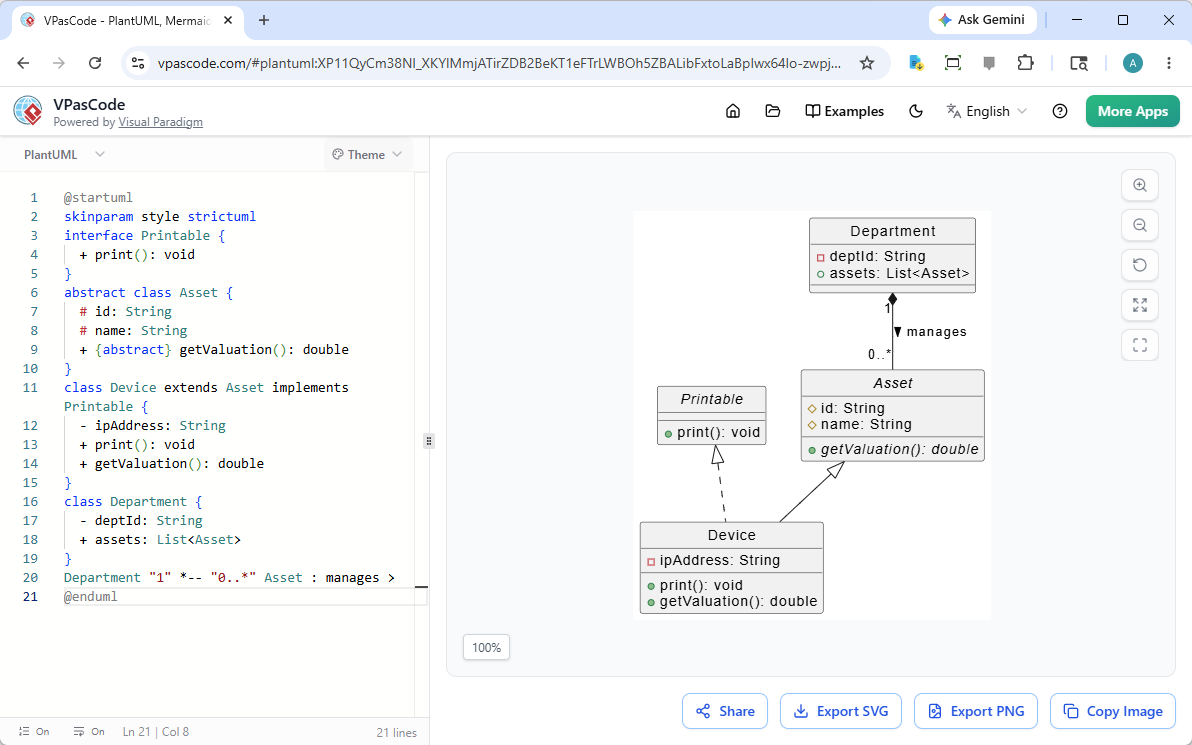
The VPasCode dual-panel editor featuring real-time preview and multi-engine support
The platform serves as a centralized workspace where developers, solution architects, and engineering teams can:
While the Diagram-as-Code ecosystem includes various tools, VPasCode distinguishes itself through several critical differentiators that address real-world development challenges:
The Problem with Traditional Tools:
Most DaC editors lock you into a single syntax engine. If your team uses PlantUML for enterprise architecture but DevOps prefers Graphviz for infrastructure mapping, you're forced to maintain separate toolchains, switch between browser tabs, or install conflicting local dependencies.
The VPasCode Solution:
VPasCode is the only platform that natively supports PlantUML, Mermaid.js, and Graphviz simultaneously in a single interface. The editor auto-detects your syntax and renders instantly—no configuration required.
| Feature | Traditional DaC Editors | VPasCode |
|---|---|---|
| Engine Support | Single engine per tool | Three major engines + expandable |
| Setup Required | Java/Node.js installations | Zero-setup cloud rendering |
| Team Collaboration | Fragmented workflows | Unified URL sharing |
| Learning Curve | Engine-specific training | One interface, multiple syntaxes |
The Competitive Edge:
While other DaC tools require manual syntax writing, VPasCode integrates directly with Visual Paradigm's AI-powered Chatbot, enabling natural language to diagram conversion. This isn't just a convenience feature—it's a fundamental workflow transformation.
Real-World Impact:
Traditional enterprise modeling tools require:
VPasCode delivers enterprise capabilities through:
Unlike closed ecosystems, VPasCode is designed as an adaptable platform. As new diagramming standards emerge (C4 model extensions, new markdown specifications, custom DSL formats), they can be integrated directly into your existing workspace without migration headaches.
VPasCode's unified environment doesn't just support multiple engines—it empowers you to select the optimal syntax for each specific architectural challenge:
Best For:
Example Use Case:
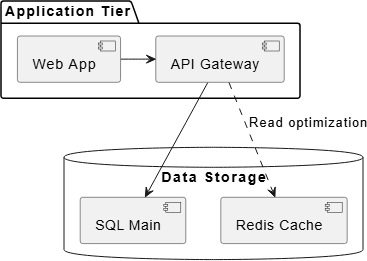
@startuml
package "Application Tier" {
    [Web App] -right-> [API Gateway]
}
database "Data Storage" {
    [API Gateway] --> [SQL Main]
    [API Gateway] ..> [Redis Cache] : "Read optimization"
}
@enduml
Best For:
Example Use Case:
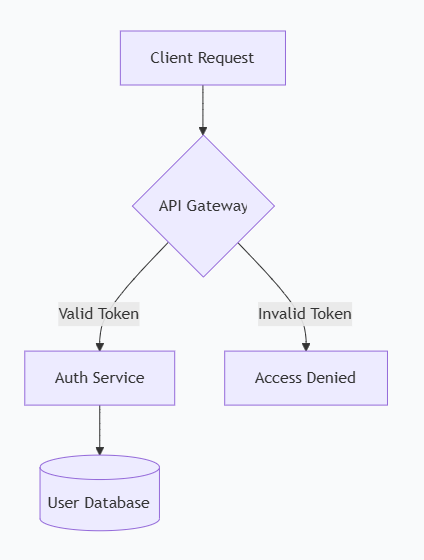
graph TD
    A[Client Request] --> B{API Gateway}
    B --> |Valid Token| C[Auth Service]
    B --> |Invalid Token| D[Access Denied]
    C --> E[(User Database)]
Best For:
Looking for a powerful, free diagram-as-code tool? Effortlessly render PlantUML, Mermaid, Graphviz, and 20+ programming languages in real time—powered by instant AI error fixing and automatic format detection.
One of VPasCode's most revolutionary features is its seamless integration with Visual Paradigm's AI Chatbot. This integration transforms how teams approach architectural documentation—from manual syntax writing to conversational design.
The Chatbot understands natural language descriptions and converts them into executable diagram code. Instead of memorizing syntax or consulting documentation, you simply describe what you want to visualize.
Example Conversation:
You: "Create a microservice architecture for a food delivery app with customers, delivery drivers, and restaurant managers. Show how they interact with the main application."
AI Chatbot: Generates complete PlantUML or Mermaid code representing:
The workflow from AI generation to editable diagram is remarkably simple:
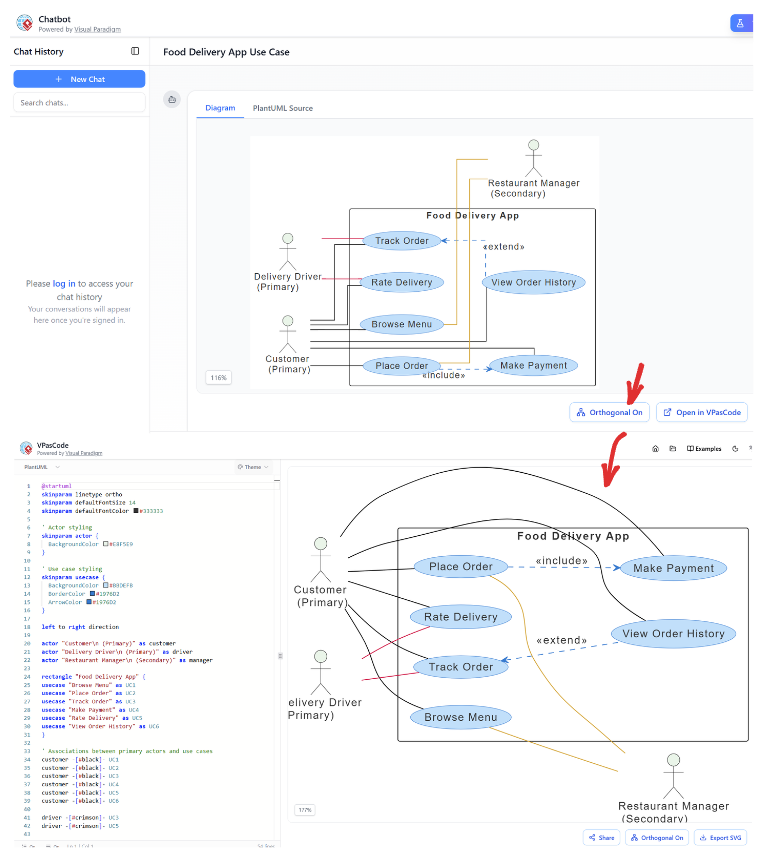
Step 1: Access the AI Chatbot
Step 2: Describe Your Architecture
Use natural language to describe your system:
Step 3: Review the Generated Diagram
The Chatbot instantly renders your description as a visual diagram with:
Step 4: Click "Open in VPasCode"
This is the critical integration point:
Step 5: Refine and Customize
Once in VPasCode, you can:
Step 6: Export or Share
Beyond simple diagram generation, the AI integration offers:
1. Automated Verification
The AI parses your diagrams to identify:
2. C4 Hierarchical Modeling
Generate multi-level architecture documentation:
3. Iterative Refinement
Continue the conversation to modify diagrams:
Getting started requires no installation, no configuration, and no learning curve.
Navigate to VPasCode Playground to access the dual-panel editor:
Option A: AI-Generated (Fastest)
Option B: Manual Syntax (Most Control)
Paste this Mermaid example:
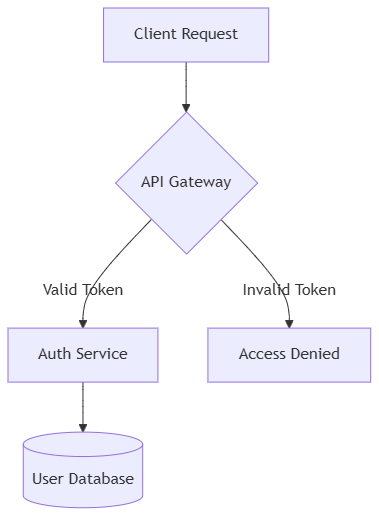
graph TD
    A[Client Request] --> B{API Gateway}
    B --> |Valid Token| C[Auth Service]
    B --> |Invalid Token| D[Access Denied]
    C --> E[(User Database)]
Or this PlantUML example:
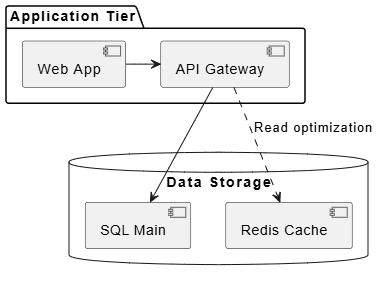
@startuml
package "Application Tier" {
    [Web App] -right-> [API Gateway]
}
database "Data Storage" {
    [API Gateway] --> [SQL Main]
    [API Gateway] ..> [Redis Cache] : "Read optimization"
}
@enduml
Use the control bar to:
1. Copy Shareable URL
2. Download High-Res SVG
3. Download PNG
Here's how a typical development team leverages VPasCode in their daily workflow:
Day 1: Initial Design
Day 2-3: Iterative Refinement
Day 4: Final Documentation
/docs/architecture directoryResult: Professional documentation created in hours instead of days, with zero manual drawing, perfect version control, and seamless team collaboration.
Because diagrams exist as plain text:
git diffThe editor provides:
Each diagram renders in:
Even if you know diagram syntax, begin with the AI Chatbot to:
Define which engine to use for what:
.puml, .mmd, and .dot files in /docsInstead of sending screenshots:
Problem: Trying to model entire systems at once
Solution: Start with AI-generated high-level views, then drill down iteratively
Problem: Treating diagrams as one-off artifacts
Solution: Store all syntax files in Git alongside source code
Problem: Using only one syntax engine
Solution: Leverage VPasCode's multi-engine support for optimal tool selection
Problem: Forgetting to update diagrams when code changes
Solution: Use AI to regenerate diagrams from updated descriptions; integrate into CI/CD
Problem: Sending static images instead of editable code
Solution: Always share VPasCode URLs for collaborative editing
If you're currently using drag-and-drop diagramming tools or fragmented DaC editors, here's your migration path:
VPasCode represents more than just another diagramming tool—it's a fundamental reimagining of how technical teams create, maintain, and share architectural knowledge. By eliminating the traditional barriers between code and documentation, VPasCode enables a future where:
Documentation Keeps Pace with Development
No more outdated diagrams gathering digital dust. With AI-powered generation and Git-friendly versioning, your architecture documentation evolves alongside your codebase, always current and always accurate.
Collaboration Transcends Technical Boundaries
Product managers can describe systems in plain English. Developers can refine those descriptions with precise syntax. Architects can validate structures against best practices. All within the same unified platform, without tool switching or format conversion.
Quality Becomes Automatic
Consistent styling, proper layouts, and syntax validation happen automatically. Teams spend less time formatting and more time thinking about architecture. The AI catches edge cases and suggests improvements before problems reach production.
Knowledge Becomes Accessible
Shareable URLs mean anyone can view, understand, and contribute to system architecture. New team members onboard faster. Stakeholders make informed decisions. The entire organization develops a shared understanding of technical systems.
The Diagram-as-Code revolution is here, and VPasCode is leading the charge. Whether you're a solo developer documenting your side project, a DevOps engineer mapping complex infrastructure, or an enterprise architect designing mission-critical systems, VPasCode provides the tools, flexibility, and AI-powered intelligence to elevate your documentation game.
Start Your Journey Today
The gap between code and documentation ends now. Welcome to the future of architectural visualization. Welcome to VPasCode.
Ready to transform your documentation workflow? Start creating professional diagrams in seconds with VPasCode—where AI meets architecture, and ideas become visuals instantly.

