
In the complex world of software engineering, modeling tools often promise comprehensive solutions but deliver overwhelming complexity. The Unified Modeling Language (UML) is no exception—it is a highly expressive language capable of modeling intricate, distributed, and hard real-time systems. However, most developers never need this full breadth of capability.
This tutorial is built on a powerful principle: you can model 80 percent of most problems by using about 20 percent of the UML. By focusing on a core subset of features, you can provide immediate value to your projects without getting lost in semantic intricacies. Whether you are new to modeling or an experienced developer looking to streamline your approach, mastering these essential elements will bring clarity and stability to your software design.
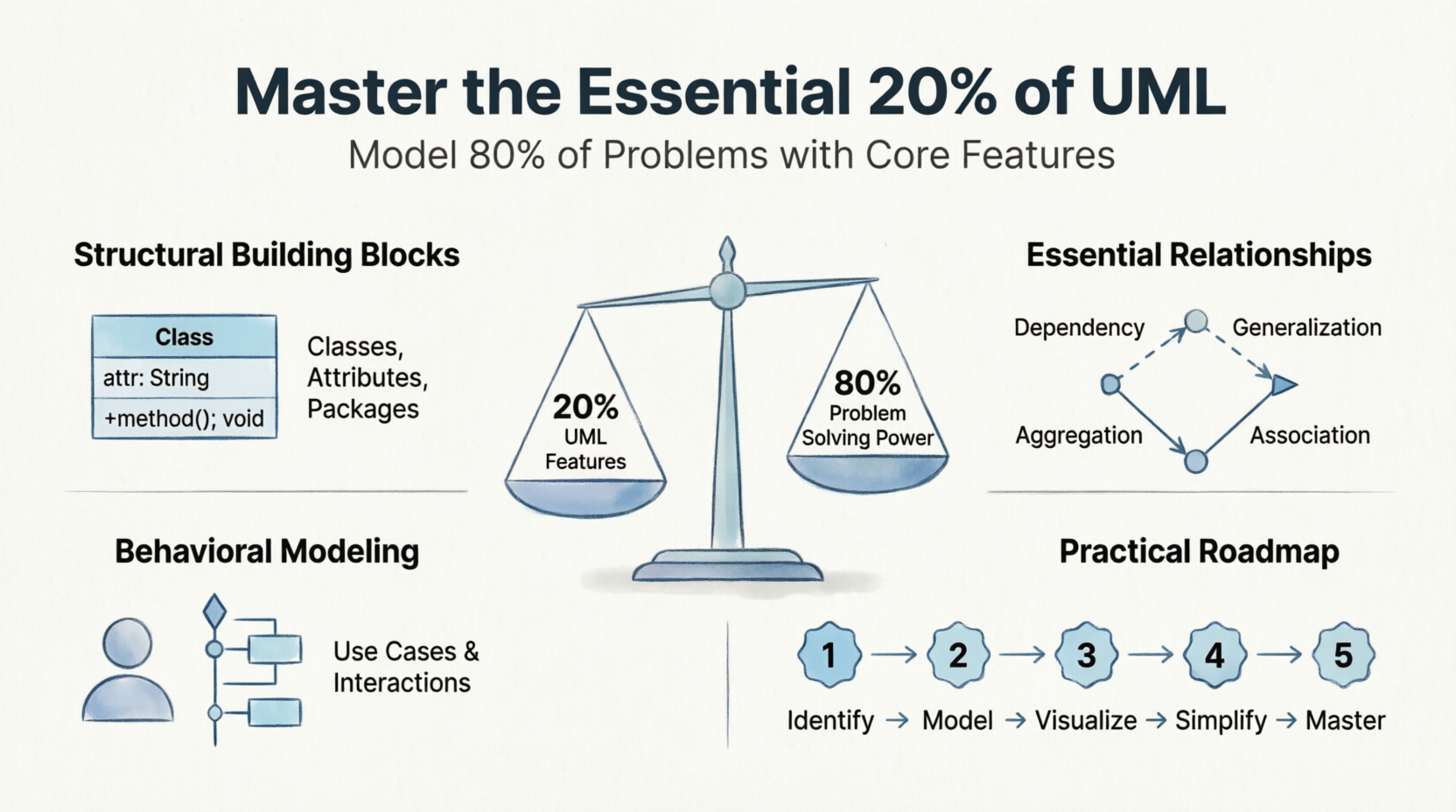
The "nouns" of your model represent the static parts of your system, whether they are conceptual or physical. Understanding these building blocks is the first step toward effective modeling.
Classes are the most important building blocks in UML. A class is a description of a set of objects that share the same:
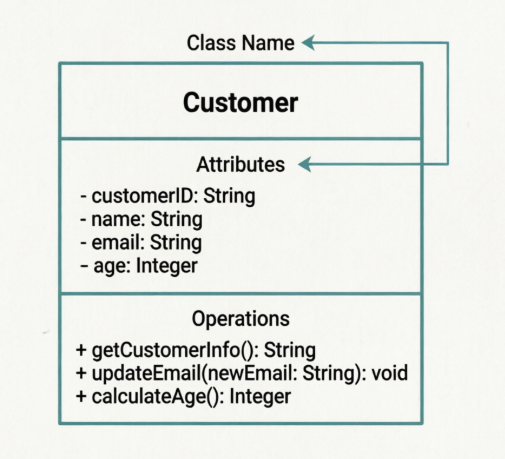
Figure 1: A basic class diagram showing attributes and operations.
At the start of your modeling journey, keep it simple. Use names for attributes and operations to clarify the intent of your model. Avoid diving into detailed signatures too early; instead, focus on what the class does and holds.
Instead of immediately specifying method parameters and return types, begin by defining responsibilities—the contracts or obligations of a class. A well-structured class usually has only a handful of these responsibilities, making it easier to understand and maintain.
As your system grows, use packages as "boxes" to organize your model into manageable, cohesive groups of elements. Packages help group elements that tend to change together, improving readability and maintainability.
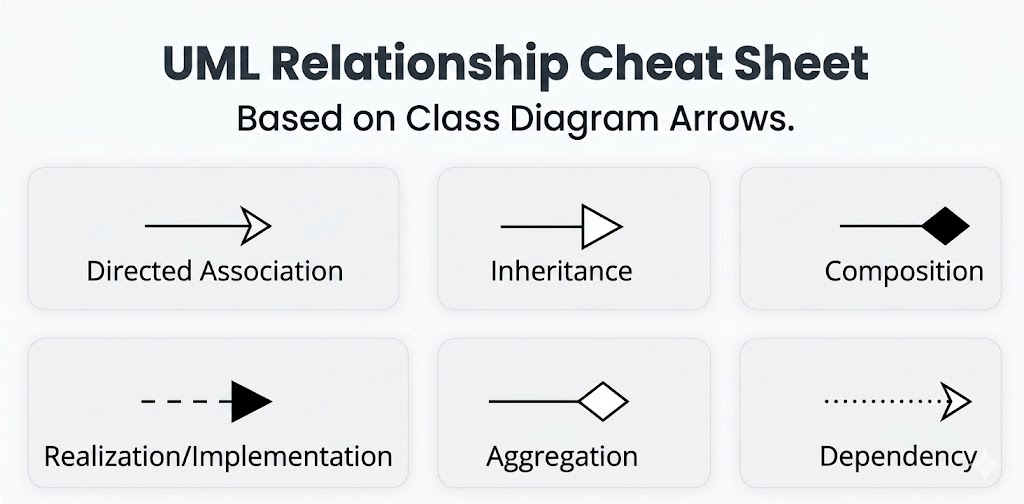
Abstractions rarely stand alone. Modeling how things relate to one another is as important as modeling the things themselves. Here are the four key relationships you need to know:
A "using" relationship where a change in the specification of one element may affect another. Use dependencies for non-structural connections, such as when a class is passed as a parameter to an operation.
An "is-a-kind-of" relationship where a specialized element (child) can be substituted for a more general element (parent). This is the foundation of inheritance in object-oriented design.
A structural relationship that describes a set of links among objects. Use associations primarily for stable, structural paths across which objects interact. Unlike dependencies, associations represent longer-term connections.
A special kind of association representing a "whole/part" relationship. For example, a company consists of various departments, but those departments can exist independently of the company.
Once you have the static "vocabulary" of your system, you need to model its behavior over time and space. This is where behavioral diagrams come into pl
Use cases describe sequences of actions a system performs that yield observable results of value to an actor. They are the primary tool for capturing requirements and understanding user goals.
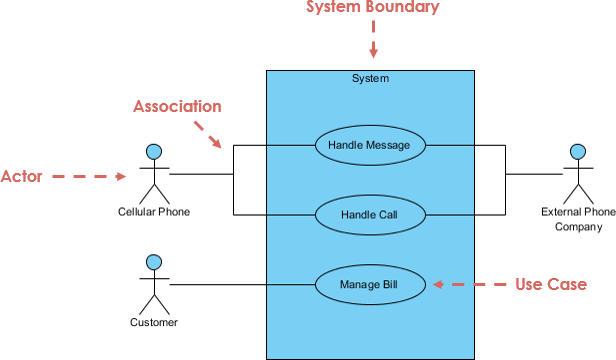
Figure 5: A simple use case diagram showing actors and their interactions.
Interactions involve modeling the flow of control between objects via message passing. Two common ways to visualize interactions are:
These provide a visual cue to the time ordering of messages. They show how objects communicate in a specific sequence over time.
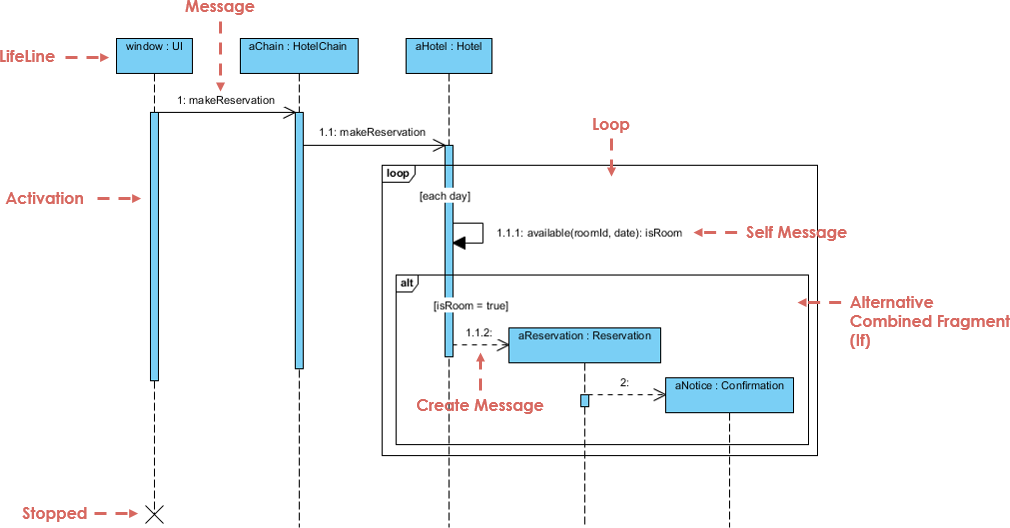
Figure 6: A sequence diagram illustrating message flow over time.
These emphasize the structural organization of the objects that send and receive messages. While less focused on timing, they highlight the relationships between interacting objects.
For those new to modeling or transitioning to UML, follow these steps for a high-value start:
Use techniques like Textual Analysis, CRC cards (Class-Responsibility-Collaboration) or use case-based analysis to identify the "crisp abstractions" (classes) that describe your problem domain. Ask: What are the key entities in my system?
Create simple class diagrams using the basic relationships mentioned above: dependency, generalization, and association. Focus on clarity rather than completeness.
Start by modeling how a user interacts with the system. This provides an immediate payback by helping you reason through important use cases and identify missing functionality.
Remember that a model is a simplification of reality. Focus only on the elements that have a broad effect and omit minor details irrelevant to your current level of abstraction. Less is often more.
Even power users should ensure they have a firm grasp of this basic 20 percent before diving into the complex semantics of concurrency, distribution, or advanced extensibility. Build a strong foundation first.
By focusing on the core 20 percent of UML, you can achieve clarity and stability in your software design without becoming overwhelmed by the total complexity of the language. Classes, relationships, use cases, and interaction diagrams form the backbone of effective modeling for most projects.
Remember, the goal of modeling is not to create perfect diagrams but to facilitate communication, uncover design flaws early, and ensure that your system meets user needs. Start small, iterate often, and let the 80/20 rule guide your journey toward better software architecture.
CRC Cards: A Tool for Object-Oriented Design: An explanation of Class-Responsibility-Collaboration cards, a lightweight technique for identifying classes and their responsibilities.

