
In the fast-paced world of Agile product management, clarity is currency. While user stories and roadmaps define what we build, Business Process Model and Notation (BPMN) defines how value flows through an organization. At the heart of this notation lies the Gateway—the critical decision point that transforms a static flowchart into a dynamic, executable logic model. Yet, for many teams, gateways remain a source of confusion, often misused or misunderstood, leading to process bottlenecks and ambiguous requirements. This guide demystifies BPMN gateways, moving beyond dry specifications to provide actionable insights for today’s practitioners.
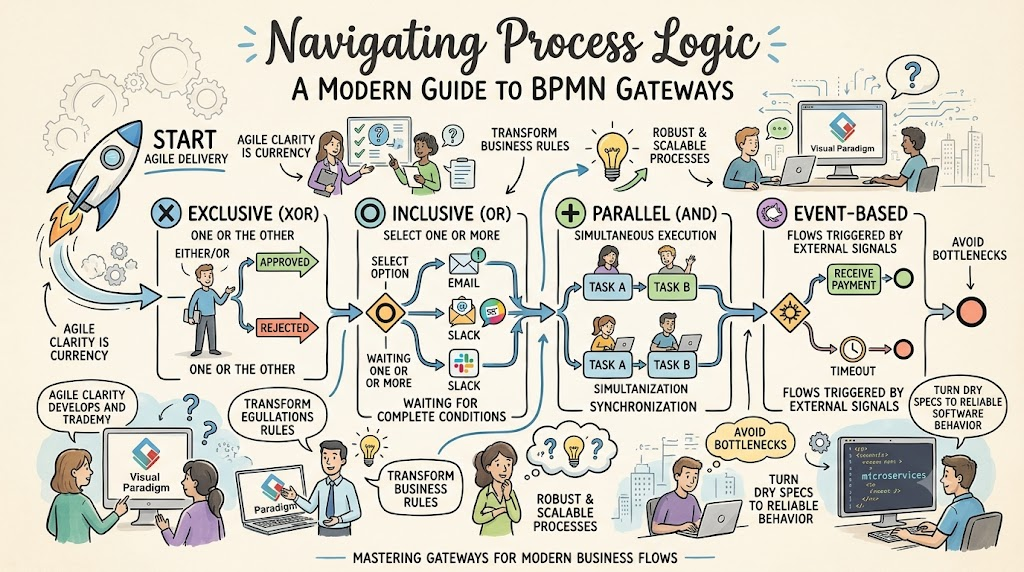
By combining foundational BPMN 2.0.2 concepts with modern tooling like Visual Paradigm and AI-assisted modeling, we explore how to design robust, scalable processes that keep pace with agile delivery cycles. Whether you are mapping a simple approval workflow or orchestrating complex microservices, mastering gateways is the key to turning business rules into reliable software behavior.
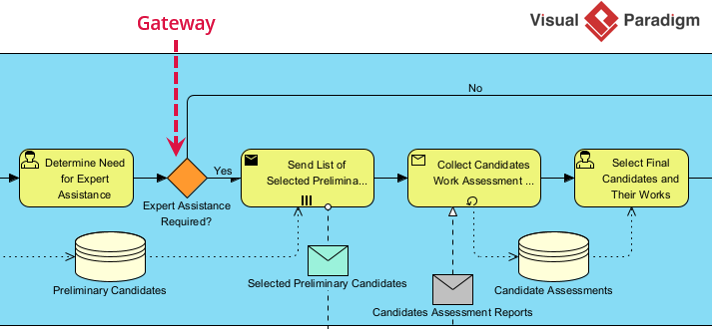
In Business Process Model and Notation (BPMN), a Gateway is the "traffic controller" of your process. While Tasks represent work being done, Gateways represent decisions and logic.
They do not perform work; they strictly control the flow of tokens (the process execution) by:
Diverging (Splitting): Taking one path and turning it into multiple parallel or conditional paths.
Converging (Merging): Taking multiple incoming paths and synchronizing them back into a single flow.
Agile Note: In Agile modeling, we often start with high-level flows. Gateways allow you to incrementally add complexity (e.g., adding an exception path later) without redrawing the whole diagram.
Based on the standard definitions (and the table you provided), here are the three primary gateways you will use in 90% of business processes.
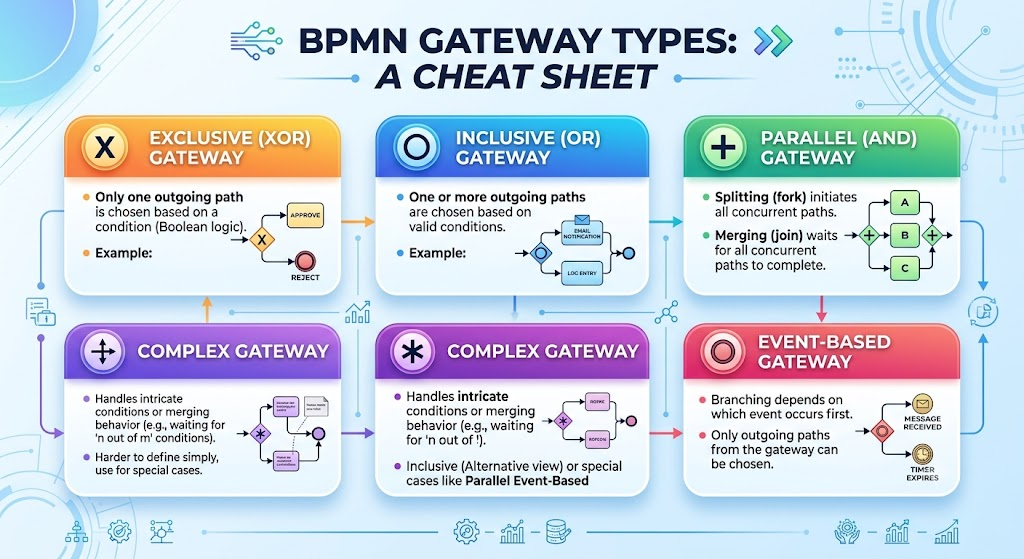
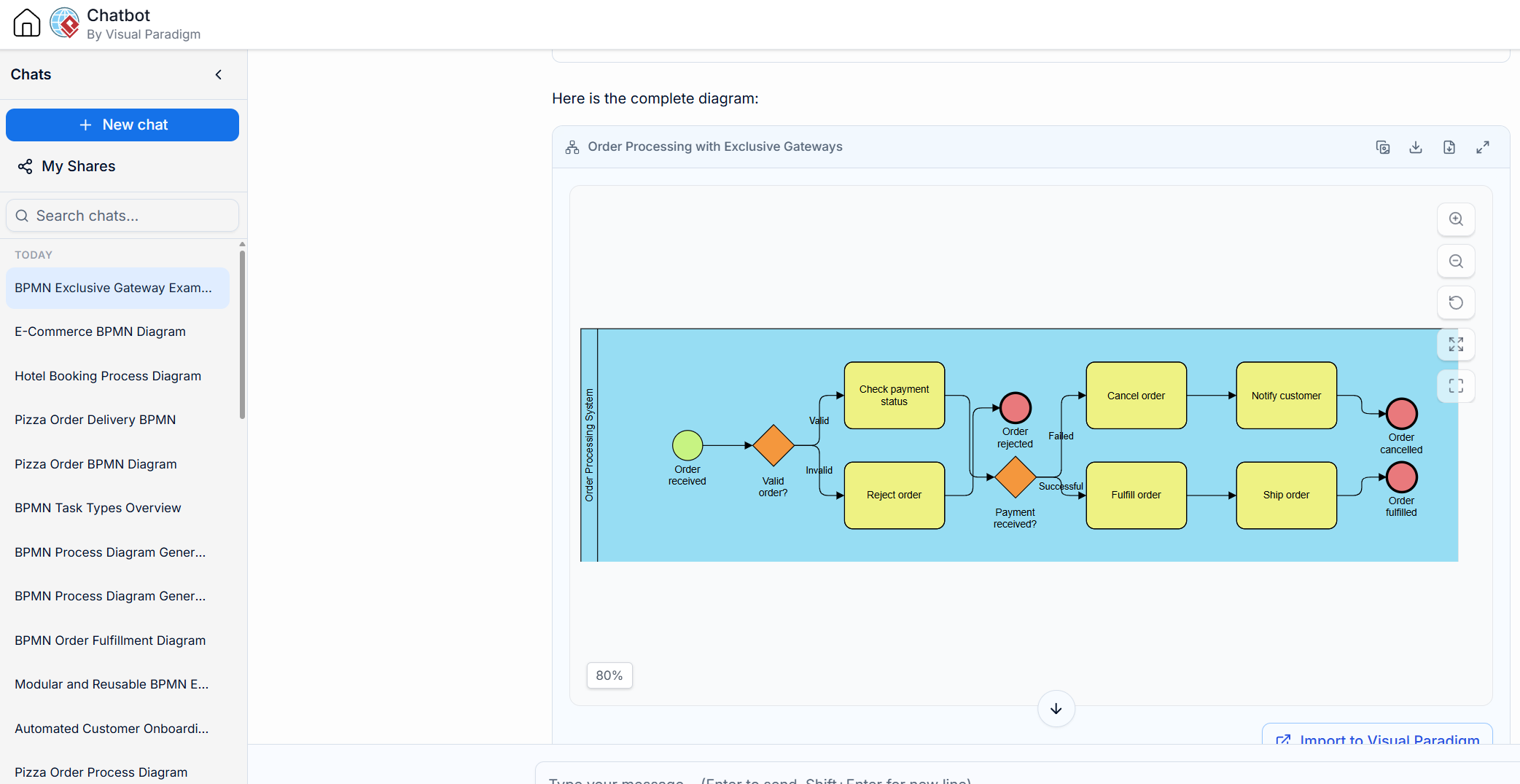
Symbol: Diamond with an "X" inside.
Purpose: Represents a decision where only one path can be taken.
Behavior:
Split: Evaluates conditions (e.g., "Is amount > $10k?"). The first condition that evaluates to true is taken; all others are ignored.
Merge: Waits for one incoming branch to arrive before continuing. It does not wait for others.
Real-World Example: A loan application. If credit score > 700, go to "Auto-Approve." If < 700, go to "Manual Review." You cannot do both.
Symbol: Diamond with a "O" (circle) inside.
Purpose: Represents a decision where one or more paths can be taken simultaneously based on independent conditions.
Behavior:
Split: Checks all conditions. If Condition A is true AND Condition B is true, both paths activate.
Merge: Acts as a synchronizer. It waits for all active incoming branches to complete before moving forward.
Real-World Example: An employee onboarding checklist. Based on the role, the system might trigger "IT Setup" AND "Security Badge" AND "HR Orientation." If it's a contractor, maybe only "IT Setup" triggers. The process waits for whichever tasks were triggered to finish.
Symbol: Diamond with a "+" inside. (Note: While not in your specific image snippet, this is essential for a complete guide).
Purpose: Splits flow into multiple paths that execute simultaneously, regardless of conditions.
Behavior:
Split: Creates a token for every outgoing sequence flow immediately.
Merge: Waits for all incoming branches to arrive before proceeding.
Real-World Example: Processing an order. Simultaneously: 1. Send confirmation email, 2. Notify warehouse, 3. Charge credit card.
| Do ✅ | Don't ❌ |
|---|---|
Label your sequence flows. When using Exclusive/Inclusive gateways, write the condition (e.g., [Amount > $500]) on the arrow, not inside the gateway. |
Don't use gateways for tasks. If you are describing work (e.g., "Check Data"), use a Task shape, not a Gateway. |
| Use Default Flows. For Exclusive gateways, always mark one path as "Default" (slash marker) to handle cases where no conditions are met. | Don't mix merging types. Don't merge a Parallel split with an Exclusive merge unless you fully understand token synchronization. |
| Keep it simple. If you have more than 4 outgoing paths from an Exclusive Gateway, consider breaking the process into a Sub-Process. | Don't leave conditions ambiguous. "Yes/No" is okay, but "Customer is VIP" is better than just "VIP". |
Visual Paradigm (VP) is an industry-standard tool that enforces BPMN 2.0 syntax, preventing you from making logical errors.
Syntax Enforcement: VP won't let you connect a Gateway to a Gateway directly (a common BPMN error). It forces valid topology.
Instant Validation: As you draw, VP highlights invalid connections in red, ensuring your model is executable-ready.
AI-Powered Modeling: Modern versions of VP integrate AI to help generate diagrams from text descriptions.
Open the Diagram: Create a new "Business Process Diagram."
Select the Gateway: In the toolbar, click the Gateway icon. You will see a dropdown for Exclusive (X), Inclusive (O), Parallel (+), and Event-Based.
Draw the Split: Drag the gateway onto the canvas. Connect an incoming flow. Drag outgoing flows.
Define Conditions (Crucial Step):
Double-click the Sequence Flow (the arrow), not the gateway.
In the specification window, select "Condition Type" -> "Expression".
Enter your logic: ${order.total > 1000}.
Set Default Flow: Right-click the preferred fallback sequence flow -> Select "Set as Default Flow." A slash / will appear on the arrow near the gateway.
For agile teams, speed is everything. You can use AI (like me, or integrated tools like VP AI) to accelerate gateway logic design.
Instead of drawing manually, describe the logic to an AI to get the structure right first.
Example Prompt:
"I am modeling a 'Refund Request' process in BPMN.
If the item is defective, send to Quality Check.
If the item is NOT defective but customer is Premium, send to Manager Approval.
If neither, auto-reject.
After Quality Check OR Manager Approval, merge back to 'Issue Refund'.
Which gateways should I use and what are the exact conditions?"
AI Output Strategy:
AI Analysis: The AI will identify that step 1 and 2 are mutually exclusive (you wouldn't usually check quality AND ask a manager for the same reason simultaneously), suggesting an Exclusive Gateway.
Condition Extraction: The AI will output the exact labels for your sequence flows: [Item == Defective], [Item != Defective AND Customer == Premium], [Default].
If you are using Visual Paradigm's AI features:
Open the AI Assistant panel in VP.
Type: "Create a BPMN diagram for an expense approval process where expenses under $50 are auto-approved, over $50 need manager approval, and over $5000 need VP approval."
VP will generate the diagram with the correct Exclusive Gateways and labeled flows automatically.
Refine: Use the AI to ask, "How do I add a timeout if the manager doesn't approve in 48 hours?" (This introduces Timer Events and potentially an Inclusive Gateway for complex merging).
| Scenario | Gateway Symbol | Logic |
|---|---|---|
| Decision: Yes/No, A/B/C | Exclusive (X) | Only 1 path taken. |
| Checklist: Do A, maybe B, maybe C | Inclusive (O) | 1+ paths taken based on independent rules. |
| Multitasking: Do A and B and C together | Parallel (+) | All paths taken simultaneously. |
| Wait for Message/Time: Wait for external trigger | Event-Based | First event to occur wins. |
By combining the strict logic of BPMN Gateways with the visual enforcement of Visual Paradigm and the rapid prototyping capabilities of AI Chatbots, agile teams can document complex business rules in minutes rather than days.

