
Use case prioritization is the process of deciding which features, functionalities, or user stories should be built first. For beginners, this can feel overwhelming, but it doesn't have to be. This guide will walk you through the simplest techniques that require minimal complexity while delivering maximum value.
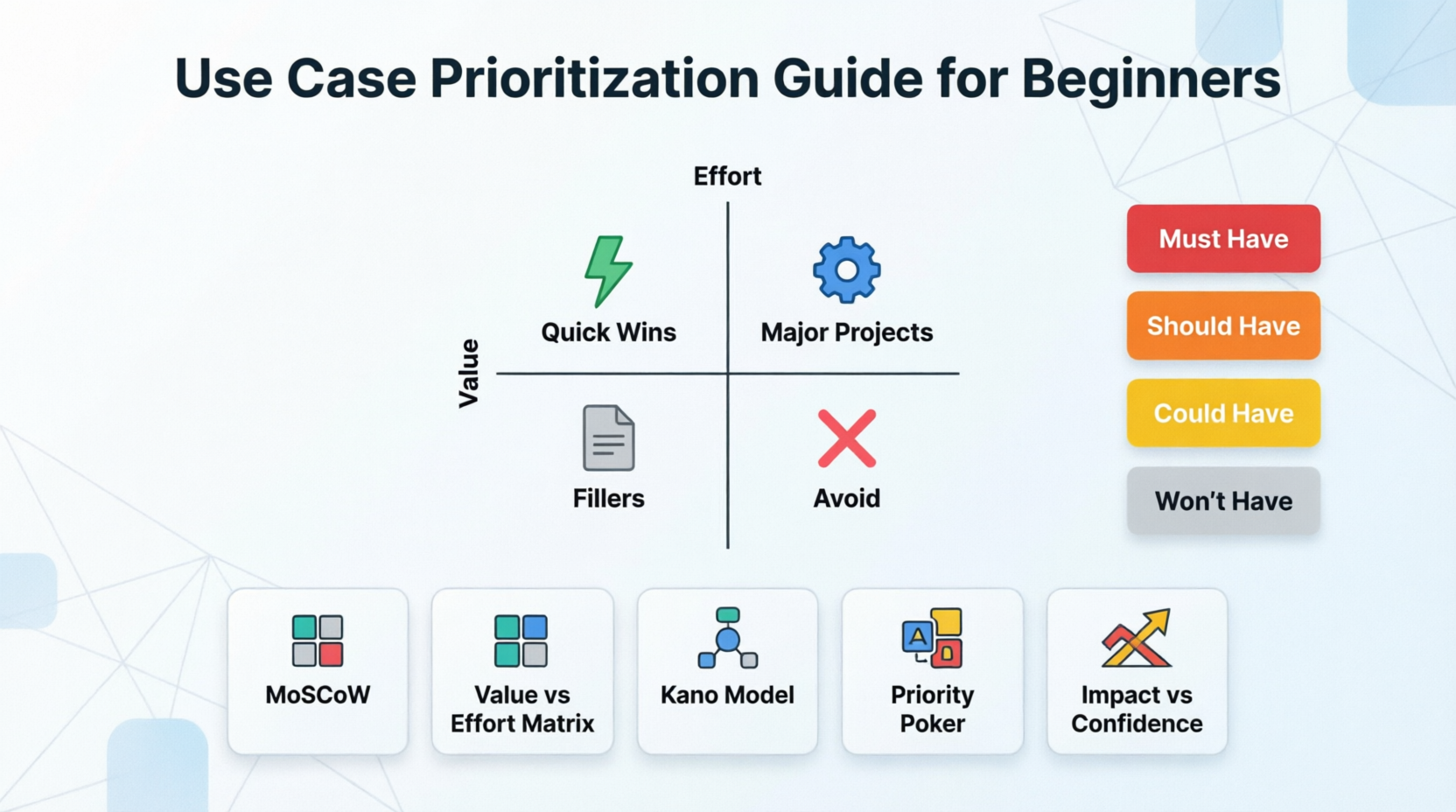
Before diving into techniques, understand why prioritization matters:
Limited resources: You can't build everything at once
Time constraints: Deadlines exist
User value: Some features matter more than others
Risk management: Tackle uncertain items early
Stakeholder alignment: Get everyone on the same page
Value: How much benefit does this provide to users or the business?
Effort: How much time, money, and resources will it take?
Must-have: Critical for launch or core functionality
Nice-to-have: Adds value but isn't essential
Some use cases must be built before others (e.g., login before profile management)
High-risk items should often be tackled earlier to avoid surprises
What it is: Categorize use cases into four buckets.
The Categories:
M - Must Have: Non-negotiable, critical for success
S - Should Have: Important but not vital; can wait if necessary
C - Could Have: Desirable but not necessary; "nice to have"
W - Won't Have (this time): Not a priority now; maybe later
How to Do It:
List all your use cases
Discuss each one with stakeholders
Assign it to one of the four categories
Build in order: M → S → C → W
Example: Building an E-commerce Website
| Use Case | Category | Reason |
|---|---|---|
| Browse products | Must Have | Core functionality |
| Add to cart | Must Have | Essential for purchasing |
| Checkout & payment | Must Have | Can't sell without it |
| Product reviews | Should Have | Builds trust, but not critical for launch |
| Wishlist feature | Could Have | Nice enhancement |
| AI recommendations | Won't Have | Too complex for V1 |
Pros:
Simple and intuitive
Easy to explain to stakeholders
Quick to implement
Cons:
Doesn't account for effort
Can become subjective without clear criteria
What it is: Plot use cases on a simple 2x2 grid based on value and effort.
The Four Quadrants:
High Value, Low Effort → Do First (Quick Wins)
High Value, High Effort → Plan Carefully (Major Projects)
Low Value, Low Effort → Fillers (Do If Time Permits)
Low Value, High Effort → Avoid (Time Wasters)
How to Do It:
Draw a 2x2 grid
Label axes: Value (low to high) and Effort (low to high)
Plot each use case as a dot
Prioritize based on quadrant
Example: Mobile Banking App Features
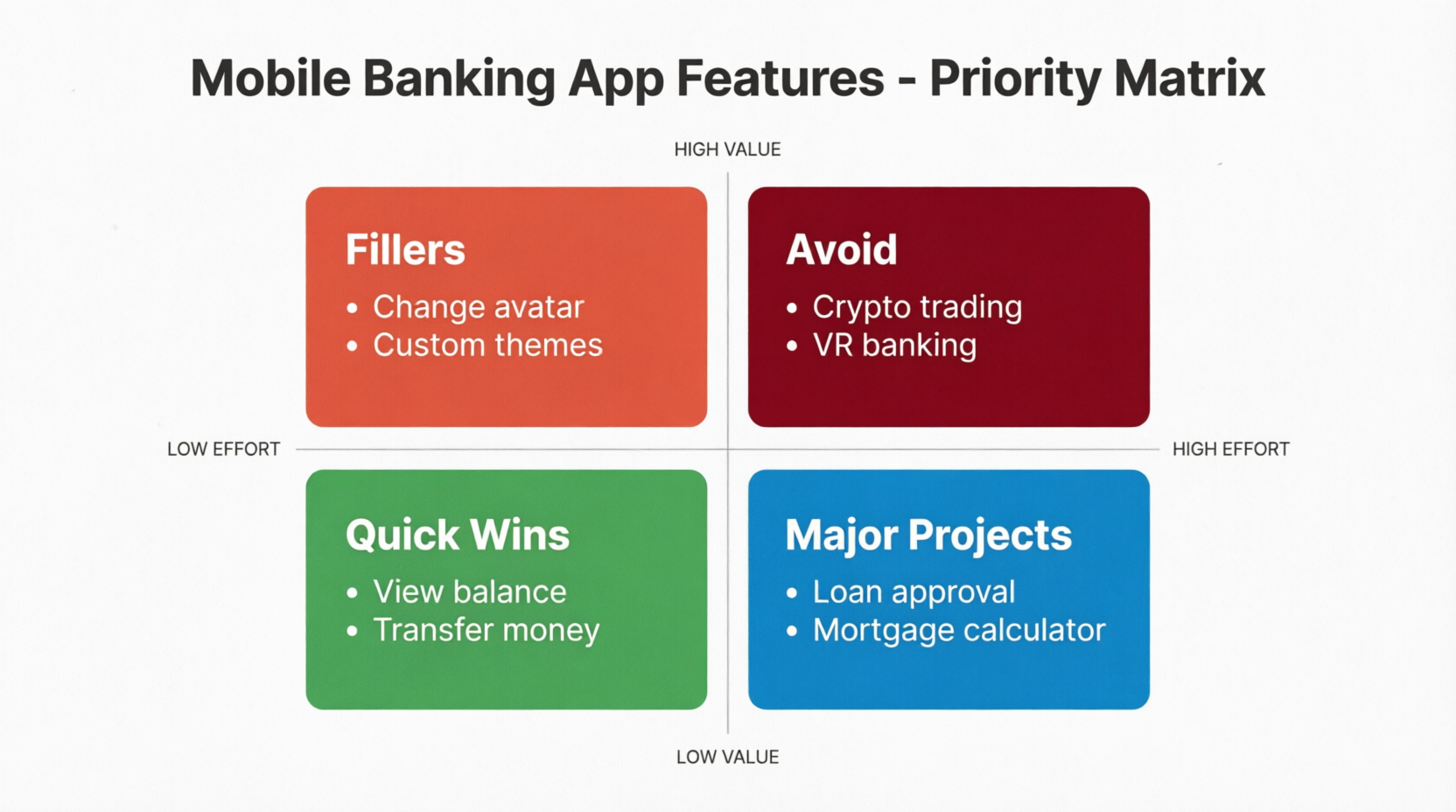
Priority Order:
Quick Wins (High Value, Low Effort)
Major Projects (High Value, High Effort)
Fillers (Low Value, Low Effort)
Avoid (Low Value, High Effort)
Pros:
Visual and easy to understand
Balances value and effort
Helps identify quick wins
Cons:
Requires estimating both value and effort
Can be subjective without data
What it is: Categorize features based on how they affect user satisfaction.
The Categories:
Basic Needs: Expected features; absence causes dissatisfaction
Performance Needs: More is better; linear relationship with satisfaction
Delighters: Unexpected features; create excitement
How to Do It:
List your use cases
Ask: "What happens if we DON'T include this?"
Users are angry → Basic Need
Users are neutral → Performance Need or Delighter
Ask: "What happens if we DO include this?"
Users are satisfied but not excited → Performance Need
Users are delighted → Delighter
Prioritize: Basic → Performance → Delighters
Example: Hotel Booking Platform
| Use Case | Category | Explanation |
|---|---|---|
| Search hotels by location/dates | Basic Need | Users expect this; without it, they're frustrated |
| Secure payment processing | Basic Need | Non-negotiable; expected |
| Filter by price/rating | Performance Need | Better filters = happier users |
| Fast loading speed | Performance Need | Faster = better experience |
| Virtual room tours | Delighter | Unexpected; creates wow factor |
| Personalized travel tips | Delighter | Nice surprise; not expected |
Priority Order:
Basic Needs (must fulfill expectations)
Performance Needs (improve satisfaction)
Delighters (add excitement, but only after basics are covered)
Pros:
User-centric approach
Helps avoid over-investing in delighters before basics
Great for understanding user expectations
Cons:
Requires user research or assumptions
Categories can shift over time (delighters become basics)
What it is: A collaborative voting technique where team members vote on priority.
How to Do It:
Gather your team (product, engineering, design, etc.)
Present one use case at a time
Each person votes using numbers (e.g., 1-5 scale):
1 = Low priority
5 = High priority
Discuss differences in votes
Re-vote if needed
Average the final votes to determine priority
Example: Social Media App Features
Use Case: "Add Stories feature (24-hour disappearing posts)"
| Team Member | Vote | Reasoning |
|---|---|---|
| Product Manager | 5 | Competitors have it; high user demand |
| Engineer | 3 | Complex to build; requires new infrastructure |
| Designer | 4 | Great engagement opportunity |
| Marketing | 5 | Huge promotional potential |
| Customer Support | 2 | Will increase support tickets |
Average: (5+3+4+5+2) / 5 = 3.8 → Medium-High Priority
Pros:
Collaborative; gets buy-in from entire team
Surfaces different perspectives
Reduces bias from single decision-maker
Cons:
Time-consuming for many use cases
Can lead to groupthink if not facilitated well
What it is: Similar to Value vs. Effort, but uses confidence level instead of effort.
The Two Axes:
Impact: How much positive effect will this have?
Confidence: How sure are we about our assumptions?
The Four Quadrants:
High Impact, High Confidence → Do Now
High Impact, Low Confidence → Test/Experiment
Low Impact, High Confidence → Consider Later
Low Impact, Low Confidence → Ignore
How to Do It:
Estimate impact (1-10 scale)
Rate confidence (1-10 scale) based on data/research
Plot on matrix
Prioritize accordingly
Example: Fitness App Features
| Use Case | Impact (1-10) | Confidence (1-10) | Action |
|---|---|---|---|
| Workout tracking | 9 | 9 | Do Now |
| Social sharing | 7 | 8 | Do Now |
| AI personal trainer | 8 | 3 | Test/Experiment |
| Nutrition logging | 6 | 7 | Consider Later |
| AR workout visualization | 4 | 2 | Ignore |
Pros:
Encourages data-driven decisions
Highlights areas needing more research
Reduces risk of building wrong things
Cons:
Confidence can be subjective
Requires some data or research
Brainstorm with your team
Collect from stakeholders
Review user feedback
Don't filter yet—capture everything
Merge similar use cases
Eliminate exact duplicates
Clarify vague items
For absolute beginners, start with MoSCoW or Value vs. Effort Matrix. They're the easiest to understand and apply.
Work through each use case
Involve key stakeholders
Document your reasoning
Review with team
Check for dependencies
Adjust based on new information
Sequence use cases based on priority
Account for dependencies
Set realistic timelines
Solution: Break into smaller batches (e.g., quarterly or sprint-level)
Solution: Map out dependencies before finalizing priority
Solution: Use structured techniques (like Priority Poker) to ensure all voices are heard
Solution: Review and adjust priorities regularly (every sprint or month)
Solution: Start simple. You don't need complex scoring models as a beginner.
Scenario: You're building a task management app for small teams.
Create tasks
Assign tasks to team members
Set due dates
Mark tasks as complete
Add comments to tasks
Upload attachments
Create recurring tasks
Generate reports
Integrate with calendar
Mobile app notifications
Dark mode
Custom task templates
Team chat feature
Time tracking
Gantt chart view
Must Have:
Create tasks
Assign tasks to team members
Set due dates
Mark tasks as complete
Should Have:
Add comments to tasks
Mobile app notifications
Upload attachments
Could Have:
Create recurring tasks
Custom task templates
Integrate with calendar
Won't Have (V1):
Generate reports
Dark mode
Team chat feature
Time tracking
Gantt chart view
| Use Case | Value | Effort | Priority |
|---|---|---|---|
| Create tasks | High | Low | 1 |
| Mark tasks as complete | High | Low | 2 |
| Set due dates | High | Low | 3 |
| Assign tasks | High | Medium | 4 |
Create tasks
Mark tasks as complete
Set due dates
Assign tasks to team members
Add comments to tasks
Mobile app notifications
Upload attachments
| Technique | Best For | Complexity | Time Required |
|---|---|---|---|
| MoSCoW | Small teams, quick decisions | Low | 30-60 min |
| Value vs. Effort | Balancing ROI | Low-Medium | 1-2 hours |
| Kano Model | User-centric products | Medium | 2-3 hours |
| Priority Poker | Team alignment | Medium | 1-2 hours |
| Impact vs. Confidence | Data-driven teams | Medium | 1-2 hours |
Start Simple: Don't over-engineer your first prioritization session
Involve the Right People: Include product, engineering, design, and customer-facing roles
Document Your Decisions: Write down why you prioritized something a certain way
Be Flexible: Priorities change as you learn more
Focus on Outcomes: Remember why you're building each feature
Say No: Prioritization is as much about what NOT to build
Practice: The more you do it, the better you'll get
Prioritization doesn't have to be complicated. As a beginner, start with MoSCoW or Value vs. Effort Matrix. These techniques are simple, visual, and effective. As you gain experience, you can explore more sophisticated methods.
Remember: The best prioritization technique is the one your team actually uses. Keep it simple, stay consistent, and iterate as you learn.
Good luck with your prioritization journey! 🚀

