
Visual Paradigm Desktop VP Online

The Blueprint of Behavior: A Masterclass in Writing Flawless Use Case Descriptions

Introduction

In the realm of software engineering, few artifacts are as universally utilized—yet consistently misunderstood—as the use case. Originally formalized by Ivar Jacobson in the late 1980s, the use case was designed to be the ultimate boundary object: a textual description that could bridge the gap between the subjective world of business stakeholders and the rigid, logical world of system architects.

However, in modern agile development, the use case has been largely usurped by the simpler user story. While user stories are excellent for capturing quick feature requests on a whiteboard, they fail spectacularly when tasked with mapping complex, multi-variant system behaviors, error handling, and intricate data validation. This is where the use case description reclaims its rightful place. Yet, a poorly written use case is arguably worse than having none at all; it shackles developers to brittle user-interface details and blinds teams to critical failure points until production crashes.
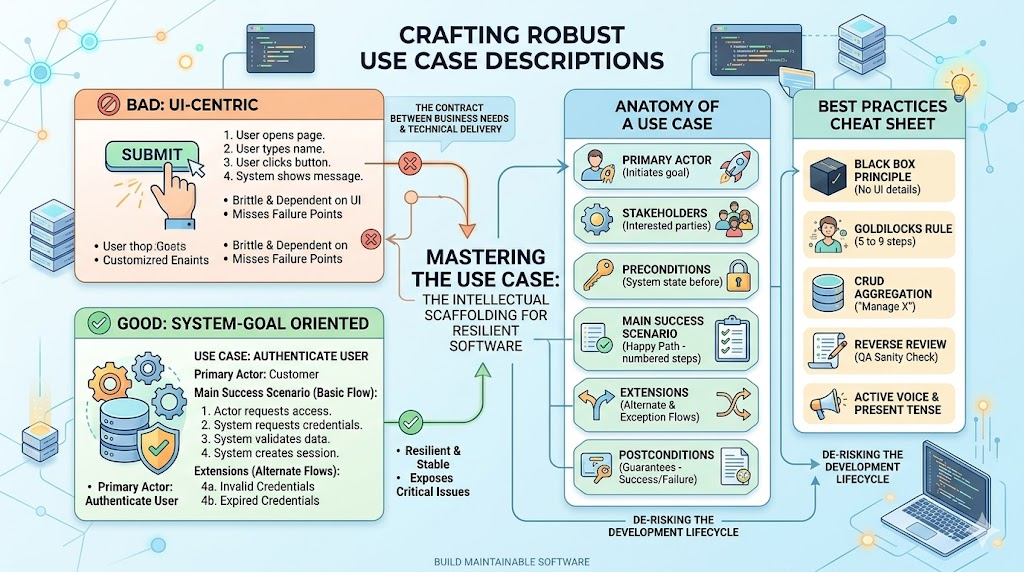
Crafting Robust Use Case Descriptions

This masterclass provides an exhaustive, critical review of the use case description. We will dissect why most descriptions fail, clarify the often-overlooked technical concepts, walk through stark examples that transform vagueness into robustness, and provide a cheat-sheet of guidelines to ensure your documentation survives UI changes, resists scope creep, and acts as a true contract between business needs and technical delivery.


Part 1: The Critical Review – Strengths and Pitfalls

The Strengths

  • Bridging the Gap: The primary strength of a well-written use case description is its ability to translate vague stakeholder wishes ("We need a faster checkout") into concrete, testable interactions ("The system validates the cart total before redirecting to the payment gateway").
  • Scope Definition: It explicitly defines the boundary of the system. If an action occurs outside the system (e.g., "Customer receives an email"), it is clearly demarcated as an external actor interaction, preventing scope creep.
  • Identifying Failure Points: Unlike simple user stories, a robust use case description forces the team to think about alternate flows and exceptions (e.g., "What happens if the password expires?"), which uncovers technical debt early.

The Weaknesses (The "Gotchas")

  • The "System" Trap: The single biggest failure is mistaking User Interface (UI) actions for System actions. For example, writing "The user clicks the 'Submit' button" is terrible; the system doesn't care about the click. The correct description is: "The system receives the submitted form data."
  • Over-Elaboration: Use cases often devolve into massive, 50-step documents that are impossible to maintain. If a use case has more than 3 significant alternate flows, it is usually a sign that you are describing an entire business process rather than a single, discrete goal.
  • Forgotten Preconditions: Many descriptions omit the state the system must be in before the use case starts (e.g., "User is authenticated" or "Inventory count exists"). This leads to runtime errors.

Part 2: The Anatomy – Key Concepts Defined

To write a perfect description, you must move beyond the diagram (stick figures and ovals) and master these textual components:

Concept Definition Critical Insight
Primary Actor The entity that initiates the use case to achieve a goal. Usually a human, but can be an external system (e.g., a Time Scheduler).
Stakeholders Entities with an interest in the outcome (not just the user). Often forgotten. Example: The Accounting Department cares about a "Cancel Order" use case, even if they don't touch the system.
Preconditions What must be true before the use case starts. Critical: If this fails, the use case should not execute. (e.g., "User session is active.")
Main Success Scenario (Basic Flow) The "happy path" where everything goes perfectly. Must be written in chronological, numbered steps.
Extensions (Alternate Flows) Variations that occur due to errors or optional choices. Distinguish between Alternate (a valid different path) and Exception (failure).
Postconditions (Guarantees) What must be true after the use case finishes. Differentiates between Success (Order is placed) and Failure (Order is rolled back).

Part 3: From Bad to Brilliant – Worked Examples

Let us review three examples to illustrate the degradation and elevation of quality.

Example 1: The "Garbage" Description (Too Vague)

"User logs into the website."
Review: Useless. No preconditions, no alternate flows, no definition of "logged in." It implies UI clicks rather than system state.

Example 2: The "UI-Centric" Description (Common Mistake)

"1. User opens browser. 2. User types username. 3. User clicks login. 4. System shows dashboard."
Review: This is a UI specification, not a system behavior description. If the UI changes from a "click" to a "swipe," the entire use case breaks. It also fails to handle security.

Example 3: The "Gold Standard" Description (System-Goal Oriented)

Use Case: Authenticate User
Primary Actor: Registered Customer
Stakeholders: Customer (wants access), Security Team (wants integrity).
Preconditions:

  1. The user account exists in the database.
  2. The account is not locked.

Main Success Scenario (Basic Flow):

  1. The Actor initiates the authentication process.
  2. The System requests the Actor's credentials (Identifier and Secret).
  3. The Actor provides the required credentials.
  4. The System validates the credentials against the stored record.
  5. The System creates an authenticated session token.
  6. The System returns a success signal and the session token to the Actor.

Extensions (Alternate/Exception Flows):

  • 4a. Invalid Credentials:
    1. The System increments the failed attempt counter.
    2. If counter < 3, the System notifies the Actor of invalid credentials and returns to step 2.
    3. If counter >= 3, the System locks the account and notifies the Security Team via email. The use case terminates.
  • 4b. Expired Credentials:
    1. The System detects the Secret has expired.
    2. The System redirects the Actor to the "Update Credentials" use case.

Postconditions:

  • Success: Actor session is active; Audit log records the successful login.
  • Failure: Actor session remains null; Account remains locked.

Part 4: Guidelines, Tips & Tricks (The Cheat Sheet)

1. The "Goldilocks" Rule of Detail

  • The Sweet Spot: Aim for 5 to 9 steps in your Main Success Scenario. If it is longer, break it into sub-use cases.
  • Data Mention: State the logical data entity (e.g., "Order Details") without specifying UI character limits. Save strict field validation for data dictionaries.

2. The "Black Box" Principle (UI vs. System)

  • Guideline: The system is a black box. Describe what goes in and what comes out, not the internal gears.
  • Tip: Replace physical UI verbs with logical system verbs.
    • ❌ Bad: "The user selects a product from the dropdown."
    • ✅ Good: "The user specifies the desired product."

3. Mastering Alternate & Exception Flows

  • Guideline: For every step in your Main Scenario, ask: "Can this step fail?"
  • Tip: Number your Alternate Flows by referencing the step they branch from (e.g., Step 4a).
  • Categorize:
    • Alternate Flow: A valid different route to success (e.g., Pay with PayPal).
    • Exception Flow: A failure route (e.g., Payment Declined) that terminates the use case.

4. Preconditions and Postconditions (The Contract)

  • Trick: Separate Postconditions into two categories:
    • Minimal Guarantee: What is always true, even if the use case fails (e.g., "Transaction is rolled back").
    • Success Guarantee: What is only true if the use case completes successfully (e.g., "Inventory is decremented").

5. The "CRUD" Aggregation Trick

  • Guideline: Combine Create, Read, Update, and Delete into a single use case called "Manage [Entity]."
  • List the CRUD operations as alternate flows within this single use case to avoid massive documentation bloat.

6. The "3-Strike" Rule for Scope Creep

  • If a use case has more than 3 significant Alternate/Exception flows, it is too large. You are likely describing an entire business process. Split it into a diagram of smaller, atomic use cases using <<include>> or <<extend>>.

7. Golden Rule of Language

  • Write in active voice, present tense.
  • Mandatory forbidden words: Avoid Click, Tap, Swipe, Hover, Button, Screen, Page.
  • Mandatory preferred words: Use Submit, Request, Provide, Specify, Confirm, Validate, Process.

8. The "Reverse Review" Technique (QA Sanity Check)

  • Hand your finished use case to a QA Engineer and say: "Write your test cases based solely on this document. Do not look at the UI."
  • If the QA engineer writes test cases that perfectly align with your Basic Flow and Extensions without asking clarifying questions, your use case is bulletproof.

Part 5: The Ultimate Quick-Reference Cheat Sheet

Do This Avoid This
Describe system responses and actor actions. Describe UI elements (clicks, buttons, screens).
Define strict Preconditions and Postconditions. Assume the system is in a "default" state.
Reference external use cases for complex sub-processes. Write a 50-step novel trying to solve everything at once.
Group CRUD operations into "Manage X." Write 4 separate use cases for basic entity maintenance.
Use numbers to trace Alternate Flows (e.g., Step 4a). Write Alternate Flows as disconnected, floating paragraphs.
Ask: "What happens if this fails?" for every step. Only write the "Happy Path" and ignore errors.

Conclusion: The Art of the Contract

The use case description is far more than a bureaucratic checkbox on a requirements document; it is the intellectual scaffolding upon which resilient, maintainable software is built. The difference between a disastrous project and a successful one often lies not in the code itself, but in the clarity of the conversations that happen before the code is written. A precise description forces stakeholders to confront uncomfortable questions about system boundaries, preconditions, and failure states long before they become million-dollar production incidents.

Treat your use case descriptions as a living contract, not a static novel. Obsess over the system's responsibilities rather than the user's physical interactions. Challenge every step by asking the "Golden Question"—"If the UI changes entirely, does this break?"—and ruthlessly purge any phrasing that fails this test. Remember that a great description standardizes the "what" and the "if," while leaving the "how" and the "look" to the designers and developers.

In an industry obsessed with velocity, it is tempting to skip this rigorous exercise in favor of faster coding. But speed without direction is chaos. By mastering the anatomy of a high-quality use case description, you are not just documenting requirements; you are de-risking the entire development lifecycle, ensuring that every line of code written serves a validated, boundary-tested business goal. Master this discipline, and you will master the art of delivering software that works exactly as it should—even when everything goes wrong.

Turn every software project into a successful one.

We use cookies to offer you a better experience. By visiting our website, you agree to the use of cookies as described in our Cookie Policy.

OK