Introduction: Finding Rhythm in the Chaos of Delivery
In today’s fast-paced product and software development landscape, teams are constantly pulled in multiple directions: shifting priorities, emerging technologies, stakeholder demands, and the relentless pressure to deliver value faster. Without a structured rhythm, this complexity quickly devolves into chaos, burnout, and missed deadlines.
Enter time-boxing—the foundational heartbeat of Agile frameworks like Scrum. Far from being a restrictive constraint, a time-box is a liberating boundary. It forces focus, demands prioritization, and creates a predictable cadence for inspection and adaptation. By capping events to fixed durations, teams stop endlessly debating and start consistently delivering.
However, simply scheduling these meetings is not enough. Too many organizations treat Agile ceremonies as bureaucratic checkboxes, resulting in status-report Daily Scrums, slide-deck Sprint Reviews, and blame-game Retrospectives. To unlock the true power of Agile, teams must understand the intent behind each event, who should be involved, and what tangible outcomes must be produced.
This comprehensive guide breaks down the six core time-boxed events and ceremonies of iterative delivery: the Sprint, Sprint Planning, Daily Scrum, Sprint Review, Sprint Retrospective, and Backlog Refinement. Packed with real-world examples, best practices, and common pitfalls, this guide will equip you to transform your team’s meetings from time-wasters into the engine of continuous improvement and predictable value delivery.
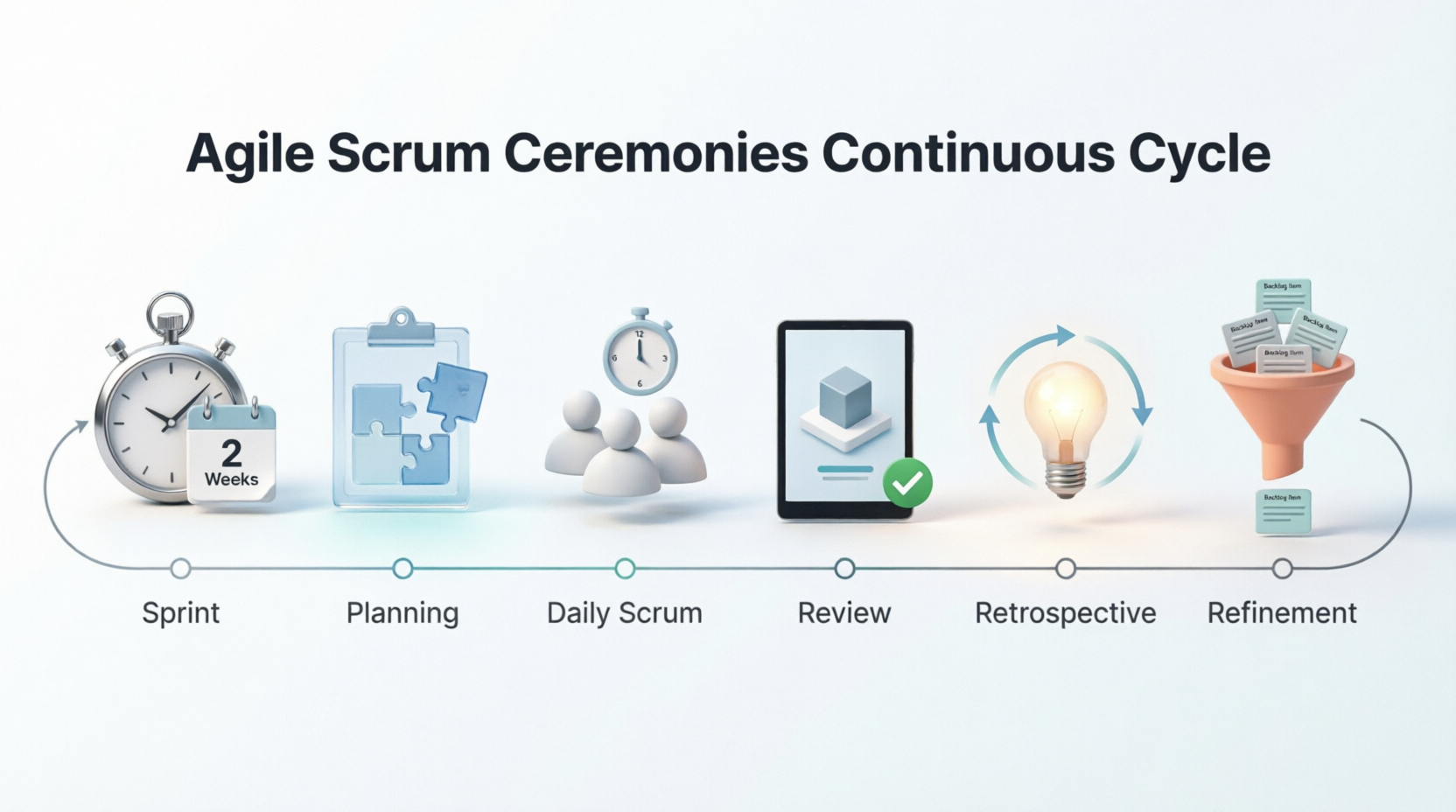
Time-boxing is the heartbeat of iterative Agile frameworks. By capping events to fixed durations, teams create rhythm, enforce discipline, protect focus, and ensure continuous delivery and improvement. While most commonly associated with Scrum, these ceremonies apply to any iterative or incremental delivery model.
Below is a comprehensive, example-rich guide to the six core time-boxed events, including their purpose, structure, best practices, common pitfalls, and real-world applications.
📦 1. Sprint (or Iteration)
Purpose
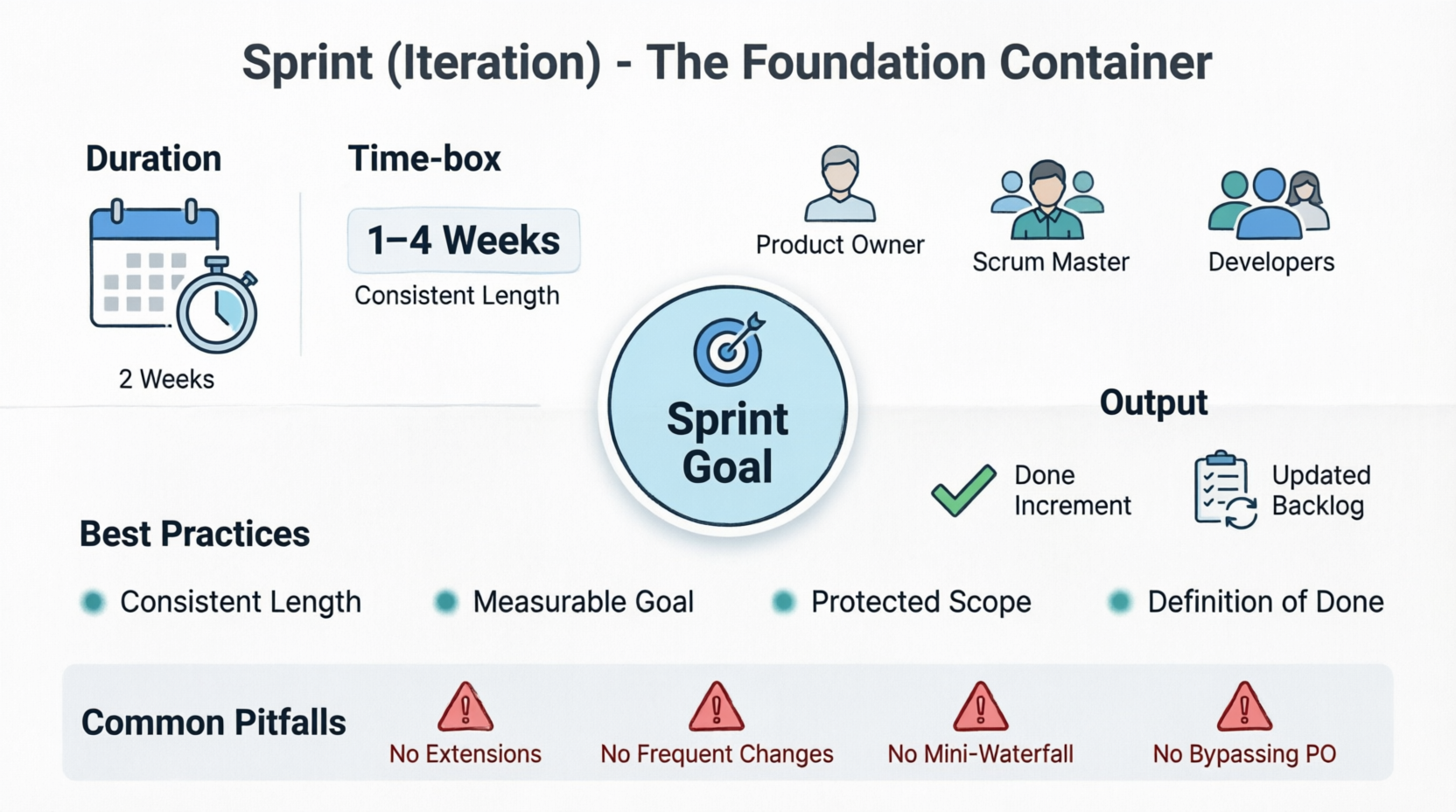
The Sprint is the foundational container event. It is a fixed-length cycle during which a cross-functional team creates a "Done," usable, and potentially releasable product increment.
Time-Box
- Standard: 1–4 weeks (2 weeks is most common)
- Rule: Length remains consistent across sprints to establish predictability and rhythm.
Participants
Entire Scrum Team: Product Owner (PO), Scrum Master (SM), Developers
Key Rules & Outputs
- A clear Sprint Goal is established
- Scope may be clarified/negotiated with the PO, but changes that endanger the Sprint Goal are not allowed
- Output: Potentially shippable Increment + Updated Backlog
✅ Best Practices
- Keep sprint length consistent; change only after a retrospective review
- Define one measurable Sprint Goal per iteration
- Protect the sprint from external interruptions
- Treat the increment as truly "Done" (meets Definition of Done)
⚠️ Common Pitfalls
- Extending the sprint to "finish more work"
- Changing sprint length frequently
- Treating the sprint as a mini-waterfall with late integration/testing
- Allowing stakeholders to bypass the PO and inject mid-sprint requests
💡 Real-World Examples
| Context |
Sprint Length |
Sprint Goal |
Example Outcome |
| SaaS Product Team |
2 weeks |
"Enable users to export reports in CSV format" |
Working export feature, documented, tested, deployed to staging |
| Mobile App Startup |
1 week |
"Reduce app launch time to under 2 seconds" |
Optimized asset loading, performance benchmarks met, released to beta |
| IoT Hardware/Software |
3 weeks |
"Sync sensor data to cloud with 99% reliability" |
Firmware update + cloud endpoint validated, integration test suite passing |
| Marketing Ops Team |
2 weeks |
"Launch Q3 email nurture sequence for enterprise segment" |
5 automated emails built, tracked in CRM, A/B tests configured |
📋 2. Sprint Planning
Purpose
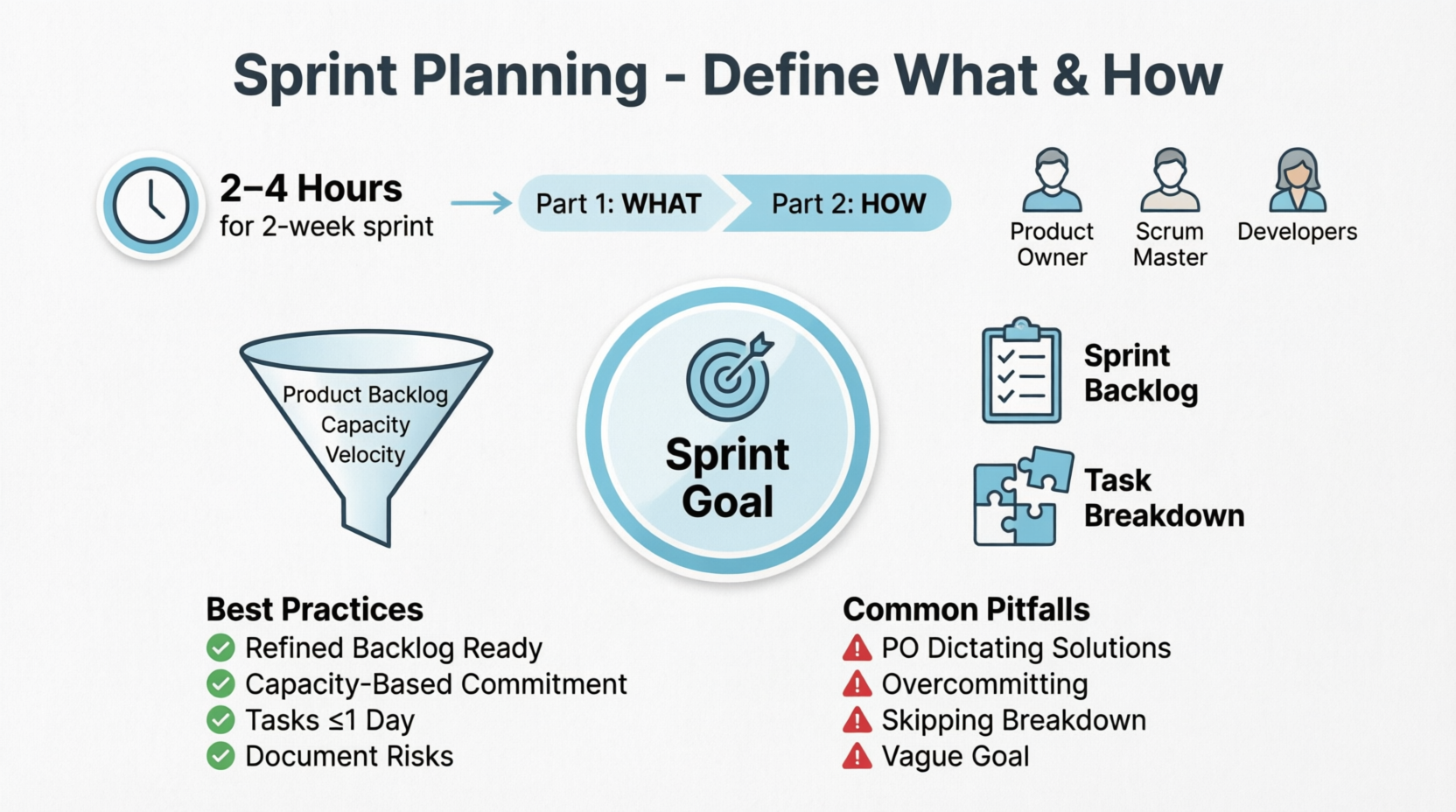
To determine what can be delivered in the upcoming sprint and how that work will be achieved. It aligns the team around a shared Sprint Goal and creates a actionable plan.
Time-Box
- Max 8 hours for a 1-month sprint
- Practical: 2–4 hours for a 2-week sprint
- Split into two parts (optional but recommended):
- What can we do? (PO presents, team selects)
- How will we do it? (Team breaks down tasks, estimates, identifies dependencies)
Participants
Scrum Team (PO, SM, Developers)
Inputs & Outputs
- Inputs: Product Backlog, latest increment, team capacity, past velocity
- Outputs: Sprint Goal, Sprint Backlog (selected items + task breakdown + initial plan)
✅ Best Practices
- PO arrives with a refined, prioritized backlog
- Team commits based on capacity, not pressure
- Break items into tasks ≤ 1 day of work
- Explicitly document risks and assumptions
⚠️ Common Pitfalls
- PO dictating solutions or task assignments
- Overcommitting due to optimism bias
- Skipping task breakdown ("we'll figure it out later")
- Vague Sprint Goal ("do some bug fixes and features")
💡 Real-World Examples
- E-Commerce Checkout Team
- PO presents: "Reduce cart abandonment by 10%"
- Team selects: Guest checkout, address auto-complete, payment retry logic
- Tasks split: Frontend form validation, API integration, test cases, UX copy review
- Sprint Goal: "Enable faster, frictionless checkout for first-time visitors"
- Data Science Team
- PO presents: Improve churn prediction model accuracy to 85%
- Team selects: Feature engineering, model retraining, validation pipeline
- Tasks split: Data cleaning script, hyperparameter tuning, performance dashboard
- Sprint Goal: "Deploy v2 churn model with validated lift over baseline"
- Internal IT Support Team
- PO presents: Reduce ticket resolution time for password resets
- Team selects: Self-service portal update, SSO integration, knowledge base refresh
- Tasks split: UI mockups, backend auth config, user testing, rollout comms
- Sprint Goal: "Enable 70% of password resets via self-service portal"
🔄 3. Daily Scrum (Daily Stand-up)
Purpose
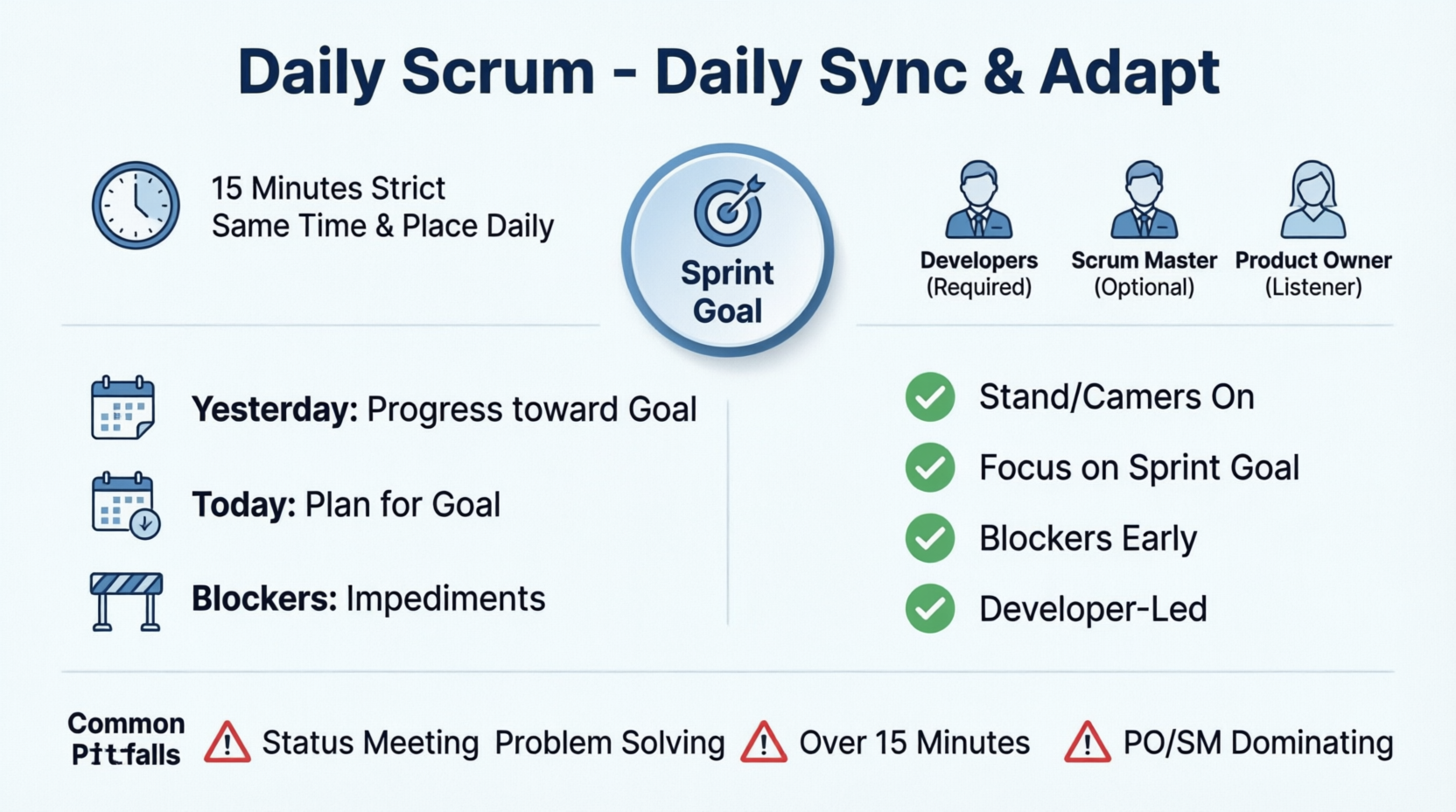
A 15-minute daily sync for Developers to inspect progress toward the Sprint Goal and adapt the plan for the next 24 hours. It is not a status report to management.
Time-Box
- Strictly 15 minutes
- Same time and place (or virtual room) every day
Participants
- Required: Developers
- Optional: SM (ensures it happens, facilitates if needed), PO (may attend as listener)
Focus Areas
- What did I do yesterday that helped the Sprint Goal?
- What will I do today to advance the Sprint Goal?
- Do I see any impediments or blockers?
- Note: Teams often adapt format; the core is inspecting progress, not answering three rigid questions.
✅ Best Practices
- Stand (or keep cameras on) to maintain energy and time discipline
- Focus on the Sprint Goal, not individual task lists
- Identify blockers early; take detailed discussions offline
- Developer-led; SM coaches, doesn't run it
⚠️ Common Pitfalls
- Turning it into a status meeting for managers
- Problem-solving during the sync
- Going over 15 minutes repeatedly
- SM or PO dominating the conversation
- Team members giving vague updates ("working on it")
💡 Real-World Examples
- Software Engineering Team
- Dev A: "Yesterday merged PR for payment validation. Today writing unit tests. Blocker: staging DB credentials expired."
- Dev B: "Finished API endpoint for user profiles. Today integrating with frontend. No blockers."
- Action: SM notes credential issue, resolves with DevOps after meeting.
- Hardware Firmware Team
- Dev A: "Flashed v3.2 to test board. Sensor readings stable. Today calibrating temperature thresholds."
- Dev B: "Debugging I2C bus timeout. Found race condition. Pairing with Dev C today to fix."
- Action: Pairing scheduled immediately after Daily Scrum.
- Remote/Distributed Team (Async + Sync Hybrid)
- Pre-meeting: Team posts updates in Slack thread by 9:00 AM local time
- 9:30 AM sync (10 mins): SM reads thread, team highlights 1-2 cross-dependencies and blockers
- Result: Time saved, async documentation created, blockers surfaced quickly
🎯 4. Sprint Review (Demo)
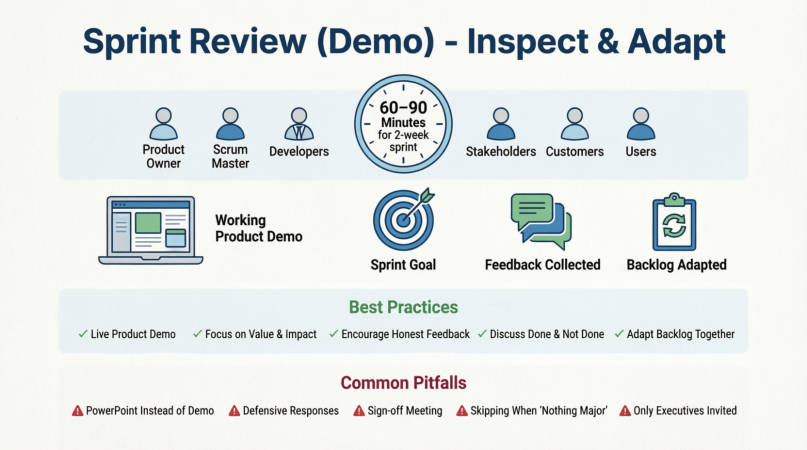
Purpose
To inspect the increment, gather stakeholder feedback, and collaboratively adapt the Product Backlog. It's a working session, not a presentation or approval gate.
Time-Box
- Max 4 hours for a 1-month sprint
- Practical: 60–90 minutes for a 2-week sprint
Participants
Scrum Team + Key Stakeholders, Customers, Users, Subject Matter Experts
Inputs & Outputs
- Inputs: Completed increment, Sprint Goal, Product Backlog, market/business updates
- Outputs: Stakeholder feedback, updated backlog priorities, shared understanding of product direction
✅ Best Practices
- Demonstrate working software/product, not slides
- Focus on value delivered and user impact
- Encourage honest, constructive feedback
- Discuss what was done, what wasn't, and why
- Adapt backlog based on new insights
⚠️ Common Pitfalls
- PowerPoint demos instead of live product
- Defensive responses to feedback
- Turning it into a sign-off meeting
- Skipping it because "nothing major was done"
- Only inviting executives, not actual users
💡 Real-World Examples
- FinTech Compliance App
- Demo: New transaction monitoring dashboard with real-time alert rules
- Feedback: Compliance officer requests export to PDF for audit trails
- Adaptation: PO adds "PDF export" to top of backlog, deprioritizes low-impact UI polish
- EdTech Platform
- Demo: Interactive quiz builder with auto-grading
- Feedback: Teachers want question bank sharing and difficulty tagging
- Adaptation: PO schedules refinement session to split "quiz builder" into modular features
- Internal HR Onboarding Tool
- Demo: Automated welcome email + checklist tracker
- Feedback: New hires report missing equipment request step
- Adaptation: Team adds IT provisioning workflow to next sprint, PO adjusts priority
🔍 5. Sprint Retrospective
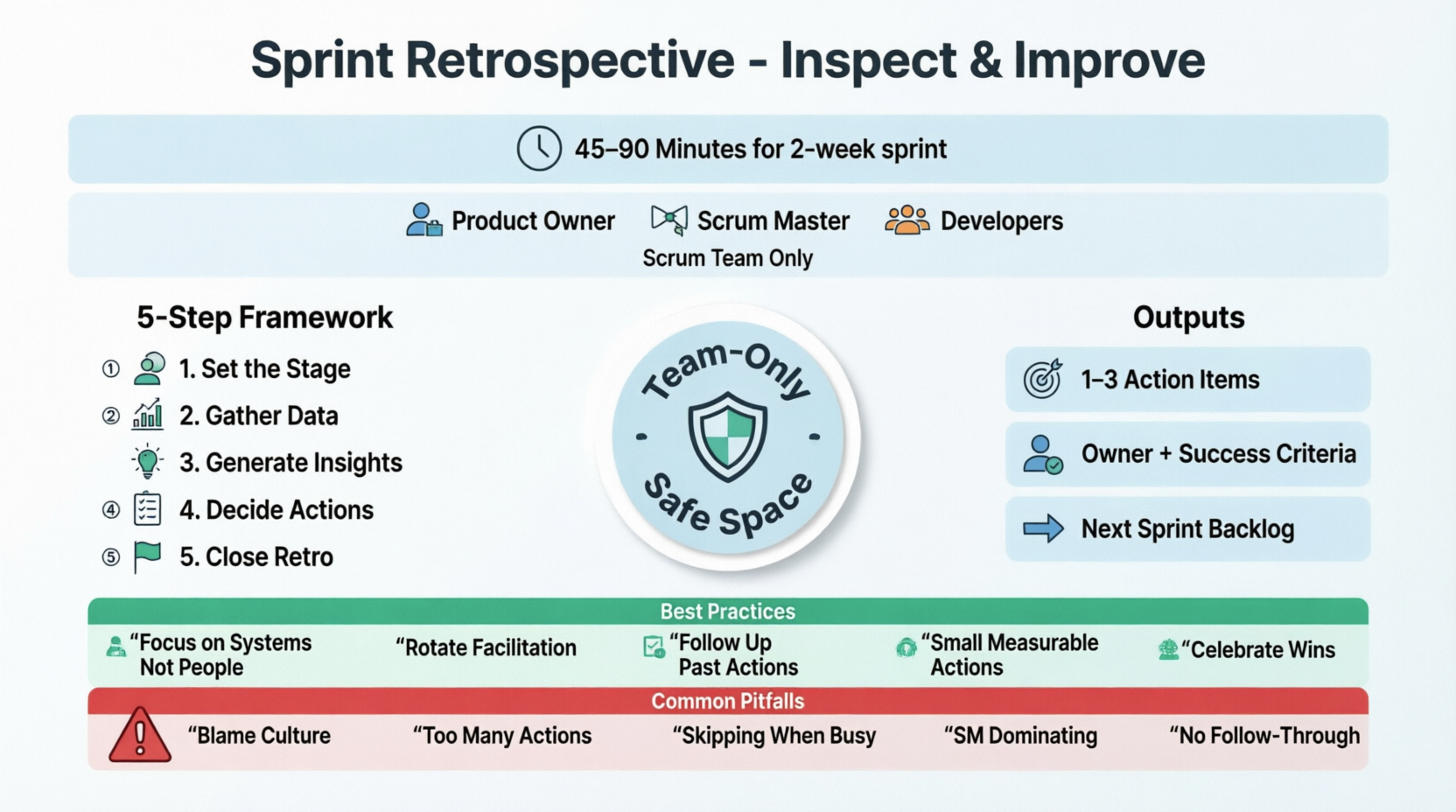
Purpose
A safe, team-only space to inspect how the sprint went (process, tools, communication, relationships) and create a concrete improvement plan for the next sprint.
Time-Box
- Max 3 hours for a 1-month sprint
- Practical: 45–90 minutes for a 2-week sprint
Participants
Scrum Team only (PO, SM, Developers)
Structure (Common Framework)
- Set the stage (psychological safety)
- Gather data (facts, not opinions)
- Generate insights (what worked, what didn't)
- Decide actions (1–2 actionable improvements)
- Close the retrospective
Outputs
- 1–3 concrete improvement items added to next Sprint Backlog
- Owner and success criteria for each action
✅ Best Practices
- Focus on systems, not people
- Use rotating facilitation to avoid SM dependency
- Follow up on past action items first
- Keep actions small, measurable, and time-bound
- Celebrate wins openly
⚠️ Common Pitfalls
- Blame culture or personal criticism
- Generating 10 action items, implementing zero
- Skipping retros when "too busy"
- SM dominating the conversation
- No follow-through or accountability
💡 Real-World Examples
- CI/CD Pipeline Bottleneck
- Insight: Builds queue for 4+ hours daily, blocking PR merges
- Action: Allocate 50% of next sprint to optimize pipeline parallelization
- Owner: DevOps lead + 2 engineers
- Success metric: Average build time < 30 mins by sprint end
- Cross-Timezone Collaboration
- Insight: Async handoffs cause rework; overlap hours are inconsistent
- Action: Shift core overlap to 2 PM–4 PM UTC; document handoff template
- Owner: SM facilitates adoption, team tests for 1 sprint
- QA Bottleneck
- Insight: Manual testing starts only after "code complete"
- Action: Shift-left testing: QA joins story refinement, writes test cases during development
- Success metric: Reduce post-dev bug count by 40%
📖 6. Backlog Refinement (Grooming)
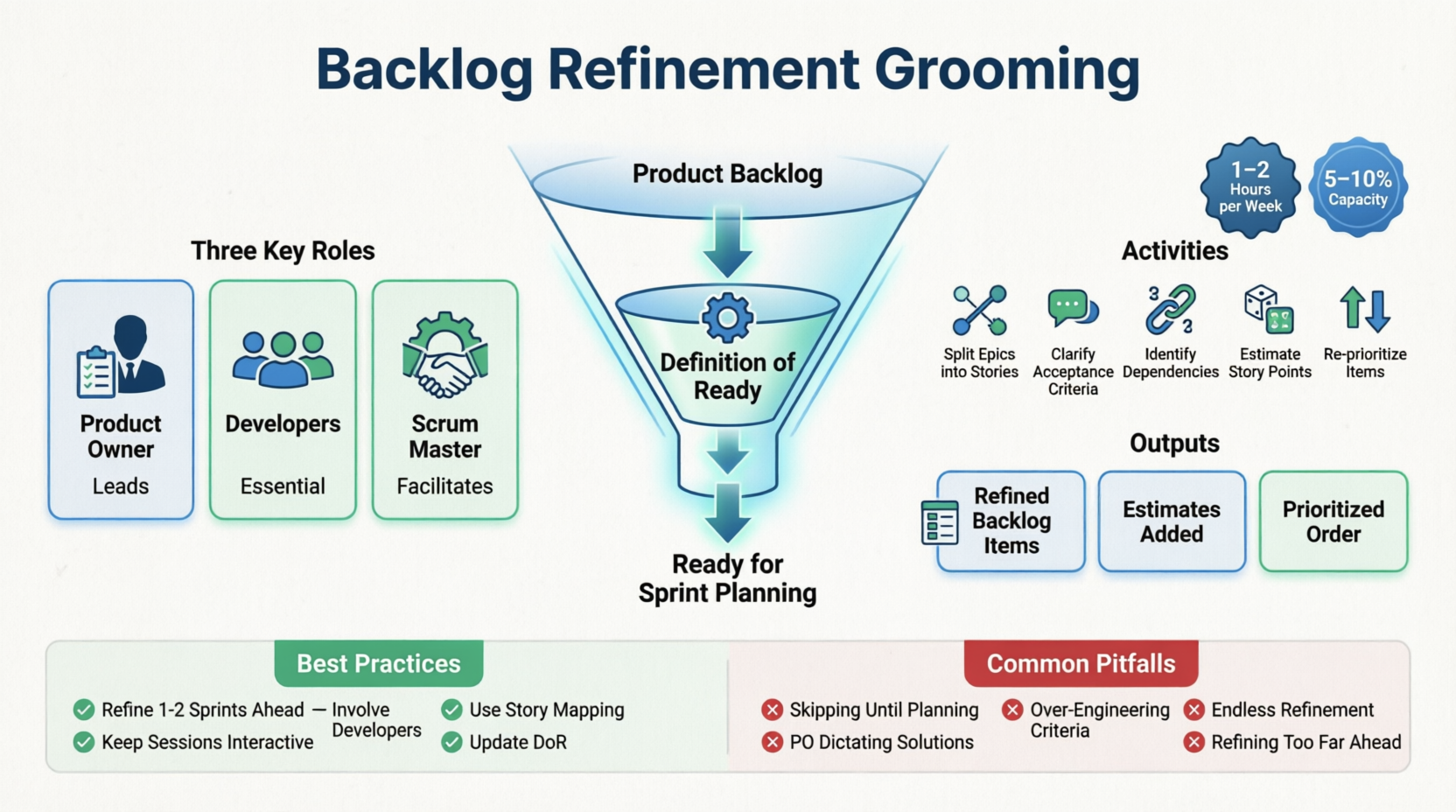
Purpose
An ongoing activity to clarify, split, estimate, and prioritize Product Backlog items so they are ready for future Sprint Planning. (Note: Not a formal Scrum event, but a continuous practice consuming ~5–10% of team capacity.)
Time-Box
- Typically 1–2 hours per week, or scheduled as needed
- No strict limit; time-box per session (e.g., 60 mins)
Participants
PO (leads), Developers (essential), SM (facilitates time-box & collaboration)
Activities
- Split large epics into sprint-sized stories
- Write/clarify acceptance criteria
- Identify dependencies, risks, and non-functional requirements
- Estimate using story points, T-shirt sizes, or ideal days
- Remove outdated or low-value items
- Re-prioritize based on new data or feedback
Outputs
- Definition of Ready (DoR) met items
- Ordered, clarified, estimated backlog
- Reduced Sprint Planning time and uncertainty
✅ Best Practices
- Refine 1–2 sprints ahead
- Involve developers early for technical feasibility
- Use user story mapping or impact mapping for context
- Keep sessions interactive; avoid PO monologues
- Update DoR and refine it over time
⚠️ Common Pitfalls
- Skipping refinement until Sprint Planning (causes long planning sessions)
- PO dictating technical solutions
- Over-engineering acceptance criteria
- Endless refinement without decision
- Refining items that won't be prioritized for months
💡 Real-World Examples
- Breaking Down an Epic
- Epic: "User Profile Redesign"
- Refined into:
- Upload profile picture with cropping
- Edit contact info with validation
- Link social accounts
- Privacy toggle for public/private profile
- DoR checked: Each has UI mockup, acceptance criteria, dependency notes, estimated 3–5 SP
- Clarifying Third-Party Integration
- Item: "Integrate Stripe for subscriptions"
- Refinement outcome:
- Confirm webhook endpoints needed
- Define error handling for failed payments
- Identify PCI compliance boundaries
- Split into: Stripe account setup, checkout flow, webhook listener, test suite
- Data Platform Team
- Item: "Build customer 360 view"
- Refinement outcome:
- Too large → split by data source (CRM, billing, support tickets)
- Add data quality checks
- Define SLA for refresh frequency
- PO re-prioritizes billing data first based on sales feedback
🔄 How the Events Work Together: Typical 2-Week Cadence
Day 1: Sprint Planning (2–4 hrs) → Sprint Goal set, Backlog selected
Days 2–9: Daily Scrum (15 min/day) + Execution + Backlog Refinement (1–2 hrs)
Day 10: Sprint Review (60–90 min) → Demo, feedback, backlog adaptation
Day 10 (after Review): Sprint Retrospective (45–90 min) → Process improvement
Day 11: Next Sprint begins
Note: Backlog Refinement occurs continuously, often mid-sprint, to prepare for the next Sprint Planning.
🌍 Adapting & Scaling Ceremonies
| Context |
Adaptation Tips |
| Remote/Hybrid Teams |
Use shared digital boards, time-zone friendly windows, async pre-reads, record reviews for absent stakeholders |
| Multiple Teams (Scaling) |
Keep sprint lengths aligned, sync reviews via "Scrum of Scrums", share retros outcomes across teams, use PI Planning for longer horizons |
| Non-Software Teams |
Replace "code demo" with working process, policy draft, campaign asset, or prototype; keep time-boxes and outcomes identical |
| High-Urgency/Support Teams |
Use 1-week sprints, combine Review + Retro if needed, focus retros on workflow bottlenecks, refine backlog daily |
🧭 Quick Reference: Time-Box Guidelines (Per Sprint Length)
| Event |
1-Week Sprint |
2-Week Sprint |
3-Week Sprint |
4-Week Sprint |
| Sprint Planning |
2–3 hrs |
2–4 hrs |
3–5 hrs |
Max 8 hrs |
| Daily Scrum |
15 min |
15 min |
15 min |
15 min |
| Sprint Review |
45 min |
60–90 min |
2 hrs |
Max 4 hrs |
| Sprint Retrospective |
30–45 min |
45–90 min |
1.5–2 hrs |
Max 3 hrs |
| Backlog Refinement |
30–60 min/week |
60–90 min/week |
1–2 hrs/week |
2–3 hrs/week |
✅ Final Checklist for Healthy Ceremonies
- Every event has a clear purpose and output
- Time-boxes are respected; meetings don't regularly run over
- Right people attend for the right reasons
- Sprint Goal is visible and referenced daily
- Feedback from Review directly shapes backlog
- Retrospective actions are tracked and implemented
- Refinement happens continuously, not cramming before planning
- Psychological safety is maintained, especially in Retrospectives
Conclusion: Beyond the Calendar Invite
Mastering Agile time-boxed events is not about rigidly adhering to a calendar or perfectly executing a meeting agenda. It is about cultivating a culture of transparency, inspection, and adaptation.
When executed with purpose, these ceremonies create a powerful feedback loop:
- Refinement ensures we are building the right things. a clear path to get it done.
- The Daily Scrum keeps the team aligned and unblocks progress in real-time.
- The Sprint Review validates that the work actually delivers value to the user and the business.
- The Retrospective ensures the team is constantly evolving, becoming smarter and more efficient with every iteration.
The ultimate measure of success for these ceremonies is not whether they finished exactly on time, but whether they resulted in better decisions, stronger alignment, and a higher-quality product increment. If a ceremony consistently fails to produce these outcomes, it is a signal to inspect the way the ceremony is being facilitated, not an excuse to abandon the practice altogether.
As you implement or refine these events within your team, remember: the framework serves the team, not the other way around. Start by respecting the time-boxes, inviting the right voices, and focusing relentlessly on the Sprint Goal. Over time, this disciplined rhythm will transform your team from a group of individuals reacting to chaos into a high-performing, predictable, and continuously improving delivery engine.
Ready to put this into practice? Pick one ceremony your team struggles with the most, apply the best practices and examples from this guide in your very next cycle, and measure the difference it makes.


