
The integration of Large Language Models (LLMs) into software development has sparked a fundamental debate in engineering circles: How should we structure the interaction between human intent and machine implementation?
On one side, we have the allure of Direct Prompting, where natural language is translated instantly into executable code. This approach leverages the LLM’s massive training corpus of GitHub repositories and coding tutorials, offering unprecedented speed for prototyping. On the other side stands the UML-Mediated Approach, a more disciplined workflow that inserts a formal modeling layer (Unified Modeling Language) between the requirement and the code. While theoretically robust, this method fights against the LLM’s native training distribution, which rarely sees end-to-end "design-then-implement" sequences.
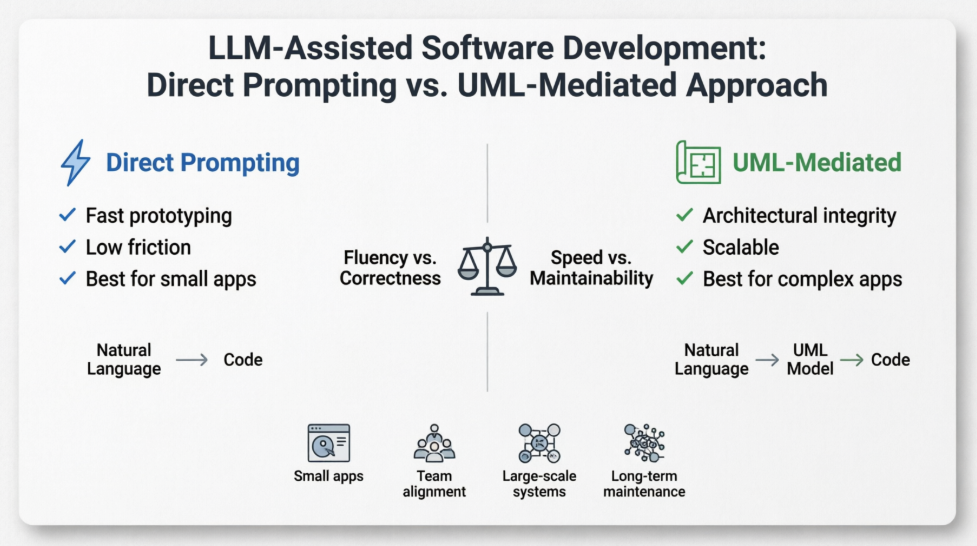
This case study examines these two paradigms not just through theoretical lenses, but through the prism of native training bias. We explore why LLMs are inherently "fluent" in direct coding yet often "clumsy" in model-driven engineering, and why—counterintuitively—the harder path (UML) often yields superior software for complex, long-lived applications. By analyzing the trade-offs between fluency and structural integrity, we provide a strategic framework for product managers and engineers to choose the right approach for their specific context.
| Criterion | Approach 1: Direct Prompting | Approach 2: UML-Mediated |
|---|---|---|
| Core Idea | LLM translates natural language directly into code. | LLM translates natural language into formal UML, then uses that UML as a specification to generate code. |
| Output Quality | Variable; good for small/medium apps, but degrades with complexity. | More consistent for medium-to-large apps; enforces structural integrity. |
| Fidelity to Requirements | Prone to hallucination and missing edge cases. | Higher, because UML acts as a verifiable intermediate contract. |
| Iteration Cost | Low for small changes, but changes often break unrelated parts. | Higher upfront cost, but lower cost for systematic changes later. |
| Human-in-the-loop | Required for debugging and refinement. | Required to validate UML diagrams before code generation. |
| Best For | Prototypes, small tools, single-file scripts. | Team projects, maintainable apps, enterprise logic, safety-critical features. |
The user writes a prompt describing the desired application (e.g., “Build a to-do list app with a React frontend and Node.js backend”). The LLM directly generates the code files, often in one shot or via a conversational loop.
Low Initial Friction: No modeling, no extra syntax. Just describe and get working code quickly.
Fast Prototyping: For small apps (under ~500 lines of code), this can produce a correct first version in seconds.
Exploratory Nature: Ideal for “what if I try this idea?” scenarios where the final architecture is unknown.
Broad Adoption: Tools like ChatGPT’s Code Interpreter, V0 by Vercel, and Replit Ghostwriter rely on this paradigm.
Brittleness at Scale: For apps with >5–10 interrelated components (e.g., authentication, database, UI state), the LLM often forgets constraints, duplicates logic, or introduces subtle bugs.
No Intermediate Verification: You can only test the final app. If it fails, you must re-prompt or debug manually without a clear "blueprint" to reference.
High Change Amplification: Changing one requirement (e.g., “make tasks due at 5 PM instead of midnight”) often requires regenerating large portions of code, risking regression.
Lack of Architectural Transparency: The app’s structure is implicit in the code, making it hard to review before execution.
Inconsistent naming across modules.
Missing error handling (e.g., no database connection retry logic).
Security flaws (e.g., SQL injection in generated queries).
UI logic mixed with business logic.
Step 1: The LLM converts the user’s natural language into one or more UML diagrams (class diagram, sequence diagram, state machine, activity diagram). This can be textual (PlantUML, Mermaid) or graphical.
Step 2: The user (or an automated validator) checks the UML for correctness, consistency, and completeness.
Step 3: The validated UML model is fed back into the LLM, often with a prompt like: “Generate production-ready code strictly following this UML model.”
Step 4: The LLM generates code from the UML.
Architectural Contract: UML acts as a precise, verifiable blueprint. Errors are caught before a single line of runtime code is written.
Improved Scalability: For apps with 10–50 classes and multiple interaction patterns, the UML keeps the LLM from losing global context.
Separation of Concerns: The “what” (UML) is separate from the “how” (code). You can reuse the same UML with different LLMs or target languages.
Easier Maintenance: To change behavior, you modify the UML (which is smaller and more abstract than code) and regenerate the app.
Multi-LLM Collaboration: One LLM can design the UML, another can generate code from it, allowing for specialization.
Traceability: Every piece of code can be traced back to a specific UML element (e.g., a method in a class diagram).
Higher Upfront Cost: The user must learn or at least validate UML syntax. The extra step slows down initial delivery.
UML Limitations: Some behaviors (e.g., complex event handling, asynchronous callbacks) are awkward to express in standard UML without advanced profiles.
LLM UML Errors: The first LLM may generate an invalid or incomplete UML model. You must fix it or re-prompt.
Over-engineering for Tiny Apps: For a 3-function script, UML is overkill.
Tooling Dependency: You need parsers for PlantUML or Mermaid to visualize and check the model.
LLM generates UML that is syntactically correct but semantically wrong (e.g., a BankAccount class with a transferTo method that doesn’t reference another account).
The code generation LLM ignores parts of the UML if the prompt is poorly structured.
Loss of non-structural requirements (performance, UI look-and-feel) that are hard to capture in UML.
| Feature | Direct Prompting (Approach 1) | UML-Mediated (Approach 2) |
|---|---|---|
| Handles Ambiguous Requirements | Yes, by guessing | No, forces clarification |
| Produces Runnable App in One Shot | Often, for small apps | Rarely (two steps) |
| Ease of Debugging | Hard – logic errors buried in code | Easier – first check UML, then generated code |
| Requires Domain Modeling Skill | Low | Medium (to validate UML) |
| LLM Context Window Usage | High (all code at once) | Lower per step (UML then code) |
| Support for Non-functional Reqs | Poor | Still poor, but can annotate UML with constraints |
| Version Control Friendliness | Diff of code files | Diff of UML (more abstract) + code |
| Typical Output LOC | 100 – 2,000 | 500 – 10,000+ (more scalable) |
A critical question arises: Does the LLM’s training data create an inherent performance advantage for one approach?
Option 1 (Direct NL → Code): Extremely high training abundance. The pretraining corpus contains billions of examples from GitHub, Stack Overflow, and coding tutorials. Reinforcement Learning from Human Feedback (RLHF) is heavily tuned on direct instruction-to-code conversations.
Option 2 (NL → UML → Code): Very low to moderate abundance. LLMs see UML in documentation, but rarely paired with the preceding natural language requirement. End-to-end sequences of "Requirement → UML → Code" are almost nonexistent in training data.
Imagine the LLM’s internal probability distribution:
Option 1: The LLM has directly seen $P(\text{code} | \text{natural_language})$ billions of times. It has interpolated across frameworks, error patterns, and styles.
Option 2: The LLM must approximate:
$$ P(\text{code} | \text{UML}) \times P(\text{UML} | \text{natural_language}) $$
Both factors are less well-trained. Crucially, the LLM has no training signal that enforces UML to be a faithful intermediate. It can be sloppy in Step 1 and still produce syntactically correct code in Step 2—but that code will mismatch requirements.
| Capability | Option 1 (Direct) | Option 2 (UML-mediated) |
|---|---|---|
| First-token Latency | Very fast | Slower (two passes) |
| Fluency in Common Frameworks | Excellent | Good but indirect |
| Handling Underspecified Reqs | LLM guesses plausibly | LLM may produce vague UML |
| Correctness for >10 Objects | Drops sharply after ~500 LOC | Holds up better if UML is validated |
| LLM’s Own Preference | Confidently produces direct code | Often "cuts corners" in UML |
Key Insight: The LLM treats UML in Option 2 as just another text format, not as a formal specification. It will happily generate inconsistent UML because its training never heavily penalized cross-diagram inconsistency.
The target app fits on one screen (e.g., simple calculator, markdown previewer, single API endpoint).
You are exploring or prototyping and will discard the code after validation.
You are working solo and prefer fast iteration over long-term structure.
The app has no significant state or concurrency.
The app has >5 distinct entities with relationships (e.g., e-commerce cart, booking system, multiplayer game logic).
Multiple people will maintain the code.
You need to guarantee certain architectural patterns (MVC, layered architecture) before coding.
You are willing to invest 20–30% more time upfront to save 70% later during maintenance.
You want to generate code in multiple languages from the same design.
The debate between Direct Prompting and UML-Mediated development is not a contest of which tool is "better," but rather a choice between optimizing for the LLM’s comfort versus optimizing for the software’s longevity.
LLMs are natively trained to be fluent in direct code generation. This gives Approach 1 a significant advantage in speed and initial usability for small tasks. However, this fluency is a trap when applied to complex systems. The LLM’s native training does not equip it to handle architectural soundness, state management, or long-term maintainability.
Approach 2, while fighting against the LLM’s native biases, introduces a human-verifiable abstraction layer. By forcing the design into a formal model (UML) before code generation, we shift the bottleneck from the LLM’s probabilistic guessing to structured engineering principles. While the LLM may struggle with the two-step pipeline, the introduction of human validation at the UML stage corrects these weaknesses, resulting in software that is more robust, maintainable, and scalable.
The Verdict: For serious, long-lived applications, the extra friction of UML-mediated development is not a bug—it is a feature. It forces clarity, enables verification, and ultimately produces software that survives beyond the first prototype. The best strategy is often hybrid: use Direct Prompting to explore, but switch to UML-Mediated workflows once the core architecture needs to solidify.

