
UML Class Diagrams are one of the most powerful yet underutilized tools in a developer’s arsenal. While many treat them as optional documentation or academic exercises, their true “secret power” lies in their ability to reveal the hidden structure, dependencies, and design flaws of a system before significant code is written. They facilitate early detection of issues like tight coupling, low cohesion, circular dependencies, and violation of design principles. They also serve as a universal language for communicating complex architectures across teams, stakeholders, and even future maintainers.
This comprehensive guide covers everything from fundamentals to advanced applications, with practical examples.
In agile and fast-paced environments, many developers jump straight into coding, viewing UML as outdated or time-consuming. However, class diagrams excel at modeling the static structure of object-oriented systems—classes, their attributes, operations, and interrelationships.
The secret power:
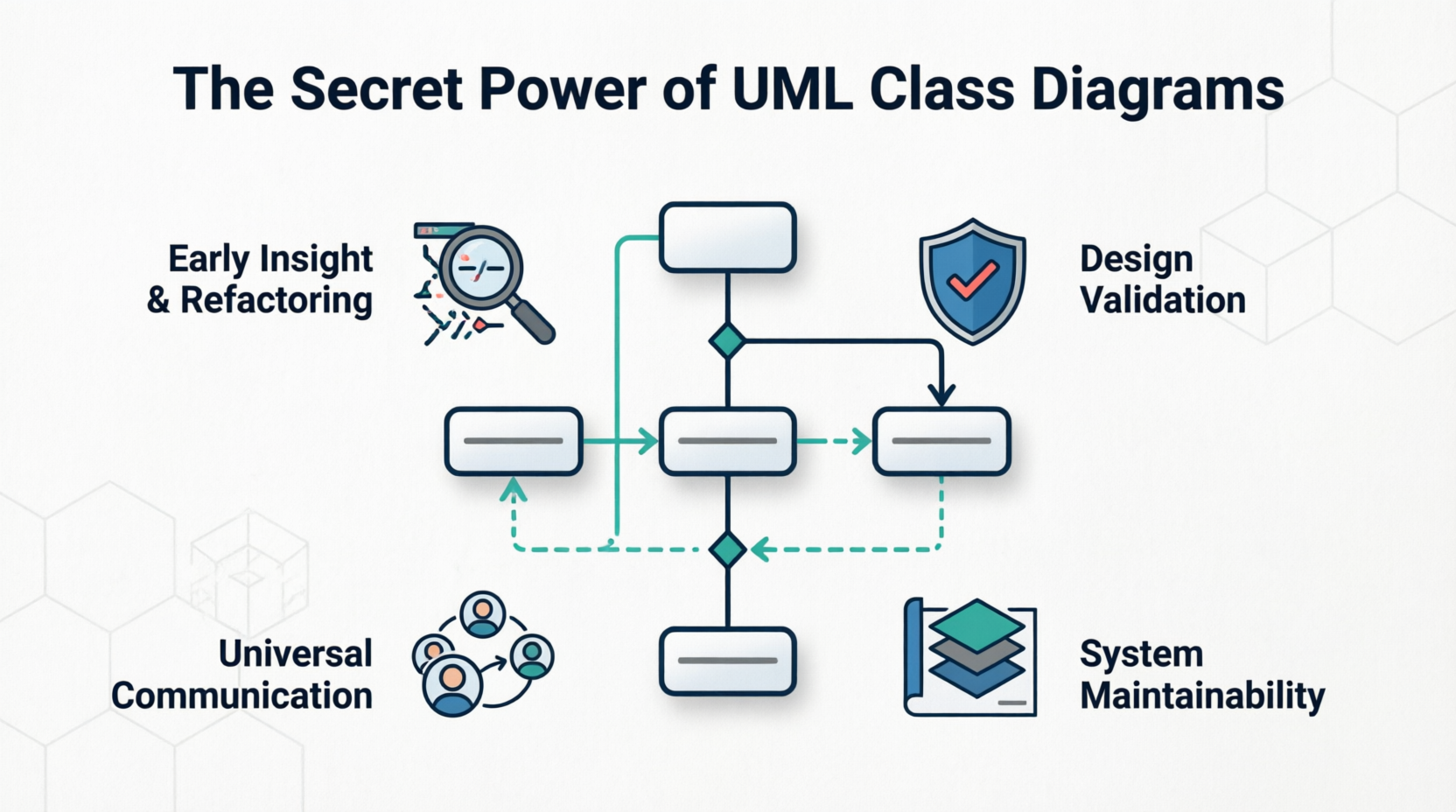
Early insight and refactoring: Spot overly complex classes, god classes, or poor separation of concerns visually.
Design validation: Verify adherence to principles like SOLID, DRY, and encapsulation before implementation.
Communication and knowledge transfer: Onboard new team members faster or align non-technical stakeholders.
Long-term maintainability: Reduce debugging and maintenance time by providing a high-level map of the codebase.
Code generation and reverse engineering: Many IDEs and tools can generate skeleton code from diagrams or vice versa.
Class diagrams are not about rigid waterfall processes; they are lightweight, iterative tools that scale from conceptual domain models to detailed implementation designs.
A UML class diagram is a static structure diagram. The core element is the class, represented as a rectangle divided into three compartments (top to bottom):
Class Name (bold, centered; abstract classes in italics).
Attributes (properties/data members).
Operations/Methods (behaviors).
Visibility modifiers (access levels):
+ Public
- Private
# Protected
~ Package (default)
Attributes example: -username: String = "guest" {readOnly} (type, default value, constraints).
Operations example: +login(username: String, password: String): boolean.
Additional elements:
Interfaces: Stereotyped as <<interface>> or shown with lollipop notation.
Abstract classes: Italicized name.
Enumerations or data types: Stereotyped accordingly.
Relationships show how classes interact and reveal coupling:
Association (solid line): General “uses” or “knows about” relationship. Can be bidirectional or unidirectional (arrow). Often labeled with role names and multiplicity.
Directed Association: Arrow indicates navigation direction.
Aggregation (hollow diamond): “Has-a” or whole-part relationship where parts can exist independently (e.g., Team and Player).
Composition (filled diamond): Stronger “owns” relationship; parts cannot exist without the whole (e.g., House and Room). Implies lifecycle dependency.
Generalization/Inheritance (solid line with hollow triangle arrow): “Is-a” relationship. Arrow points to the superclass.
Dependency (dashed line with open arrow): Weak, temporary usage (e.g., a method parameter or local variable). Indicates looser coupling.
Realization (dashed line with hollow triangle): A class implements an interface.
Multiplicity (cardinality) specifies how many instances participate:
1 Exactly one
0..1 Zero or one (optional)
* or 0..* Many (zero or more)
1..* One or more
2..5 Specific range
Other advanced features:
Constraints in {} (e.g., {ordered}).
Stereotypes like <<entity>>, <<service>>, <<value object>> for DDD.
Notes for additional explanations.
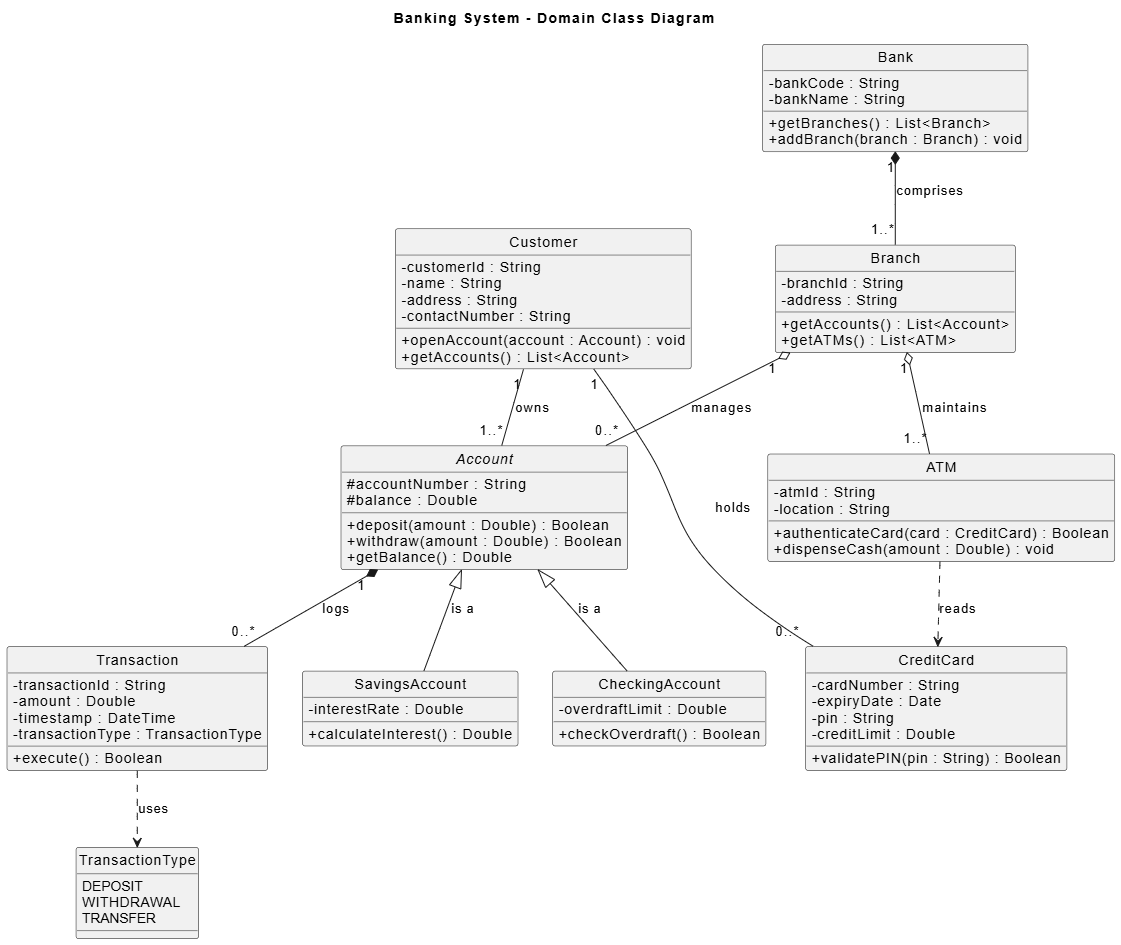
PlantUML Class Digaram - Banking System
@startuml
skinparam style strictuml
skinparam classAttributeIconSize 0
title Banking System - Domain Class Diagram

' --- Classes ---

class Bank {
- bankCode : String
- bankName : String
+ getBranches() : List<Branch>
+ addBranch(branch : Branch) : void
}

class Branch {
- branchId : String
- address : String
+ getAccounts() : List<Account>
+ getATMs() : List<ATM>
}

class Customer {
- customerId : String
- name : String
- address : String
- contactNumber : String
+ openAccount(account : Account) : void
+ getAccounts() : List<Account>
}

abstract class Account {
# accountNumber : String
# balance : Double
+ deposit(amount : Double) : Boolean
+ withdraw(amount : Double) : Boolean
+ getBalance() : Double
}

class SavingsAccount {
- interestRate : Double
+ calculateInterest() : Double
}

class CheckingAccount {
- overdraftLimit : Double
+ checkOverdraft() : Boolean
}

class Transaction {
- transactionId : String
- amount : Double
- timestamp : DateTime
- transactionType : TransactionType
+ execute() : Boolean
}

enum TransactionType {
DEPOSIT
WITHDRAWAL
TRANSFER
}

class CreditCard {
- cardNumber : String
- expiryDate : Date
- pin : String
- creditLimit : Double
+ validatePIN(pin : String) : Boolean
}

class ATM {
- atmId : String
- location : String
+ authenticateCard(card : CreditCard) : Boolean
+ dispenseCash(amount : Double) : void
}

' --- Relationships ---

Bank "1" *-- "1..*" Branch : "comprises"
Branch "1" o-- "0..*" Account : "manages"
Branch "1" o-- "1..*" ATM : "maintains"

Customer "1" -- "1..*" Account : "owns"
Customer "1" -- "0..*" CreditCard : "holds"

Account <|-- SavingsAccount : "is a"
Account <|-- CheckingAccount : "is a"
Account "1" *-- "0..*" Transaction : "logs"

Transaction ..> TransactionType : "uses"
ATM ..> CreditCard : "reads"
@endumlThis shows a Customer associated with multiple Accounts, with SavingsAccount specializing Account.
Secret insight: The diagram immediately highlights potential issues, such as whether Account should be abstract or if Transaction history needs modeling as a separate class for better cohesion.
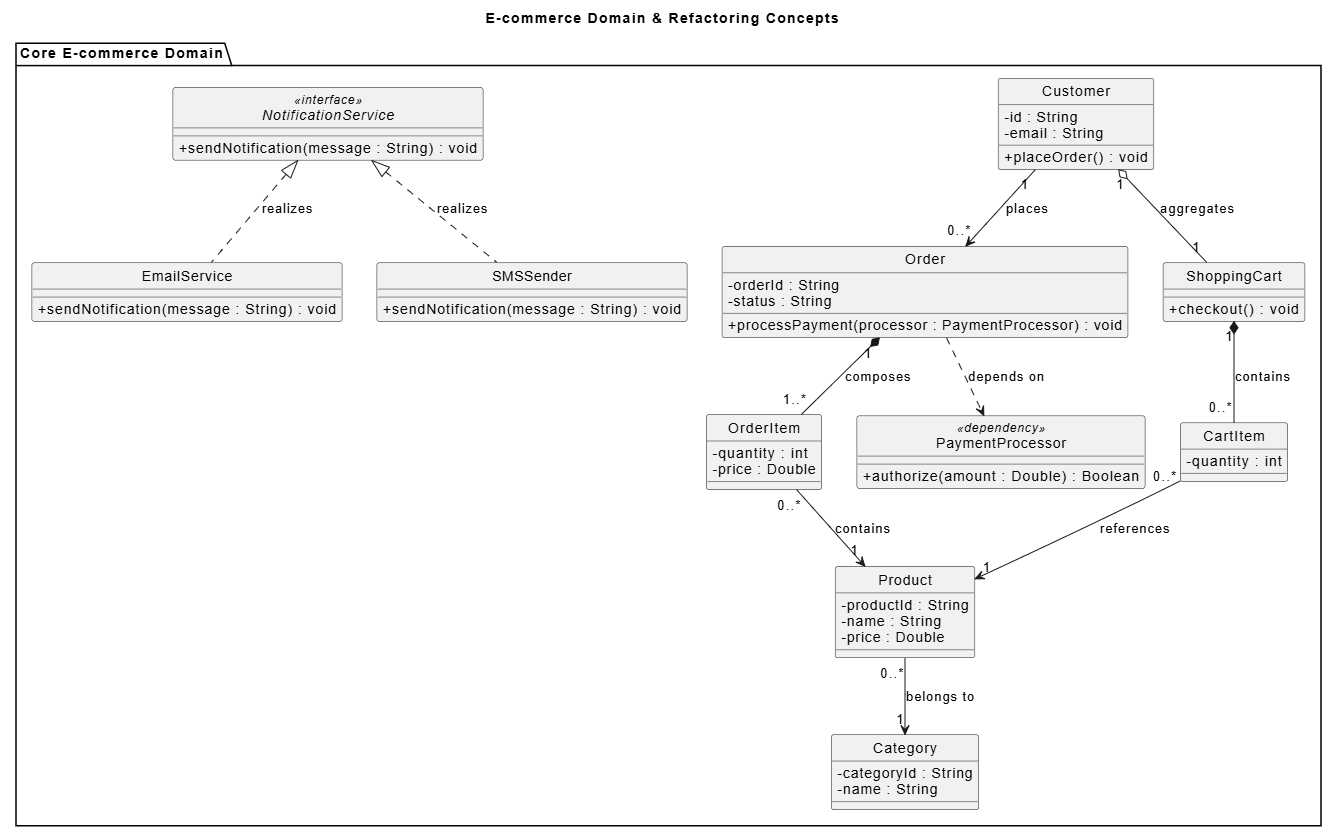
Classes:
Customer (attributes: id, email; methods: placeOrder())
Order (composition with OrderItem)
Product (association with Category)
ShoppingCart (aggregation with CartItem)
PaymentProcessor (dependency for Order)
<<interface>> NotificationService realized by EmailService/SMSSender
Relationships:
Order composes OrderItem (filled diamond).
Customer aggregates ShoppingCart.
Order depends on PaymentProcessor (dashed arrow).
@startuml
skinparam style strictuml
skinparam classAttributeIconSize 0
title E-commerce Domain & Refactoring Concepts

package "Core E-commerce Domain" {
class Customer {
- id : String
- email : String
+ placeOrder() : void
}

class Order {
- orderId : String
- status : String
+ processPayment(processor : PaymentProcessor) : void
}

class OrderItem {
- quantity : int
- price : Double
}

class ShoppingCart {
+ checkout() : void
}

class CartItem {
- quantity : int
}

class Product {
- productId : String
- name : String
- price : Double
}

class Category {
- categoryId : String
- name : String
}

class PaymentProcessor <<dependency>> {
+ authorize(amount : Double) : Boolean
}

interface NotificationService <<interface>> {
+ sendNotification(message : String) : void
}

class EmailService {
+ sendNotification(message : String) : void
}

class SMSSender {
+ sendNotification(message : String) : void
}

' --- Relationships ---
Customer "1" o-- "1" ShoppingCart : "aggregates"
ShoppingCart "1" *-- "0..*" CartItem : "contains"
CartItem "0..*" --> "1" Product : "references"

Customer "1" --> "0..*" Order : "places"
Order "1" *-- "1..*" OrderItem : "composes"
OrderItem "0..*" --> "1" Product : "contains"
Product "0..*" --> "1" Category : "belongs to"

Order ..> PaymentProcessor : "depends on"

NotificationService <|.. EmailService : "realizes"
NotificationService <|.. SMSSender : "realizes"
}

package "Refactoring Context (UserManager Split)" {
class UserManager <<Monolith / God Class - DEPRECATED>> {
.. excessive responsibilities ..
- authData
- profileData
- billingData
+ authenticate()
+ updateProfile()
+ sendNotification()
+ processBilling()
}

note bottom of UserManager
<b>God Class Risk</b>
Visual cue screaming for extraction
into modular, single-responsibility services.
end note

class AuthService {
+ authenticate() : Boolean
}

class ProfileService {
+ updateProfile() : void
}

class BillingService {
+ processBilling() : void
}

' Visual representation of the refactoring destination
UserManager ..> AuthService : "Extract to"
UserManager ..> ProfileService : "Extract to"
UserManager ..> BillingService : "Extract to"
}

@endumlAdvanced observation: This diagram reveals opportunities for patterns like Factory (for payments), Repository (for persistence), or Strategy (for notifications). It also flags potential god-class risks if Order accumulates too many responsibilities.
Imagine a monolithic UserManager class handling authentication, profile updates, notifications, and billing. The class diagram would show excessive associations and methods, screaming for extraction into AuthService, ProfileService, etc. This visual cue drives better modular design.
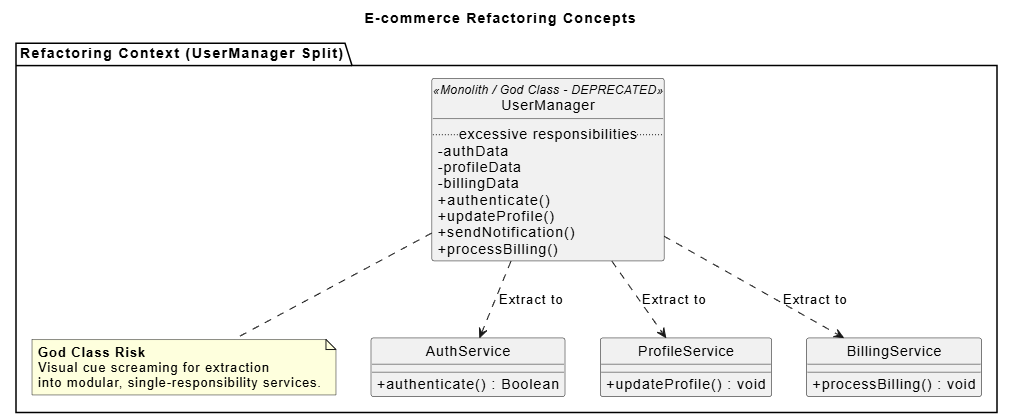
PlantUML Class Diagram Refactoring Code:
@startuml
skinparam style strictuml
skinparam classAttributeIconSize 0
title E-commerce Domain & Refactoring Concepts

package "Refactoring Context (UserManager Split)" {
class UserManager <<Monolith / God Class - DEPRECATED>> {
.. excessive responsibilities ..
- authData
- profileData
- billingData
+ authenticate()
+ updateProfile()
+ sendNotification()
+ processBilling()
}

note bottom of UserManager
<b>God Class Risk</b>
Visual cue screaming for extraction
into modular, single-responsibility services.
end note

class AuthService {
+ authenticate() : Boolean
}

class ProfileService {
+ updateProfile() : void
}

class BillingService {
+ processBilling() : void
}

' Visual representation of the refactoring destination
UserManager ..> AuthService : "Extract to"
UserManager ..> ProfileService : "Extract to"
UserManager ..> BillingService : "Extract to"
}

@endumlLevel of detail: Use conceptual diagrams (high-level, few details) for domain modeling and specification diagrams (with visibility, types, signatures) for implementation.
Keep it focused: One diagram per bounded context or major subsystem. Avoid “wall of classes.”
Iterate: Update diagrams as the design evolves (tools like PlantUML, draw.io, Lucidchart, or IDE plugins help).
Combine with other UML: Pair with sequence diagrams for behavior or package diagrams for organization.
Tools: Visual Paradigm, Mermaid/PlantUML for code-based diagramming, or IDE reverse-engineering features.
Agile integration: Use them in spikes, design reviews, or documentation—not as exhaustive upfront specs.
Common pitfalls to avoid: Over-modeling trivial details, ignoring multiplicity, or creating diagrams that don’t reflect actual code (sync via reverse engineering).
Secret power in practice: Class diagrams help apply domain-driven design (DDD) by clarifying aggregates, entities, and value objects. They expose architectural smells early, saving refactoring costs later. They also improve code reviews by letting reviewers grasp structure instantly.
UML Class Diagrams are far more than pretty pictures—they are a thinking tool that sharpens your design skills, uncovers hidden complexities, and fosters better software architecture. By investing a little time in diagramming, you gain disproportionate returns in clarity, collaboration, maintainability, and reduced bugs.
The next time you start a new feature or refactor a legacy module, sketch (or generate) a class diagram first. You’ll likely discover insights that transform how you build. Mastering this “secret power” separates good developers from great system thinkers.
Start small, practice with real projects, and watch your designs improve dramatically. The diagram you draw today prevents the tangled code of tomorrow.

