
Diagram-as-Code (DaC) has transformed how technical teams create and maintain documentation. By treating diagrams as code artifacts, teams gain version control, automated updates, and seamless collaboration. But with multiple tools and approaches available, choosing the right ecosystem for your team can be challenging.
This comprehensive guide compares Mermaid.js (the open-source standard), Mermaid Chart (the commercial platform), and Visual Paradigm's VPasCode ecosystem with its AI features and OpenDocs pipeline. We'll explore realistic use cases with correct Mermaid syntax and show you how these tools work together.
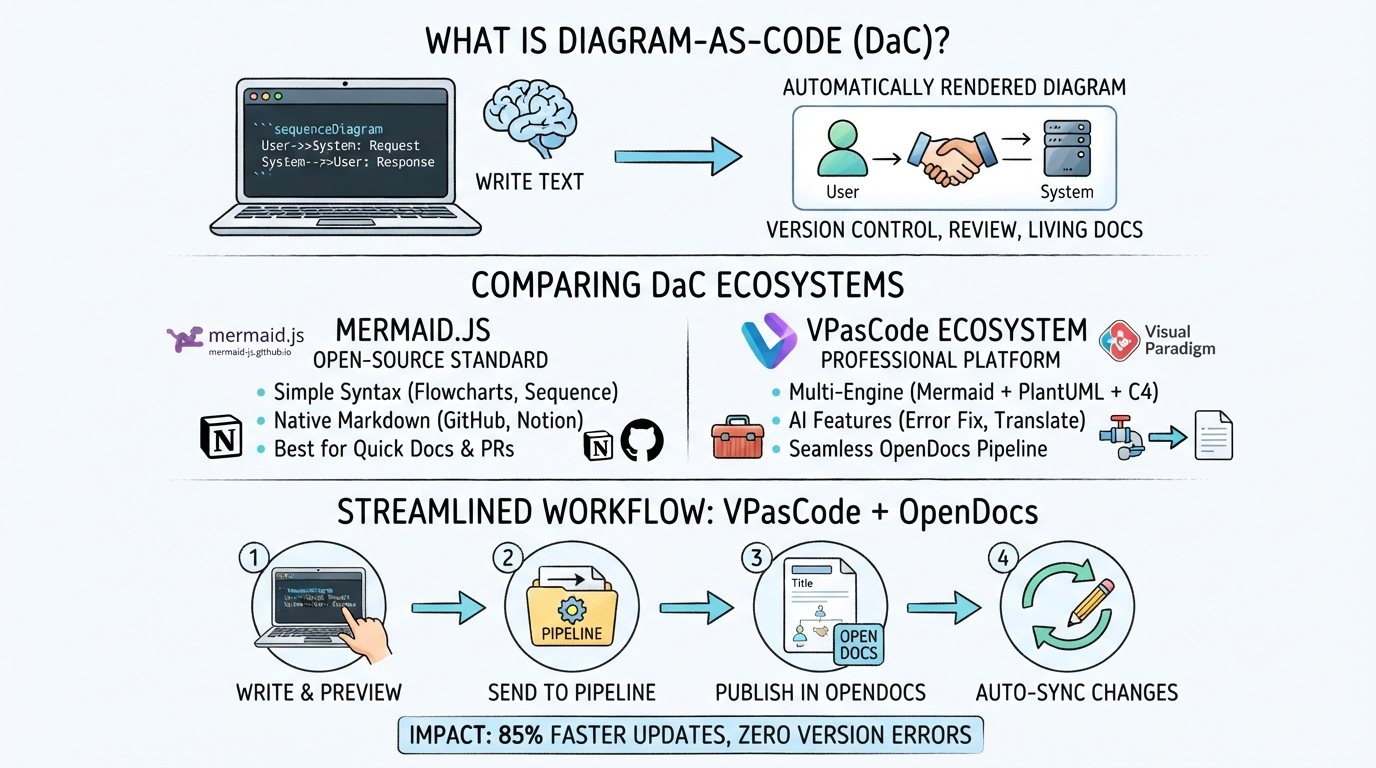
Diagram-as-Code means writing diagrams in plain text using a structured syntax. This approach offers several advantages:
Three major engines dominate the DaC space:
| Engine | Core Strength | Best For |
|---|---|---|
| Mermaid | Markdown integration, simple syntax | Flowcharts, sequence diagrams, quick documentation |
| PlantUML | Rigid engineering standards, UML support | C4 architecture, professional UML diagrams |
| Graphviz | Complex relational logic, structural networks | Dependency trees, network graphs |
Mermaid.js is a JavaScript library that renders diagrams from text definitions. It's natively supported in GitHub, Notion, and many Markdown editors, making it the most accessible DaC tool.
Mermaid supports multiple diagram types:
This sequence diagram shows a user logging into an application:
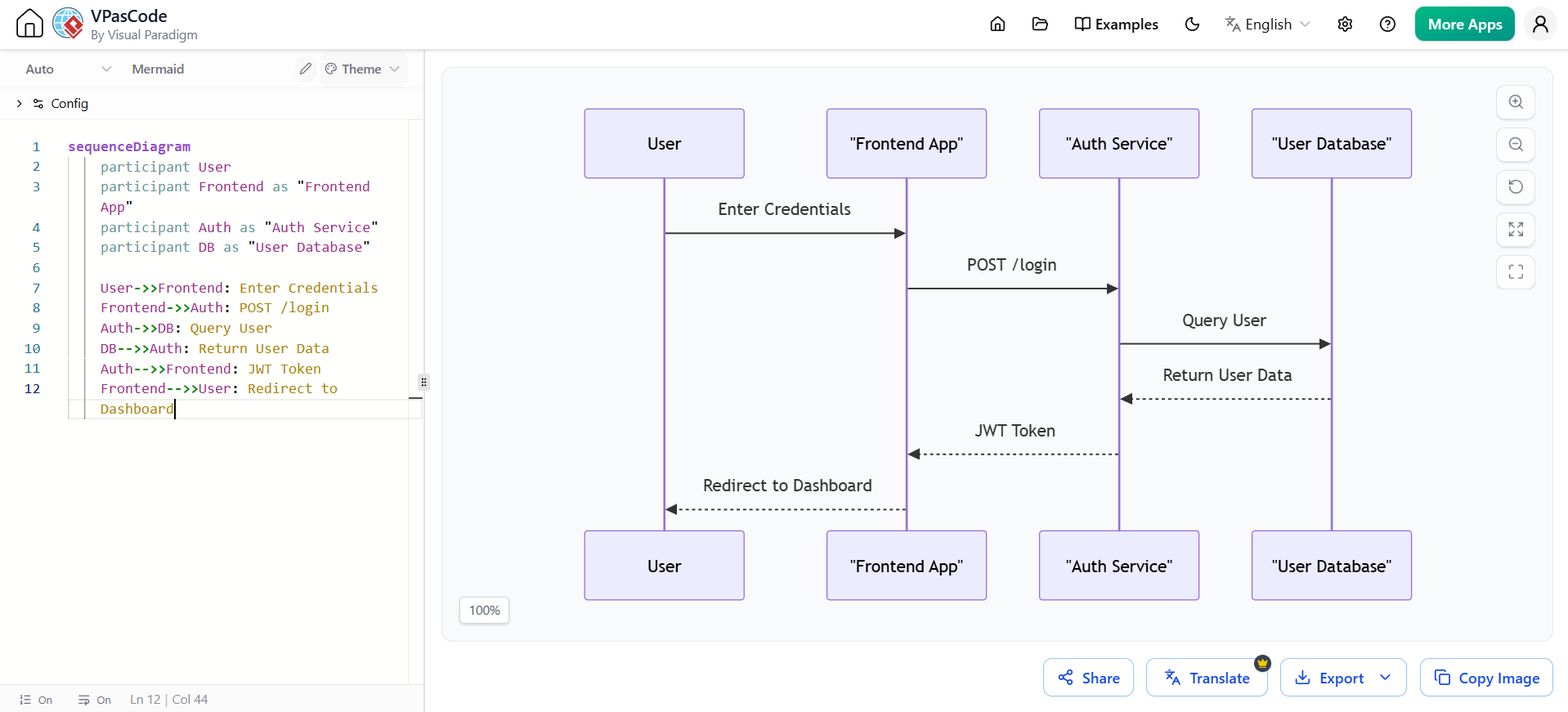
sequenceDiagram
    participant User
    participant Frontend as "Frontend App"
    participant Auth as "Auth Service"
    participant DB as "User Database"

    User->>Frontend: Enter Credentials
    Frontend->>Auth: POST /login
    Auth->>DB: Query User
    DB-->>Auth: Return User Data
    Auth-->>Frontend: JWT Token
    Frontend-->>User: Redirect to Dashboard
Key syntax notes: Use participant to define actors, ->> for solid arrows with arrowheads, and -->> for dotted return arrows. Aliases make labels more readable.
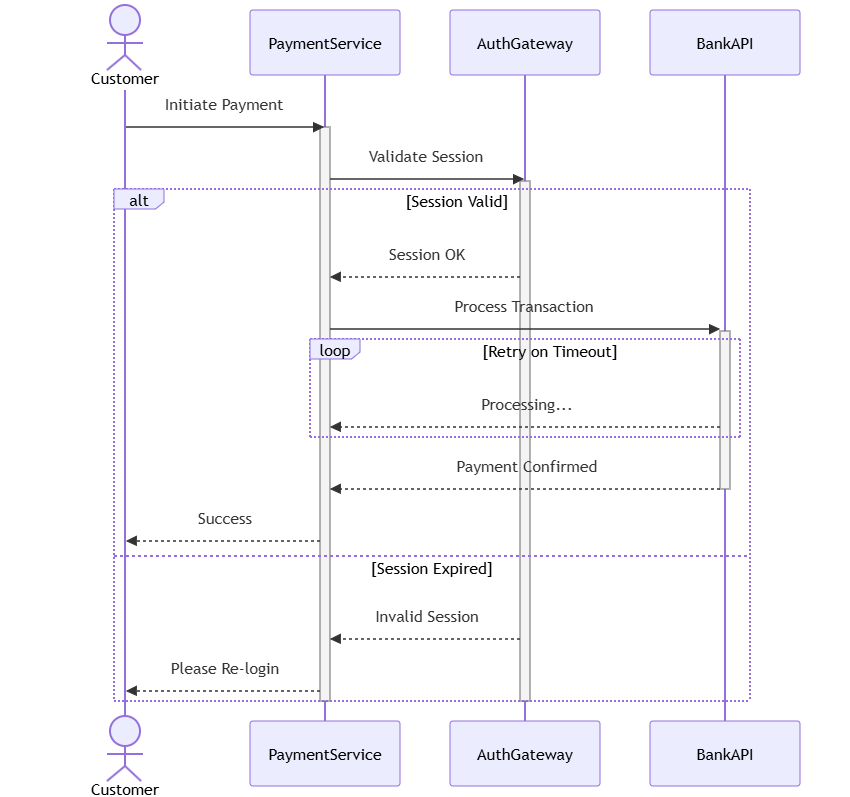
This more complex sequence diagram shows a payment flow with conditional paths:
sequenceDiagram
    actor Customer
    participant PaymentService
    participant AuthGateway
    participant BankAPI

    Customer->>PaymentService: Initiate Payment
    activate PaymentService

    PaymentService->>AuthGateway: Validate Session
    activate AuthGateway

    alt Session Valid
        AuthGateway-->>PaymentService: Session OK
        PaymentService->>+BankAPI: Process Transaction

        loop Retry on Timeout
            BankAPI-->>PaymentService: Processing...
        end

        BankAPI-->>-PaymentService: Payment Confirmed
        PaymentService-->>Customer: Success
    else Session Expired
        AuthGateway-->>PaymentService: Invalid Session
        PaymentService-->>Customer: Please Re-login
    end

    deactivate AuthGateway
    deactivate PaymentService
Key syntax notes: Use alt for conditional branches, loop for iterations, and activate/deactivate (or +/- shorthand) to show lifeline activation.
Mermaid's C4 support is experimental but functional for many use cases:
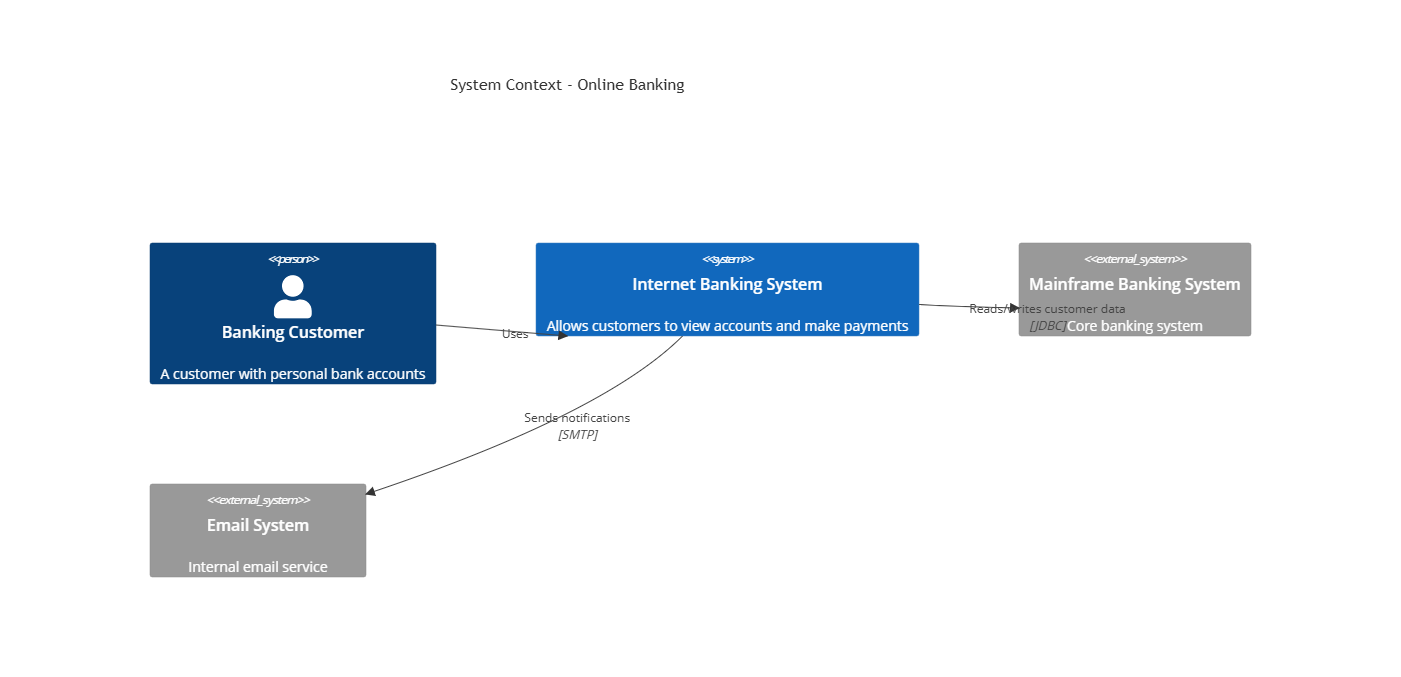
C4Context
    title System Context - Online Banking

    Person(customer, "Banking Customer", "A customer with personal bank accounts")
    System(bankingSystem, "Internet Banking System", "Allows customers to view accounts and make payments")
    System_Ext(mainframe, "Mainframe Banking System", "Core banking system")
    System_Ext(emailSystem, "Email System", "Internal email service")

    Rel(customer, bankingSystem, "Uses")
    Rel(bankingSystem, mainframe, "Reads/writes customer data", "JDBC")
    Rel(bankingSystem, emailSystem, "Sends notifications", "SMTP")
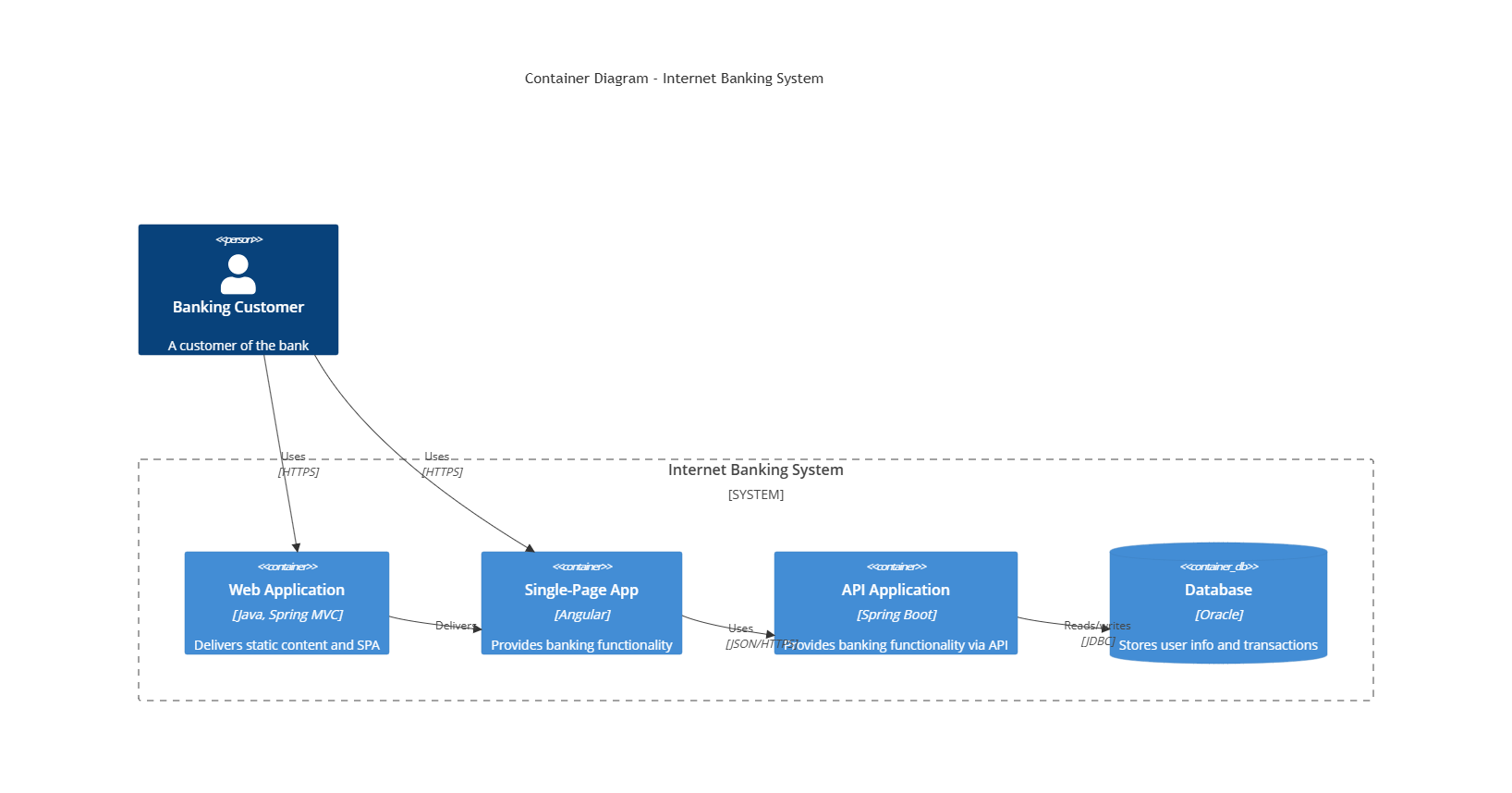
C4Container
    title Container Diagram - Internet Banking System

    Person(customer, "Banking Customer", "A customer of the bank")

    System_Boundary(bankingSystem, "Internet Banking System") {
        Container(webApp, "Web Application", "Java, Spring MVC", "Delivers static content and SPA")
        Container(spa, "Single-Page App", "Angular", "Provides banking functionality")
        Container(api, "API Application", "Spring Boot", "Provides banking functionality via API")
        ContainerDb(db, "Database", "Oracle", "Stores user info and transactions")
    }

    Rel(customer, webApp, "Uses", "HTTPS")
    Rel(customer, spa, "Uses", "HTTPS")
    Rel(webApp, spa, "Delivers")
    Rel(spa, api, "Uses", "JSON/HTTPS")
    Rel(api, db, "Reads/writes", "JDBC")
VPasCode is Visual Paradigm's browser-based Diagram-as-Code editor that supports Mermaid, PlantUML, and Graphviz in a single environment.
| Feature | Benefit |
|---|---|
| Multi-engine support | Write Mermaid, PlantUML, or Graphviz in one editor |
| Smart engine detection | Automatically switches engine based on pasted code |
| Built-in templates | 11+ pre-built templates to avoid syntax memorization |
| Real-time preview | See diagrams update as you type |
| Export options | SVG (vector) or PNG for any documentation platform |
VPasCode handles all three engines. Here's the same authentication flow in each syntax:
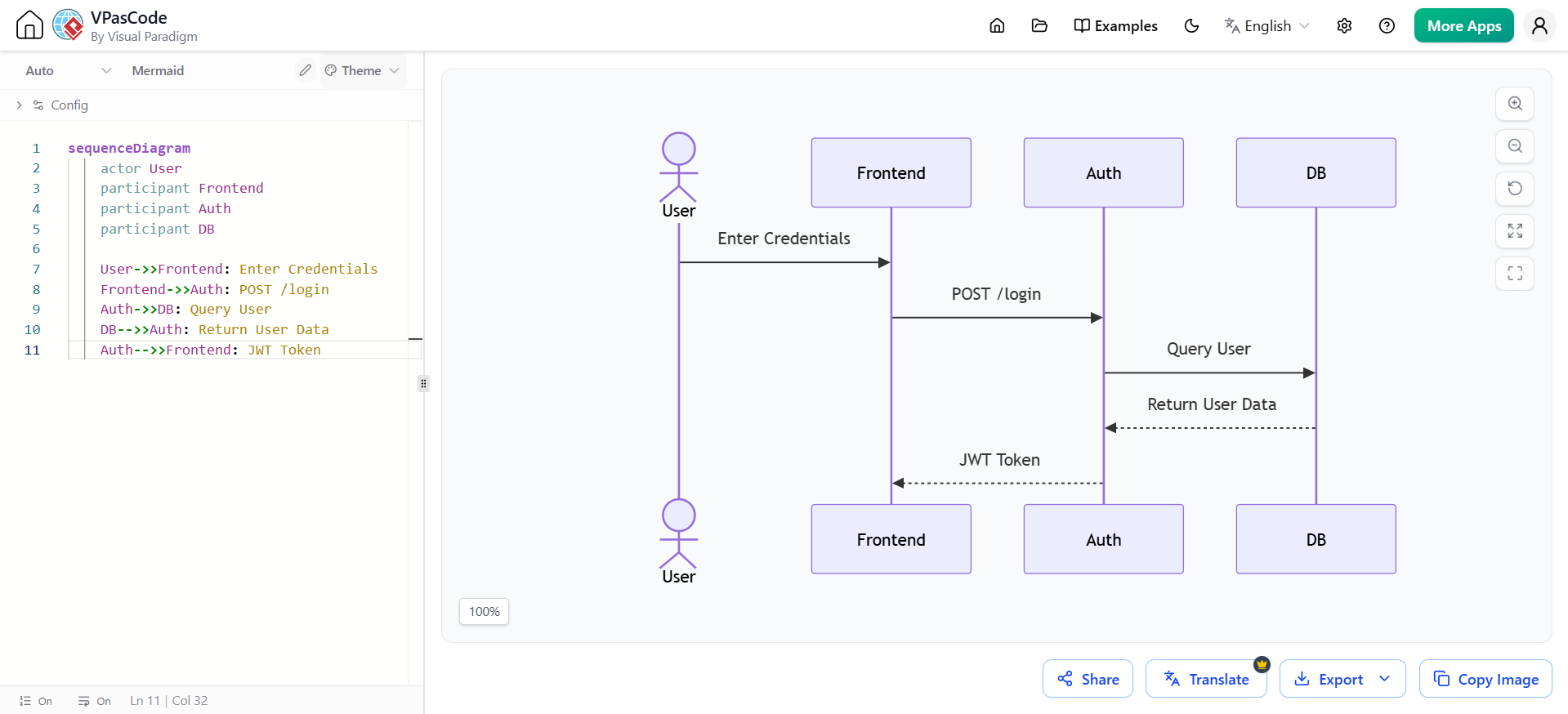
sequenceDiagram
    actor User
    participant Frontend
    participant Auth
    participant DB

    User->>Frontend: Enter Credentials
    Frontend->>Auth: POST /login
    Auth->>DB: Query User
    DB-->>Auth: Return User Data
    Auth-->>Frontend: JWT Token
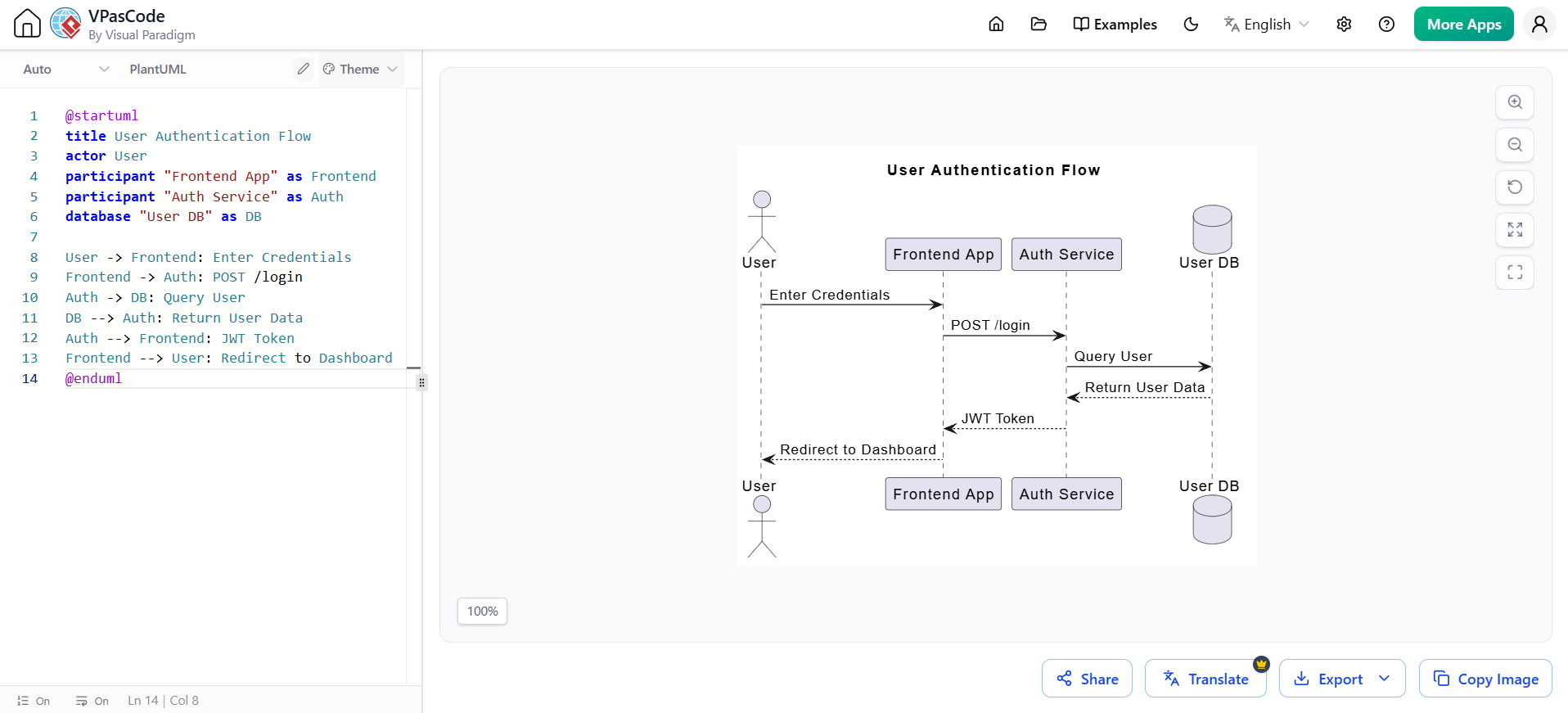
@startuml
title User Authentication Flow
actor User
participant "Frontend App" as Frontend
participant "Auth Service" as Auth
database "User DB" as DB

User -> Frontend: Enter Credentials
Frontend -> Auth: POST /login
Auth -> DB: Query User
DB --> Auth: Return User Data
Auth --> Frontend: JWT Token
Frontend --> User: Redirect to Dashboard
@enduml
If you paste PlantUML code while Mermaid is active (or vice versa), VPasCode detects the mismatch and offers a one-click engine switch. This is invaluable when working across teams using different syntaxes.
AI is transforming how diagrams are created. Instead of memorizing syntax, you can describe what you want in plain English.
AI tools (like those integrated into VPasCode and OpenDocs) can:
Prompt: "Create a sequence diagram showing a user placing an order through a web frontend. Include authentication check and inventory validation."
AI Output (Mermaid):
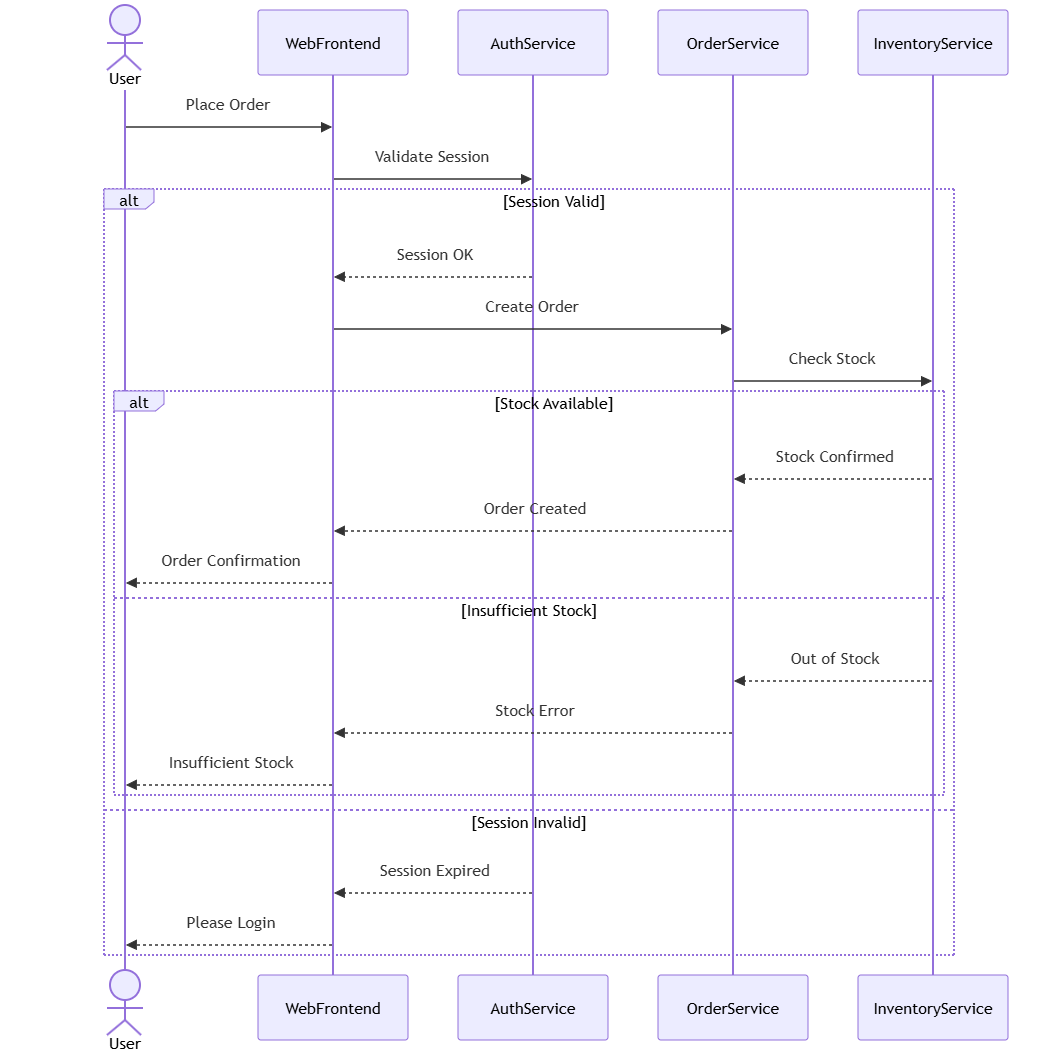
sequenceDiagram
    actor User
    participant WebFrontend
    participant AuthService
    participant OrderService
    participant InventoryService

    User->>WebFrontend: Place Order
    WebFrontend->>AuthService: Validate Session

    alt Session Valid
        AuthService-->>WebFrontend: Session OK
        WebFrontend->>OrderService: Create Order

        OrderService->>InventoryService: Check Stock
        alt Stock Available
            InventoryService-->>OrderService: Stock Confirmed
            OrderService-->>WebFrontend: Order Created
            WebFrontend-->>User: Order Confirmation
        else Insufficient Stock
            InventoryService-->>OrderService: Out of Stock
            OrderService-->>WebFrontend: Stock Error
            WebFrontend-->>User: Insufficient Stock
        end
    else Session Invalid
        AuthService-->>WebFrontend: Session Expired
        WebFrontend-->>User: Please Login
    end
Visual Paradigm's AI capabilities include:
Looking for a powerful, free diagram-as-code tool? Effortlessly render PlantUML, Mermaid, Graphviz, and 20+ programming languages in real time—powered by instant AI error fixing and automatic format detection.
The VPasCode-to-OpenDocs pipeline is Visual Paradigm's killer feature: a direct connection from diagram editing to published documentation.
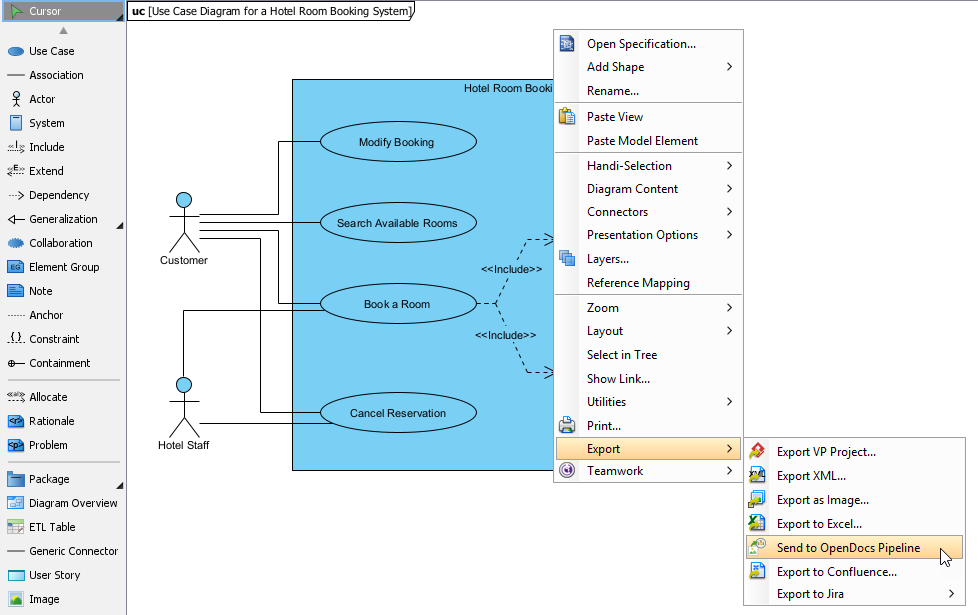
A mid-sized SaaS company reduced documentation update time by 85% using this workflow:
| Metric | Before | After | Improvement |
|---|---|---|---|
| Update Cycle Time | 55 min | 8 min | 85% faster |
| Version Errors | Frequent | Zero | 100% reduction |
| Cross-Team Handoffs | 3 | 0 | Eliminated |
Previous Process:
With Pipeline:
| Factor | Mermaid.js | VPasCode Ecosystem |
|---|---|---|
| Cost | Free, open-source | Free tier; paid for AI features |
| Syntax Support | Mermaid only | Mermaid + PlantUML + Graphviz |
| AI Features | Limited (third-party) | Built-in error fixing, translation, generation |
| Documentation Pipeline | Manual export/upload | Direct OpenDocs integration |
| Markdown Integration | Native (GitHub, Notion) | Export SVG/PNG only |
| C4 Diagram Support | Experimental | Full (via PlantUML) |
Many teams adopt a hybrid approach:
The Diagram-as-Code ecosystem offers tools for every need and budget. Mermaid.js provides an accessible, open-source foundation with native Markdown integration. VPasCode elevates the experience with multi-engine support, AI assistance, and a seamless pipeline to OpenDocs documentation.
For teams serious about maintaining accurate, living documentation, the VPasCode-OpenDocs pipeline represents the current state-of-the-art. As one engineering lead put it: "We were spending more time managing diagram files than actually documenting our system. Our 'living documentation' was effectively dead on arrival."
The tools exist to make documentation a first-class citizen in your development workflow. Choose the approach that matches your team's needs, and start treating diagrams with the same rigor as your application code.

