Introduction
User stories are one of the most powerful tools in Agile and Scrum. When written well, they drive clarity, alignment, and value delivery. When written poorly, they cause confusion, scope creep, technical debt, and frustrated teams.
Great user stories act as conversation starters rather than exhaustive specifications. They keep the focus on the user, deliver clear business value, and remain flexible enough for the team to innovate.
This comprehensive guide shares proven tips and tricks from experienced Agile coaches and practitioners (including Mike Cohn, Roman Pichler, and the wider Agile community). You’ll learn key concepts, practical techniques, examples, templates, and common pitfalls to avoid.
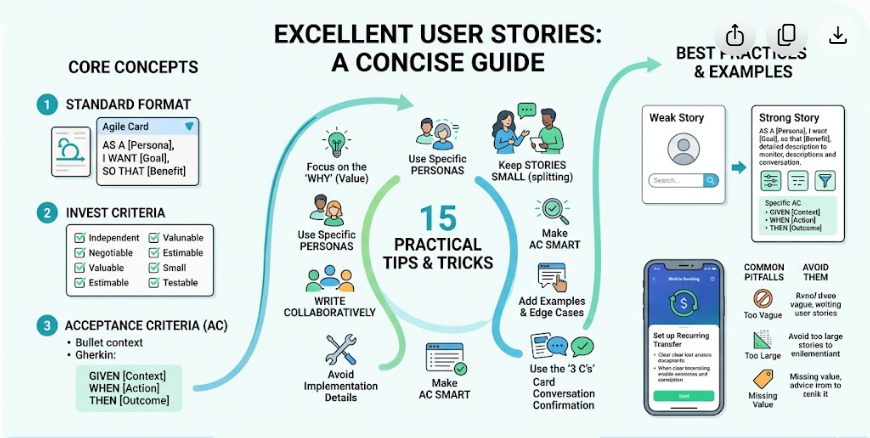
Key Concepts for Good User Stories
1. The Standard User Story Format
As a [type of user / persona],
I want [goal or feature],
so that [benefit or reason].
This format keeps stories user-centric and outcome-oriented.
2. INVEST Criteria
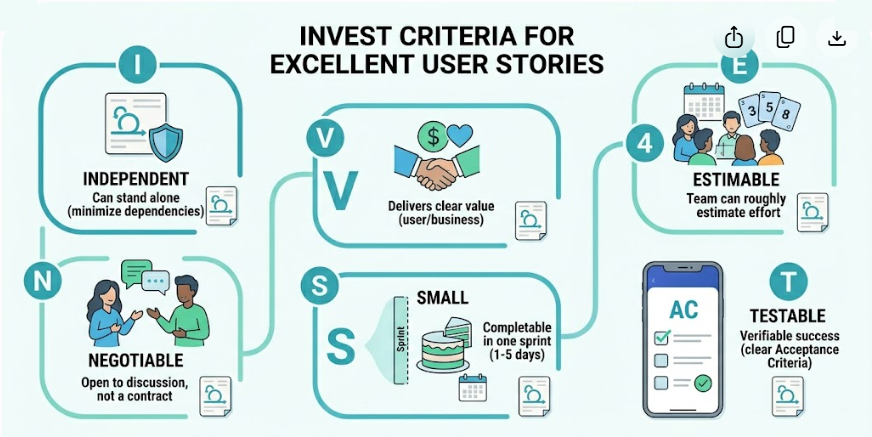
Every effective user story should pass the INVEST test:
- Independent – Can stand alone
- Negotiable – Open to discussion and refinement
- Valuable – Delivers clear value to users or business
- Estimable – The team can roughly estimate effort
- Small – Can be completed in a single sprint (ideally 1–5 days)
- Testable – Has clear, verifiable acceptance criteria
3. Acceptance Criteria (AC)
These are the conditions of satisfaction. They turn a story into something testable.
Recommended formats:
- Bullet list
- Given-When-Then (Gherkin) for behavior-driven development
4. Definition of Done (DoD)
A shared checklist that applies to all stories (e.g., code reviewed, tested, documented, deployed).
15 Practical Tips and Tricks for Writing Excellent User Stories
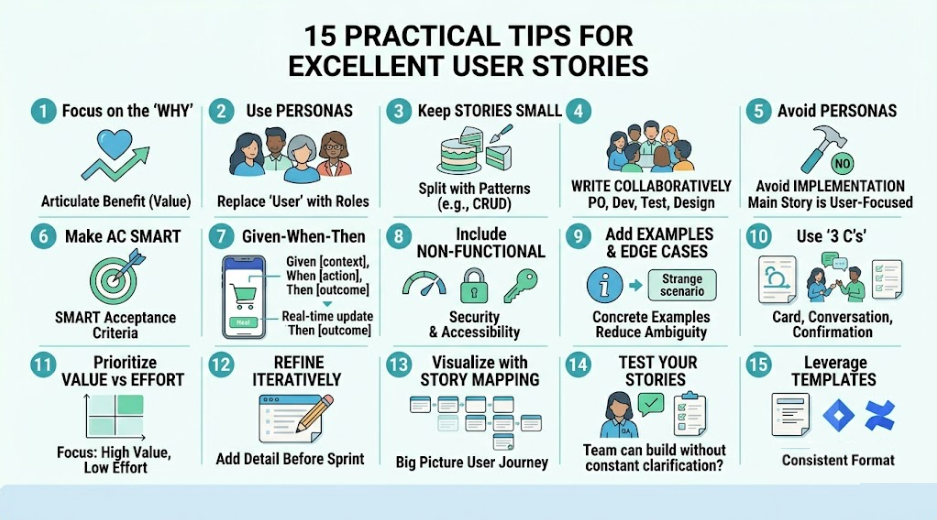
- Focus on the “Why” (Value)
Always articulate the benefit. This helps prioritization and prevents building unnecessary features.
- Use Personas Instead of Generic “User”
Replace “As a user” with specific roles: “As a first-time visitor”, “As a premium subscriber”, “As an admin”.
- Keep Stories Small (Split When Necessary)
If a story feels too big, use these splitting patterns:
- By workflow steps
- By business rules
- By data types
- By operations (CRUD)
- Write Collaboratively
Involve the Product Owner, developers, testers, and designers during backlog refinement.
- Avoid Implementation Details in the Story
Put technical notes in acceptance criteria or as notes, not in the main story.
- Make Acceptance Criteria SMART
Specific, Measurable, Achievable, Relevant, Testable.
- Use Given-When-Then for Complex Behavior
Example:
- Given the user is logged in
- When they add an item to cart
- Then the cart total updates in real-time
- Include Non-Functional Requirements
Performance, security, accessibility, usability, etc., when relevant.
- Add Examples and Edge Cases
Concrete examples reduce ambiguity.
- Use the “3 C’s” (Card, Conversation, Confirmation)
- Card: The written story
- Conversation: The discussion it generates
- Confirmation: Acceptance criteria + tests
- Prioritize with Value vs Effort
Focus on high-value, low-effort stories first.
- Refine Iteratively
Stories don’t have to be perfect on day one. Add detail just before the sprint.
- Visualize with Story Mapping
Arrange stories on a timeline or user journey to see the big picture.
- Test Your Stories
Ask: “Can the team build this without constant clarification?” and “Does it deliver measurable value?”
- Leverage Templates and Tools
Use Visual Paradigm Desktop / Online, Chatbot, Visual Paradigm OpenDocs.
Real-World Examples
Example 1: Basic E-commerce Story
Weak Story:
As a user, I want a search bar.
Strong Story:
As a busy online shopper,
I want to search products by keyword and apply multiple filters (price, rating, category),
so that I can quickly find relevant items without browsing endless pages.
Acceptance Criteria:
- Search returns relevant results ranked by relevance
- Filters can be combined
- Results update dynamically without page reload
- Empty results show helpful suggestions
Example 2: Banking App
As a mobile banking customer,
I want to set up recurring transfers to my savings account,
so that I can automate my savings without manual effort every month.
Acceptance Criteria (Given-When-Then):
- Given I have sufficient balance, when I schedule a recurring transfer, then it executes on the chosen date
- Given the transfer date falls on a non-banking day, then it moves to the next banking day
- User receives confirmation email and push notification
Example 3: Splitting a Large Story
Large: “As a user, I want to manage my profile.”
Split into:
- Update personal information
- Change password with 2FA
- Upload profile picture with validation
Templates You Can Use Immediately
Basic Template:
As a [persona],
I want [action/feature],
so that [benefit].
Advanced Template with AC:
**Title**: Short descriptive name

**Story**: As a ..., I want ..., so that ...

**Acceptance Criteria**:
- [AC 1]
- [AC 2]
- Given ... When ... Then ...

**Notes / Technical Considerations**:
- [Any relevant details]
INVEST Checklist Template (use during refinement):
- Independent
- Negotiable
- Valuable
- Estimable
- Small
- Testable
Common Pitfalls and How to Avoid Them
- Too Vague → Add specific acceptance criteria and examples
- Too Large → Split using horizontal or vertical slicing
- Solution-Focused → Reframe to user goal (“I want the system to…” → “I want to achieve…”)
- Missing Value → Strengthen the “so that” clause
- No Team Input → Hold regular refinement sessions
- Treating as Fixed Contract → Keep stories negotiable
Tools and Resources to Support Better Stories
- Visual Paradigm Desktop / Online, Chatbot, OpenDocs
- StoriesOnBoard or Craft.io (story mapping)
- Mike Cohn’s User Stories Applied (book)
- Roman Pichler’s Blog (excellent templates)
Conclusion
Writing good user stories is a skill that improves with practice and collaboration. Master the INVEST criteria, focus relentlessly on user value, pair every story with solid acceptance criteria, and treat stories as promises of conversation rather than complete specifications.
Teams that consistently write clear, valuable user stories experience fewer misunderstandings, faster delivery, higher quality, and happier stakeholders.
Actionable Next Step: Take 3–5 items from your current backlog right now. Rewrite them using the templates and INVEST checklist above. Review them with your team in the next refinement session and note the improvement in clarity.
The difference between average and exceptional Agile delivery often comes down to the quality of your user stories.
Would you like a downloadable checklist, Jira template file, more industry-specific examples (SaaS, mobile, fintech, etc.), or a guide on story mapping? Let me know how I can help you implement these tips effectively!


