
Building successful IT projects requires more than just writing code—it demands clear planning, structured design, and maintainable architecture. Two fundamental concepts that bridge the gap between abstract ideas and working software are UML (Unified Modeling Language) modeling and the MVC (Model-View-Controller) architectural pattern.
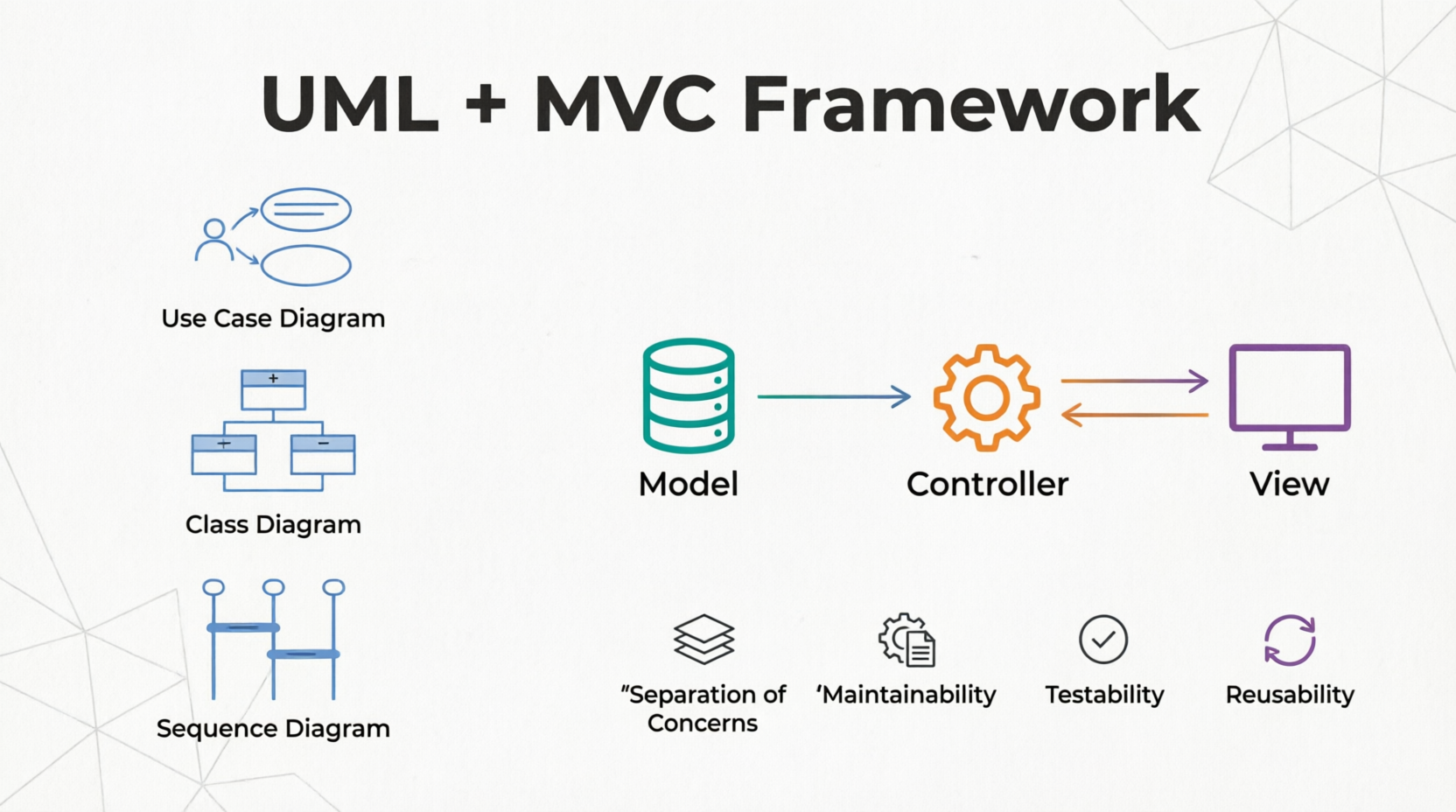
UML provides a visual language to design, document, and communicate system structure and behavior before implementation begins. MVC separates concerns in your application, making it easier to manage complexity, test components independently, and scale your project over time. Together, these approaches create a powerful foundation for beginners entering the world of professional software development. This guide introduces key concepts with practical examples and PlantUML diagrams you can use immediately in your projects.
UML is a standardized modeling language consisting of 14 diagram types that help visualize system design. For beginners, focus on these essential diagrams:
1. Use Case Diagrams - Show what the system does from a user's perspective
2. Class Diagrams - Display the static structure of classes and their relationships
3. Sequence Diagrams - Illustrate how objects interact over time
4. Activity Diagrams - Model workflows and business processes
Association: A connection between classes (e.g., Customer places Order)
Inheritance: An "is-a" relationship (e.g., Admin is a User)
Composition: A "part-of" relationship where the part cannot exist without the whole (e.g., Order has OrderItems)
Aggregation: A "has-a" relationship where parts can exist independently (e.g., Department has Employees)
Model: Represents data and business logic. It manages the application's state, handles database operations, and enforces rules. The Model is independent of the user interface.
View: Handles the presentation layer—what users see and interact with. It displays data from the Model but doesn't process business logic. Views should be passive and simply render information.
Controller: Acts as an intermediary between Model and View. It receives user input, processes requests, updates the Model, and selects the appropriate View to display. Controllers contain application flow logic.
Separation of Concerns: Each component has a single responsibility
Maintainability: Changes to one layer don't break others
Testability: Models can be tested without UI; Controllers can be tested with mock data
Reusability: Multiple Views can use the same Model; Models can serve different Controllers
Let's build a simple task management application using UML and MVC principles.
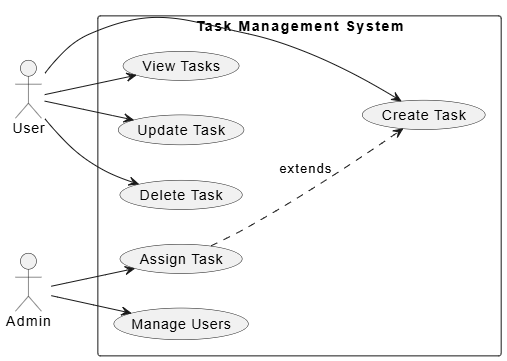
First, identify who uses the system and what they do:
@startuml
left to right direction
actor "User" as user
actor "Admin" as admin

rectangle "Task Management System" {
  usecase "Create Task" as UC1
  usecase "Update Task" as UC2
  usecase "Delete Task" as UC3
  usecase "View Tasks" as UC4
  usecase "Assign Task" as UC5
  usecase "Manage Users" as UC6
}

user --> UC1
user --> UC2
user --> UC3
user --> UC4
admin --> UC5
admin --> UC6

UC5 ..> UC1 : extends
@enduml
This diagram shows that regular Users can create, update, delete, and view tasks, while Admins have additional capabilities like assigning tasks and managing users.
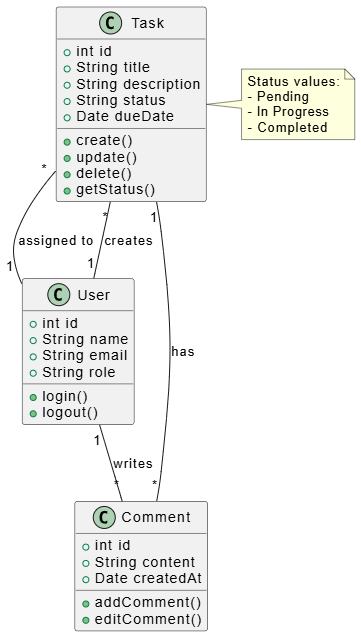
Design the core data structures:
@startuml
class User {
  +int id
  +String name
  +String email
  +String role
  +login()
  +logout()
}

class Task {
  +int id
  +String title
  +String description
  +String status
  +Date dueDate
  +create()
  +update()
  +delete()
  +getStatus()
}

class Comment {
  +int id
  +String content
  +Date createdAt
  +addComment()
  +editComment()
}

User "1" -- "*" Task : creates
Task "1" -- "*" Comment : has
User "1" -- "*" Comment : writes
Task "*" -- "1" User : assigned to

note right of Task
  Status values:
  - Pending
  - In Progress
  - Completed
end note
@enduml
This class diagram reveals:
A User can create multiple Tasks
Each Task can have multiple Comments
Comments are written by Users
Tasks are assigned to specific Users
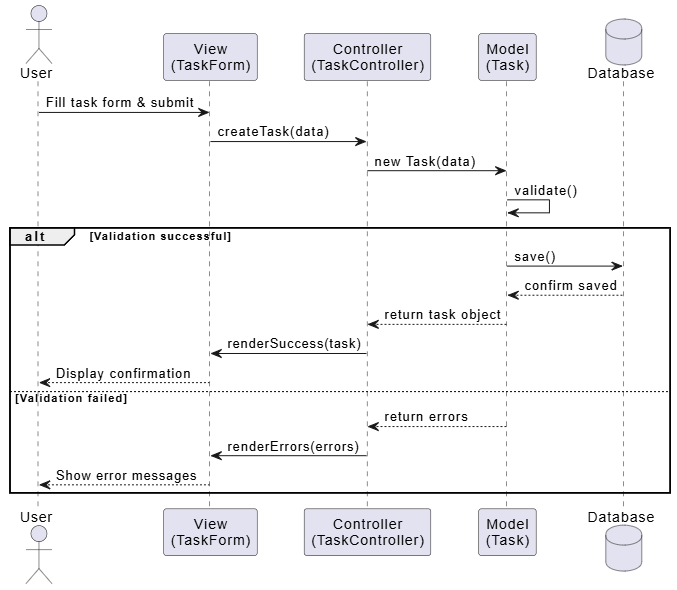
Show how components interact when a user creates a task:
@startuml
actor User
participant "View\n(TaskForm)" as View
participant "Controller\n(TaskController)" as Controller
participant "Model\n(Task)" as Model
database "Database" as DB

User -> View : Fill task form & submit
View -> Controller : createTask(data)
Controller -> Model : new Task(data)
Model -> Model : validate()
alt Validation successful
  Model -> DB : save()
  DB --> Model : confirm saved
  Model --> Controller : return task object
  Controller -> View : renderSuccess(task)
  View --> User : Display confirmation
else Validation failed
  Model --> Controller : return errors
  Controller -> View : renderErrors(errors)
  View --> User : Show error messages
end
@enduml
This sequence demonstrates the MVC flow:
User interacts with the View
View passes data to the Controller
Controller creates a Model instance
Model validates and persists data
Response flows back through Controller to View
Model the workflow for completing a task:
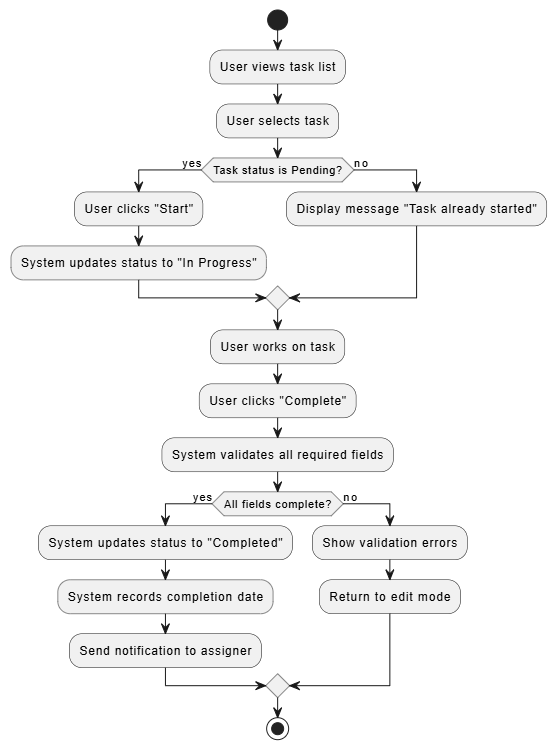
@startuml
start
:User views task list;
:User selects task;
if (Task status is Pending?) then (yes)
  :User clicks "Start";
  :System updates status to "In Progress";
else (no)
  :Display message "Task already started";
endif
:User works on task;
:User clicks "Complete";
:System validates all required fields;
if (All fields complete?) then (yes)
  :System updates status to "Completed";
  :System records completion date;
  :Send notification to assigner;
else (no)
  :Show validation errors;
  :Return to edit mode;
endif
stop
@enduml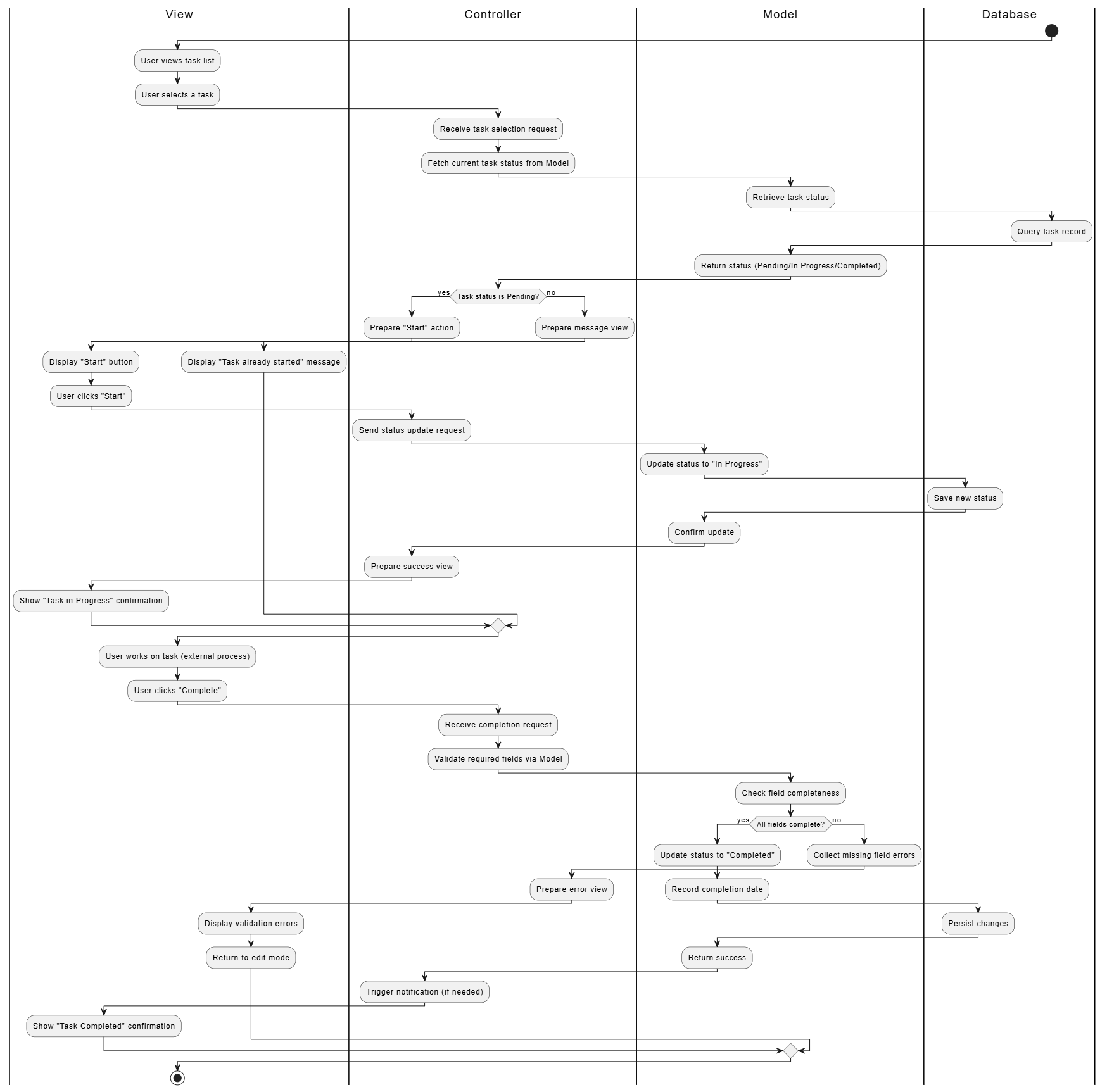
Here's how the MVC pattern translates into actual file organization:
task-management-app/
├── models/
│   ├── User.php          # or .py, .js, etc.
│   ├── Task.php
│   └── Comment.php
├── views/
│   ├── tasks/
│   │   ├── index.php     # List all tasks
│   │   ├── create.php    # Form to create task
│   │   └── show.php      # Display single task
│   └── shared/
│       └── header.php
├── controllers/
│   ├── TaskController.php
│   ├── UserController.php
│   └── CommentController.php
├── routes/               # URL routing configuration
└── config/               # Database and app settings
# TaskController.py
class TaskController:
    def __init__(self, model):
        self.task_model = model

    def create(self, request_data):
        """Handle task creation"""
        # Validate input
        errors = self.validate(request_data)
        if errors:
            return {'status': 'error', 'errors': errors}

        # Create model instance
        task = self.task_model.create(
            title=request_data['title'],
            description=request_data.get('description', ''),
            due_date=request_data.get('due_date'),
            assigned_to=request_data.get('assigned_to')
        )

        # Return success response
        return {'status': 'success', 'task_id': task.id}

    def validate(self, data):
        errors = []
        if not data.get('title'):
            errors.append('Title is required')
        if len(data.get('title', '')) > 100:
            errors.append('Title must be under 100 characters')
        return errors
Putting Business Logic in Views: Views should only display data, not process it
Fat Controllers: Keep controllers thin—they should coordinate, not implement complex logic
Ignoring UML Early On: Sketch diagrams before coding; it saves time debugging later
Over-Engineering: Start with simple MVC; add layers (Services, Repositories) only when needed
Tight Coupling: Ensure Models don't depend on Controllers or Views directly
PlantUML: Text-based diagramming (examples above work directly)
draw.io / diagrams.net: Free drag-and-drop UML tool
Lucidchart: Professional diagramming with collaboration features
StarUML: Desktop application for comprehensive UML modeling
Visual Paradigm Community Edition: Full-featured free tier
Start Simple: Begin with Class and Sequence diagrams for your core features
Iterate: Update diagrams as your understanding evolves
Keep Diagrams Current: Outdated diagrams are worse than no diagrams
Use Consistent Naming: Match diagram element names to actual code classes
Document Decisions: Add notes to diagrams explaining why certain designs were chosen
Review with Team: Use diagrams as communication tools during planning sessions
Mastering UML modeling and MVC architecture gives beginners a significant advantage in building well-structured, maintainable IT projects. UML diagrams serve as blueprints that clarify thinking, facilitate team communication, and catch design flaws early. The MVC pattern provides a proven organizational structure that scales from small applications to enterprise systems.
Remember that these tools serve your development process—not the other way around. Start with basic diagrams for your most critical features, implement clean MVC separation from day one, and gradually expand your modeling practice as projects grow in complexity. The initial investment in planning pays dividends throughout the project lifecycle through reduced bugs, easier maintenance, and smoother team collaboration.
As you gain experience, you'll naturally discover which UML diagrams provide the most value for your specific projects and how to adapt MVC patterns to fit your technology stack. The key is consistency: establish conventions early, document your decisions, and always prioritize clarity over completeness. With these foundations in place, you're well-equipped to tackle increasingly sophisticated IT projects with confidence and professionalism.

