
Use Case 2.0 represents the evolution of traditional use case modeling for modern Agile development. Created by Ivar Jacobson and his team, it bridges the gap between comprehensive requirements capture and the flexibility needed for iterative delivery . This guide covers everything beginners need to know, with practical examples and PlantUML diagrams.
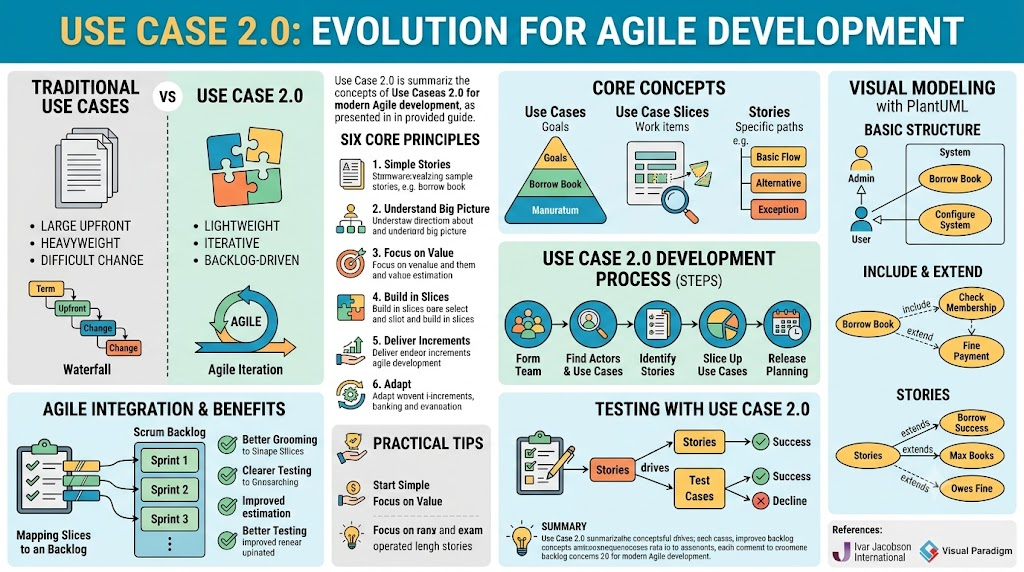
Traditional use case methodology involves creating detailed documents to capture functional requirements. A typical use case includes :
Brief description of system behavior
Preconditions (what must be true before the use case starts)
Post-conditions (what must be true after completion)
Actors (who interacts with the system)
Detailed flow of steps (basic flow, alternative flows, exception flows)
Use Case: Withdraw Cash
Actor: Customer
Precondition: Customer has valid ATM card and PIN
Postcondition: Cash dispensed, account balance updated

Basic Flow:
1. Customer inserts ATM card
2. System validates card
3. Customer enters PIN
4. System validates PIN
5. Customer selects "Withdrawal"
6. Customer enters amount
7. System checks sufficient balance
8. System dispenses cash
9. System prints receipt
10. Customer removes card

Alternative Flow 1: Insufficient Funds
   Step 7a: System detects insufficient balance
   Step 7b: System displays error message
   Step 7c: Return to step 5

Alternative Flow 2: Invalid PIN
   Step 4a: System detects invalid PIN
   Step 4b: System displays error
   Step 4c: After 3 failures, system retains card
The Problem: Traditional use cases are written as large documents upfront. They work for waterfall projects but become too heavy for Agile teams. Requirements change, and maintaining these documents becomes a burden .
Use Case 2.0 is a lightweight, Agile-friendly evolution of traditional use cases. It was inspired by user stories, Scrum, and Kanban, bringing together the best of both worlds .
Keep it simple by telling stories - Use cases capture goals through storytelling
Understand the big picture - Use case diagrams show system boundaries and actors
Focus on value - Every use case delivers observable value to users
Build the system in slices - Break use cases into manageable, valuable pieces
Deliver the system in increments - Release working software regularly
Adapt to meet team's needs - Scale up or down as required
| Aspect | Traditional Use Case | Use Case 2.0 |
|---|---|---|
| Approach | Waterfall, upfront documentation | Agile, iterative, just-in-time |
| Work Unit | Complete use case document | Use Case Slice (small, valuable piece) |
| Planning | Document everything first | Backlog-driven, prioritize by value |
| Testing | After development | Test cases derived from stories, early testing |
| Change | Difficult, expensive to change | Flexible, adapts to changing requirements |
| Format | Heavy documents | Lightweight narratives + visual models |
A use case is a sequence of actions a system performs that yields an observable result of value to a particular user. It's the smallest unit of activity that provides meaningful value .
Think of a use case as a goal that a user wants to achieve, not a list of features. Example goals:
"Borrow a book" (not "Scan barcode, update database...")
"Purchase a product" (not "Process payment, update inventory...")
A use case slice is the most important concept in Use Case 2.0. It represents one or more stories selected from a use case, forming a work item of clear value to the customer .
Use case slices are the bridge to Agile development - they become your backlog items, replacing or complementing traditional user stories.
Example: The "Borrow Book" use case can be sliced into:
| Use Case | Stories | Slices |
|---|---|---|
| Borrow Book | Borrow with success (Basic Flow) | Slice A: Successful Borrow |
| Borrow Book | Maximum borrow record reached | Slice B: Borrow Failed (Max Books) |
| Borrow Book | Borrower owes fine | Slice B: Borrow Failed (Owes Fine) |
Both failure stories can be grouped into a single slice "Borrow Failed" if that delivers value together .
Stories are the detailed descriptions of how a specific goal is achieved or how problems are handled. Each story traces through part of a use case's flow .
Stories fall into three categories:
Basic Flow Story - The simplest, most typical way to achieve the goal
Alternative Stories - Different ways to achieve the same goal
Exception Stories - Error conditions and problem handling
Example: From the "Withdraw Cash" use case:
Story A: "Withdraw $100 successfully with receipt" (Basic flow, standard amount)
Story B: "Withdraw $75 and get receipt" (Alternative flow, non-standard amount)
Story C: "Respond to invalid PIN" (Exception flow)
Each use case slice contains scenarios - the different paths a user might take:
Normal Path - The happy path, what usually happens
Alternative Path - Variations, different choices
Exception Path - Error handling, failures
The STEPS method (Seamless Technique Expressed in Prescribed Steps) provides a step-by-step approach to Use Case 2.0 :
Identify the people who will participate in use case identification and management.
Identify the system's actors (who uses it) and use cases (what goals they want to achieve).
Example: Library Management System
| Actor | Use Cases |
|---|---|
| Member | Borrow Book, Return Book, Search Catalog |
| Librarian | Borrow Book, Return Book, Manage Inventory, Manage Members |
| System Admin | Configure System, Manage Backups |
For each use case, capture the stories:
| Use Case | Stories |
|---|---|
| Borrow Book | - Borrow with success (Basic flow) |
| - Max borrow record reached (Exception) | |
| - Borrower owes fine (Exception) | |
| Return Book | - Return with success (Basic flow) |
| - Damaged book (Exception) | |
| - Late return (Exception) |
Group stories into value-delivering slices:
| Use Case | Slice | Stories Included |
|---|---|---|
| Borrow Book | Borrow Success | Basic flow story |
| Borrow Book | Borrow Failed | Max books reached + Owes fine |
| Return Book | Return Success | Basic flow story |
| Return Book | Return With Penalty | Late return + Damaged book |
Decide which slices go into which releases/sprints. Prioritize by business value.
PlantUML is perfect for Use Case 2.0 because it's text-based, version-control friendly, and easy to update in Agile projects .
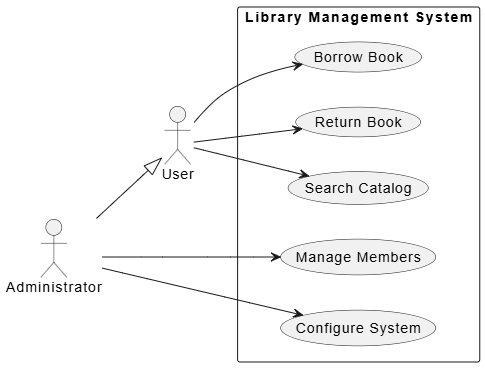
@startuml
left to right direction
skinparam packageStyle rectangle

actor "User" as user
actor "Administrator" as admin

' Actor Generalization (Inheritance)
admin --|> user

rectangle "Library Management System" {
    usecase "Borrow Book" as UC1
    usecase "Return Book" as UC2
    usecase "Search Catalog" as UC3
    usecase "Manage Members" as UC4
    usecase "Configure System" as UC5
}

user --> UC1
user --> UC2
user --> UC3
admin --> UC4
admin --> UC5
@enduml
What this shows:
System boundary (rectangle)
Actors outside the system
Use cases inside
Actor generalization (Admin inherits User capabilities)
Associations (who can do what)
«include» - Mandatory reuse. The base use case always calls the included use case .
«extend» - Optional, conditional behavior. Only triggers under specific conditions .
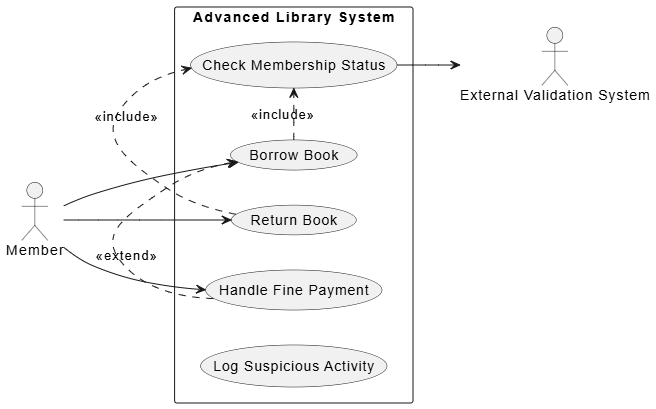
@startuml
left to right direction

actor "Member" as member
actor "External Validation System" as validation

rectangle "Advanced Library System" {
    usecase "Borrow Book" as borrow
    usecase "Return Book" as return
    usecase "Check Membership Status" as check
    usecase "Handle Fine Payment" as fine
    usecase "Log Suspicious Activity" as log
}

member --> borrow
member --> return
member --> fine

' Include: Both borrow and return MUST check membership
borrow .> check : <<include>>
return .> check : <<include>>

' Check membership calls external system
check --> validation

' Extend: Fine payment can extend borrow (optional, conditional)
fine .> borrow : <<extend>>
@enduml
Understanding the arrows:
A .> B : <<include>> = A always uses B
A .> B : <<extend>> = A may extend B in certain situations
Use Case 2.0 stories are often represented as extended use cases:
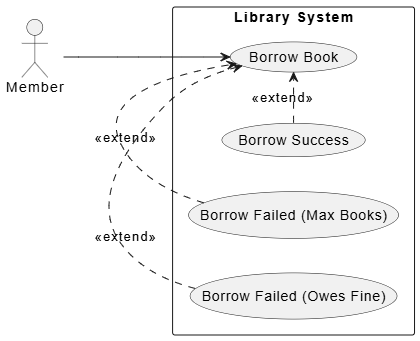
@startuml
left to right direction

actor "Member" as member

rectangle "Library System" {
    usecase "Borrow Book" as borrow
    usecase "Borrow Success" as success
    usecase "Borrow Failed (Max Books)" as maxBooks
    usecase "Borrow Failed (Owes Fine)" as owesFine
}

member --> borrow

' Stories as extend relationships
success .> borrow : <<extend>>
maxBooks .> borrow : <<extend>>
owesFine .> borrow : <<extend>>
@enduml
Note: The basic flow story is represented by the base use case itself. Alternative and exception stories are modeled as extends .
Let's build a complete Use Case 2.0 model for an e-commerce platform.
| Actor | Use Cases |
|---|---|
| Customer | Browse Products, Search Products, Add to Cart, Checkout, View Order History |
| Admin | Manage Inventory, Manage Users, View Sales Reports |
| Payment Gateway | Process Payment |
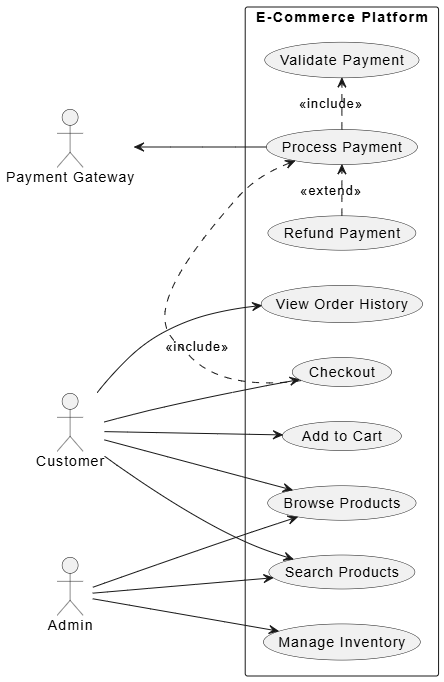
@startuml
left to right direction
skinparam packageStyle rectangle

actor "Customer" as customer
actor "Admin" as admin
actor "Payment Gateway" as payment

rectangle "E-Commerce Platform" {
    usecase "Browse Products" as browse
    usecase "Search Products" as search
    usecase "Add to Cart" as addCart
    usecase "Checkout" as checkout
    usecase "View Order History" as history
    usecase "Manage Inventory" as inventory
    usecase "Process Payment" as processPay
    usecase "Validate Payment" as validatePay
    usecase "Refund Payment" as refund
}

customer --> browse
customer --> search
customer --> addCart
customer --> checkout
customer --> history
admin --> inventory
admin --> browse
admin --> search

' Checkout includes payment processing
checkout .> processPay : <<include>>

' Process payment uses validation
processPay .> validatePay : <<include>>

' Refund extends process payment (optional)
refund .> processPay : <<extend>>

' Payment gateway is external actor for processing
payment <-- processPay
@enduml
| Story Type | Story Description |
|---|---|
| Basic Flow | Customer successfully completes purchase with credit card |
| Alternative 1 | Customer pays with PayPal |
| Alternative 2 | Customer pays with gift card |
| Exception 1 | Payment declined - insufficient funds |
| Exception 2 | Payment declined - invalid card details |
| Exception 3 | Inventory unavailable at checkout |
| Slice Name | Stories | Business Value |
|---|---|---|
| Checkout Success - Credit Card | Basic flow (credit card) | High - most common path |
| Checkout Success - PayPal | Alternative 1 | Medium - supports more customers |
| Checkout Success - Gift Card | Alternative 2 | Low - nice to have |
| Checkout Failed - Payment | Exception 1, Exception 2 | High - must handle errors gracefully |
| Checkout Failed - Inventory | Exception 3 | High - prevents overselling |
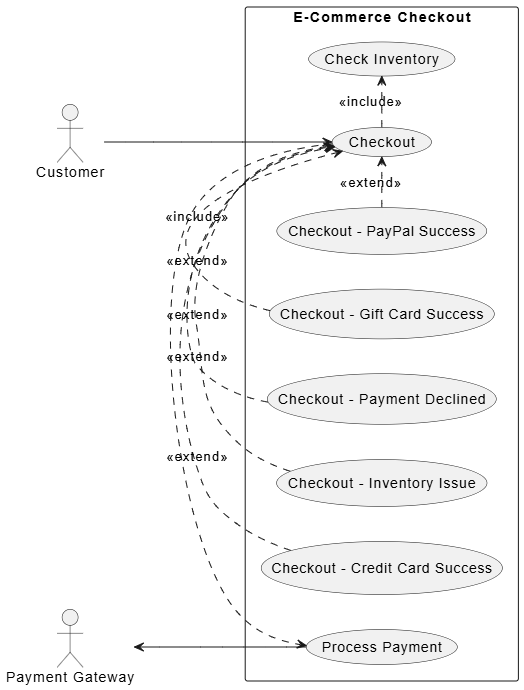
@startuml
left to right direction

actor "Customer" as customer
actor "Payment Gateway" as payment

rectangle "E-Commerce Checkout" {
    usecase "Checkout" as checkout
    usecase "Checkout - Credit Card Success" as ccSuccess
    usecase "Checkout - PayPal Success" as paypal
    usecase "Checkout - Gift Card Success" as gift
    usecase "Checkout - Payment Declined" as declined
    usecase "Checkout - Inventory Issue" as inventoryIssue
    usecase "Process Payment" as processPay
    usecase "Check Inventory" as checkInv
}

customer --> checkout

' Payment processing is mandatory
checkout .> processPay : <<include>>
checkout .> checkInv : <<include>>

' Success stories
ccSuccess .> checkout : <<extend>>
paypal .> checkout : <<extend>>
gift .> checkout : <<extend>>

' Failure stories
declined .> checkout : <<extend>>
inventoryIssue .> checkout : <<extend>>

' External system
payment <-- processPay
@enduml
One of the biggest benefits of Use Case 2.0 is its natural fit with Scrum and Kanban backlogs .
Epic: E-Commerce Checkout

Stories (Backlog Items):
🟢 Sprint 1: Checkout Success - Credit Card
   - Normal path: credit card payment
   - Acceptance tests: valid card, sufficient funds

🟢 Sprint 2: Checkout Success - PayPal
   - Alternative path: PayPal redirect
   - Acceptance tests: PayPal success flow

🟡 Sprint 3: Checkout Failed - Payment
   - Exception handling: declined, invalid
   - Acceptance tests: declined response handling

🔵 Sprint 4: Checkout Success - Gift Card
   - Alternative path: gift card entry
   - Acceptance tests: valid/invalid gift card

🔵 Sprint 5: Checkout Failed - Inventory
   - Exception handling: out of stock at checkout
   - Acceptance tests: inventory validation
Better backlog grooming: Use case slices provide context that raw user stories lack
Clearer testing: Each story maps directly to test cases
Improved estimation: With clear boundaries, estimates become more accurate
Rich requirements without heavy docs: Lightweight but comprehensive
Use Case 2.0 excels at driving testing :
Each story in a use case represents a test scenario:
| Story | Test Case |
|---|---|
| Basic flow: Credit card success | Test: Valid card, valid amount, available funds → Success |
| Alternative: PayPal success | Test: Redirect to PayPal, complete payment → Success |
| Exception: Insufficient funds | Test: Card with insufficient funds → Decline message |
| Exception: Inventory issue | Test: Item goes out of stock during checkout → Error |
Key Benefit: You derive acceptance criteria directly from the use case stories, eliminating ambiguity .
Don't create all use cases upfront. Identify just enough to start development .
Use index cards or lightweight tools for initial stories .
Ask: "What value does this use case deliver to the user?"
Prioritize slices by business value, not technical ease.
Small teams can use very lightweight narratives .
Larger, distributed teams may need more detailed documentation.
No one-size-fits-all - adapt to what works for you.
Each slice should be completable within a sprint.
Slices should deliver observable value when complete.
Don't slice too small (loses value context) or too large (can't finish).
Diagrams communicate big picture quickly .
PlantUML keeps diagrams in version control.
Update diagrams as the system evolves, not as a one-time activity.
Use Case 2.0 combines the structured thinking of traditional use cases with the flexibility of Agile development.
| Strength | How Use Case 2.0 Delivers |
|---|---|
| Business Focus | Use cases capture goals, not just features |
| Agile Ready | Slices become backlog items |
| Testable | Each story defines acceptance criteria |
| Scalable | Works for small teams and large systems |
| Collaborative | Stories are easy for stakeholders to understand |
| Visual | Diagrams provide big-picture context |
[1] Ivar Jacobson, Ian Spence, Brian Kerr. "Use-Case 2.0: The Hub of Software Development." ACM Digital Library.
[2] Visual Paradigm Guides. "Developing a New E-commerce Platform with Use Case 2.0."
[3] Ivar Jacobson International. "Use-Case 2.0 eLearning."
[4] Visual Paradigm. "STEPS Wizards Example: Use Case 2.0."
[5] Visual Paradigm Blog. "Bridging Requirements and Design: A Practical Guide to Use Case Modeling with UML and PlantUML."

