
In the fast-paced world of IT project delivery, one of the most critical yet challenging tasks is capturing and communicating requirements effectively. Get it right, and your team builds the right solution efficiently. Get it wrong, and you risk costly rework, missed deadlines, and stakeholder dissatisfaction.
Two dominant techniques have emerged as foundational tools for requirements capture: Use Cases and User Stories. While both aim to describe what a system should do from the user's perspective, they differ significantly in their approach, level of detail, and ideal application contexts.
Use Cases, rooted in traditional software engineering methodologies, provide comprehensive, structured descriptions of system interactions. They excel at documenting complex business processes, ensuring regulatory compliance, and providing detailed specifications for development teams. Think of them as the detailed blueprint of a building—thorough, precise, and leaving little room for ambiguity.
User Stories, born from the Agile movement, offer a lightweight, conversational approach to requirements. They focus on delivering user value in small, manageable increments and thrive in environments where collaboration and adaptability are paramount. Consider them as sketch plans that evolve through ongoing dialogue with stakeholders—flexible, iterative, and focused on outcomes rather than exhaustive documentation.
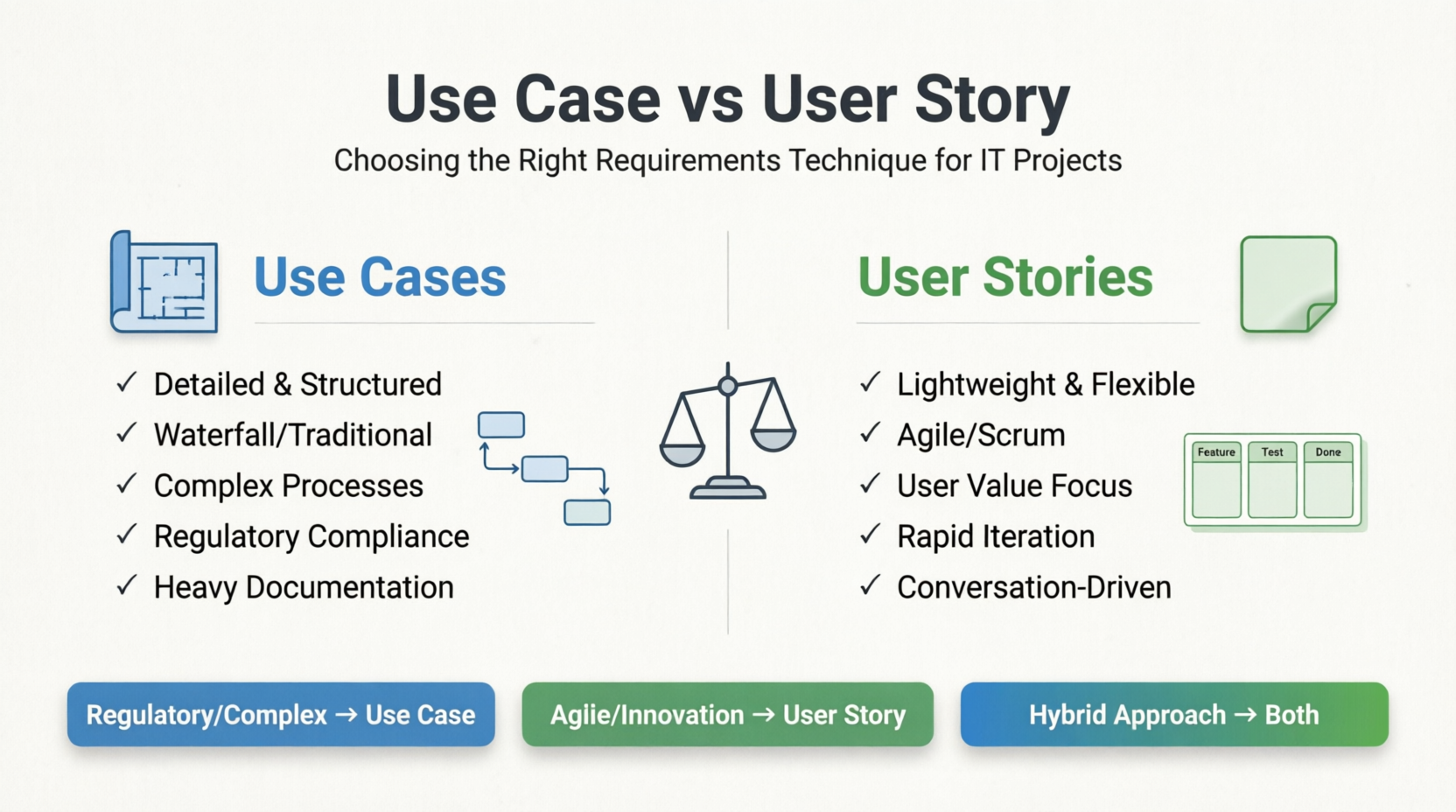
The question isn't which technique is "better," but rather which is better suited for your specific project context. Should you invest time in detailed use case documentation, or embrace the agility of user stories? Can you leverage both? How do you decide when complexity warrants a use case versus when simplicity calls for a story?
This comprehensive guide will help you answer these questions by:
Explaining the key concepts and characteristics of both techniques
Providing a detailed comparison table highlighting their strengths and weaknesses
Offering a practical decision framework to choose the right approach
Presenting five detailed examples across different domains (e-commerce, healthcare, banking, project management, and airline booking) showing both formats side-by-side
Sharing best practices, common pitfalls, and real-world case studies
Providing ready-to-use templates and tools recommendations
Whether you're a product manager deciding how to structure your backlog, a business analyst tasked with requirements documentation, or a development team lead seeking clarity on specification approaches, this guide will equip you with the knowledge to make informed decisions and deliver successful IT projects.
Let's dive in and explore how to master the art of requirements capture in modern IT projects.
Both Use Cases and User Stories are requirements capture techniques, but they serve different purposes, audiences, and project methodologies. Understanding when to use each (or both) is critical for successful IT project delivery.
A Use Case is a detailed description of how users interact with a system to achieve a specific goal. It captures functional requirements from the user's perspective in a structured format.
Characteristics:
Detailed and comprehensive
Formal structure with preconditions, postconditions, main flow, and alternative flows
Focuses on system behavior and interactions
Often includes diagrams (UML)
Suitable for complex business processes
Standard Template:
Use Case Name: [Brief descriptive name]
Actor(s): [Who initiates the interaction]
Preconditions: [What must be true before starting]
Postconditions: [What will be true after completion]
Main Success Scenario: [Step-by-step primary path]
Alternative Flows: [Variations and error paths]
Business Rules: [Constraints and rules]
A User Story is a brief, informal description of a feature told from the perspective of the end user. It's a placeholder for a conversation about requirements.
Characteristics:
Concise and lightweight
Follows the format: "As a [role], I want [feature], so that [benefit]"
Focuses on user value and outcomes
Designed for Agile/Scrum environments
Encourages collaboration and iteration
Standard Format (INVEST criteria):
Independent
Negotiable
Valuable
Estimable
Small
Testable
| Aspect | Use Case | User Story |
|---|---|---|
| Level of Detail | High - comprehensive documentation | Low - just enough to start conversation |
| Format | Structured template with multiple sections | Simple sentence or card |
| Length | Several pages possible | One sentence + acceptance criteria |
| Methodology | Waterfall, RUP, traditional SDLC | Agile, Scrum, Kanban |
| Focus | System behavior and interactions | User value and outcomes |
| Audience | Business analysts, developers, testers, stakeholders | Product owners, development teams |
| Flexibility | Less flexible once documented | Highly flexible, evolves through sprint |
| Documentation | Heavy upfront documentation | Just-in-time documentation |
| Traceability | Easy to trace requirements to design | Requires additional tools for traceability |
| Complexity Handling | Excellent for complex workflows | Better for simple, discrete features |
| Time Investment | High initial investment | Low initial investment |
| Testing | Test cases derived from scenarios | Acceptance tests from criteria |
| Change Management | Changes require document updates | Changes handled in backlog refinement |
| Stakeholder Engagement | Formal review processes | Continuous collaboration |
| Best For | Regulated industries, complex systems | Fast-moving products, MVPs |
| Risk Coverage | Explicitly documents edge cases | Edge cases discovered during development |
✅ Regulatory compliance required (healthcare, finance, aviation)
✅ Complex business processes with many decision points
✅ Multiple actors interacting with the system
✅ Detailed documentation needed for audit trails
✅ System integration projects requiring precise specifications
✅ Large enterprise systems with long development cycles
✅ Outsourced development where clear specs reduce ambiguity
✅ Safety-critical systems where completeness is essential
✅ Agile/Scrum methodology in use
✅ Rapid prototyping or MVP development
✅ Uncertain or evolving requirements
✅ Close collaboration with stakeholders possible
✅ Customer feedback loops are short
✅ Startup environment with limited resources
✅ Innovation projects where discovery is ongoing
✅ User experience-focused development
Many successful IT projects use both:
High-level User Stories for backlog management and sprint planning
Detailed Use Cases for complex features requiring thorough analysis
User stories link to use cases for deeper context
--- if you're managing a large ERP implementation, you might use use cases for core financial modules and user stories for UI enhancements.
Title: Guest Checkout

As a guest user
I want to checkout without creating an account
So that I can complete my purchase quickly

Acceptance Criteria:
- Guest can enter shipping address
- Guest can select payment method
- Guest receives order confirmation email
- Guest is offered option to create account after purchase
- Order is tracked with order number only
Use Case Name: Process Guest Checkout
Actor: Guest Customer, Payment Gateway, Inventory System

Preconditions:
- User has items in shopping cart
- User has not logged in
- Items are in stock

Postconditions:
- Order is created in system
- Payment is processed
- Inventory is updated
- Confirmation email is sent

Main Success Scenario:
1. Guest clicks "Checkout as Guest"
2. System displays checkout form
3. Guest enters shipping information
4. System validates address format
5. Guest selects shipping method
6. System calculates shipping cost
7. Guest enters payment details
8. System sends payment request to gateway
9. Payment gateway approves transaction
10. System creates order record
11. System updates inventory levels
12. System sends confirmation email
13. System displays order confirmation page
14. System offers account creation option

Alternative Flows:

A1. Invalid Address Format (at step 4):
    4a. System displays error message
    4b. Guest corrects address
    4c. Return to step 4

A2. Payment Declined (at step 9):
    9a. System displays decline message
    9b. Guest chooses different payment method
    9c. Return to step 7

A3. Item Out of Stock (detected at step 10):
    10a. System notifies guest item unavailable
    10b. Guest chooses to remove item or cancel
    10c. If remove, return to step 7; if cancel, end use case

A4. Email Delivery Failure (at step 12):
    12a. System logs error
    12b. System retries up to 3 times
    12c. If still fails, display message to save order number

Business Rules:
- BR1: Guest orders over $500 require phone verification
- BR2: Shipping addresses must be within service area
- BR3: Payment must be authorized within 5 minutes
- BR4: Order numbers are unique 10-digit identifiers
Title: Register New Patient

As a receptionist
I want to register new patients in the system
So that they can receive medical care and billing

Acceptance Criteria:
- Can capture patient demographics (name, DOB, contact)
- Can upload insurance card image
- System validates insurance eligibility
- Generates unique patient ID
- Creates electronic health record (EHR) shell
- Prints registration confirmation
Use Case Name: Register New Patient
Actors: Receptionist, Insurance Verification System, EHR System

Preconditions:
- Receptionist is logged into registration system
- Patient is present with identification and insurance card

Postconditions:
- Patient record exists in database
- Insurance eligibility verified
- EHR initialized
- Patient ID assigned

Main Success Scenario:
1. Receptionist selects "New Patient Registration"
2. System displays registration form
3. Receptionist enters patient demographics
   - First name, last name
   - Date of birth
   - Gender
   - Contact information (phone, email, address)
   - Emergency contact
4. System validates required fields
5. Receptionist scans/uploads insurance card
6. System extracts insurance information via OCR
7. Receptionist verifies extracted data
8. System sends eligibility request to insurance provider
9. Insurance system returns coverage details
10. System assigns unique patient ID
11. System creates EHR shell record
12. System generates registration summary
13. Receptionist reviews and confirms accuracy
14. System saves patient record
15. System prints registration confirmation
16. System notifies clinical staff of new patient

Alternative Flows:

A1. Missing Required Information (at step 4):
    4a. System highlights missing fields
    4b. Receptionist completes information
    4c. Return to step 4

A2. OCR Extraction Errors (at step 7):
    7a. Receptionist manually enters/corrects insurance data
    7b. Return to step 8

A3. Insurance Ineligible (at step 9):
    9a. System displays coverage limitations
    9b. Receptionist informs patient
    9c. Patient provides alternative insurance OR agrees to self-pay
    9d. If alternative insurance, return to step 5
    9e. If self-pay, mark as self-pay and continue to step 10

A4. Duplicate Patient Detected (at step 10):
    10a. System displays potential matches
    10b. Receptionist verifies if existing patient
    10c. If duplicate, merge records or update existing
    10d. End use case

A5. System Timeout During Insurance Check (at step 8):
    8a. System retries up to 3 times
    8b. If still fails, flag for manual verification
    8c. Continue registration with pending status
    8d. Create task for billing team to verify later

Business Rules:
- BR1: Patients under 18 require guardian information
- BR2: Insurance eligibility must be verified before non-emergency services
- BR3: Patient IDs follow format: P-YYYY-NNNNNN
- BR4: HIPAA consent form must be signed before record creation
- BR5: Duplicate detection uses name + DOB + last 4 SSN
Title: Transfer Between Accounts

As a mobile banking customer
I want to transfer money between my accounts
So that I can manage my funds conveniently

Acceptance Criteria:
- Can select source and destination accounts
- Can enter transfer amount
- System validates sufficient funds
- Shows transfer confirmation with reference number
- Updates account balances immediately
- Sends push notification upon completion
- Daily transfer limit enforced ($10,000)
Use Case Name: Transfer Funds Between Accounts
Actor: Mobile Banking Customer, Core Banking System, Notification Service

Preconditions:
- Customer is authenticated and logged in
- Customer has at least two active accounts
- No account freezes or restrictions

Postconditions:
- Source account debited
- Destination account credited
- Transaction recorded in ledger
- Customer notified

Main Success Scenario:
1. Customer selects "Transfer" from main menu
2. System displays transfer form
3. Customer selects source account
4. System displays available balance
5. Customer selects destination account
6. Customer enters transfer amount
7. Customer optionally enters memo/note
8. Customer reviews transfer details
9. Customer confirms transfer
10. System validates:
    - Sufficient funds in source account
    - Within daily transfer limit
    - Accounts are active
    - Amount is positive
11. System places hold on source account funds
12. System sends transfer request to core banking
13. Core banking processes transfer
14. System updates both account balances
15. System generates transaction reference number
16. System displays confirmation screen
17. System sends push notification
18. System logs transaction for audit trail

Alternative Flows:

A1. Insufficient Funds (at step 10):
    10a. System displays error: "Insufficient funds"
    10b. System shows available balance
    10c. Customer adjusts amount or cancels
    10d. If adjusted, return to step 6; if cancelled, end

A2. Exceeds Daily Limit (at step 10):
    10a. System displays error with remaining daily limit
    10b. Customer adjusts amount or cancels
    10c. If adjusted, return to step 6; if cancelled, end

A3. Invalid Amount (at step 10):
    10a. System displays error (negative, zero, or non-numeric)
    10b. Customer corrects amount
    10c. Return to step 6

A4. Core Banking Timeout (at step 13):
    13a. System waits up to 30 seconds
    13b. If timeout, query transaction status
    13c. If completed, continue to step 14
    13d. If pending, display "processing" message
    13e. If failed, release hold and notify customer

A5. Destination Account Inactive (at step 10):
    10a. System displays error
    10b. Customer selects different destination account
    10c. Return to step 5

Business Rules:
- BR1: Maximum single transfer: $50,000
- BR2: Daily cumulative transfer limit: $10,000 (resets midnight)
- BR3: Transfers between own accounts are instant
- BR4: Minimum transfer amount: $0.01
- BR5: Memo field limited to 100 characters
- BR6: Failed transfers automatically reversed within 24 hours
Title: Create New Task

As a team member
I want to create a new task
So that I can track work items

Acceptance Criteria:
- Can enter task title and description
- Can assign to team member
- Can set due date
- Can add labels/tags
- Can attach files
- Task appears in assigned user's backlog
- Creator receives confirmation
Use Case Name: Create New Task
Actors: Team Member, Project Manager, Notification Service

Preconditions:
- User is logged into project management system
- User has permission to create tasks in selected project
- Project is active

Postconditions:
- Task record created in database
- Assigned user notified
- Task visible in project board/backlog

Main Success Scenario:
1. User navigates to project
2. User clicks "Create Task" button
3. System displays task creation form
4. User enters task title (required)
5. User enters description (optional)
6. User selects assignee from team members list
7. User sets due date (optional)
8. User selects priority level
9. User adds labels/tags
10. User attaches files (optional)
11. User clicks "Create Task"
12. System validates required fields
13. System creates task record with unique ID
14. System adds task to project backlog
15. System sends notification to assignee
16. System displays success message with task link
17. System refreshes project board

Alternative Flows:

A1. Missing Title (at step 12):
    12a. System highlights title field
    12b. System displays "Title is required"
    12c. User enters title
    12d. Return to step 11

A2. Invalid Due Date (at step 12):
    12a. System detects past date or invalid format
    12b. System displays error message
    12c. User corrects date
    12d. Return to step 11

A3. Assignee Not Available (at step 12):
    12a. System warns that assignee is on leave
    12b. User confirms assignment or changes assignee
    12c. If confirmed, continue to step 13

A4. File Upload Failure (at step 10):
    10a. System displays upload error
    10b. User retries or removes file
    10c. Return to step 10 or proceed without file

A5. Duplicate Task Detected (at step 12):
    12a. System suggests similar existing tasks
    12b. User reviews suggestions
    12c. User chooses to create anyway or use existing
    12d. If using existing, end use case

Business Rules:
- BR1: Task titles limited to 200 characters
- BR2: Descriptions support markdown formatting
- BR3: Maximum 5 attachments per task (10MB each)
- BR4: Default priority is "Medium"
- BR5: Tasks auto-expire if not started within 90 days of due date
- BR6: Only project admins can create tasks in archived projects
Title: Search and Book Flight

As a traveler
I want to search for flights and book a ticket
So that I can plan my trip

Acceptance Criteria:
- Can search by origin, destination, dates
- Can filter by price, duration, airline
- Can select seat during booking
- Can add baggage options
- Can pay with credit card
- Receives e-ticket via email
- Booking appears in "My Trips"
Use Case Name: Search and Book Flight
Actors: Traveler, Payment Gateway, Seat Map System, Baggage System, Email Service

Preconditions:
- Traveler has valid payment method
- Flight inventory is available
- Travel dates are valid (not in past)

Postconditions:
- Flight booked and confirmed
- Payment processed
- Seat assigned
- E-ticket issued
- Booking in traveler's account

Main Success Scenario:
1. Traveler enters search criteria:
   - Origin airport
   - Destination airport
   - Departure date
   - Return date (if round-trip)
   - Number of passengers
   - Cabin class preference
2. System searches flight inventory
3. System displays available flights sorted by price
4. Traveler applies filters (airline, stops, duration)
5. Traveler selects outbound flight
6. If round-trip, traveler selects return flight
7. System displays fare breakdown
8. Traveler enters passenger details:
   - Full name (as on ID)
   - Date of birth
   - Passport/ID number (international)
   - Contact information
   - Frequent flyer number (optional)
9. System validates passenger information
10. Traveler selects seats from seat map
11. System displays seat availability and pricing
12. Traveler adds baggage options
13. System calculates total price
14. Traveler reviews booking summary
15. Traveler enters payment details
16. System validates payment information
17. System processes payment through gateway
18. Payment approved
19. System confirms seat assignments
20. System reserves baggage allowance
21. System generates booking reference (PNR)
22. System issues e-ticket
23. System sends confirmation email with e-ticket
24. System adds booking to traveler's account
25. System displays confirmation page

Alternative Flows:

A1. No Flights Available (at step 2):
    2a. System displays "No flights found"
    2b. System suggests alternative dates or nearby airports
    2c. Traveler modifies search or ends

A2. Flight Becomes Unavailable (at step 5 or 6):
    5a/6a. System displays "Flight no longer available"
    5b/6b. System refreshes search results
    5c/6c. Traveler selects different flight
    5d/6d. Return to step 7

A3. Invalid Passenger Name (at step 9):
    9a. System detects mismatch with ID format
    9b. System displays validation error
    9c. Traveler corrects name
    9d. Return to step 9

A4. Seat Selection Conflict (at step 11):
    11a. Selected seat taken by another user
    11b. System refreshes seat map
    11c. Traveler selects different seat
    11d. Return to step 11

A5. Payment Declined (at step 18):
    18a. System displays decline reason
    18b. Traveler enters different payment method
    18c. Return to step 15

A6. Payment Timeout (at step 17):
    17a. System waits 60 seconds for response
    17b. If timeout, query payment status
    17c. If charged but booking failed, initiate refund
    17d. Display error and allow retry

A7. Email Delivery Failure (at step 23):
    23a. System logs error
    23b. System retries up to 3 times
    23c. If still fails, display PNR prominently for manual retrieval
    23d. Create support ticket for manual email

Business Rules:
- BR1: Names must match government-issued ID exactly
- BR2: International flights require passport details
- BR3: Seat selection free for premium cabin, $15-50 for economy
- BR4: Baggage: 1 carry-on free, checked bags $30-50 each
- BR5: Booking must be completed within 15 minutes of flight selection
- BR6: Cancellation allowed up to 24 hours before departure (fees apply)
- BR7: PNR format: 6 alphanumeric characters
- BR8: Children under 2 travel free on lap (domestic only)
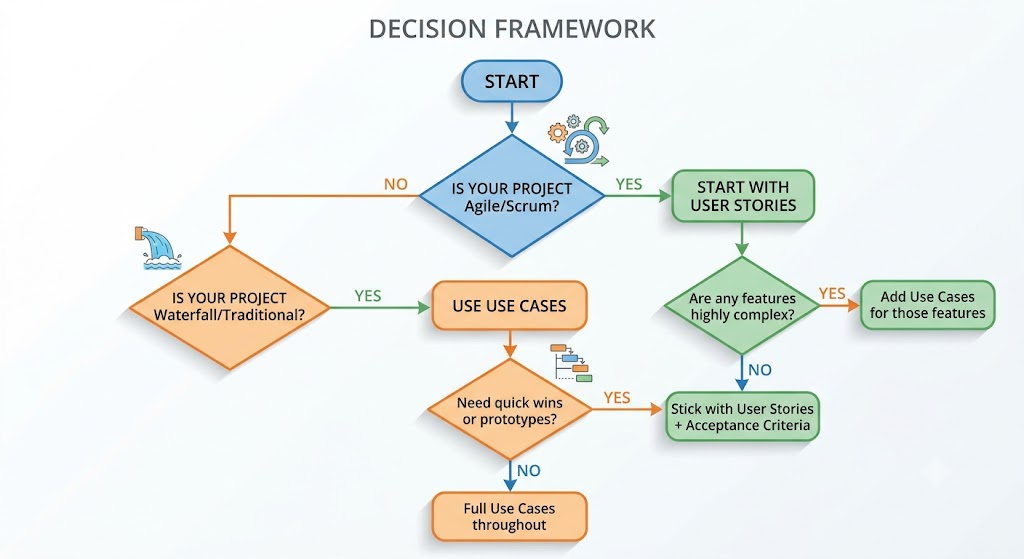
Use this flowchart to decide:
| Question | If YES → Lean Toward |
|---|---|
| Do you need regulatory documentation? | Use Case |
| Are requirements stable and well-understood? | Use Case |
| Is the team co-located with stakeholders? | User Story |
| Do you need to deliver in 2-week sprints? | User Story |
| Are there 10+ decision branches in the process? | Use Case |
| Is this a greenfield innovation project? | User Story |
| Will external vendors build parts of the system? | Use Case |
| Do you have continuous customer feedback? | User Story |
| Is audit trail critical? | Use Case |
| Is time-to-market the top priority? | User Story |
Keep actor-focused: Always describe from the actor's perspective
Number steps clearly: Enables easy reference in discussions
Document all alternatives: Don't assume happy path only
Include diagrams: Activity diagrams complement text
Maintain traceability: Link use cases to requirements IDs
Review with stakeholders: Ensure accuracy before development
Update iteratively: Treat as living documents
Avoid technical jargon: Keep business-language focused
Define clear boundaries: Each use case = one user goal
Validate pre/post conditions: Ensure logical consistency
Follow INVEST criteria: Ensure quality before grooming
Write acceptance criteria: Use Given/When/Then format
Keep conversations central: Stories are reminders to talk
Size appropriately: Should fit in one sprint
Prioritize by value: Use MoSCoW or WSJF methods
Include examples: Concrete examples clarify intent
Split vertically: Each story delivers end-to-end value
Avoid technical stories: Frame from user perspective
Refine continuously: Backlog grooming is essential
Link related stories: Use epics and themes for organization
Scenario: Successful fund transfer with sufficient balance
  Given the customer has $500 in checking account
  And the customer has savings account
  When the customer transfers $100 from checking to savings
  Then checking account balance should be $400
  And savings account balance should increase by $100
  And customer receives confirmation with reference number
❌ Too technical: Describing database operations instead of user goals
❌ Missing alternatives: Only documenting the happy path
❌ Overly granular: Breaking into tiny steps that change frequently
❌ No actor clarity: Unclear who initiates each action
❌ Static documents: Never updating after initial creation
❌ Scope creep: Including multiple goals in one use case
❌ Too vague: "As a user, I want it to work better"
❌ Technical framing: "As a developer, I want to refactor the API"
❌ No acceptance criteria: Leaving success undefined
❌ Too large: Stories that span multiple sprints
❌ Ignoring dependencies: Not identifying blocked stories
❌ No conversation: Treating stories as fixed contracts
| Purpose | Use Case Tools | User Story Tools |
|---|---|---|
| Documentation | Confluence, Word, Visio | Jira, Azure DevOps, Trello |
| Diagramming | Lucidchart, Draw.io, Enterprise Architect | Miro, Mural (for story mapping) |
| Collaboration | SharePoint, Google Docs | Jira, Linear, ClickUp |
| Tracking | IBM DOORS, Jama Connect | Jira, Asana, Monday.com |
Use Case Template:
USE CASE: [Name]
ID: UC-[Number]
Version: [X.X]
Author: [Name]
Date: [Date]
Status: [Draft/Reviewed/Approved]

1. DESCRIPTION
   [Brief overview]

2. ACTORS
   - Primary: [Who initiates]
   - Secondary: [Who participates]

3. PRECONDITIONS
   - [Condition 1]
   - [Condition 2]

4. POSTCONDITIONS
   - [Condition 1]
   - [Condition 2]

5. MAIN SUCCESS SCENARIO
   Step 1: [Action]
   Step 2: [Action]
   ...

6. ALTERNATIVE FLOWS
   A1. [Trigger]
      a. [Response]
      b. [Response]

   A2. [Trigger]
      ...

7. BUSINESS RULES
   - BR1: [Rule]
   - BR2: [Rule]

8. SPECIAL REQUIREMENTS
   - Performance: [Requirements]
   - Security: [Requirements]
   - Compliance: [Requirements]

9. ASSUMPTIONS
   - [Assumption 1]

10. OPEN ISSUES
    - [Issue 1]
User Story Template:
STORY: [Brief Title]
ID: STORY-[Number]
Epic: [Parent Epic]
Priority: [High/Medium/Low]
Estimate: [Story Points]

AS A [role/user type]
I WANT [action/feature]
SO THAT [benefit/value]

ACCEPTANCE CRITERIA:

Scenario 1: [Scenario name]
  Given [context]
  When [action]
  Then [outcome]

Scenario 2: [Scenario name]
  Given [context]
  When [action]
  Then [outcome]

NOTES:
- [Additional context]
- [Dependencies]
- [Design links]
- [Technical considerations]

DEFINITION OF DONE:
☐ Code written
☐ Unit tests passing
☐ Acceptance tests passing
☐ Code reviewed
☐ Documentation updated
☐ Deployed to staging
☐ PO acceptance
Challenge: Building a new online banking platform with strict regulatory requirements.
Approach:
Used Use Cases for:
Account opening (KYC/AML compliance)
Wire transfers (regulatory reporting)
Loan applications (credit decisioning)
Used User Stories for:
Dashboard customization
Notification preferences
UI theme selection
Result: Met compliance requirements while maintaining agile delivery speed for customer-facing features. Reduced rework by 40% compared to previous all-use-case approach.
Challenge: Developing a telemedicine platform with uncertain market fit.
Approach:
Started entirely with User Stories for rapid MVP
After 3 sprints, added Use Cases for:
Prescription workflow (complex multi-actor process)
Insurance claim submission (regulatory complexity)
Result: Launched MVP in 8 weeks. Use cases prevented costly errors in regulated workflows. Pivot-friendly due to story-based backlog.
Challenge: Replacing legacy ERP system across 12 facilities.
Approach:
Exclusively used Use Cases for:
Inventory management
Production scheduling
Quality control workflows
Supplemented with User Stories for:
Reporting dashboard enhancements
Mobile app features
Result: Comprehensive documentation enabled smooth vendor handoff. Use cases served as training materials. 18-month project delivered on schedule.
| Factor | Use Case | User Story |
|---|---|---|
| Detail Level | ★★★★★ | ★★☆☆☆ |
| Speed | ★★☆☆☆ | ★★★★★ |
| Flexibility | ★★☆☆☆ | ★★★★★ |
| Compliance | ★★★★★ | ★★★☆☆ |
| Collaboration | ★★★☆☆ | ★★★★★ |
| Complex Processes | ★★★★★ | ★★★☆☆ |
| Innovation | ★★☆☆☆ | ★★★★★ |
| Documentation | ★★★★★ | ★★☆☆☆ |
Don't choose sides - Use both where appropriate
Match to methodology - Agile → stories first; Waterfall → use cases
Consider complexity - Complex = use cases; Simple = stories
Think about audience - Regulators want use cases; Teams prefer stories
Start lightweight - You can always add detail later
Focus on value - Both techniques should drive business value
Iterate and improve - Learn what works for your team
Tool support matters - Choose tools that fit your chosen approach
Books:
"Writing Effective Use Cases" by Alistair Cockburn
"User Story Mapping" by Jeff Patton
"Agile Estimating and Planning" by Mike Cohn
Online:
Mountain Goat Software (user stories)
IBM Developer Works (use cases)
Atlassian Community (practical examples)
Standards:
IEEE 830 (Software Requirements Specification)
BABOK Guide (Business Analysis Body of Knowledge)
This guide provides a foundation, but every project is unique. Adapt these techniques to your specific context, team dynamics, and organizational culture.

