AI Mermaid.js Generator for Markdown Workflows
Turn natural language prompts into production-ready Mermaid flowcharts, sequence diagrams, and Git graphs. Embeddable directly in your READMEs, docs, and GitHub pull requests.
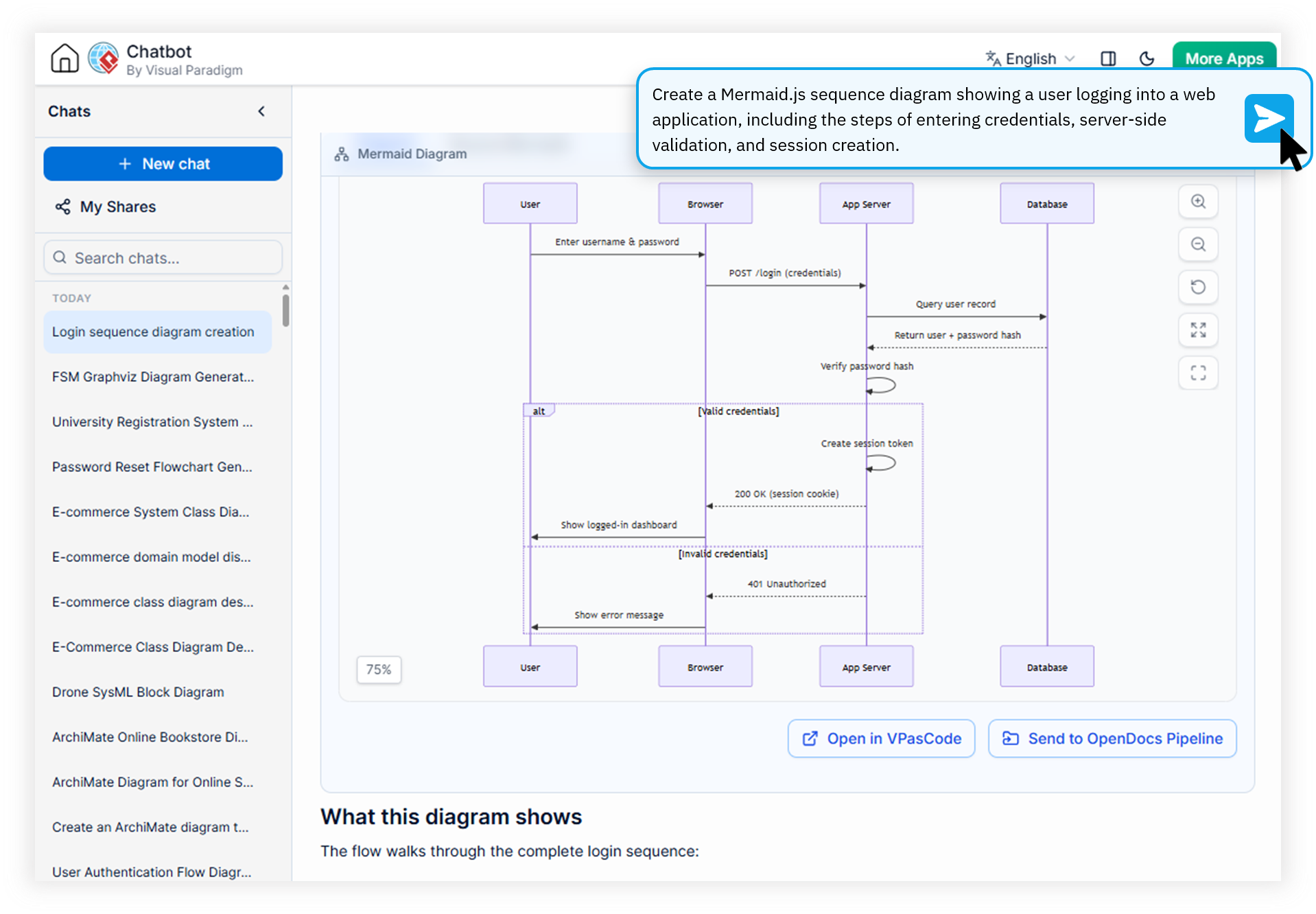
Built for Technical Documentation Teams
Our AI Mermaid.js generator bridges the gap between developer workflows and visual documentation, eliminating the syntax overhead that slows teams down.
GitHub Contributors
Embed architecture diagrams in pull requests with a single prompt. Document system changes visually without leaving your development workflow or learning new diagramming tools.
Open Source Developers
Ship README files with rich, interactive diagrams. Maintain documentation that stays synchronized with code through Mermaid-native generation and standards-compliant output.
Documentation Engineers
Eliminate syntax errors and manual rendering bottlenecks. Generate compliant Mermaid diagrams that integrate seamlessly with MkDocs, Docusaurus, and other static site generators.
Watch How Visual Paradigm AI Chatbot Works
What Makes This Mermaid JS Editor Online Different
Summary: A purpose-built AI Mermaid diagram generator that converts natural language into syntactically perfect Mermaid code, optimized for GitHub, GitLab, and documentation platforms. It replaces error-prone manual coding with conversational refinement.
Prompt-to-Mermaid AI Engine
Describe your workflow in plain English and receive syntactically valid Mermaid code in seconds. Our domain-trained models handle complex flowchart logic that generic LLMs often mangle, making it a reliable convert text to mermaid js solution for engineering teams.
Real-Time Markdown Embedding
Copy generated Mermaid syntax directly into Markdown files and preview rendered diagrams inline. No context switching, no third-party plugins, and no broken image links in your documentation.
Git Graph Automation
The dedicated mermaid git graph generator creates branch visualizations from natural-language branching descriptions. Perfect for release notes, onboarding guides, and architecture decision records.
Sequence Diagram Intelligence
Model API interactions, user flows, and microservice communication patterns conversationally. Iterate on participants, message timing, and error handling through simple follow-up chat prompts.
How to Generate Mermaid Diagrams with AI
Four steps from prompt to embedded diagram using the Visual Paradigm AI Diagramming Chatbot.
Describe Your Diagram
Open the AI Diagramming Chatbot and describe what you want to visualize. For example: "Create a sequence diagram for user login with OAuth provider and three error paths."
Review & Refine
The AI returns production-ready Mermaid code in the artifacts pane. Ask follow-up questions to adjust styling, add participants, or modify flow logic through natural conversation.
Export & Embed
Copy the clean Mermaid syntax directly to your clipboard or export as SVG. Paste into GitHub README files, pull requests, Notion pages, or documentation platforms like Docusaurus.
Sync Across the Ecosystem
Send diagrams to VPasCode for precision editing, export to VP Online for drag-and-drop refinements, or sync to Visual Paradigm Desktop for enterprise-grade modeling projects.
Manual Mermaid Coding vs. AI-Driven Generation
| Focus Area | Manual Mermaid Coding | AI Mermaid.js Generator |
|---|---|---|
| Time to First Diagram | Hours of syntax lookup | Seconds |
| Syntax Error Rate | High with complex graphs | Near-zero |
| Iteration Cycles | Rewrite from scratch | Conversational refinement |
| Learning Curve | Steep syntax memorization | Plain English prompts |
| Multi-Diagram Sessions | Disjointed files | Unified chat history |
| Cross-Platform Export | Manual copy-paste | One-click to VP Online & Desktop |
Seamlessly Integrated With the Visual Paradigm AI Ecosystem
The AI Mermaid.js generator is a core component of the Visual Paradigm AI Diagramming Chatbot, giving you access to a full suite of diagramming tools beyond Mermaid.
OpenDocs Integration
Send generated Mermaid diagrams directly to Visual Paradigm OpenDocs for extended documentation and team-wide knowledge sharing.
VPasCode Bridge
Seamlessly transfer diagram-as-code scripts into VPasCode for precision code-level editing, fine-tuning, and version control.
VP Online & Desktop Sync
Move from AI ideation to rich visual editing in VP Online, or import generated visual models into enterprise-grade desktop projects.
Frequently Asked Questions
Is the AI Mermaid.js generator free to use?
Yes, a free trial is available for evaluation. Full access to the AI Mermaid diagram generator is included with subscriptions to VP Online (Deluxe Edition) and VP Desktop (Professional Edition).
Can I embed the generated Mermaid diagrams directly in GitHub?
Absolutely. GitHub natively renders Mermaid syntax in Markdown files. Our generator produces standards-compliant code that renders perfectly in READMEs, issues, and pull requests without requiring additional plugins or rendering services.
What types of Mermaid diagrams can I generate?
The AI supports flowcharts, sequence diagrams, Git graphs, state diagrams, class diagrams, ER diagrams, Gantt charts, and more. Beyond Mermaid, the chatbot also handles PlantUML, Graphviz, ArchiMate, C4, and dozens of other diagram types.
How accurate is the generated Mermaid code compared to manual coding?
Our domain-trained AI models deliver near-zero syntax error rates, significantly outperforming generic LLMs which often produce broken Mermaid syntax that requires manual debugging. Every output is optimized for immediate rendering.
Start Generating Mermaid Diagrams Today
Join GitHub contributors and documentation engineers using AI to ship better docs, faster. No Mermaid syntax memorization required.