AI PlantUML Generator & Editor
Generate syntactically correct PlantUML scripts for UML, SysML, and JSON data from plain language prompts. Refine every line in the VPasCode bridge and export production-ready diagrams in seconds.
Built for Software Developers, Technical Writers, and Diagram-as-Code Enthusiasts.
Watch How Visual Paradigm AI Chatbot Works
How Our AI PlantUML Generator Outperforms Generic LLMs
Bottom Line: Unlike generic chatbots that produce broken PlantUML code, our domain-trained AI PlantUML generator delivers syntactically and semantically correct diagrams on the first attempt — reducing debugging time by up to 90% and integrating directly into your existing diagram-as-code workflow via the VPasCode bridge.
Domain-Trained PlantUML Intelligence
Our AI PlantUML generator is trained specifically on PlantUML, Mermaid, and Graphviz syntax. It understands proper arrow notation, grouping constructs, skinparams, and layout hints — producing code that compiles cleanly without manual correction.
Online PlantUML Editor with AI (VPasCode Bridge)
Seamlessly transfer generated scripts into VPasCode for precision code-level editing. Adjust participant names, reorder message flows, or fine-tune styling without leaving the Visual Paradigm ecosystem.
Full UML & SysML Coverage
Generate every major PlantUML-supported diagram type: sequence, class, use case, activity, component, deployment, state, and more. Also handles SysML requirements, ERD, ArchiMate, C4, and JSON data structures.
Multi-Format Export & Ecosystem Integration
Export diagrams as high-resolution PNG or vector SVG, copy image outputs to clipboard, or send diagrams directly to OpenDocs, Visual Paradigm Online, or VP Desktop. Print conversations as PDF or export as markdown.
From Plain Text to Production-Ready Diagrams in Four Steps
The Visual Paradigm AI Diagramming Chatbot turns any natural language request into a refined, exportable PlantUML diagram through a conversational workflow.
Describe Your Diagram
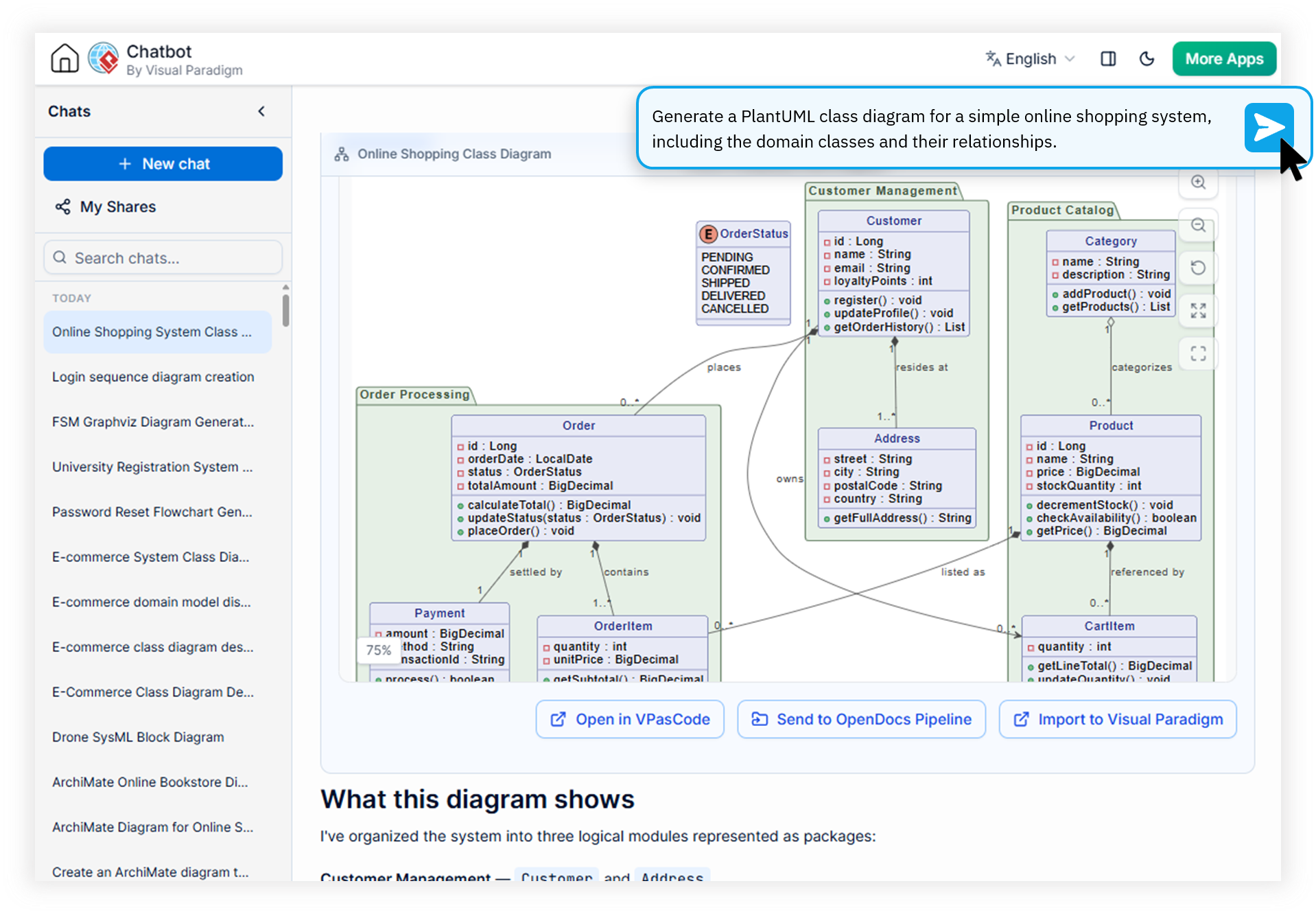
Open the AI PlantUML generator and describe your system interaction, data flow, or architecture in plain language. For example: "Draw a sequence diagram for a user login flow with OAuth."
Review the Generated Diagram
The AI instantly renders the PlantUML sequence diagram maker output in the advanced viewer. Zoom, fit-to-screen, or view full-screen, then navigate all artifacts via the interactive table of contents.
Refine in VPasCode Bridge
Push the script into the VPasCode editor for precision code-level fine-tuning. Modify participants, adjust timing, or iterate on styling — or ask the AI to make changes conversationally.
Export or Sync to Your Stack
Export to PNG, SVG, or clipboard. Send to OpenDocs for publishing, drop into Visual Paradigm Online for drag-and-drop refinement, or sync to VP Desktop for enterprise projects.
Everything You Need to Know About the AI PlantUML Generator
What is an AI PlantUML generator and how does it work?
+
An AI PlantUML generator uses domain-trained AI models to convert natural language descriptions into syntactically correct PlantUML scripts for UML, SysML, and JSON diagrams. Unlike generic LLMs, it delivers near-zero error rates with proper PlantUML syntax, and integrates directly with editors like VPasCode for precision code-level editing.
Can I convert text to PlantUML online for free?
+
Yes. Visual Paradigm's AI PlantUML generator offers a free trial that allows you to convert text descriptions into PlantUML scripts online. Full access is available with VP Online Deluxe or VP Desktop Professional subscriptions, giving you unlimited generation, VPasCode bridge editing, and export capabilities.
Which PlantUML diagram types can the AI generate?
+
The AI PlantUML generator supports the full PlantUML specification including Sequence diagrams, Class diagrams, Use Case diagrams, Activity diagrams, Component diagrams, Deployment diagrams, State diagrams, Package diagrams, Object diagrams, Composite Structure, and Timing diagrams. It also handles SysML, C4 architecture, ArchiMate, ERD, and JSON structures.
How does the VPasCode bridge enhance PlantUML editing?
+
The VPasCode bridge seamlessly transfers generated PlantUML scripts into a dedicated code-level editor for precision fine-tuning. You can directly modify syntax, adjust diagram relationships, and iterate on the diagram-as-code without leaving the Visual Paradigm ecosystem, then export to PNG, SVG, or push directly to Visual Paradigm Online for visual editing.
Ship Perfect PlantUML Diagrams on Your First Try
Start generating syntactically correct UML, SysML, and JSON diagrams today. Free trial available — no credit card required.