AI-Powered Alternative to Manual Drag-and-Drop Diagramming
Eliminate tedious manual shape dragging with prompt-driven generation and conversational visual editing. Build professional diagrams, flowcharts, and architecture diagrams in seconds instead of hours.
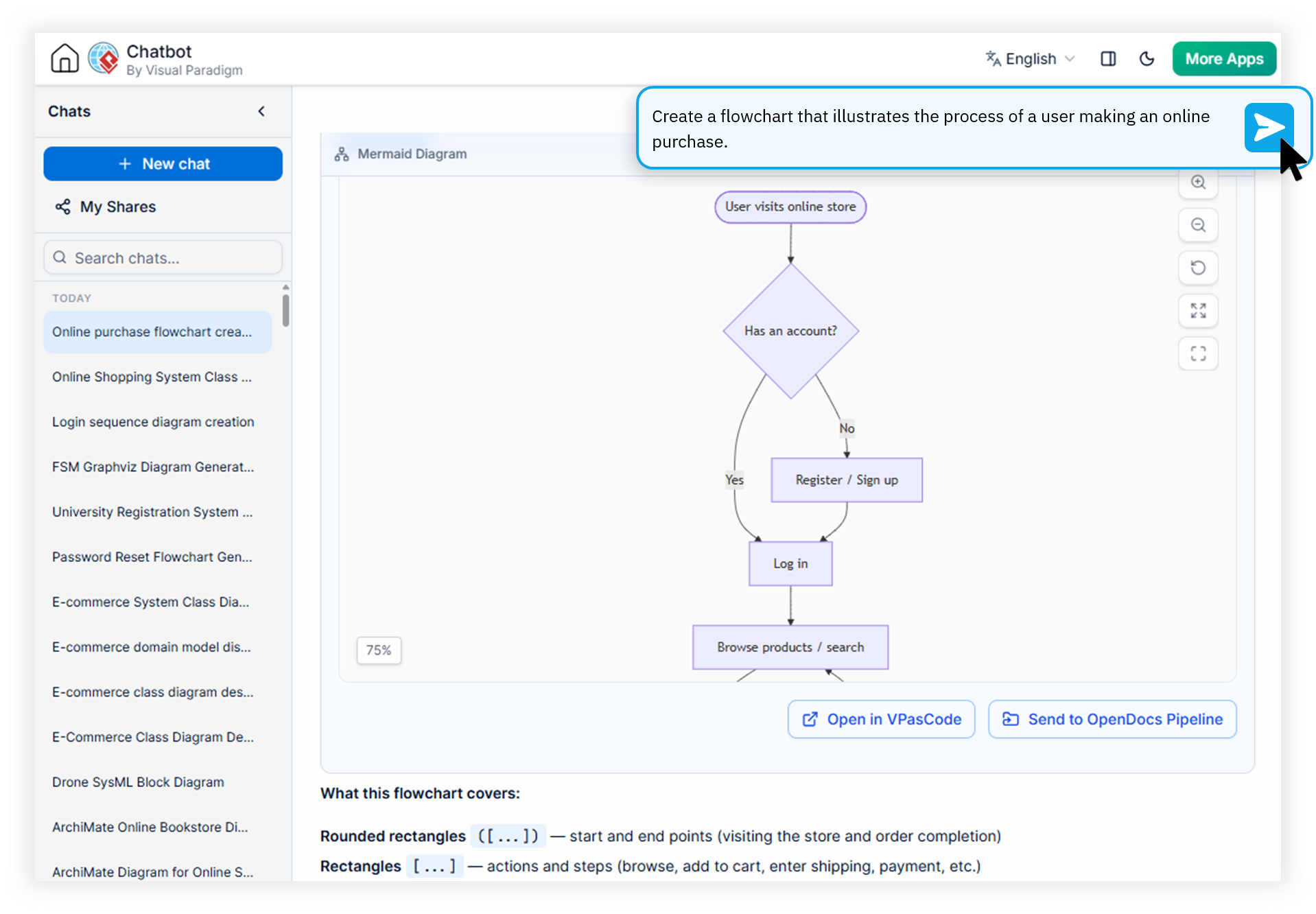
Engineered for Professionals Who Value Speed Over Shape-By-Shape Tweaking
Manual Alignment Hassle
Spending hours dragging, resizing, and aligning shapes pixel-by-pixel just to produce a clean diagram. Alignment guides and snap-to-grid features only add friction to the workflow.
Costly Iteration Cycles
Making even minor structural changes requires repositioning every connected element. Every iteration multiplies the manual effort and slows down design reviews.
Steeper Learning Curves
Traditional diagramming tools require weeks of onboarding to master palettes, connectors, and styling. Non-technical stakeholders remain locked out of the diagramming process.
Watch How Visual Paradigm AI Chatbot Works
Why the AI Diagramming Chatbot Is the Fast AI Diagramming Alternative You Need
Summary: The Visual Paradigm AI Diagramming Chatbot converts plain language into production-ready diagrams with auto-alignment and near-zero error rates, removing the manual drag-and-drop bottleneck entirely from your workflow.
Instant Diagram Generation from Prompts
Describe your system architecture, business process, or data model in plain English. The AI interprets your intent and produces a complete, professionally formatted diagram in seconds — the true power of prompt based diagram software.
Conversational Visual Editing
Refine any element of an existing diagram through follow-up chat. Add nodes, rename labels, adjust relationships, or restructure entire flows without touching a single shape manually.
True Auto Aligning Diagram Tool
Every generated diagram ships with semantically correct structure and spacing. Domain-trained AI models enforce layout conventions across UML, SysML, ArchiMate, flowcharts, and more.
Diagram Expansion and Documentation
Drill down into any shape to auto-generate detailed sub-diagrams. Export structured reports, technical documentation, and markdown transcripts alongside your visual deliverables.
From Idea to Diagram in Four Simple Steps
A no drag and drop flowchart generator experience designed for analysts, architects, engineers, and business professionals.
Describe Your Idea
Open the chatbot and type a natural language description of the diagram you need — a system architecture, business process, or strategy model.
Generate Instantly
Domain-trained AI produces a structured, syntax-valid diagram using industry-standard formats like PlantUML, Mermaid, and Graphviz.
Refine by Conversation
Ask the AI to adjust specific elements, expand sub-diagrams, or rename components through simple follow-up messages.
Export and Integrate
Export to PNG, SVG, Markdown, or PDF. Send to OpenDocs, transfer to VPasCode, sync with VP Desktop, or edit in VP Online.
Traditional Diagramming vs. AI Chatbot Approach
A side-by-side comparison showing why professionals are moving from manual tools to this ai alternative to manual diagramming.
| Metric / Focus Area | Traditional Drag-and-Drop | AI Diagramming Chatbot |
|---|---|---|
| Time to First Diagram | 30–60 minutes of manual setup | Seconds via natural language |
| Alignment & Layout | Manual pixel-by-pixel adjustment | Fully auto-aligned |
| Iteration Speed | Minutes per structural change | Instant via chat prompts |
| Onboarding Required | Weeks to master the tool | Zero learning curve |
| Documentation Output | Separate, manual process | Auto-generated reports |
| Syntax Accuracy | Dependent on user skill | Domain-trained, near-zero errors |
Answers to Common Questions About AI Diagramming
What is conversational diagramming and how does it differ from traditional drag-and-drop?
Conversational diagramming uses natural language prompts to generate and edit diagrams through an AI chat interface. Unlike traditional drag-and-drop tools, you describe what you want and the AI handles shape placement, alignment, and structure automatically. This makes it a true no drag and drop flowchart generator for modern teams.
Can I edit AI-generated diagrams after they are created?
Absolutely. You can iteratively refine any AI-generated diagram through follow-up prompts, asking the chatbot to add nodes, rename elements, or restructure relationships. For code-level control, transfer the diagram-as-code script into VPasCode. For visual editing, export directly into Visual Paradigm Online's drag-and-drop editor.
What diagram types does the AI Diagramming Chatbot support?
The chatbot supports an extensive library including UML (Class, Sequence, Use Case, Activity, Component, Deployment, State), SysML diagrams, Enterprise Architecture models like ArchiMate and C4, Strategic Analysis frameworks (SWOT, PESTLE, McKinsey 7S), Flowcharts, DFDs, ERDs, Org Charts, and many more specialized diagram types.
How can I export diagrams generated by the AI Chatbot?
You can export diagrams as high-resolution PNG or vector SVG files, copy images directly to your clipboard, export conversations as Markdown, print to PDF, send to OpenDocs for knowledge sharing, sync with Visual Paradigm Desktop for enterprise projects, or open in VP Online for further visual refinement.
Ready to Ditch Manual Diagramming Forever?
Join thousands of professionals who have replaced tedious drag-and-drop workflows with fast, intelligent, conversational diagramming.