MEETING INTELLIGENCE FOR PROJECT TEAMS

Convert Meeting Transcripts & Notes into Mind Maps & Process Flows

Transform unstructured audio transcripts and brainstorming meeting notes into structured MarkMaps and step-wise process flowcharts. Built for project managers, consultants, and team leads who need clarity fast.
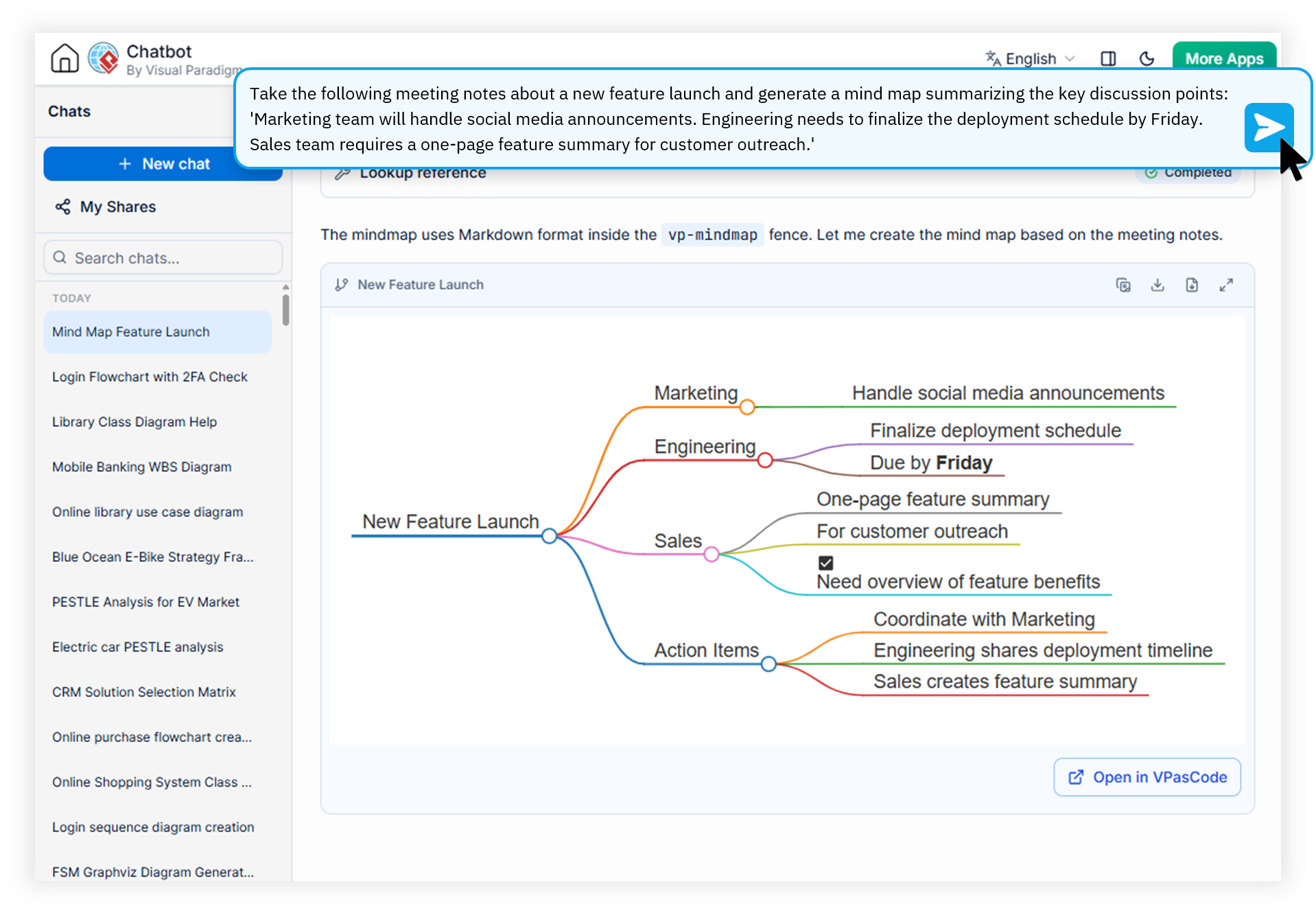
Visual Paradigm AI Diagramming Chatbot converting a meeting transcript into a structured MarkMap and process flowchart
THE CHALLENGE

Engineered for Project Managers, Consultants & Team Leads

Every meeting produces valuable insights, decisions, and action items. But without a meeting notes process mapping tool, that knowledge gets buried in scattered docs and forgotten conversations.

01

Project Managers

Spend hours translating stakeholder discussions into actionable Gantt charts and RACI diagrams. Manual re-typing of meeting notes into process flows introduces drift and delays kickoff.

02

Management Consultants

Capture hundreds of interview notes during discovery phases, then struggle to structure them into client-ready SWOT, SOAR, or McKinsey 7S deliverables between site visits.

03

Team Leads

Run daily stand-ups and retrospectives but lose the thread of decisions once the meeting ends. Action items evaporate without a shared, visual anchor the whole team can reference.

SEE IT IN ACTION

Watch How Visual Paradigm AI Chatbot Works
Watch How Visual Paradigm AI Works
CORE CAPABILITIES

How the AI Chatbot Turns Meetings into Structured Diagrams

A purpose-built transcript to flowchart AI that understands business conversations, not just generic language.

Bottom Line: The Visual Paradigm AI Diagramming Chatbot converts unstructured meeting transcripts and brainstorming notes into structured MarkMaps and step-wise process flowcharts in seconds. Teams paste their meeting notes, ask for a mind map or flowchart, and receive a diagram they can immediately refine, export, or share — eliminating the manual diagramming bottleneck that slows down project kickoff and consulting deliverables.

Convert Meeting Notes to Mind Map in Seconds

Paste a raw meeting transcript or typed brainstorm and the AI chatbot instantly generates a hierarchical MarkMap. Topics, sub-topics, and action items are organized automatically — no manual node-dragging required.

Transcript to Flowchart AI for Process Clarity

Turn sequential meeting discussions into step-wise process flowcharts with decision branches. The AI recognizes conditional language ("if approved, then...") and translates it into proper diagram logic.

Iterative Refinement Through Conversation

Unlike static AI generators, this tool lets you keep the conversation going. Ask the chatbot to expand a branch, merge duplicate nodes, or drill down into a specific topic to generate a detailed sub-diagram.

AI MarkMap Generator from Text with Open Formats

Outputs are built on industry-standard text formats (PlantUML, Mermaid, Graphviz). Copy the underlying code, edit it in any IDE, or feed it into downstream AI workflows without vendor lock-in.

High-Precision, Domain-Trained Generation

Generic LLMs produce syntactically broken diagrams. Visual Paradigm's models are trained on business analysis, software engineering, and consulting frameworks for near-zero error rates on SWOT, PESTLE, C4, and more.

Free Brainstorming to Diagram Tool with Sharing

Save full chat sessions and generate shareable URLs via the My Shares page. Send a link to your team so everyone sees the same evolving mind map or flowchart — no file attachments needed.

HOW IT WORKS

From Meeting Transcript to Shareable Diagram in Four Steps

A conversational workflow that fits naturally into the way project managers and consultants already capture meeting notes.

01

Paste Your Transcript

Drop in a raw voice-to-text transcript, typed meeting minutes, or a rough brainstorm dump into the chat window.

02

Ask for a Diagram

Prompt the AI: "turn this into a MarkMap" or "convert to a step-wise flowchart." The chatbot generates the diagram as an interactive artifact.

03

Refine in Conversation

Ask follow-ups: "expand the risk branch," "add a decision gate after step 4," or "drill down into the budget topic."

04

Export & Share

Export as PNG or SVG, copy to clipboard, push to OpenDocs, open in VP Online, or sync directly to a VP Desktop enterprise project.

MANUAL VS. AI-POWERED

Traditional Meeting Documentation vs. AI Diagramming Chatbot

Focus Area Traditional Manual Process With Visual Paradigm AI Chatbot
Time to Visualize Hours of manual diagramming per meeting Seconds from paste to diagram
Format Consistency Ad-hoc shapes, inconsistent styling across team Standardized MarkMaps & flowcharts every time
Cross-Team Knowledge Transfer Siloed notes in email threads and docs Shareable URLs from My Shares page
Follow-Up Action Planning Manual extraction of action items Action items appear as diagram branches automatically
Drill-Down into Topics Start a whole new diagram from scratch Click any shape to generate a detailed sub-diagram
Documentation Output Separate reports typed after the fact Auto-generated structured reports & OpenDocs integration
FREQUENTLY ASKED QUESTIONS

Everything You Need to Know About Meeting-to-Diagram AI

How does the AI convert meeting transcripts into mind maps?

The Visual Paradigm AI Diagramming Chatbot uses domain-trained models to parse unstructured meeting transcripts or voice-to-text notes, extract key topics, action items, and dependencies, and auto-generate a hierarchical MarkMap in seconds. Users can then refine the output through natural-language follow-up prompts in the chat — making it a true meeting notes process mapping tool rather than a one-shot generator.

What diagram formats can be generated from meeting notes?

Meeting notes can be converted into MarkMaps (mind maps), step-wise process flowcharts, activity diagrams, decision trees, SWOT, PESTLE, SOAR, and other strategic frameworks. All outputs are built on open text-based formats such as PlantUML, Mermaid, and Graphviz — giving you full control to copy, edit, or integrate them into custom AI workflows.

Can I export the generated diagrams to other tools?

Yes. Generated diagrams can be exported as high-resolution PNG or vector SVG files, copied to the clipboard, or printed as PDF. They can also be sent directly to Visual Paradigm OpenDocs for knowledge sharing, refined inside Visual Paradigm Online via drag-and-drop editing, or imported into enterprise-grade VP Desktop projects. The VPasCode Bridge also lets developers fine-tune diagram-as-code scripts with precision.

Is there a free trial available?

Yes, a free trial is available so project managers, consultants, and team leads can evaluate the meeting-to-diagram workflow before committing. Full access to the AI Diagramming Chatbot is included with subscriptions to VP Online (Deluxe Edition) or VP Desktop (Professional Edition), and the chatbot itself can be tried immediately at the public demo URL.

START IN SECONDS

Stop Letting Great Meetings Evaporate Into Unstructured Notes

Join project managers, consultants, and team leads using the Visual Paradigm AI Diagramming Chatbot to turn every meeting into a structured, shareable, and actionable diagram.