Convert Text & Requirements Documents into Diagrams
Paste raw PRDs, functional specs, or requirements documents to instantly render flowcharts, use cases, and system models. A purpose-built text document to diagram converter designed for product and engineering teams.
Trusted by Product Owners, Business Analysts, and Systems Engineers worldwide.
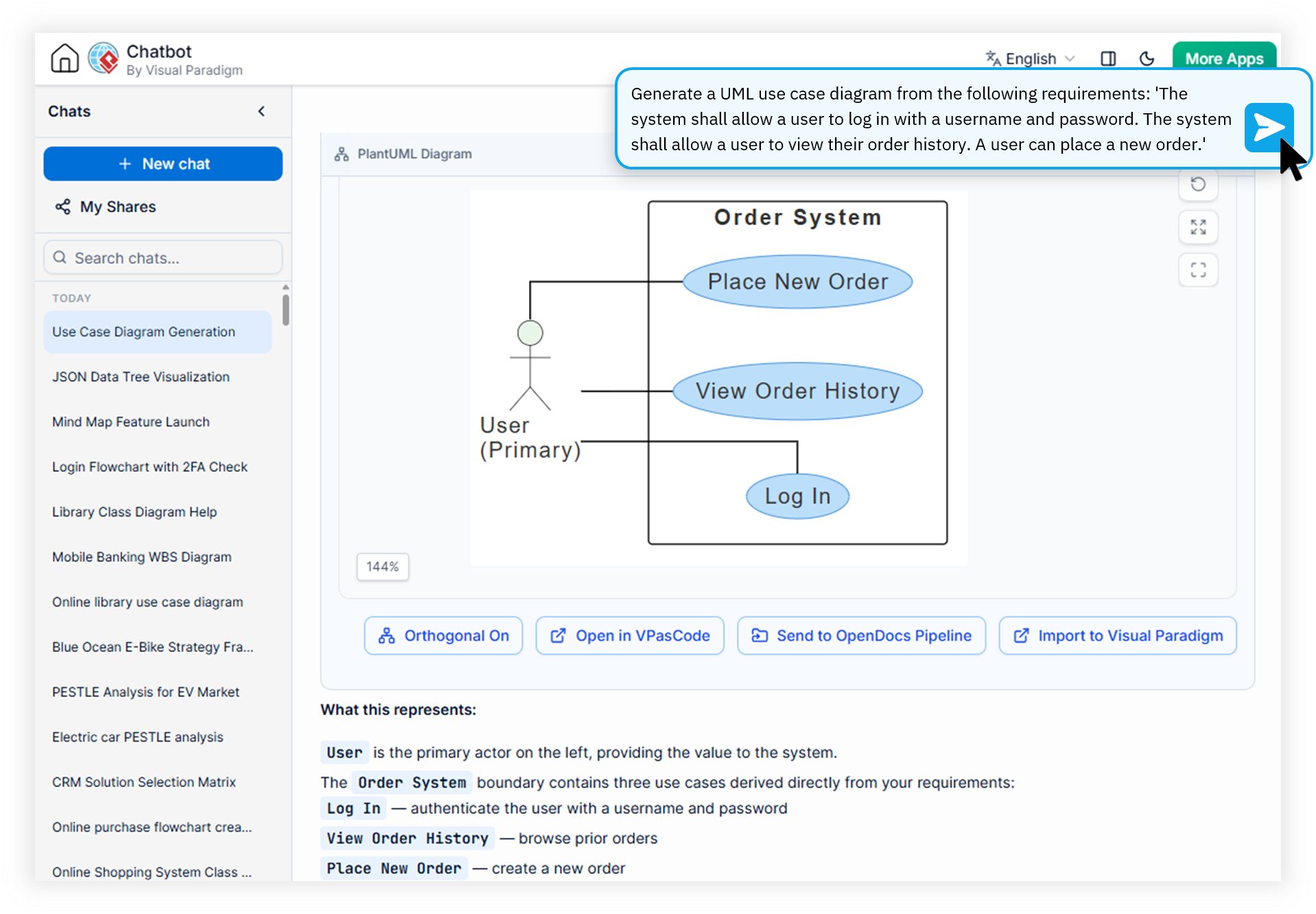
Watch How Visual Paradigm AI Chatbot Works
From Raw Text to Production-Ready Diagrams
Our domain-trained models understand business and technical language equally well, delivering precise visual output that generic LLMs simply cannot match.
Bottom Line: Visual Paradigm's AI Diagramming Chatbot is the most accurate tool to convert PRD to diagram, transform functional specifications into UML, and convert architectural documents into system models, all through a conversational chat interface with enterprise-grade export and integration.
Instant PRD Visualization
Paste your product requirements document directly into the chat and watch it transform into use case diagrams, user flow maps, and system context views. The premier tool to convert PRD to diagram at enterprise scale.
Requirements-to-Flowchart Engine
Turn business process descriptions into BPMN, DFD, and standard flowcharts. Our requirements to flowchart tool preserves conditional logic, parallel paths, and decision branches automatically.
Functional Spec Diagram Generator
Translate technical specifications into state diagrams, sequence flows, and component models. Every relationship, trigger, and dependency is captured with precise UML notation.
Architecture Document Conversion
Convert doc to architecture diagram including C4 models views, ArchiMate layers, deployment diagrams, and component structures. Drill down into any shape to expand sub-architectures.
From Document to Diagram in Four Steps
No steep learning curve, no complex drag-and-drop tooling required. Just paste, prompt, and produce.
Paste Your Document
Drop PRDs, functional specs, user stories, or requirements text directly into the conversational chat interface.
Generate Instantly
The domain-trained AI parses entities, relationships, and processes to produce accurate UML, flowcharts, and system diagrams in seconds.
Refine in Natural Language
Ask for modifications, expand specific shapes into sub-diagrams, or request documentation for any component in plain English.
Export & Integrate
Export as PNG, SVG, or PlantUML code. Send directly to OpenDocs, VP Online, or sync with VP Desktop projects.
Manual Drafting vs. AI-Powered Conversion
See how our text document to diagram converter compares to traditional hand-drawn diagramming workflows.
| Focus Area | Traditional Drafting | Visual Paradigm AI Chatbot |
|---|---|---|
| Time to First Diagram | Hours to days of manual drafting | Seconds from paste to render |
| Notation Accuracy | Depends on drafter expertise | Domain-trained precision across 30+ formats |
| Iterative Refinement | Slow manual redraws | Instant natural language edits |
| Format Flexibility | Limited by individual skill | UML, SysML, ArchiMate, C4, DFD, ERD and more |
| Ecosystem Integration | Manual exports and imports | Direct OpenDocs, VP Desktop, VP Online sync |
| Documentation Output | Written separately from diagrams | Auto-generated from any shape or full model |
Frequently Asked Questions
What document formats can I paste into the AI diagram chatbot?
+
How accurate are diagrams generated from requirements documents?
+
Can I edit and refine the generated diagram after creation?
+
Which diagram types are supported from text input?
+
Start Converting Requirements into Diagrams Today
Join thousands of Product Owners, Business Analysts, and Systems Engineers using the most accurate AI diagram generator on the market. Included with VP Online Deluxe and VP Desktop Professional subscriptions.