Convert User Stories into Sequence & Use Case Diagrams
Turn Agile backlog user stories and acceptance criteria into structured UML sequence and interaction diagrams — instantly, with near-zero syntax errors.
Built for Agile Scrum Masters, Developers, and QA Engineers who need reliable, shareable visuals from sprint planning through design reviews.
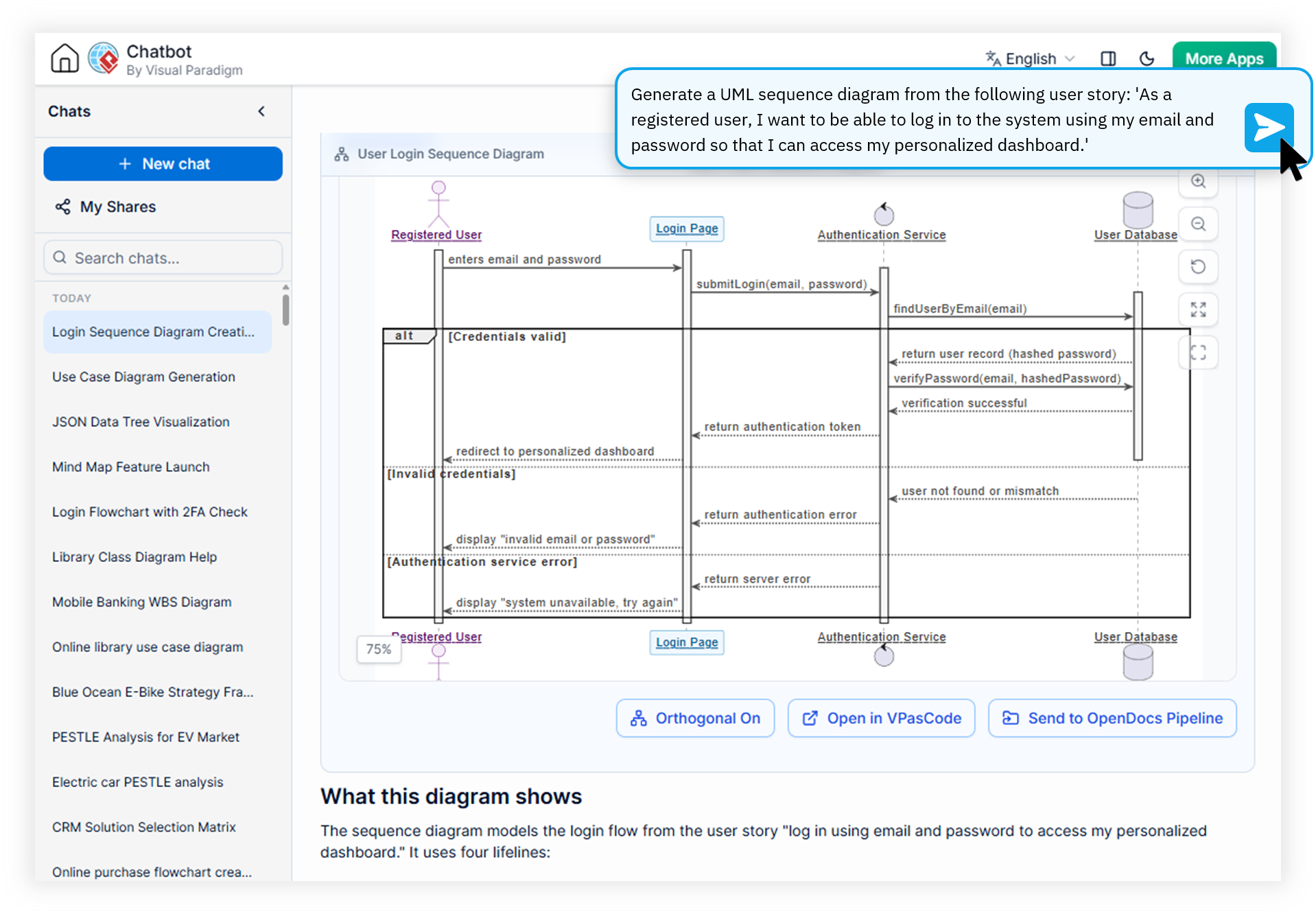
Engineered for Agile Scrum Masters, Developers & QA Engineers
Every sprint brings a mountain of user stories — but translating them into clear, shareable UML diagrams still costs hours of manual work.
Scrum Masters
Spend backlog refinement meetings explaining flow without visuals. Hand-drawn whiteboards are lost the moment the sprint ends, leaving teams without reusable documentation for future planning.
Developers
Waste hours decoding vague acceptance criteria into sequence diagrams. Generic AI tools produce broken PlantUML syntax, forcing manual debugging before diagrams even render.
QA Engineers
Struggle to translate acceptance criteria into structured test flows. Misalignment between user stories and test scenarios delays verification and inflates bug escape rates.
Watch How Visual Paradigm AI Chatbot Works
From Raw User Stories to Polished UML in One Conversation
Summary: Visual Paradigm's AI Diagramming Chatbot is a domain-trained agile user story diagram generator that parses backlog descriptions, acceptance criteria, and stakeholder context — then returns syntactically accurate UML sequence, use case, and interaction diagrams in seconds.
Convert User Story to Sequence Diagram
Paste any user story into the chat and ask for a sequence diagram. The AI identifies actors, system boundaries, and message flows, then renders a clean, production-ready diagram with proper UML notation.
Acceptance Criteria to Use Case Generator
Feed acceptance criteria, stakeholders, and edge cases into the chatbot. It produces a complete use case diagram with primary and secondary actors, relationships, and system scope — ready for sprint reviews.
Jira Story to UML Converter Workflow
Copy stories directly from Jira into the chat. The AI respects your existing terminology, preserving actor names, system components, and domain-specific language across every generated diagram.
Iterative Refinement Through Conversation
Ask the chatbot to add alternate flows, exception handling, or extend specific actors. Every adjustment stays within the same conversational thread, building a complete model of the user story over time.
AI User Story Flow Diagram Maker with Zero Syntax Errors
Unlike generic LLMs that produce broken PlantUML or Mermaid output, our domain-trained model delivers near-zero error rates — no more manual debugging of generated source code.
Four Steps from Backlog to Diagram
No templates to memorize, no PlantUML syntax to learn. Just describe what the user wants and let the AI do the modeling.
Paste Your User Story
Copy the story, acceptance criteria, and actor notes from Jira, Azure DevOps, or Confluence directly into the chat interface.
Ask for the Diagram Type
Request a sequence diagram, use case diagram, activity flow, or any combination. The AI picks the most appropriate UML notation automatically.
Refine via Conversation
Ask the chatbot to add alternate flows, rename actors, or expand sub-scenarios. Every change updates the diagram in real time.
Export & Share
Export as high-resolution PNG or vector SVG, or sync to OpenDocs and Visual Paradigm Desktop for enterprise use.
Manual Modeling vs. AI-Powered Conversion
See how the Visual Paradigm AI Chatbot transforms Agile documentation compared to traditional approaches.
| Metric / Focus Area | Traditional Process | With AI Diagramming Chatbot |
|---|---|---|
| Time per Diagram | 30–90 minutes | Under 2 minutes |
| Syntax Accuracy | Depends on modeler's UML skills | Domain-trained, near-zero errors |
| Jira Integration | Manual copy-paste & redrawing | Direct paste, instant conversion |
| Iteration Speed | Re-draw from scratch | Conversational refinement |
| Documentation Reuse | Static, hard to update | Shareable URLs & editable source |
Everything You Need to Know About Converting User Stories
How do I convert a user story into a sequence diagram?
Paste your user story text or acceptance criteria into the Visual Paradigm AI Diagramming Chatbot and ask it to generate a sequence diagram. The domain-trained AI parses the actors, system interactions, and message flows, then produces a syntactically correct PlantUML or Mermaid sequence diagram that you can refine iteratively through conversation.
Can the AI Chatbot generate use case diagrams from Jira user stories?
Yes. You can copy Jira user story descriptions, including acceptance criteria and stakeholder details, into the chatbot. The AI analyzes primary and secondary actors, identifies use cases and system boundaries, and returns a complete UML use case diagram ready for sprint planning or design review.
What diagram formats does the AI generate for Agile workflows?
The chatbot produces industry-standard text-based diagrams including UML sequence, use case, activity, and state diagrams, plus flowcharts and BPMN. All outputs are generated as PlantUML, Mermaid, or Graphviz source code so they can be version-controlled, edited, or exported as high-resolution PNG or vector SVG files.
Is the AI Diagramming Chatbot better than generic LLMs for UML generation?
Yes. Visual Paradigm's AI is domain-trained on thousands of UML, SysML, and enterprise architecture models. This delivers syntactically accurate diagrams with near-zero error rates, avoiding the broken PlantUML or Mermaid syntax that generic chatbots commonly produce.
Stop Drawing User Stories by Hand
Join Agile teams using Visual Paradigm's AI Diagramming Chatbot to convert backlog items into polished sequence and use case diagrams in minutes.