
In today's rapidly evolving digital landscape, organizations face a persistent challenge: bridging the gap between dynamic visual modeling and comprehensive technical documentation. Traditional workflows often force teams into cumbersome cycles of exporting static images, manually uploading files, and struggling to keep documentation synchronized with evolving designs. This disconnect not only wastes valuable time but also introduces risks of version mismatches and outdated information.
Enter the Visual Paradigm OpenDocs Pipeline—a transformative cloud-based transfer mechanism designed to serve as the connective tissue across the Visual Paradigm ecosystem. This case study explores how the Pipeline redefines knowledge management by creating a seamless, living documentation workflow where diagrams remain editable, versions are tracked automatically, and teams can focus on innovation rather than file management. Whether you're an enterprise architect, agile developer, or technical writer, understanding this integrated approach can unlock significant efficiency gains and improve the quality of your organizational knowledge base.
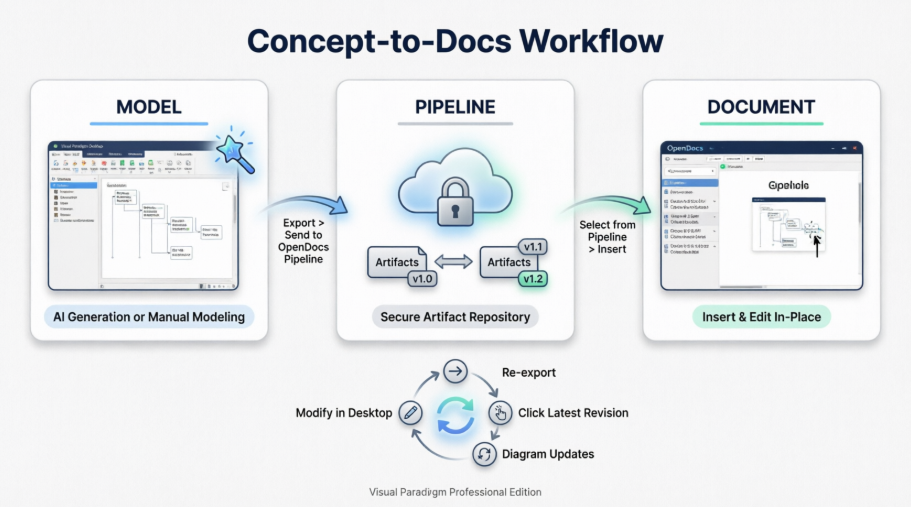
Before the introduction of the OpenDocs Pipeline, teams using Visual Paradigm tools often encountered several friction points:
Manual Export Cycles: Diagrams created in Visual Paradigm Desktop or VP Online required manual export as PNG/JPG files before being uploaded to documentation platforms.
Loss of Editability: Once exported as static images, diagrams could not be easily modified without returning to the source tool and repeating the entire export process.
Version Control Gaps: Keeping documentation aligned with evolving models demanded meticulous manual tracking, often leading to inconsistencies.
Collaboration Barriers: Different team members working in different tools struggled to share and update assets efficiently.
These challenges were particularly acute in agile environments where requirements and designs evolve rapidly, demanding documentation that can keep pace without becoming a bottleneck.
The Visual Paradigm OpenDocs Pipeline addresses these challenges by functioning as a secure, cloud-based repository for "artifacts"—the valuable assets created across the Visual Paradigm ecosystem. Rather than treating diagrams as static outputs, the Pipeline preserves them as live, editable cloud assets that maintain a direct link to their source models.
The Pipeline operates as a bidirectional bridge connecting:
Visual Paradigm Desktop: For professional-grade modeling and AI-assisted diagram generation
VP Online: For cloud-based collaborative diagramming
AI Chatbot: For rapid concept visualization through natural language prompts
OpenDocs: For integrated knowledge management and documentation
This architecture ensures that a diagram created in any environment can flow seamlessly into documentation while retaining its intelligence and editability.
Elimination of Manual File Handling
Teams no longer need to download images, take screenshots, or manage file uploads. The Pipeline automates the transfer process, reducing administrative overhead and minimizing human error.
Preserved Editability and Fidelity
Diagrams inserted into OpenDocs via the Pipeline maintain their vector quality and remain fully editable. Changes made to source models can be reflected in documentation without recreating visuals from scratch.
Automatic Change Synchronization
When a source model is updated and pushed to the Pipeline, OpenDocs receives sync notifications. Users can compare revisions and update embedded diagrams with a single click, ensuring documentation always reflects the current design state.
Built-in Version Control
Every artifact pushed to the Pipeline is automatically versioned. Teams can attach contextual notes to revisions, browse historical versions, and roll back if needed—all without leaving the OpenDocs interface.
From Visual Paradigm Desktop:
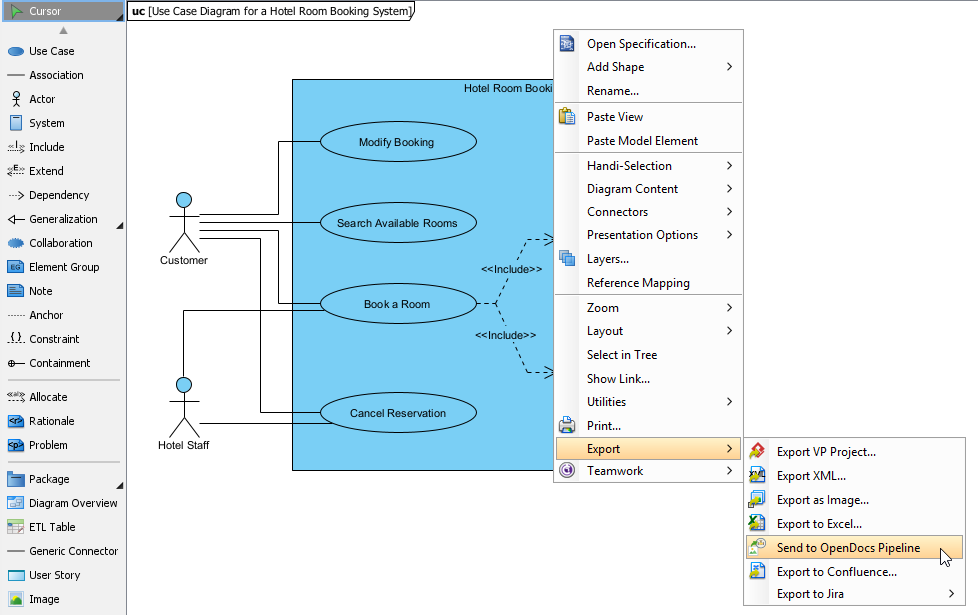
Open your diagram in the Desktop application
Right-click anywhere on the canvas
Select Export > Send to OpenDocs Pipeline (or use the drawer button on the right edge)
Add an optional comment to provide context for the artifact
Confirm to save and push the diagram to the cloud repository
From VP Online:
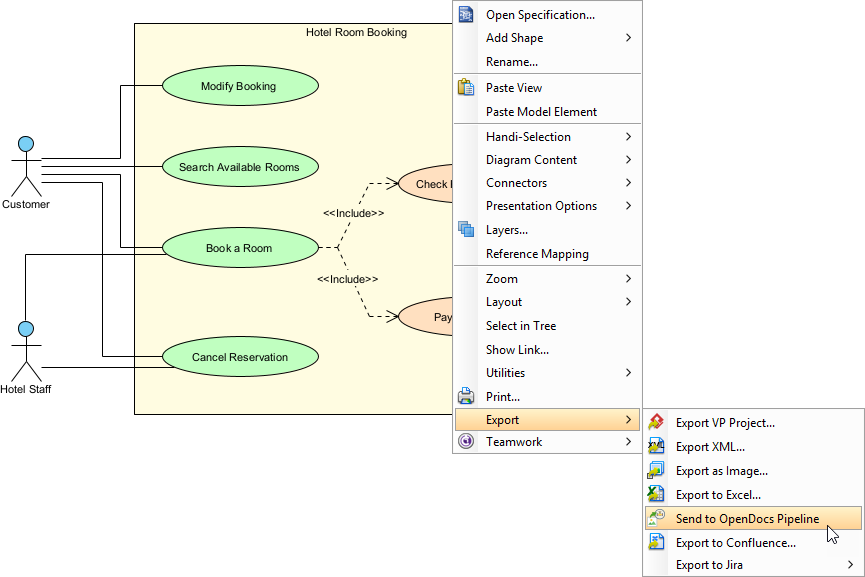
From AI Chatbot:
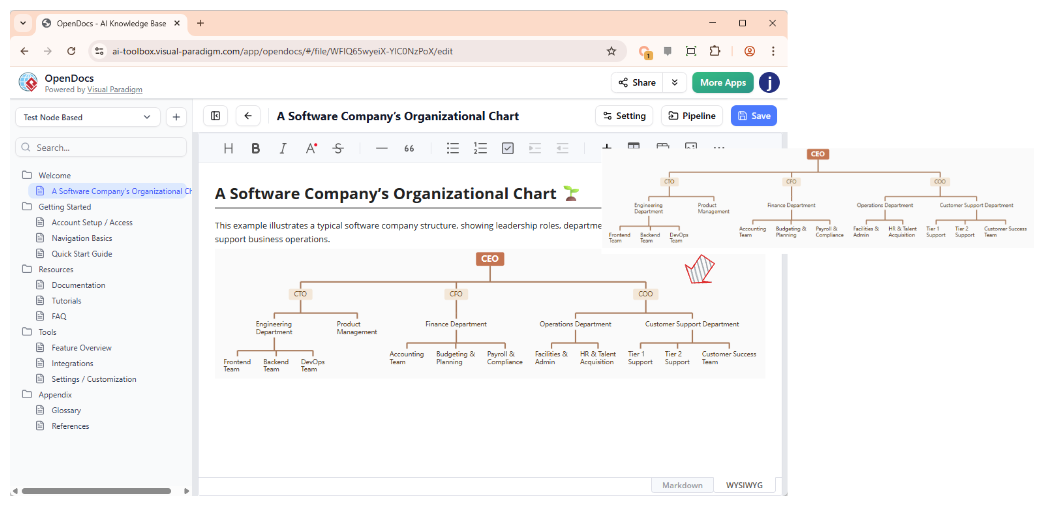
The inserted diagram appears as a live, interactive element within your document—not a static image.
When source models evolve:
In OpenDocs:
A mid-sized financial services company adopted the OpenDocs Pipeline to manage documentation for a core banking system modernization project. Previously, their architecture team spent approximately 15 hours per week manually synchronizing UML diagrams with Confluence documentation. After implementing the Pipeline:
Time Savings: Reduced diagram maintenance overhead by 80%, freeing ~12 hours weekly for higher-value analysis
Accuracy Improvement: Eliminated version mismatches that previously caused 3-4 documentation errors per sprint
Collaboration Enhancement: Enabled business analysts to view live diagrams in OpenDocs while architects refined models in Desktop—without coordination delays
Onboarding Acceleration: New team members could explore versioned diagram histories to understand design evolution, reducing ramp-up time by 40%
A SaaS startup integrated the Pipeline into their two-week sprint cycles. Product managers used the AI Chatbot to rapidly prototype user journey maps, which were then pushed to OpenDocs for stakeholder review. Key outcomes included:
Faster Iteration: Concept-to-documentation time reduced from 2 days to under 2 hours
Stakeholder Alignment: Live, editable diagrams in shared OpenDocs spaces improved feedback quality and reduced revision cycles
Knowledge Retention: Versioned artifact histories created an auditable trail of design decisions for compliance and retrospective analysis
Establish Naming Conventions: Use consistent, descriptive artifact names and comments to simplify browsing and retrieval in the Pipeline repository.
Leverage Optional Comments: When pushing artifacts, add contextual notes explaining the diagram's purpose, scope, or key changes—this metadata proves invaluable during revision reviews.
Schedule Regular Sync Reviews: Incorporate Pipeline revision checks into sprint retrospectives or documentation maintenance cycles to ensure living docs stay current.
Train Cross-Functional Teams: Ensure both modelers and documentation specialists understand the end-to-end workflow to maximize collaboration benefits.
Utilize Version Context Notes: Attach meaningful descriptions to revisions to create a narrative of design evolution alongside the visual artifacts.
The Visual Paradigm OpenDocs Pipeline represents more than a technical integration—it embodies a philosophical shift toward living, intelligent documentation. By treating diagrams as dynamic, versioned assets rather than static outputs, the Pipeline enables organizations to build knowledge bases that evolve in lockstep with their designs. This case study demonstrates that when visual modeling and documentation workflows are unified through a centralized asset transit hub, teams achieve measurable gains in efficiency, accuracy, and collaboration.
For organizations navigating complex system designs, agile development cycles, or enterprise architecture initiatives, the Pipeline offers a practical path to reduce documentation debt while enhancing knowledge accessibility. As AI-assisted modeling continues to accelerate the pace of design exploration, tools like the OpenDocs Pipeline become essential infrastructure for ensuring that documentation remains a strategic asset rather than a maintenance burden.
The future of technical communication lies not in static manuals but in adaptive, interconnected knowledge ecosystems. With the Visual Paradigm OpenDocs Pipeline, that future is already here—ready to transform how your team creates, shares, and maintains the visual intelligence that drives innovation.

