
In today's rapidly evolving software development landscape, the ability to visualize system architecture, document design decisions, and communicate technical concepts clearly has never been more critical. Unified Modeling Language (UML) remains the industry-standard notation for representing software systems, yet access to professional-grade modeling tools has traditionally required significant financial investment. This barrier has often excluded students, independent developers, educators, and hobbyists from leveraging powerful visual modeling capabilities during their learning journeys or personal projects.
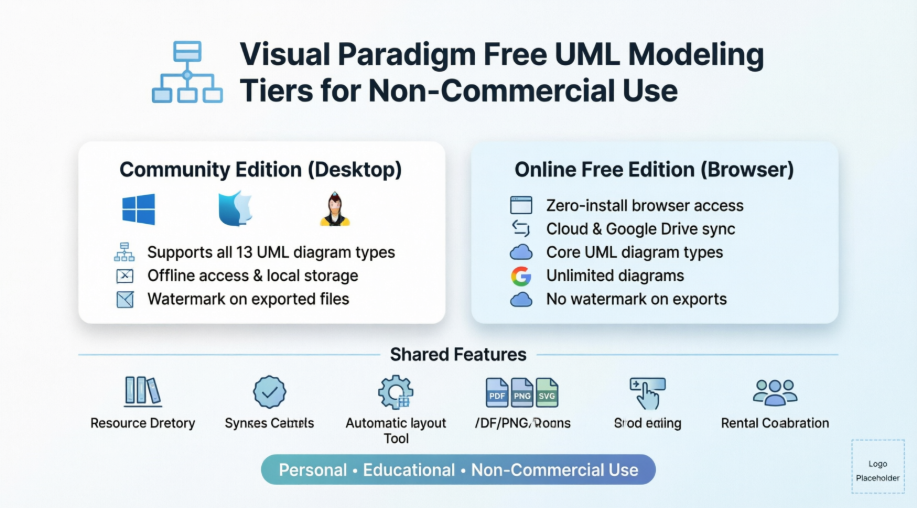
Visual Paradigm addresses this gap through two distinct, high-quality free tiers specifically designed for non-commercial, personal, and educational use. This case study explores how these offerings—Visual Paradigm Community Edition (desktop) and Visual Paradigm Online Free Edition (browser-based)—democratize access to professional UML modeling while maintaining robust functionality, intuitive workflows, and cross-platform accessibility. By examining their features, constraints, and practical applications, we demonstrate how these free tools empower users to build, document, and share system designs without compromising on quality or capability.
Visual Paradigm provides two complementary free pathways for users seeking professional UML modeling capabilities without commercial licensing costs. Both options are intentionally scoped for personal learning, academic projects, and non-commercial experimentation, ensuring that individuals and educational institutions can access enterprise-grade modeling features while respecting intellectual property boundaries.
The first option, Visual Paradigm Community Edition, is a full-featured desktop application compatible with Windows, macOS, and Linux. It delivers comprehensive support for all 13 standard UML 2.x diagram types, advanced syntax validation, element reuse capabilities, and local file storage—ideal for users who prefer offline work or require deeper integration with local development environments.
The second option, Visual Paradigm Online Free Edition, is a zero-installation, browser-based platform accessible from any device with an internet connection. It emphasizes accessibility, cloud collaboration, and seamless integration with Google Drive, making it perfect for students, remote learners, or teams needing quick, shareable modeling sessions without software deployment overhead.
Together, these offerings create a flexible ecosystem where users can choose the platform that best aligns with their workflow preferences, technical constraints, and project requirements.
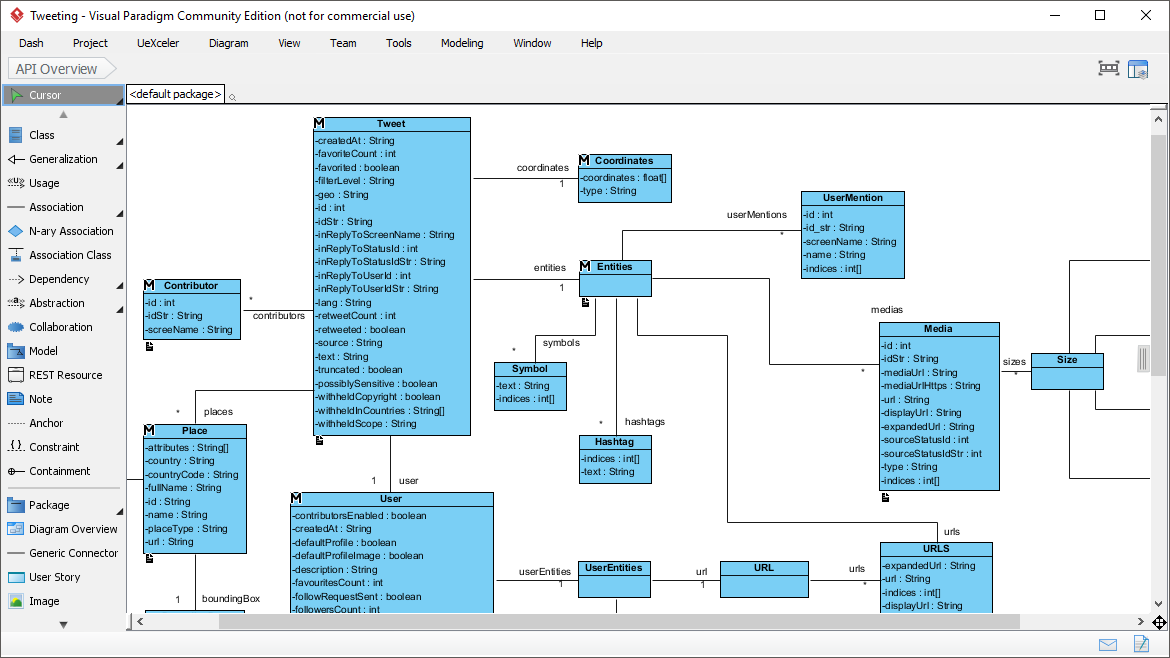
Visual Paradigm Community Edition brings professional-grade UML modeling to the desktop without licensing fees. Designed for Windows, Mac, and Linux environments, this application supports the complete spectrum of UML 2.x diagrams—including Class, Use Case, Sequence, Activity, State Machine, Component, Deployment, Package, Requirement, and more—enabling comprehensive system documentation from conceptual design through implementation planning.
 Key capabilities include intelligent syntax checking that validates diagram structure against UML specification rules, element reuse functionality that accelerates modeling across multiple diagrams, and sub-diagram support for managing complex architectures hierarchically. The interface prioritizes efficiency with context-aware toolbars, keyboard shortcuts, and a clean workspace that minimizes visual clutter while maximizing canvas real estate.
 The Resource Catalog feature allows users to create shapes and connectors contextually, right beside active diagram elements, dramatically reducing mouse travel and accelerating diagram construction. On-the-Fly Check continuously validates notation compliance, helping users learn proper UML conventions while they work. Layout management tools—including alignment guides, sweeper utilities, and magnet-based positioning—simplify the arrangement of complex diagrams with professional polish.
 Export functionality supports multiple formats including PDF, PNG, JPG, GIF, and SVG, enabling seamless integration into documentation, presentations, or version control systems. While exported images include a subtle watermark to denote the free edition, all modeling functionality remains fully accessible without feature gating or time limitations.
Users can acquire the Community Edition directly through the official download portal, with straightforward installation processes tailored to each supported operating system.
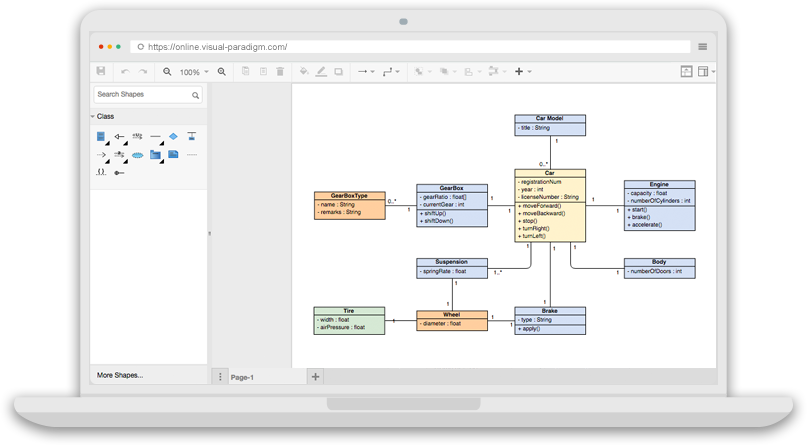
Visual Paradigm Online Free Edition redefines accessibility by delivering professional UML modeling entirely through a web browser. With zero installation, zero configuration, and zero cost, this platform removes traditional barriers to entry for visual modeling, enabling immediate productivity from any internet-connected device.
The interface features an intuitive drag-and-drop editor optimized for touch and mouse input, with smart connectors that automatically maintain relationships between elements as diagrams evolve. Users can create unlimited diagrams and shapes without encountering artificial paywalls, making it ideal for iterative learning, academic assignments, or personal project documentation.
Core UML diagram types are fully supported, including Class Diagrams for API design, Use Case Diagrams for requirement elicitation, Sequence Diagrams for interaction modeling, and Activity Diagrams for workflow visualization. Additionally, the platform includes Entity Relationship Diagrams (ERD) for database design and Organization Charts for structural documentation, extending utility beyond pure software engineering contexts.
Cloud integration enables direct saving to Google Drive or the included 1 GB Visual Paradigm cloud repository, facilitating backup, sharing, and cross-device continuity. Export options include clean PNG, JPG, and SVG outputs without forced watermarks, ensuring professional presentation of finished work.
The platform's educational value is enhanced by hundreds of startup templates and diagram examples spanning ITIL frameworks, floor plans, business concept diagrams, and more. Users can begin by importing existing Visio files or exploring pre-built examples to accelerate learning and reduce initial setup friction.
| Feature | Desktop Community Edition | Online Free Edition |
|---|---|---|
| Platform | Desktop App (Win/Mac/Linux) | Web Browser |
| UML Diagrams | All 13 UML 2.x types | Core types (Class, Use Case, Sequence, etc.) |
| Other Formats | ERD, SysML | ERD, Organization Charts |
| Limitations | Adds a watermark on exports | Personal, non-commercial use only |
| Storage | Local storage | Cloud storage & Google Drive |
This comparison highlights the complementary nature of both offerings. Users prioritizing offline access, comprehensive UML coverage, or SysML support may prefer the Community Edition. Those valuing instant accessibility, cloud collaboration, or zero-installation convenience will find the Online Free Edition more aligned with their needs. Both platforms share core modeling efficiencies and maintain Visual Paradigm's commitment to intuitive, professional-grade user experience.
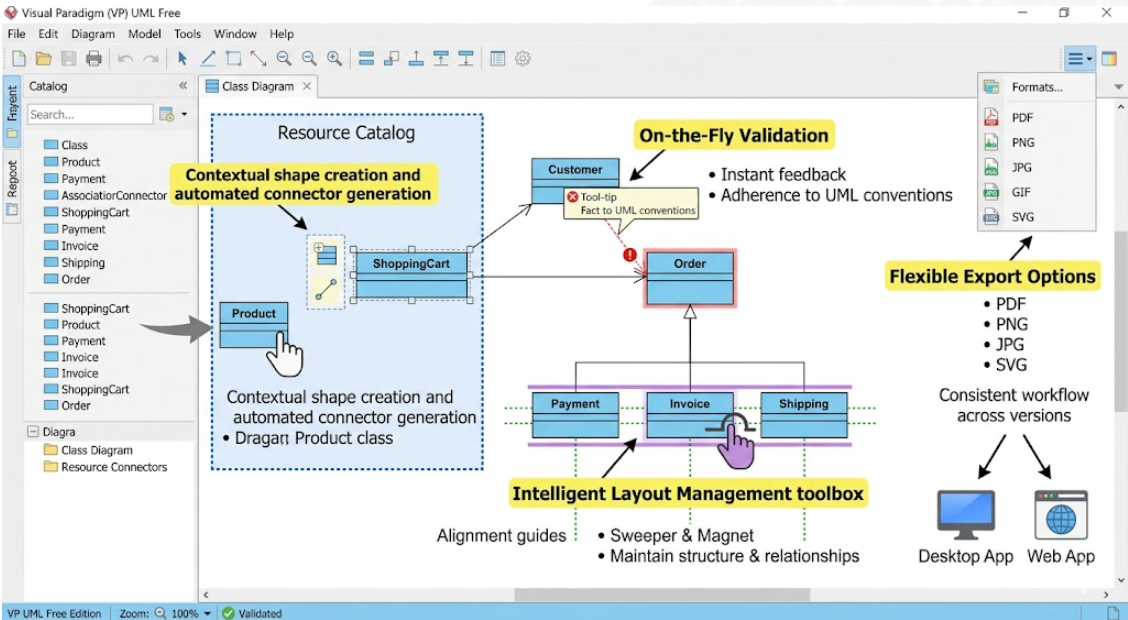
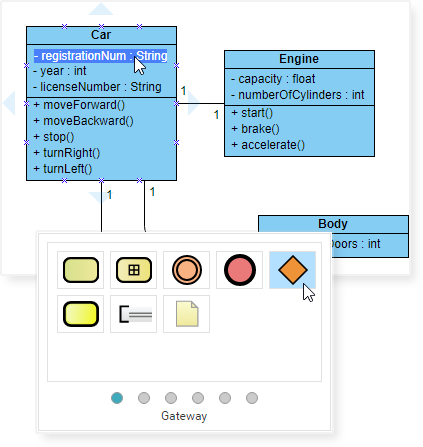
Contextual shape creation and automated connector generation appear adjacent to active diagram elements, reducing navigation overhead and accelerating diagram assembly. Users can drag new elements directly onto the canvas while maintaining logical relationships automatically.
Real-time syntax checking ensures diagrams adhere to UML specification rules, providing immediate feedback on notation errors. This feature serves both as a quality assurance mechanism and an educational tool for users mastering UML conventions.
Alignment guides, sweeper tools, and magnet-based positioning simplify the arrangement of complex diagrams. Users can reorganize large structures with confidence that connectors and relationships remain intact and visually coherent.
Both platforms support conversion to widely compatible formats including PDF, PNG, JPG, GIF, and SVG. This flexibility enables seamless integration into documentation workflows, presentation decks, or version-controlled repositories.
Users transitioning between desktop and web environments benefit from consistent interface paradigms, shortcut conventions, and modeling workflows. This continuity reduces relearning overhead and supports hybrid work patterns.
Both free tiers operate under clear, transparent licensing frameworks designed to protect commercial interests while enabling broad educational access.
Non-Commercial Use Requirement: Both editions are restricted exclusively to personal learning, academic projects, and non-commercial experimentation. Commercial deployment, client deliverables, or revenue-generating activities require upgraded licensing.
Storage and Export Limitations: The Online Free Edition caps cloud storage at 1 GB, sufficient for most educational and personal projects but potentially limiting for extensive archival needs. The Community Edition includes watermarks on exported images to distinguish free-tier outputs from commercial licenses.
Advanced Feature Availability: Enterprise-grade templates—including BPMN, Mind Maps, advanced Flowcharts, and ArchiMate—remain exclusive to paid tiers. However, core UML and ERD capabilities remain fully accessible in both free editions.
These constraints are intentionally scoped to balance accessibility with sustainability, ensuring that Visual Paradigm can continue investing in tool development while providing meaningful value to the non-commercial community.
Students enrolled in software engineering, systems analysis, or computer science programs can leverage either free tier to complete UML-based assignments, document capstone projects, or visualize algorithmic concepts. The Online Edition's Google Drive integration simplifies submission workflows, while the Community Edition's offline capability supports environments with limited internet access.
Independent developers building open-source applications, hobbyist programmers exploring new languages, or tech enthusiasts documenting home automation systems can use these tools to create professional architecture diagrams without licensing overhead. Export flexibility enables inclusion in README files, project wikis, or portfolio websites.
Instructors developing course materials, tutorial authors creating step-by-step guides, or conference speakers preparing technical presentations can generate clear, standards-compliant diagrams for educational distribution. The watermark-free exports of the Online Edition are particularly valuable for publicly shared content.
Professionals preparing for UML-related certifications, career changers building foundational modeling skills, or teams standardizing on UML notation can use these free tiers for deliberate practice. Syntax validation and template libraries accelerate mastery of notation conventions and modeling best practices.
Visual Paradigm's dual free-tier strategy represents a thoughtful approach to democratizing professional software modeling capabilities. By offering both a powerful desktop application and an accessible browser-based platform—each intentionally scoped for non-commercial use—the company removes financial barriers while maintaining high standards of functionality, usability, and educational value.
For students, educators, hobbyists, and independent developers, these tools provide more than just diagramming capabilities; they offer a structured pathway to mastering system design thinking, communicating technical concepts effectively, and building professional-grade documentation portfolios. The thoughtful constraints around commercial use ensure sustainability while the generous feature sets empower meaningful learning and creation.
As software systems grow increasingly complex and interdisciplinary, the ability to visualize architecture, interactions, and requirements becomes not just advantageous but essential. Visual Paradigm's free offerings ensure that this critical skill set remains accessible to anyone with curiosity, commitment, and a desire to build better systems—regardless of budget, institutional affiliation, or geographic location.
Whether you choose the offline depth of Community Edition or the instant accessibility of Online Free Edition, you gain more than a tool: you gain a partner in your journey toward clearer thinking, better communication, and more intentional software design.

