
In Enterprise Architecture, complexity is managed by breaking down systems into understandable, targeted representations. Because no single document or diagram can effectively communicate an entire system to everyone involved, architects rely on a structured approach to tailor information to specific audiences. This guide explains the foundational concepts of stakeholders, concerns, architecture viewpoints, and architecture views, how they interrelate, and how to apply them in practice.
Before diving into views and viewpoints, it is essential to understand the three building blocks that drive their creation:
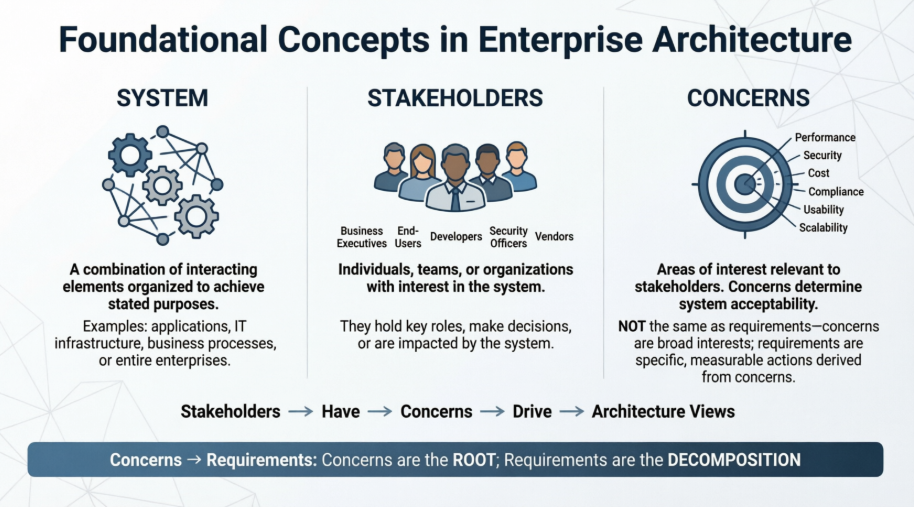
A system is any combination of interacting elements organized to achieve one or more stated purposes. In the context of Enterprise Architecture, a system can be a single application, a suite of software, an IT infrastructure, a business process, or even an entire enterprise.
Stakeholders are individuals, teams, organizations, or groups that have an interest in a system. They typically hold key roles, make decisions, or are impacted by the system's development or operation. Examples include:
Business executives and department heads
End-users and customers
Software developers and system administrators
Security, compliance, and legal officers
Vendors and partners
A concern is an area of interest relevant to one or more stakeholders. Concerns determine whether a system is acceptable to its audience. They may relate to performance, security, cost, compliance, usability, scalability, or maintainability.
Important Distinction: Concerns are not the same as requirements. A concern is a broad area of interest (e.g., "system security"). Requirements are the specific, measurable, and actionable statements derived from those concerns (e.g., "All user passwords must be hashed using SHA-256 and rotated every 90 days"). Concerns are the root; requirements are the decomposition.
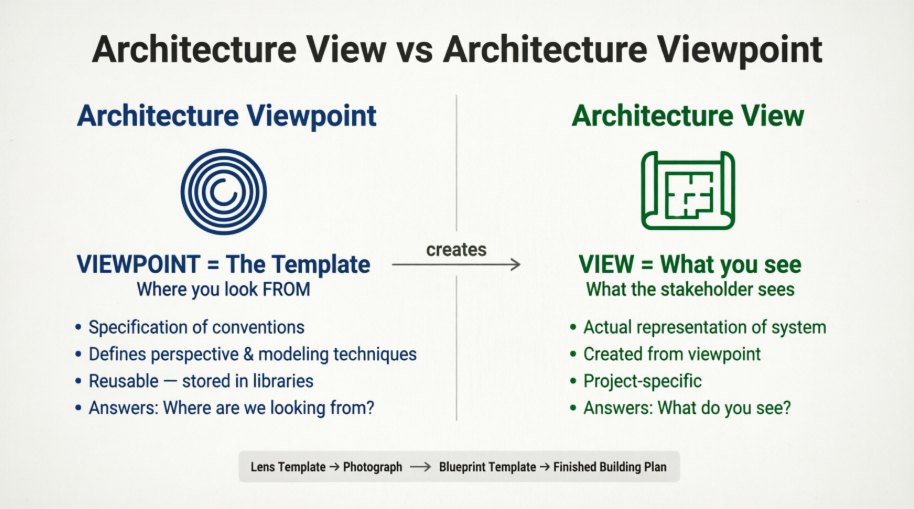
The terms "architecture view" and "architecture viewpoint" are frequently confused. The distinction is simple but critical:
| Concept | Definition | Analogy |
|---|---|---|
| Architecture Viewpoint | The specification of conventions for creating a particular type of view. It defines the perspective, modeling techniques, notation, rules, and intended audience. It answers: "Where are we looking from?" | A camera lens template or a blueprint template. It dictates what can be shown, how it should be drawn, and why. |
| Architecture View | The actual representation of the system created from a specific viewpoint to address a set of concerns. It answers: "What do you see?" | A photograph or a finished blueprint. It is the concrete output tailored to a stakeholder's needs. |
Viewpoints are reusable: They can be stored in a Viewpoint Library and applied across multiple projects.
Views are project-specific: Each view is generated for a particular architecture and tailored to address specific stakeholder concerns.
Every view has an associated viewpoint: Even if implicit, a view is always constructed using a defined perspective or set of conventions.
The creation of architectural representations follows a logical flow:
Stakeholders are identified based on their roles and influence.
Their Concerns are captured and documented.
An appropriate Architecture Viewpoint is selected (or created) to address those concerns.
Using that viewpoint as a template, an Architecture View is generated.
The view is presented to stakeholders to verify that their concerns are met.
This relationship ensures that architectural communication is purposeful, consistent, and aligned with business and technical priorities.
To create effective views, architects follow a structured, five-step process:
Consult Existing Libraries: Check the organization's viewpoint library for reusable templates before creating new ones from scratch.
Identify Key Stakeholders: Determine who will consume the architecture and who holds decision-making power or critical interests.
Analyze & Document Concerns: Work with stakeholders to capture what matters most to them. Group related concerns logically.
Select Appropriate Viewpoints: Match each set of concerns to an existing or newly designed viewpoint that uses the right modeling techniques and notation.
Generate Architecture Views: Apply the selected viewpoints to the architecture data to produce the actual diagrams, models, or reports.
Imagine an airport as a system. Two primary stakeholders interact with it differently:
| Stakeholder | Concerns | Viewpoint (Perspective/Template) | Architecture View (What They See) |
|---|---|---|---|
| Pilot | Altitude, fuel levels, runway approach, weather, passenger safety | "Flight Operations Viewpoint" | Cockpit instruments showing speed, altitude, heading, and navigation vectors. Does not see other aircraft or air traffic control radar. |
| Air Traffic Controller | Airspace management, collision avoidance, runway sequencing, traffic flow | "Airspace Management Viewpoint" | Radar screen showing aircraft locations, altitudes, flight paths, and communication logs. Does not see passenger manifests or cockpit fuel gauges. |
Shared Element: Both viewpoints intersect at communication protocols. Pilots and controllers use a standardized language (phraseology) to exchange vital safety information, demonstrating how different views can share underlying conventions.
A company is migrating its legacy CRM to a cloud platform.
| Stakeholder | Concerns | Viewpoint | Architecture View |
|---|---|---|---|
| CFO | Cost, ROI, licensing fees, migration budget | "Financial Impact Viewpoint" | A dashboard showing current vs. projected IT spend, licensing cost reductions, and 3-year ROI forecasts. |
| Security Officer | Data encryption, access control, compliance (GDPR/SOX) | "Security & Compliance Viewpoint" | A diagram showing data flow boundaries, encryption points, IAM roles, and audit logging mechanisms. |
| Development Lead | API compatibility, deployment pipelines, scalability | "Technical Integration Viewpoint" | Sequence diagrams and architecture maps showing microservices, CI/CD pipelines, and load balancer configurations. |
Each view is generated from a distinct viewpoint, yet all describe the same migration architecture from different, stakeholder-aligned angles.
When designing views and viewpoints, the architect must ensure two critical qualities:
Does the architecture address all identified stakeholder concerns?
Are any critical areas (e.g., security, performance, data privacy) missing from the set of views?
Can the different views be logically connected to form a coherent whole?
How are conflicting concerns reconciled? (e.g., balancing high security with fast user access)
What trade-offs were made, and are they documented and justified?
The architect acts as a translator between complex system designs and stakeholder needs, ensuring that the right information reaches the right audience at the right time.
Start with Stakeholders, Not Diagrams: Always identify who needs the information and what they care about before drawing anything.
Leverage Viewpoint Libraries: Maintain a centralized repository of approved viewpoints to ensure consistency across projects and reduce redundant work.
Keep Views Focused: A view should only contain information relevant to its intended audience. Overloading a view defeats its purpose.
Document the Trade-offs: When stakeholder concerns conflict, explicitly record the decisions, rationale, and approved compromises.
Validate Early and Often: Present views to stakeholders during development to verify alignment before finalizing architectural decisions.
Architecture views and viewpoints are not merely documentation exercises; they are essential communication tools that bridge the gap between complex technical systems and diverse stakeholder needs. By systematically identifying stakeholders, capturing their concerns, selecting appropriate viewpoints, and generating targeted views, architects ensure that Enterprise Architecture remains actionable, transparent, and aligned with business objectives. Mastering this framework enables organizations to make informed decisions, manage complexity effectively, and deliver architectures that truly serve their intended audiences.

