
In today's fast-paced software development landscape, teams face a constant tension: how to maintain clear architectural vision and shared understanding without succumbing to the overhead of traditional, documentation-heavy processes. The Unified Modeling Language (UML), once associated with lengthy upfront design phases, has found renewed relevance through an Agile lens. This case study explores how modern product teams successfully integrate UML into Agile workflows by embracing "Just-in-Time" (JIT) modeling—a philosophy that prioritizes lightweight, purpose-driven diagrams created only when they solve immediate problems or align the team.
Rather than viewing UML as a compliance artifact, Agile teams treat diagrams as temporary, collaborative sketches that evolve alongside the code. This approach maximizes the work not done while preserving the communication benefits of visual modeling. Through practical implementation steps, tool-specific guidance using platforms like Visual Paradigm, and real-world golden rules, this case study demonstrates how UML becomes a catalyst for agility—not a constraint. Whether your team uses Scrum, Kanban, or a hybrid framework, the principles outlined here provide a adaptable blueprint for harnessing UML's power without sacrificing velocity.
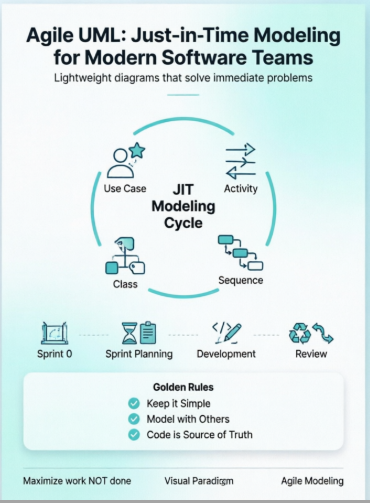
Out of the 14 standard UML diagram types, Agile teams typically rely heavily on just four to keep documentation nimble:
Use Case Diagrams: Mapping roles (actors) to system functionalities. Excellent during initial sprint planning or product backlog refinement to visualize User Stories.
Activity Diagrams: Showing step-by-step workflows or complex business logic. Use these to detail how a specific feature flows from start to finish before coding it.
Sequence Diagrams: Visualizing how objects interact chronologically to execute a scenario. Best applied to map tricky API integrations or intricate data exchanges between microservices.
Class Diagrams: Modeling the fundamental data structure and object relationships. Keep these conceptual to establish a shared domain vocabulary among developers.
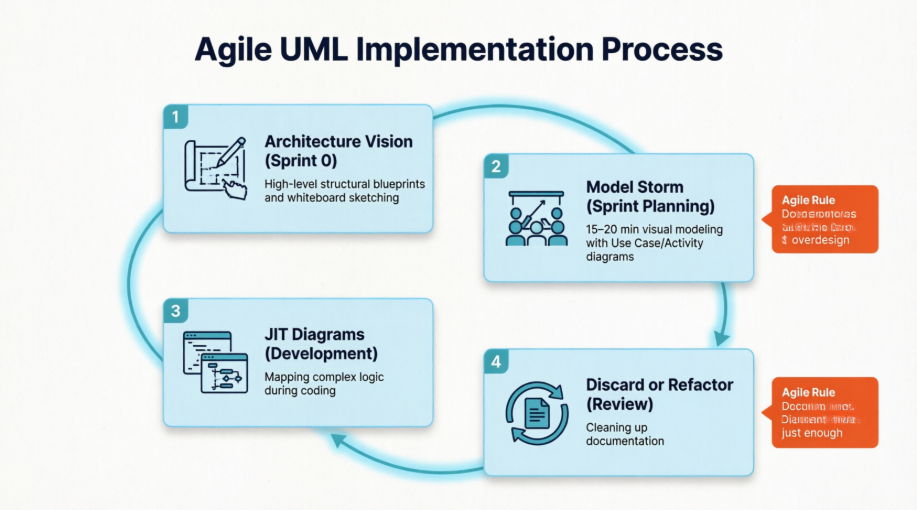
Action: Create high-level, structural blueprints.
Approach: Sketch a broad component or deployment diagram on a physical or digital whiteboard to define your tech stack and top-level infrastructure.
Agile Rule: Do not over-detail the inner layers; leave room for the architecture to evolve incrementally.
Action: Unpack complex User Stories visually.
Approach: Gather the team around a collaborative tool like Figma or Visual Paradigm. Use a Use Case diagram to understand user interactions, or an Activity diagram to handle complex branching logic.
Agile Rule: Limit these modeling sessions to 15–20 minutes. Stop modeling as soon as the team understands how to begin writing the code.
Action: Map complex logic during active development.
Approach: If a developer gets stuck on a multifaceted database trigger or sequential API loop, they should map it out using a quick Sequence diagram. This structure can directly serve as the logical blueprint for writing automated unit and integration tests.
Agile Rule: If the logic is straightforward, skip the diagram entirely and go straight to code.
Action: Clean up your documentation artifact list.
Approach: Evaluate the diagrams created during the sprint. If a diagram was only useful for brainstorming, erase or archive it. If it represents a core system engine that new hires must understand, update it to match the final codebase and save it to your internal wiki.
Agile Rule: Outdated documentation is toxic liability; never maintain a diagram unless it actively saves time.
Keep it Simple: Use basic boxes and arrows rather than stressing over strict UML semantic rules.
Model with Others: Diagrams are communication tools. Never sit alone in a silo designing a massive model to hand off to developers.
Code is the Source of Truth: The working software is your ultimate benchmark of progress, not the completeness of your drawings.
To implement Agile UML workflows using Visual Paradigm, you should shift focus from manually drawing standalone diagrams to using the platform's dedicated Agile Toolset (UeXceler). This environment automatically bridges the gap between text-based user stories and live UML models.
The standard process consists of four tactical steps designed to keep modeling lightweight, automated, and tightly coupled with your active sprints:
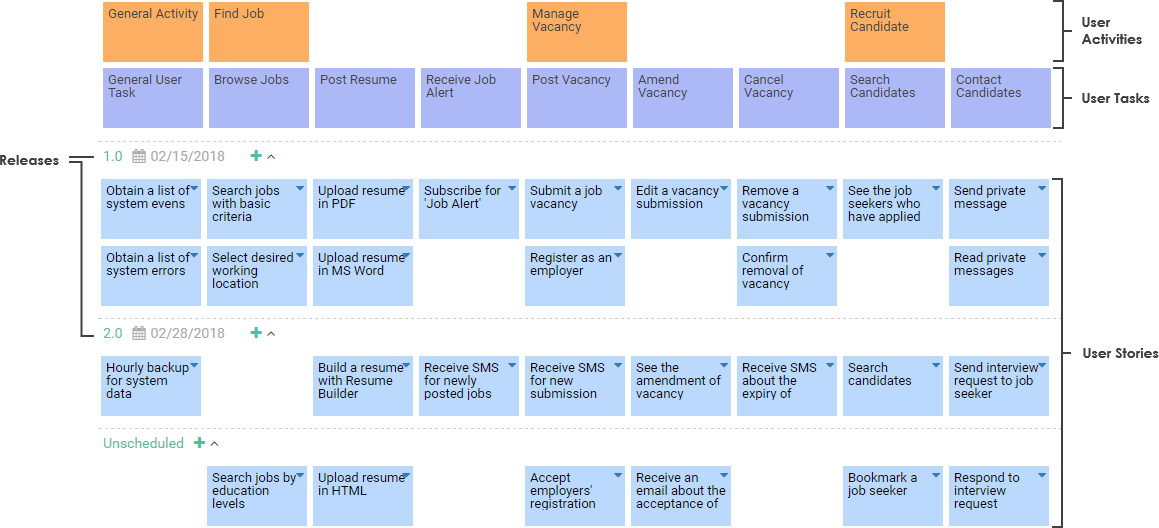
Instead of starting with a blank UML canvas, map your user requirements visually to establish a clear hierarchy.
Navigate to the top toolbar and click UeXceler > User Story Map.
Structure your user matrix by filling out the top rows with your high-level Activities and Tasks (your product backbone).
Drop down to the vertical lanes to create individual User Stories or larger Epics nested underneath those tasks.
Use the built-in horizontal Release / Sprint partitions to drag-and-drop stories directly into their planned delivery cycles.
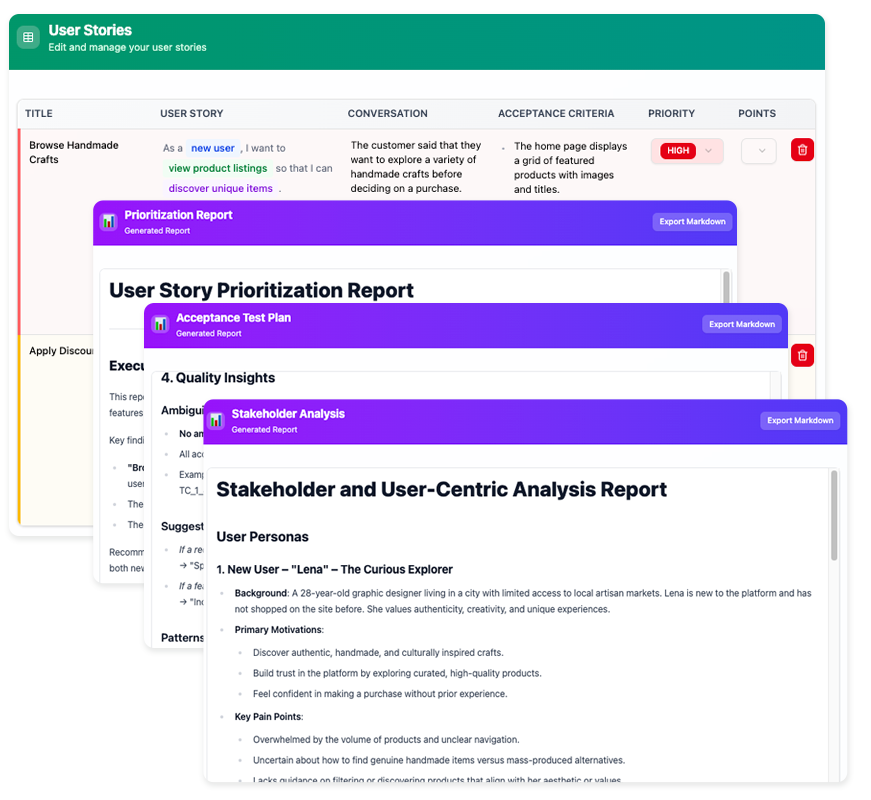
Avoid spending valuable sprint time manually arranging flowchart shapes; instead, use text-based automation.
Open the Visual Paradigm User Story Tool and double-click any story card to reveal its backend attributes.
Select the Scenario tab and type out a chronological, step-by-step description of how the system functions during that story.
Click Synchronize to Diagram > Synchronize to Activity Diagram from the inner menu.
The system instantly outputs a fully populated, standard UML Activity Diagram reflecting the logic you just wrote.
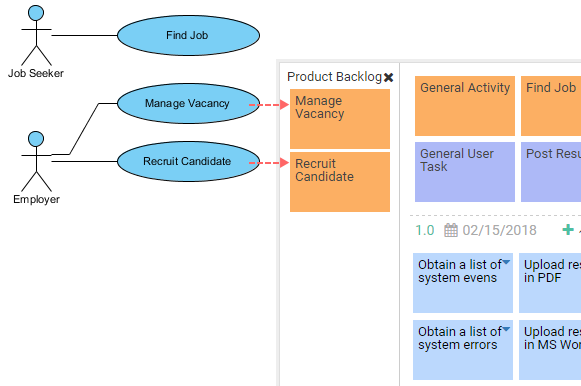
When microservices, database schemas, or API steps become too complex for a text list, link specific elements directly to your backlog.
Select Diagram > New from the main application window and open a clean canvas (like a Sequence Diagram or Class Diagram).
From the lateral tool palette, drag the specialized User Story element onto your active canvas.
Hit Ctrl + Space inside the text label to trigger the auto-completion window, then select your existing story from the list.
Drag a Model Reference Connector from that story shape directly to the specific UML Class or Lifeline box that requires visual explanation.
Visual Paradigm uses a single, centralized model repository called the Semantic Backplane. This eliminates the need to manually update multiple diagrams when requirements change.
Reuse Elements: If you drag a Class or Actor into a new diagram, search for its existing name rather than creating a new shape.
Global Updates: Editing a class name or changing an actor parameter on a quick whiteboard sketch propagates that change automatically across every other diagram in the project.
Leverage Built-In AI: Use the Create with AI wizard to write a simple domain prompt (e.g., "E-commerce checkout loop"), generating immediate base layouts for your Use Case or Class structures.
Utilize 3C's Templates: Keep conversations inside the tool by directly populating the Card, Conversation, and Confirmation tabs within the story profile to manage acceptance criteria.
The integration of UML into Agile practices is not about reverting to heavyweight documentation—it is about strategic, contextual visualization. By adopting Just-in-Time modeling principles, teams gain the clarity of visual design without the burden of maintaining obsolete artifacts. The four core diagrams (Use Case, Activity, Sequence, and Class) provide sufficient expressive power for most Agile scenarios when applied with discipline and purpose.
Tools like Visual Paradigm accelerate this approach by automating the translation between user stories and diagrams, ensuring models stay synchronized with evolving requirements. However, technology alone is not the solution; success hinges on cultural adoption of the golden rules: keep models simple, collaborate openly, and always subordinate diagrams to working software.
As software systems grow in complexity—especially with distributed architectures, microservices, and AI components—the need for clear, shared mental models intensifies. Agile UML, practiced thoughtfully, becomes not a relic of the past but a forward-looking discipline that helps teams navigate ambiguity, align stakeholders, and deliver value faster. The question is no longer whether to use UML in Agile, but how to wield it lightly, wisely, and just in time.
The Enduring Relevance of UML: Leveraging Modeling for Agile Success: A Visual Paradigm blog post detailing strategies for integrating UML modeling into Agile teams without compromising velocity or flexibility.
What is User Story Mapping?: A guide explaining user story mapping techniques for visualizing product backlogs, prioritizing features, and aligning Agile teams around user value.
AI User Story Tool for Agile Backlog Management: A release announcement detailing Visual Paradigm's AI-powered tool for generating, refining, and organizing user stories within Agile backlogs.
Agile Handbook: User Story: A Visual Paradigm learning resource covering user story fundamentals, formatting best practices, and integration with UML modeling.
User Story to Activity Diagram Tutorial: A step-by-step tutorial demonstrating how to automatically generate UML Activity Diagrams from textual user story scenarios.
User Story on Diagram: A knowledge base article explaining how to embed and link user stories directly onto UML diagrams for traceability and context.
Agile User Story Mapping Tool: A feature overview of Visual Paradigm's dedicated tool for creating, organizing, and sprint-planning with visual user story maps.
User Story Map Tour: An interactive tour showcasing Visual Paradigm's user story mapping interface, drag-and-drop planning, and release tracking capabilities.
Effective User Story Tool: A feature page describing Visual Paradigm's comprehensive user story management capabilities, including 3C's templates and acceptance criteria tracking.
Drawing Objects Guide: A Visual Paradigm user guide section covering techniques for creating, connecting, and styling UML objects within diagrams.
Mastering UML 2.5: A Use-Case-Driven Approach to Agile Modeling: A comprehensive guide module introducing foundational concepts for applying UML 2.5 within Agile, use-case-driven development contexts.

