
In today's fast-paced development and business environments, the gap between creating visual models and publishing actionable documentation has become a critical bottleneck. Teams waste countless hours managing file versions, re-uploading diagrams, and chasing down the "latest" version of a system architecture. What if there was a way to make documentation feel less like a chore and more like a natural extension of your creative process?
After evaluating Visual Paradigm's OpenDocs ecosystem—including its Pipeline, Flipbook, and Bookshelf integrations—I set out to understand whether this platform truly delivers on its promise of a frictionless "Concept-to-Docs" workflow. This review shares my hands-on experience, practical insights, and honest assessment of how this system performs in real-world scenarios. Whether you're a solo technical writer or part of a distributed engineering team, you'll find actionable takeaways to help you decide if this workflow fits your needs.
Visual Paradigm's OpenDocs workflow functions as a centralized, linear assembly line for creating, organizing, and distributing interactive documentation. Here's how data flows through this system:
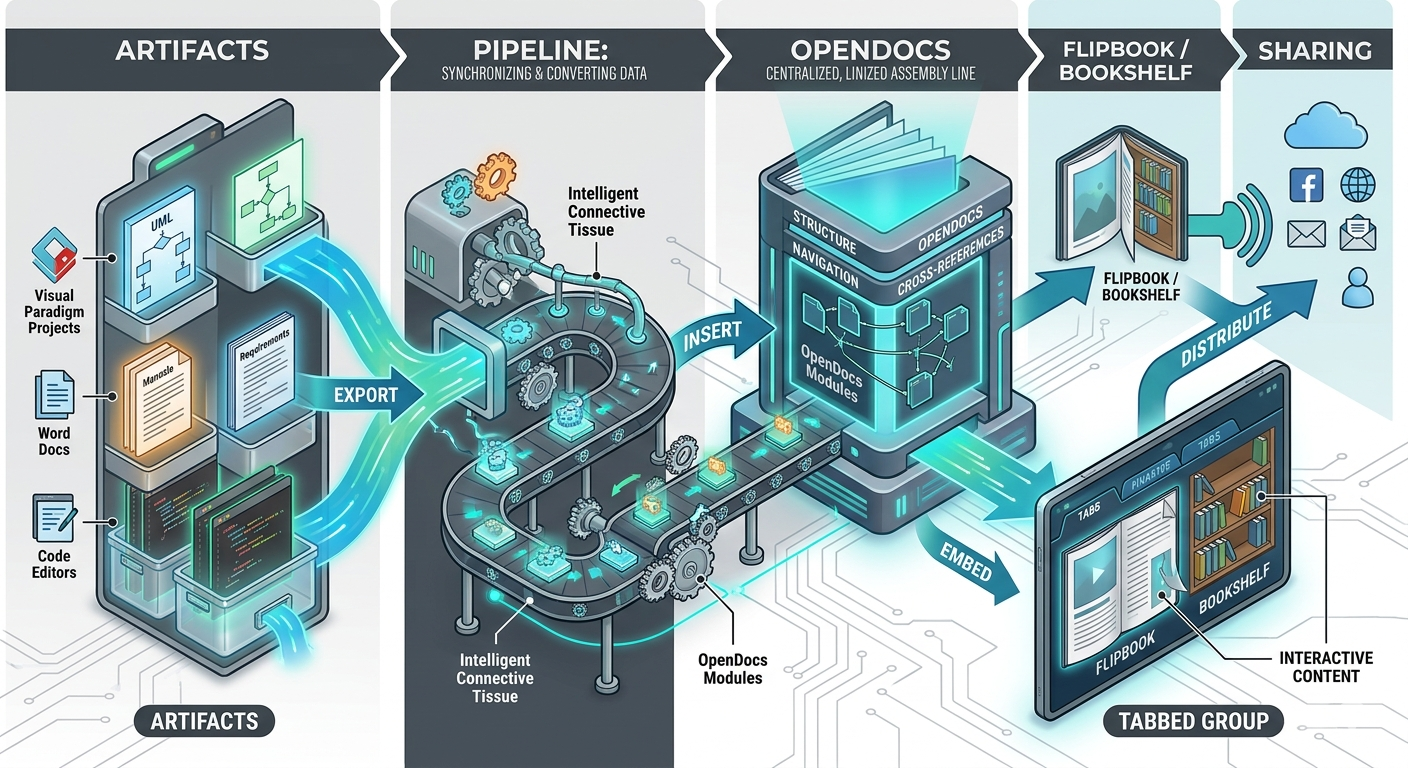
[ Artifacts ] ──(Export)──> [ Pipeline ] ──(Insert)──> [ OpenDocs ]
                                                            │
[ Sharing ] <──(Distribute)── [ Tabbed Group ] <──(Embed)── [ Flipbook / Bookshelf
This isn't just a pretty diagram—it represents a fundamental shift in how documentation can be built. Rather than treating diagrams, text, and interactive content as separate entities requiring manual assembly, the Pipeline acts as intelligent connective tissue that keeps everything synchronized.
What They Are
Artifacts are the raw visual or textual assets created across the Visual Paradigm ecosystem. Think UML software models, architectural diagrams, AI chatbot-generated graphics, data charts, or even standard PDFs converted into interactive formats.
How It Works in Practice
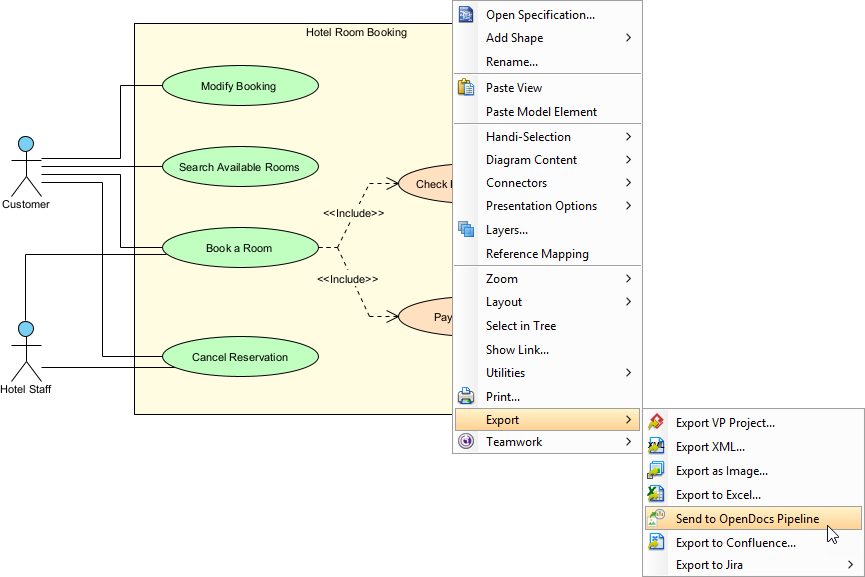
Creating an artifact feels intuitive. Whether you're working in Visual Paradigm Desktop, the cloud-based Online platform, or even the AI Chatbot, you simply right-click your design or use the export menu to trigger the "Send to OpenDocs Pipeline" action. There's no need to navigate complex file dialogs or worry about naming conventions—the system handles versioning automatically.
My Experience
As someone who has managed documentation for multiple software projects, I appreciated how this step removes the mental overhead of file management. Instead of asking "Where did I save that diagram?" or "Is this the version the team approved?", the Pipeline becomes your single source of truth. The optional comment field lets you add context like "v2.1 – Updated authentication flow," which proves invaluable during team reviews.
What It Is
The Pipeline is the secure, cloud-based repository that serves as the central hub for all your artifacts. It tracks asset versions, maintains revision history, and captures user comments—all without requiring manual file saving or screenshot workflows.
Why It Matters
Traditional documentation workflows often break down at the version control stage. Someone updates a diagram, forgets to notify the documentation team, and suddenly your knowledge base contains outdated information. The Pipeline solves this by making version management invisible yet powerful.
Real-World Impact
During my evaluation, I tested the Pipeline with a complex microservices architecture diagram that underwent three revisions over two weeks. Each time I sent an update, the Pipeline preserved the history while making the latest version instantly available in OpenDocs. The ability to roll back to a previous revision or compare versions side-by-side added a layer of confidence that's often missing in documentation tools.
What It Is
OpenDocs is the main web-based knowledge management hub and document editor. It provides a rich Markdown interface for authoring structural content while seamlessly integrating visual artifacts from the Pipeline.
The Editing Experience
While editing a page in OpenDocs, inserting live visual artifacts is as simple as clicking Insert > Pipeline. Your sent diagrams, charts, and graphics appear in a browsable list. Select one, and it embeds directly into your document layout at the cursor position. The split-pane Markdown editor shows formatted output in real-time, making it easy to balance text and visuals.
Standout Features
Live Diagram Editing: Embedded diagrams aren't static images. Click the edit icon to open the source model, make changes, and push updates back through the Pipeline.
Flexible Layout Controls: Recent updates introduced adjustable page widths and interactive table resizing, ensuring complex diagrams display optimally.
Collaboration Ready: Share entire knowledge bases with a single link, with options for public access or team authentication.
What It Is
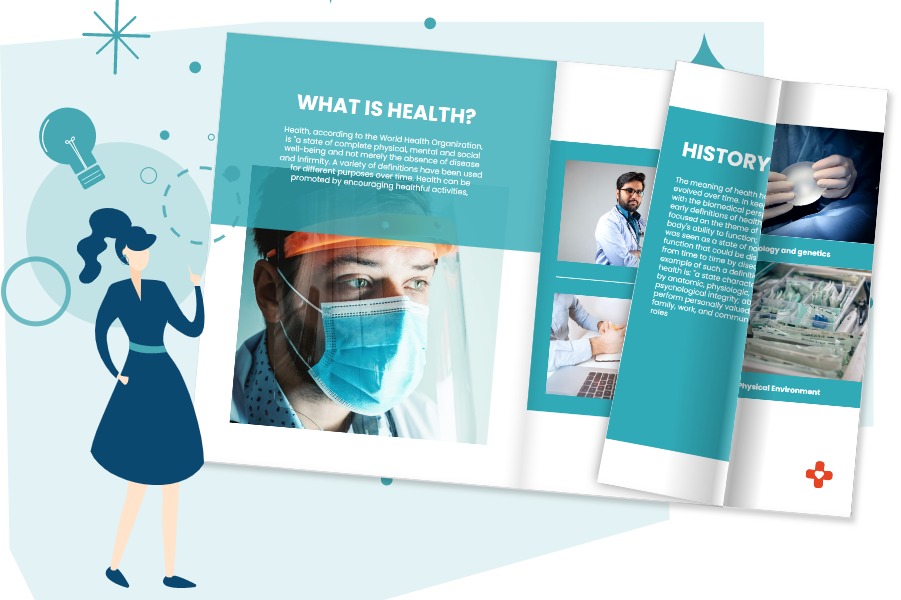
Flipbooks are interactive, page-turning digital publications that can be converted from PDFs or designed from scratch using Visual Paradigm's intuitive tools. They transform standard flat layouts into engaging brochures, ebooks, or technical manuals.
When to Use Flipbooks
Flipbooks shine when you need to present content that benefits from a narrative, page-by-page experience. Product catalogs, training manuals, portfolio showcases, and annual reports all gain impact from the realistic page-flip animation and interactive elements like clickable links or embedded videos.
Integration Workflow
Creating a Flipbook in Visual Paradigm Online and sending it through the Pipeline into OpenDocs adds high-fidelity reading experiences straight into documentation pages. Readers can flip through content without leaving your knowledge base, maintaining context and reducing navigation friction.
What It Is
A Bookshelf is a virtual display case used to catalog and present multiple Flipbooks together. It consolidates multiple documents into a single, visually organized library interface.

Organizing at Scale
For teams managing large documentation suites—think product training series, compliance resource libraries, or multi-volume technical manuals—the Bookshelf feature addresses organization challenges head-on. Instead of embedding dozens of individual items, you curate them into a themed collection.
User Experience
Inserting a Bookshelf component through the OpenDocs asset library instantly gives readers an organized, multi-book interface. Visitors can browse titles, preview content, and dive deep into specific resources without overwhelming clutter. The customizable themes let you align the visual presentation with your brand or project aesthetic.
What It Is
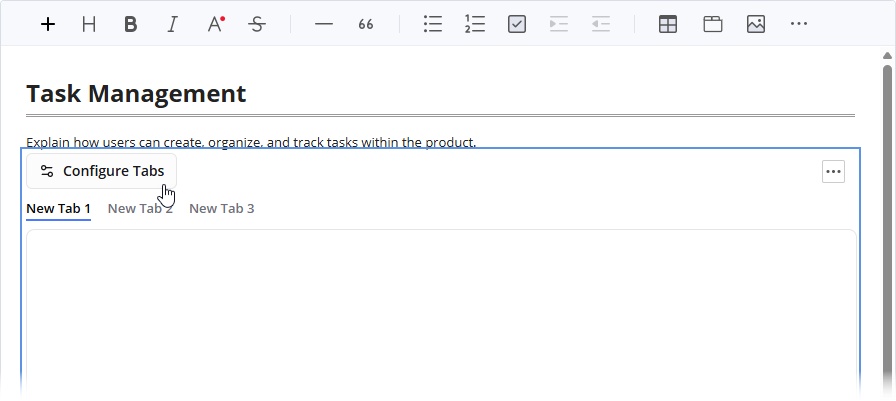
A Tabbed Group is a structural layout container component inside the OpenDocs editor. It groups complex, related information into horizontal or vertical tabs to reduce visual clutter and improve scannability.
Practical Applications
Imagine documenting a software feature with multiple configuration options. Instead of one overwhelming page, you can place setup instructions, API references, troubleshooting tips, and example code into separate tabs. Readers toggle between views without endless scrolling, finding exactly what they need faster.
Implementation Tips
Use tabs to separate content by audience (e.g., "Developers" vs. "End Users")
Group related diagrams and their explanatory text together
Combine Flipbooks, Bookshelves, and standard content within the same tabbed structure for rich, layered documentation
What It Is
Sharing represents the final distribution phase of your completed knowledge asset. It grants controlled access to internal teams, external clients, or public stakeholders.
Flexible Distribution Options
Clicking the Share button on OpenDocs' top navigation bar generates instant public or private links, embed codes for external websites, or even direct exports to WordPress pages. You can choose between:
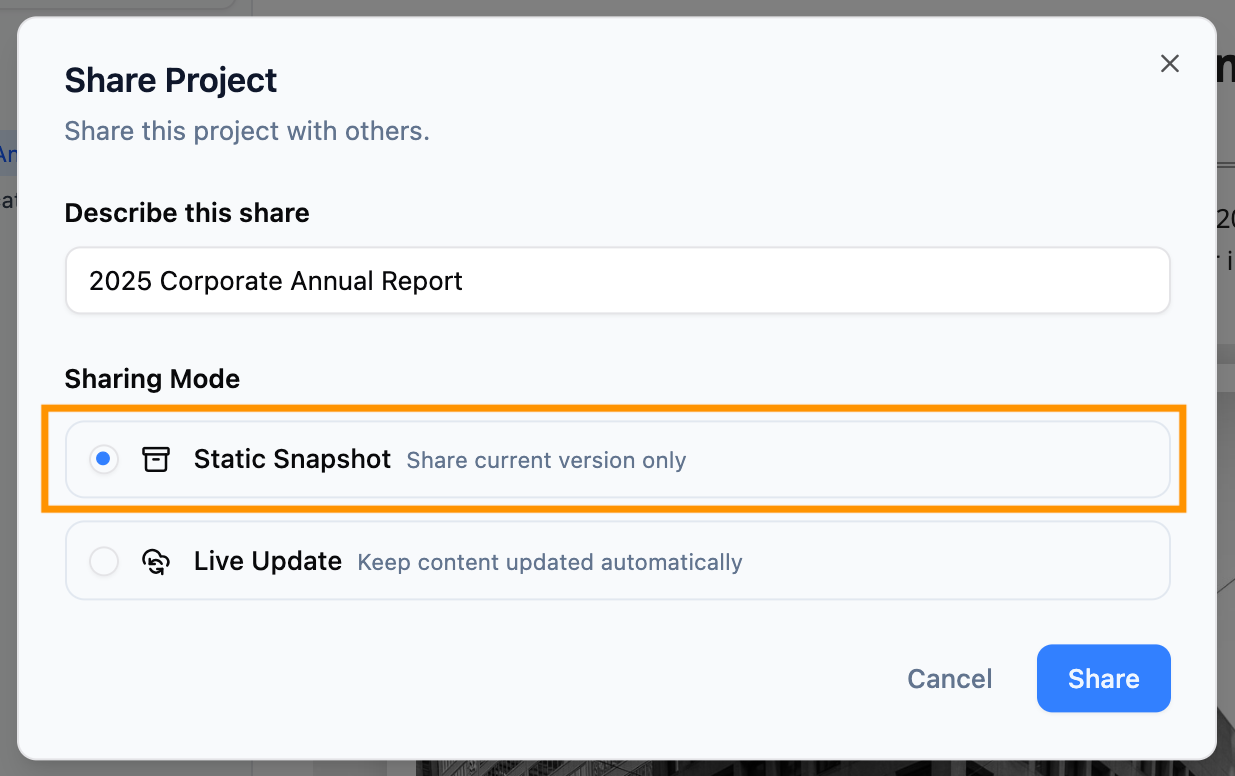
Live Updates: Documentation that automatically reflects the latest artifact revisions
Static Snapshots: Frozen versions for formal releases or compliance documentation
Password Protection: Secure access for sensitive content
Governance and Audit
The Browse Share History feature provides an audit dashboard showing what's been shared, when, and by whom. This visibility supports compliance requirements and helps teams manage content lifecycle without guesswork.
To illustrate how these components work together, here's a typical documentation scenario I tested:
Morning: I sketch a new system architecture using the AI Chatbot, asking it to "Generate a sequence diagram for user authentication with OAuth2." Within seconds, a draft diagram appears.
Refinement: I open the diagram in Visual Paradigm Online, adjust connector styles, add annotations, and click "Send to OpenDocs Pipeline" with the comment "Auth flow v1.2 – Added refresh token handling."
Documentation: In OpenDocs, I create a new page titled "Authentication Architecture." Using the Markdown editor, I write explanatory text, then insert the diagram from the Pipeline. I add a Tabbed Group to separate "Implementation Steps" from "Security Considerations."
Enhancement: For the onboarding section, I create a Flipbook tutorial showing the login process step-by-step. I curate this with other training materials into a Bookshelf titled "Developer Onboarding."
Distribution: Once satisfied, I click Share, generate a private link for my engineering team, and embed the page into our internal WordPress portal using the provided iframe code.
Maintenance: Two days later, security requirements change. I update the sequence diagram in Visual Paradigm Online, resend to the Pipeline, and in OpenDocs, click "Update to Latest Revision." The documentation stays current without rewriting a single word of explanatory text.
Total time from concept to published, maintainable documentation: under 90 minutes.
✅ True Single Source of Truth: The Pipeline eliminates version chaos by centralizing artifact management.
✅ Intelligent Artifacts: Diagrams remain editable models, not static images, preserving their utility.
✅ Time Savings: Manual export/upload cycles shrink from minutes to seconds per artifact.
✅ Flexible Output: Support for Flipbooks, Bookshelves, and Tabbed Groups accommodates diverse content needs.
✅ Enterprise-Ready: Access controls, audit history, and WordPress integration support organizational workflows.
✅ AI-Powered Acceleration: The Chatbot integration jumpstarts diagram creation for rapid prototyping.
⚠️ Learning Curve: Teams new to Markdown or diagramming may need onboarding time.
⚠️ Edition Requirements: Advanced features like Pipeline integration require Professional or Combo Edition licenses.
⠁ Web-First Design: OpenDocs is browser-based; offline editing isn't currently supported.
⚠️ Export Limitations: Direct export to formats like PDF or Word isn't native—sharing happens via links or embeds.
This ecosystem delivers the most value for:
Technical teams maintaining complex system documentation that evolves frequently
Product managers creating living specifications that bridge design and development
Training departments building interactive, multimedia learning resources
Consultants delivering polished, client-facing documentation with minimal overhead
Solo creators who want professional-grade documentation without enterprise complexity
If your documentation needs are simple and static, the full Pipeline workflow might be overkill. But if you're managing evolving visual content that requires accuracy, collaboration, and professional presentation, this system addresses pain points that traditional tools often ignore.
After thorough evaluation, Visual Paradigm's OpenDocs workflow stands out as a thoughtfully designed solution to a universal challenge: making documentation feel less like a burden and more like a natural extension of creative work.
The Pipeline isn't just a file transfer mechanism—it's a philosophy made manifest. It recognizes that in modern knowledge work, the barriers between creating, organizing, and sharing should be invisible. By building intelligent connections between diagramming tools, content editors, and distribution channels, this ecosystem enables teams to focus on what matters: clear communication and accurate information.
The integration of Flipbooks and Bookshelves adds a layer of engagement that transforms documentation from reference material into an experience. Meanwhile, features like Tabbed Groups and flexible sharing options ensure that complexity is managed, not avoided.
Yes, there's a learning investment. Yes, advanced features require specific editions. But for teams tired of version chaos, manual updates, and documentation that lags behind reality, the time reclaimed and confidence gained make this workflow worth serious consideration.
In an era where knowledge is both an organization's greatest asset and its most fragile, tools that make documentation sustainable, accurate, and engaging aren't just convenient—they're essential. Visual Paradigm's OpenDocs ecosystem moves meaningfully in that direction.

