Introduction
In an era where digital transformation accelerates at an unprecedented pace, technical teams are challenged to produce documentation that is not only accurate and comprehensive but also visually intuitive, collaboratively editable, and instantly publishable. Yet too often, organizations find themselves trapped in fragmented workflows: architects draft UML diagrams in one tool, writers craft narratives in another, and DevOps engineers manually embed assets into wikis or CMS platforms—creating version drift, broken links, and knowledge silos. This disconnect doesn't just slow delivery; it erodes trust in documentation as a living, reliable resource.
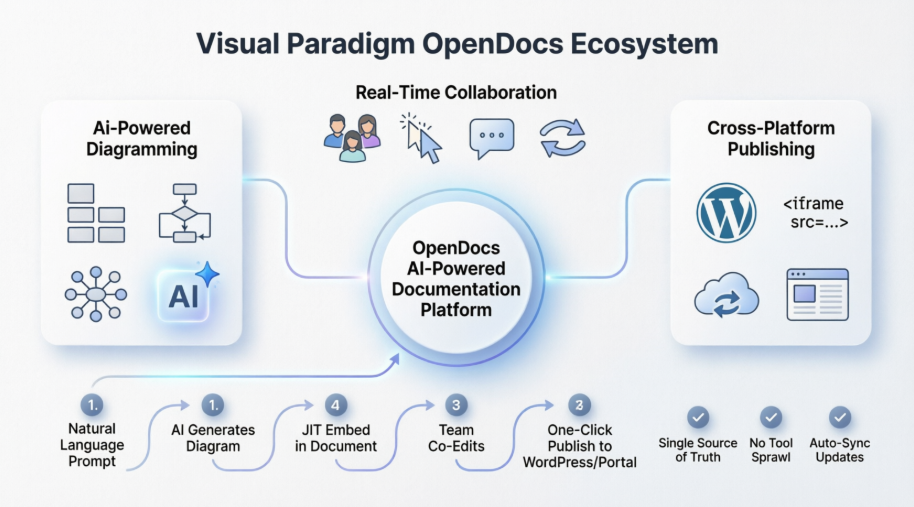
Visual Paradigm OpenDocs emerges as a transformative solution to this pervasive challenge. By converging professional-grade visual modeling, generative AI, real-time collaboration, and cross-platform publishing into a single intelligent environment, OpenDocs redefines what team documentation can achieve. This case study examines how OpenDocs empowers distributed teams to co-create dynamic, diagram-rich knowledge artifacts—from initial concept to enterprise-wide deployment—while preserving a single source of truth, reducing tool sprawl, and accelerating time-to-clarity. Whether you're mapping microservices architectures, orchestrating business processes, or publishing living runbooks to WordPress, OpenDocs provides the unified foundation modern knowledge work demands.
Supported Diagram Types in Visual Paradigm OpenDocs
Visual Paradigm OpenDocs integrates a comprehensive library of professional visual modeling standards directly into its AI-powered documentation engine, enabling teams to select the right visual language for every context:
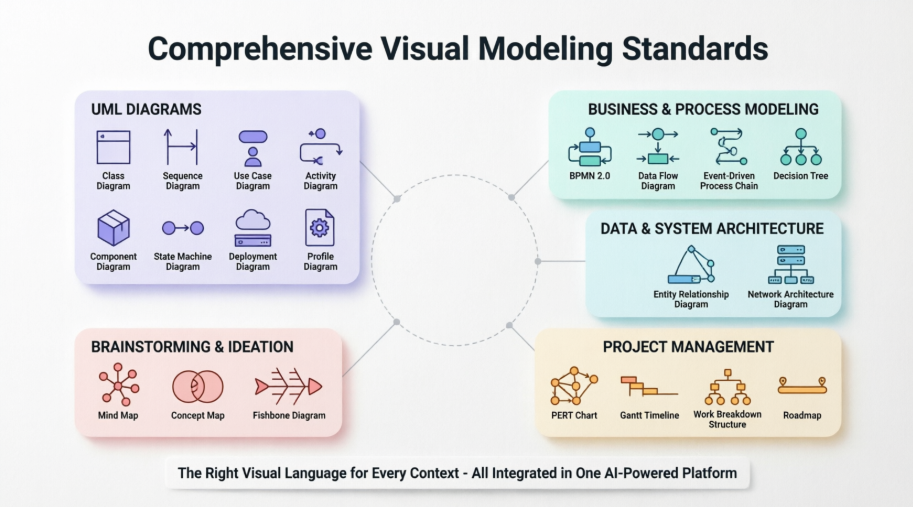
- UML Diagrams: Class, Sequence, Use Case, Activity, Component, State Machine, Deployment, and Profile diagrams for rigorous software architecture and behavioral modeling.
- Business & Process Modeling: BPMN 2.0 process flows, Data Flow Diagrams (DFD), Event-Driven Process Chains (EPC), and Decision Trees to clarify operational workflows and strategic logic.
- Data & System Architecture: Entity Relationship Diagrams (ERD) and Network Architecture diagrams for designing scalable data models and infrastructure topologies.
- Project Management: PERT charts, Gantt timelines, Work Breakdown Structures (WBS), and Roadmaps to align execution with strategic objectives.
- Brainstorming & Ideation: Mind Maps, Concept Maps, and Fishbone diagrams to foster creative exploration and root-cause analysis during discovery phases.
This breadth of native support ensures that whether a team is documenting a legacy migration, designing a new API, or planning a product launch, the appropriate visual formalism is always at hand—without leaving the documentation environment.
Just-in-Time (JIT) Embedding for Team Collaboration
OpenDocs eliminates the friction of context-switching by enabling teams to embed visuals precisely when and where they add value. Three adaptive pathways support seamless diagram integration:
- Ad Hoc Embedding: Users click Insert > Diagram directly within a document page to build a diagram immediately inside the text narrative. This inline workflow keeps visual and textual content tightly coupled, reducing cognitive load and improving narrative coherence.
- AI-Driven Generation: Teams can create diagrams just-in-time using natural language prompts—such as typing
/create a sequence diagram for user authentication or interacting with the AI Diagram Chatbot—to instantly draft layout options. The AI suggests structurally sound templates, accelerating ideation while maintaining modeling rigor.
- The Central Asset Pipeline: For cross-platform sync, diagrams created in Visual Paradigm Desktop or VP Online are pushed to the "OpenDocs Pipeline" with a single click. Collaborators editing the text can immediately pull these assets into the layout via Insert > Pipeline, ensuring consistency across design and documentation artifacts.
This JIT philosophy ensures that visuals are never afterthoughts but integral, living components of the knowledge narrative.
Knowledge Sharing and Real-Time External Sync
Tabbed and Hierarchical Structure
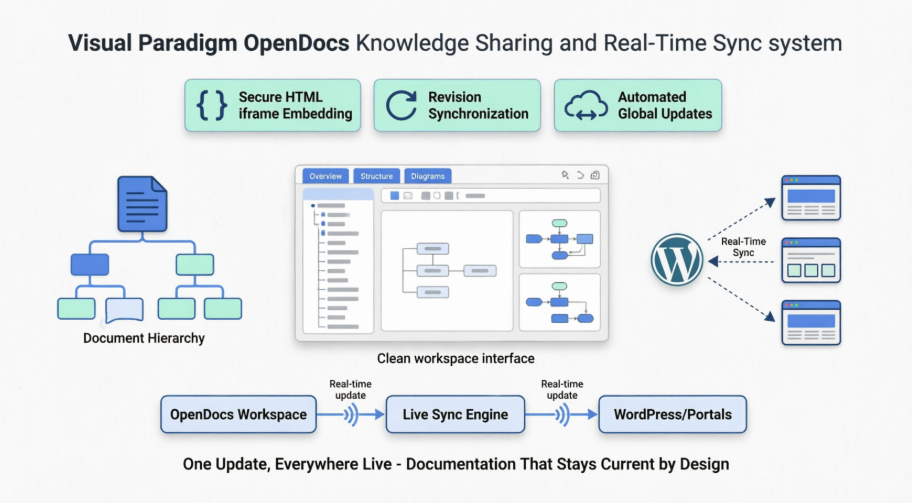
OpenDocs organizes complex project specifications, user stories, and technical guides into a centralized, navigable workspace. Content can be structured using tabbed sections and hierarchical outlines, allowing teams to scale documentation without sacrificing clarity. Diagrams function as first-class citizens: they can be embedded inline alongside explanatory text or elevated to dedicated full-page layout tabs, serving as authoritative references for the entire team.
WordPress Integration & Real-Time Sync
OpenDocs extends its value beyond the authoring environment through secure, live publishing capabilities:
- Secure Embedding via HTML iframe: Teams can publish documentation directly into external platforms like WordPress sites or internal company portals by embedding a designated code snippet. This preserves interactivity and styling while maintaining access controls.
- Revision Synchronization: When a diagram is updated in the core OpenDocs workspace, a central indicators system flags the change within the asset panel. Stakeholders are instantly aware of updates without manual polling or version checks.
- Automated Global Updates: The system pushes specified revision updates globally, maintaining live, consistent content syncing across all embedded WordPress pages. There is no need to manually replace image links, re-export files, or coordinate deployment windows—documentation stays current by design.
Strategic Benefits for Modern Technical Teams
Adopting OpenDocs delivers measurable advantages across the documentation lifecycle:
- Reduced Tool Sprawl: Consolidate diagramming, writing, collaboration, and publishing into one platform, lowering licensing costs and training overhead.
- Enhanced Accuracy: AI-assisted diagram generation reduces modeling errors, while real-time sync prevents version drift between design and documentation.
- Faster Onboarding: New team members gain context faster through visually rich, interactive documentation that mirrors system architecture and business logic.
- Improved Stakeholder Alignment: Business analysts, developers, and executives can all engage with the same living artifact, using visuals tailored to their perspective.
- Future-Proof Publishing: Content authored in OpenDocs remains portable and embeddable across evolving web platforms, protecting long-term knowledge investments.
Implementation Strategy: Getting Started with OpenDocs
Teams can adopt OpenDocs incrementally to maximize adoption and ROI:
- Pilot with a High-Value Use Case: Start by documenting a critical workflow—such as an API integration or incident response playbook—using AI-generated diagrams and JIT embedding.
- Establish the Asset Pipeline: Connect Visual Paradigm Desktop or VP Online to OpenDocs to enable seamless asset sharing between design and documentation teams.
- Enable Real-Time Collaboration: Invite cross-functional contributors to co-edit documents, leveraging live cursors and comment threads to resolve ambiguities instantly.
- Publish to a Live Environment: Embed the pilot documentation into a WordPress page or internal wiki using the iframe snippet, demonstrating end-to-end value.
- Scale with Governance: Define templates, naming conventions, and review workflows to ensure consistency as usage expands across teams.
This phased approach minimizes disruption while building momentum for organization-wide adoption.
Conclusion
Visual Paradigm OpenDocs represents more than a feature upgrade—it signifies a fundamental shift in how teams conceive, create, and consume technical knowledge. By unifying AI-powered diagram generation, just-in-time embedding workflows, and real-time cross-platform synchronization within a single intelligent environment, OpenDocs dissolves the barriers that have long fragmented documentation efforts. Teams no longer sacrifice agility for accuracy, nor collaboration for control. Instead, they gain a dynamic, visual-first knowledge platform that evolves alongside their products and processes.
As organizations increasingly recognize documentation as a strategic asset—not a compliance checkbox—solutions like OpenDocs will be pivotal in transforming static deliverables into living, collaborative resources. Whether orchestrating complex system architectures with UML, streamlining business operations with BPMN, or publishing self-updating runbooks to WordPress portals, OpenDocs empowers teams to communicate with clarity, act with confidence, and innovate with speed. In the journey from siloed tools to synergistic knowledge work, Visual Paradigm OpenDocs doesn't just support the destination—it accelerates the path forward.
References
- AI Component Diagram Generator for OpenDocs: Learn how OpenDocs leverages AI to automatically generate UML Component diagrams from natural language descriptions, streamlining system architecture documentation.
- AI Profile Diagram Generation with UML Support: Discover how OpenDocs extends UML modeling capabilities with AI-powered Profile diagram creation for customized modeling languages and domain-specific extensions.
- Visual Paradigm User Guide: Diagram Integration: Official documentation detailing step-by-step instructions for embedding and managing diagrams within OpenDocs projects.
- Supported Diagram Types in OpenDocs Doc Composer: Comprehensive reference listing all diagram templates and element types available within the OpenDocs document composition engine.
- AI Breakdown Structure Chart Maker for OpenDocs: Explore how teams can use AI prompts to instantly generate Work Breakdown Structures and hierarchical project planning visuals.
- Ad Hoc Diagram Embedding Tutorial (Video): Step-by-step video walkthrough demonstrating how to insert and edit diagrams directly within OpenDocs text narratives without leaving the document.
- Overview of the 14 UML Diagram Types: Foundational guide to UML modeling standards supported by OpenDocs, including use cases, structural diagrams, and behavioral modeling.
- Sync AI Diagrams to OpenDocs Pipeline Guide: Technical guide for pushing diagrams created in Visual Paradigm Desktop or VP Online into the centralized OpenDocs asset pipeline for team access.
- OpenDocs Pipeline Collaboration Demo (Video): Video demonstration showing how team members can pull shared diagrams from the Pipeline into collaborative documents in real-time.
- Real-Time Collaboration Update for OpenDocs: Release notes detailing concurrent editing, live cursor tracking, and instant revision syncing across distributed teams.
- Visual Paradigm Official Website: Main product hub featuring feature overviews, pricing, tutorials, and community resources for Visual Paradigm's suite of modeling and documentation tools.
- OpenDocs: AI-Powered Knowledge Platform Launch: Announcement of OpenDocs as an intelligent documentation engine that combines natural language processing with visual modeling for dynamic knowledge management.
- Timeline Diagram and Gantt Chart Update: Enhancement details for project scheduling visuals, including drag-and-drop timeline editing and automatic date synchronization.
- Export OpenDocs to WordPress Pages: Tutorial for publishing OpenDocs content directly to WordPress sites using secure embed codes and automated content syncing.
- Embed OpenDocs with HTML Code Tutorial: Step-by-step instructions for generating and deploying iframe embed snippets to share live OpenDocs pages on external web platforms.
- VP Online Integration with OpenDocs (Video): Video guide showing how diagrams created in the cloud-based VP Online editor sync seamlessly with OpenDocs projects.
- OpenDocs Feature Overview: High-level summary of OpenDocs capabilities including AI diagram generation, real-time collaboration, and cross-platform publishing features.