
Business Process Model and Notation (BPMN) is the global standard for modeling business processes, providing a visual language that bridges the gap between business stakeholders and technical implementers. While BPMN excels at illustrating the sequence of activities, decision points, and control flows, a process model remains incomplete without understanding what information drives those activities. This is where BPMN Data Objects become essential.
Data elements provide the critical context regarding how information is created, manipulated, consumed, and stored throughout a business process. They transform abstract workflow diagrams into actionable, technically precise blueprints that software developers can implement with confidence. By clearly defining inputs, outputs, collections, and persistent stores, process analysts ensure that models are not only logically sound but also data-complete.
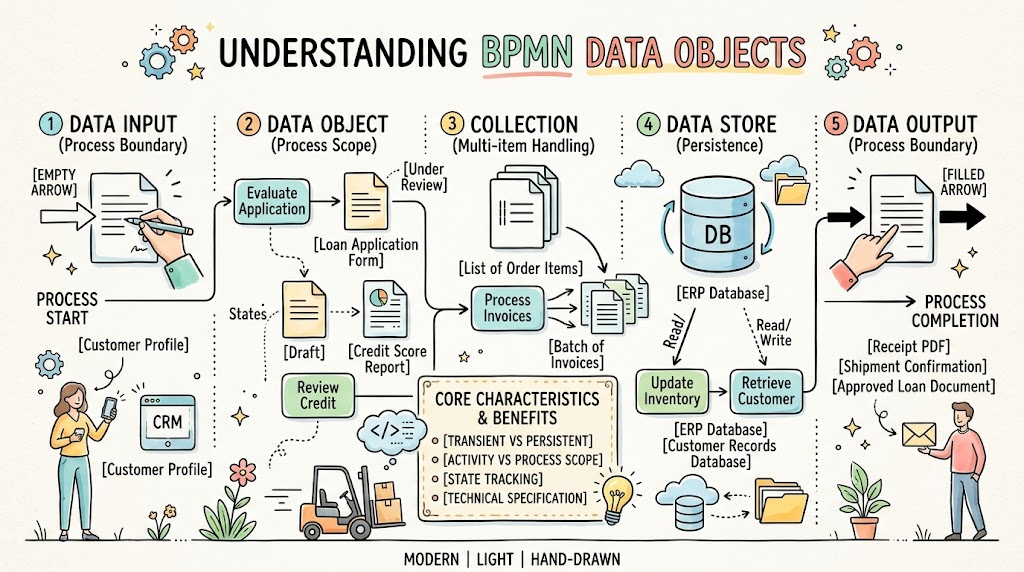
This comprehensive guide explores the five core types of BPMN data objects, their distinct characteristics, practical real-world applications, and best practices for effective modeling. Whether you are a business analyst, process architect, or product manager, mastering these elements will elevate your process models from simple flowcharts to robust specifications ready for implementation.
The BPMN 2.0 specification categorizes data elements into five distinct types, each serving a unique purpose in representing information flow. Understanding the differences between these types is crucial for accurate and meaningful process modeling.
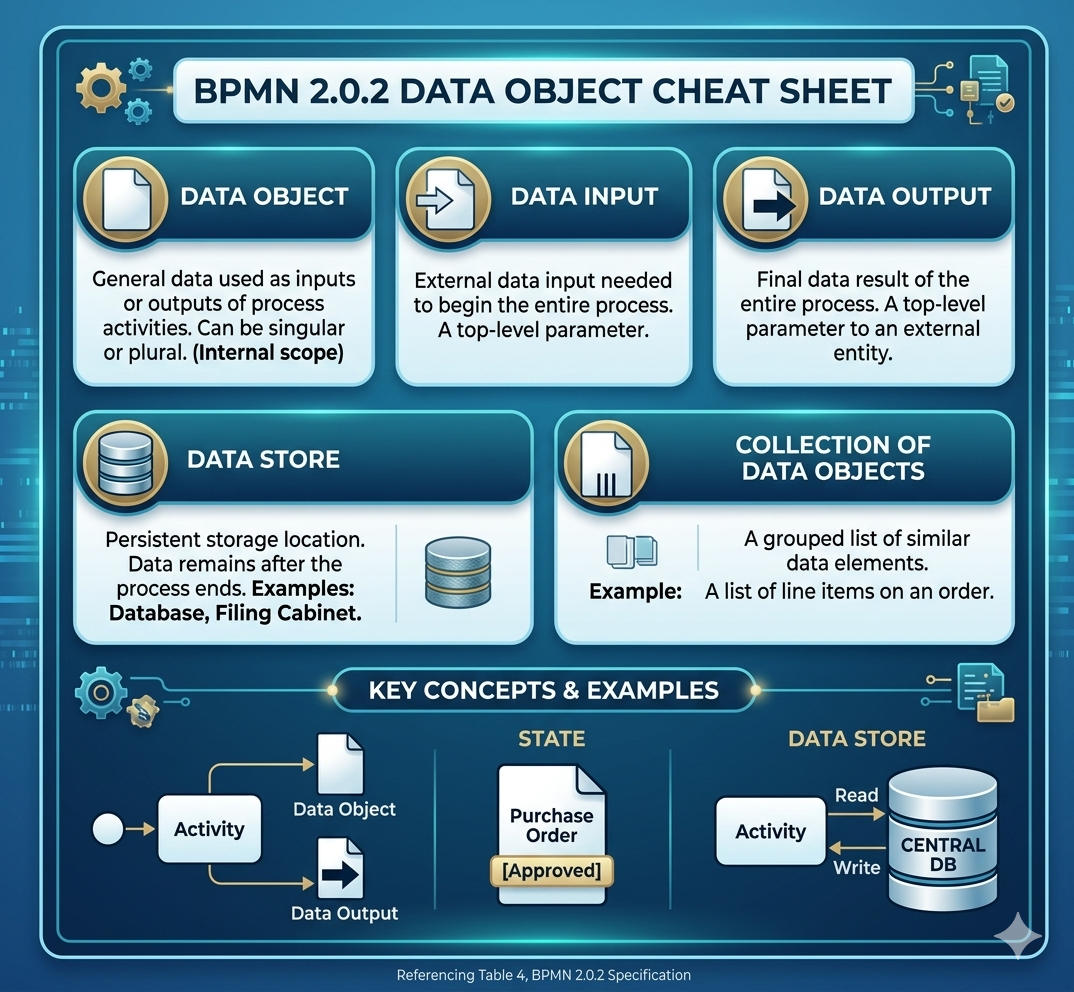
Icon: A standard document sheet with a folded top-right corner.
Definition:
A Data Object represents information that serves as an active input or output for specific activities within a process. It can denote either a singular piece of information or a grouping of related data. Unlike persistent storage, a Data Object is temporary and exists only during the execution of the specific process instance.
Key Characteristics:
Transient Nature: Created, used, and potentially discarded within the lifecycle of a single process instance.
Activity-Level Scope: Typically associated with one or more activities within a process or subprocess.
State Tracking: Can display state changes using square brackets (e.g., Invoice [Created], Invoice [Approved], Invoice [Paid]).
Practical Examples:
Loan Application Form: Generated when a customer initiates a loan request, used by the underwriting activity, and archived upon completion.
Credit Score Report: Fetched from an external service during an evaluation step and immediately consumed by the decision engine.
Shipping Label: Created after order confirmation and used by the logistics team to prepare the package.
Employee Onboarding Checklist: A dynamic document updated as each onboarding task is completed.
When to Use:
Use a Data Object when you need to show information that is created, modified, or consumed by specific tasks within the process but does not need to persist beyond the process instance.
Icon: A document sheet with an empty arrow pointing into the top-left corner.
Definition:
A Data Input represents an external data requirement for the entire process. It serves as an input parameter that must be available before the process can begin execution. Data Inputs define what information the process expects to receive from external systems, users, or upstream processes.
Key Characteristics:
Process-Level Scope: Defined at the boundary of the entire process, not individual activities.
Precondition: Must be present before the process starts; acts as a prerequisite.
External Origin: Typically sourced from external systems, user submissions, or triggering events.
Practical Examples:
Customer Profile: Required from a CRM system before a "Tailor Insurance Plan" process can initialize.
Purchase Order ID: Provided by an e-commerce platform to trigger the order fulfillment process.
Employee ID and Start Date: Supplied by HR systems to initiate the IT provisioning process.
Flight Booking Reference: Entered by a passenger to begin the check-in process.
When to Use:
Use a Data Input when you need to specify what information must be provided externally to start the process. This is particularly useful for defining process interfaces and integration points.
Icon: A document sheet with a filled black arrow pointing out of the top-left corner.
Definition:
A Data Output represents the final data result generated by the entire process. It acts as an output parameter sent back to an external system, stakeholder, or downstream process upon completion. Data Outputs define what the process produces and delivers.
Key Characteristics:
Process-Level Scope: Defined at the boundary of the entire process as the final deliverable.
Postcondition: Available only after the process completes successfully.
External Destination: Typically consumed by external systems, users, or subsequent processes.
Practical Examples:
Receipt PDF: The final invoice generated at the end of a checkout process and pushed to the customer's email.
Approved Loan Document: Signed and returned to the customer after the loan approval process completes.
Provisioned Account Credentials: Sent to the new employee and IT admin after the onboarding process finishes.
Shipment Tracking Number: Returned to the e-commerce platform after the shipping label is created and the package is dispatched.
When to Use:
Use a Data Output when you need to specify what information the process produces and delivers to external entities. This helps define clear process boundaries and integration contracts.
Icon: A standard database cylinder.
Definition:
A Data Store represents a persistent storage location where a process can read or write data. Unlike transient Data Objects, the contents of a Data Store persist beyond the lifetime of any specific process instance. Examples include databases, cloud storage systems, physical filing cabinets, or enterprise resource planning (ERP) systems.
Key Characteristics:
Persistent Nature: Data remains available across multiple process instances and over time.
Shared Access: Can be accessed by multiple processes, activities, or even different organizations.
Read/Write Operations: Processes can both retrieve data from and update data in a Data Store.
Practical Examples:
ERP Database: The centralized system where an updated Inventory Log is saved so it can be retrieved months later.
Customer Relationship Management (CRM) System: Stores customer profiles, interaction history, and purchase records.
Document Management System: Archives signed contracts, compliance documents, and audit trails.
Product Catalog Database: Maintains product details, pricing, and availability information accessed by multiple sales processes.
When to Use:
Use a Data Store when you need to represent persistent storage that survives beyond individual process instances. This is essential for modeling systems of record, historical data, and shared resources.
Icon: A document sheet featuring three vertical parallel lines at the bottom.
Definition:
A Collection of Data Objects represents a list or group of data elements related to the same data entity. It allows multiple items to be handled simultaneously, reflecting scenarios where processes operate on batches, lists, or arrays of information rather than single instances.
Key Characteristics:
Multiplicity: Represents zero, one, or many instances of the same data type.
Batch Processing: Often associated with activities that process multiple items in parallel or sequentially.
Aggregation: Useful for showing consolidated data that results from combining multiple individual elements.
Practical Examples:
List of Order Items: A collection of various goods purchased by a user, processed collectively to calculate total sales tax and shipping costs.
Batch of Invoice Records: Multiple invoices grouped together for bulk processing during month-end closing.
Employee Attendance Logs: A collection of daily attendance records aggregated for payroll calculation.
Survey Responses: Multiple individual responses collected and analyzed together to generate insights.
When to Use:
Use a Collection of Data Objects when your process handles multiple instances of the same data type simultaneously. This is common in reporting, batch processing, aggregation, and bulk operations.
To effectively leverage BPMN Data Objects in your process models, keep the following concepts and best practices in mind:
Critical Distinction:
Data elements do not affect the sequence or control flow of a process. They are connected to activities using dotted lines called Data Associations, which indicate data movement without influencing the order of execution. In contrast, Sequence Flows (solid lines with arrows) dictate the order in which activities occur.
Best Practice:
Always use dotted lines for Data Associations.
Never confuse Data Associations with Sequence Flows.
Use directional arrows on Data Associations to clarify whether data is being read from or written to an object.
Data Objects can display state changes using square brackets beneath their name. This is particularly useful for tracking how information evolves throughout a process.
Examples:
Invoice [Created] → Invoice [Reviewed] → Invoice [Approved] → Invoice [Paid]
Application [Submitted] → Application [Under Review] → Application [Accepted]
Document [Draft] → Document [Finalized] → Document [Signed]
Best Practice:
Use state annotations when the same logical data object undergoes significant transformations or status changes during the process. This adds clarity without cluttering the diagram with multiple separate objects.
Scope Rules:
Standard Data Objects are scoped to the process or subprocess level where they are defined. They cannot be accessed outside those boundaries unless explicitly passed via Data Inputs or Data Outputs.
Data Inputs and Data Outputs operate at the process boundary, defining the interface between the process and its external environment.
Data Stores have global or organizational scope, accessible by multiple processes and activities.
Best Practice:
Keep Data Objects within the smallest possible scope to maintain model clarity.
Use Data Inputs and Data Outputs to explicitly define process interfaces.
Reserve Data Stores for truly persistent, shared resources.
While data objects add valuable context, over-modeling can clutter diagrams and reduce readability.
Best Practice:
Include only data objects that are critical to understanding the process logic or technical implementation.
Omit trivial or obvious data elements (e.g., don't model every field in a form).
Focus on data that crosses system boundaries, triggers decisions, or represents significant business artifacts.
BPMN Data Objects should bridge the gap between business requirements and technical specifications.
Best Practice:
Use consistent naming conventions that align with your organization's data dictionary or schema.
Specify data formats or types when relevant (e.g., Customer Profile [JSON], Invoice PDF).
Collaborate with developers to ensure data objects map cleanly to database tables, API payloads, or message structures.
To illustrate how BPMN Data Objects work together in realistic contexts, consider the following end-to-end examples:
Process Overview: A customer places an order, and the system processes payment, picks items, ships the package, and sends confirmation.
Data Elements Used:
Data Input: Order Details (provided by the e-commerce platform)
Data Object: Payment Authorization (created during payment processing)
Data Object: Picking List (generated for warehouse staff)
Collection of Data Objects: Order Items (multiple products in the cart)
Data Store: Inventory Database (updated after items are picked)
Data Output: Shipment Confirmation (sent to the customer and platform)
Flow:
The process begins with the Order Details Data Input. The system creates a Payment Authorization Data Object, then generates a Picking List based on the Order Items collection. Warehouse staff pick items, updating the Inventory Database Data Store. Finally, the process produces a Shipment Confirmation Data Output.
Process Overview: HR initiates onboarding for a new hire, triggering IT provisioning, facility access, and training assignments.
Data Elements Used:
Data Input: New Hire Profile (from HR system, including name, role, start date)
Data Object: IT Provisioning Request (created for IT team)
Data Object: Access Badge Application (submitted to facilities)
Data Store: Employee Directory (updated with new hire information)
Collection of Data Objects: Training Modules (assigned based on role)
Data Output: Onboarding Completion Certificate (issued after all tasks are done)
Flow:
The New Hire Profile Data Input triggers the process. An IT Provisioning Request and Access Badge Application are created as Data Objects. The Employee Directory Data Store is updated. Role-specific Training Modules (a collection) are assigned. Upon completion, an Onboarding Completion Certificate Data Output is generated.
Process Overview: A bank evaluates a loan application, checks creditworthiness, makes a decision, and notifies the applicant.
Data Elements Used:
Data Input: Loan Application (submitted by customer)
Data Object: Credit Report (fetched from credit bureau)
Data Object: Risk Assessment (generated by underwriting engine)
Data Store: Customer Records Database (historical data referenced)
Data Object (with states): Loan Decision [Pending] → Loan Decision [Approved] or [Rejected]
Data Output: Approval Letter or Rejection Notice (sent to applicant)
Flow:
The Loan Application Data Input starts the process. A Credit Report is fetched, and a Risk Assessment is generated. The Customer Records Database is consulted for historical context. The Loan Decision Data Object transitions through states. Finally, either an Approval Letter or Rejection Notice Data Output is produced.
BPMN Data Objects are indispensable tools for creating comprehensive, actionable business process models. By distinguishing between transient Data Objects, persistent Data Stores, process-boundary Data Inputs and Outputs, and multi-item Collections, you can accurately represent how information flows through your organization's workflows.
When used correctly, these elements:
Clarify Requirements: Make explicit what data is needed, produced, and stored.
Bridge Business and IT: Provide developers with precise specifications for implementation.
Improve Communication: Ensure all stakeholders share a common understanding of process dependencies.
Enhance Maintainability: Document data dependencies that might otherwise be hidden or assumed.
Remember the key principles: use Data Associations (dotted lines) for data flow, annotate states when helpful, respect scope boundaries, and avoid over-modeling. Strike a balance between completeness and clarity, focusing on data elements that truly matter to process logic and technical implementation.
For creating professional BPMN diagrams with robust support for Data Objects, Visual Paradigm is an excellent choice. Visual Paradigm offers intuitive drag-and-drop interfaces for all BPMN 2.0 elements, including Data Objects, Data Inputs, Data Outputs, Data Stores, and Collections. Its smart connectors automatically render Data Associations as dotted lines, and its property panels make it easy to define states, scopes, and metadata. Whether you're a beginner or an experienced process analyst, Visual Paradigm provides the features needed to create clean, standards-compliant, and visually appealing BPMN models that effectively communicate both workflow and data requirements.
By mastering BPMN Data Objects and leveraging powerful tools like Visual Paradigm, you'll be well-equipped to design process models that are not only logically sound but also technically precise—ready to drive successful implementation and continuous improvement in your organization

