
Visual Paradigm Desktop VP Online

OpenDocs Transforms Technical Knowledge Management Through AI-Powered Integration

Introduction

In today’s fast-paced software development landscape, technical teams face a persistent challenge: maintaining synchronized, accurate documentation while simultaneously designing complex systems. Traditional workflows often force engineers and product managers to toggle between diagramming tools, word processors, version control systems, and collaboration platforms—creating friction, version drift, and knowledge silos.

Visual Paradigm’s OpenDocs emerges as a transformative solution to this fragmentation. As a web-based, AI-powered knowledge management and documentation platform, OpenDocs natively unifies technical text editing with professional visual modeling in a single, cohesive workspace. This case study explores how OpenDocs empowers engineering teams to eliminate context-switching, accelerate documentation workflows, and maintain a single source of truth through intelligent automation, real-time collaboration, and flexible sharing controls. Whether you’re documenting system architecture, onboarding new team members, or preparing client deliverables, OpenDocs redefines what’s possible when documentation and design work in harmony.
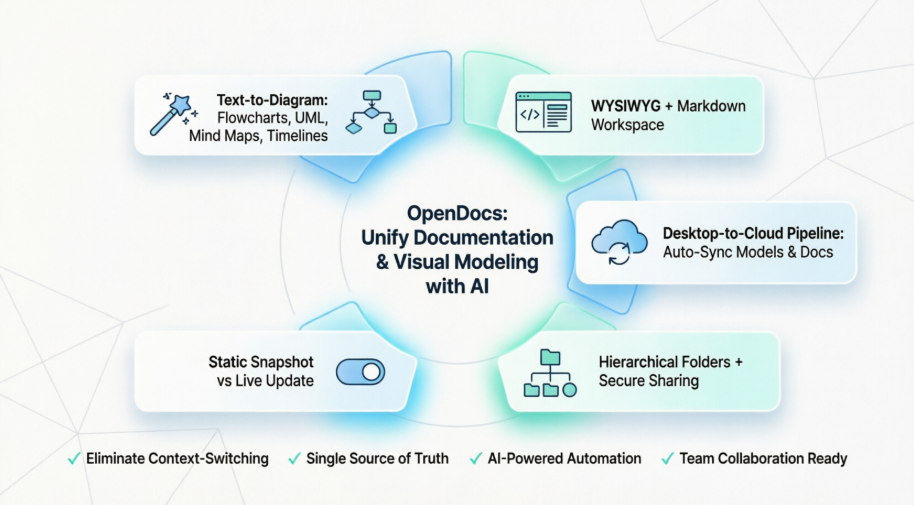
Core Capabilities

🧠 AI-Powered Diagram Generation

OpenDocs leverages artificial intelligence to dramatically reduce the time and expertise required to create professional-grade visual documentation:

  • Text-to-Diagram Automation: Generate entire professional visuals instantly from simple English descriptions. Describe a process, workflow, or system architecture in plain language, and OpenDocs constructs the corresponding diagram.
  • Supported AI Layouts: Build complex flows including Flowcharts, Data Flow Diagrams (DFD), Mind Maps, Timelines, Concept Maps, and Breakdown Structures—all generated from natural language prompts.
  • UML Engine: Automate the draft structure for complex UML diagrams, including Composite Structure, Profile, Sequence, and Activity diagrams, enabling software architects to focus on design logic rather than manual drawing.

✍️ Dual-Mode Editing Workspace

Recognizing that documentation creators have diverse preferences and technical backgrounds, OpenDocs offers flexible editing experiences:

  • WYSIWYG Mode: Provides a rich text interface for simplified documentation creation, ideal for stakeholders who prefer a word-processor-like experience.
  • Markdown Suite: Offers full Markdown formatting utilizing a split-pane layout for real-time formatting previews, catering to developers and technical writers who value code-friendly syntax.
  • Embedded Drawings: Allows the placement of live, fully editable shape libraries directly inside text paragraphs, ensuring diagrams remain contextually integrated with explanatory content.

🔄 Ecosystem Synchronization & Real-Time Sync

OpenDocs bridges the gap between desktop modeling tools and cloud-based collaboration:
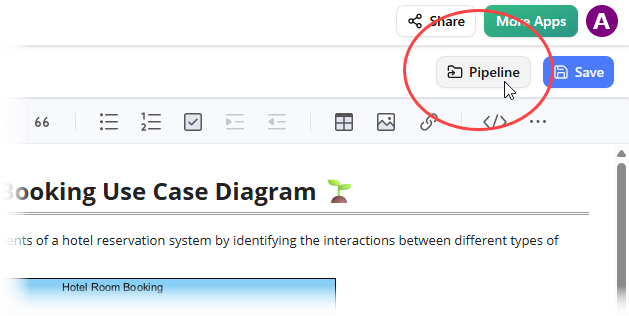
  • The Pipeline Bridge: Connects Visual Paradigm Desktop tools securely to the cloud-based OpenDocs repository. This enables live syncing where source model changes propagate to active documentation pages automatically, eliminating manual export/import cycles.
    Mastering the Pipeline in Visual Paradigm OpenDocs: A Complete Guide to Streamlined Knowledge Management - Cybermedian
  • Page-Level Sync: Updates text modifications instantly across concurrent team users to avoid version fragmentation and ensure everyone works from the latest content.
  • Structural Team-Sync: Reflects folder hierarchy adjustments—such as creating nodes or shifting folders—in real time across the workspace, maintaining organizational consistency.
  • Collision Protection: Manages editing rights through a request-and-grant conflict resolution layout, preventing overwrites and preserving work integrity during collaborative sessions.

🗂️ Knowledge Organization & Sharing

Effective knowledge management requires intuitive structure and controlled accessibility:

  • Hierarchical Folders: Arranges documentation cleanly via deep nested tree structures, enabling logical categorization of projects, modules, and deliverables.
  • Secure Sharing: Distributes entire documentation spaces via a single, read-only link that stakeholders can view securely without needing a system login, simplifying external collaboration.
  • Share History Audits: Logs exactly when and which documentation snapshots were sent to specific stakeholders, providing transparency and accountability for compliance-sensitive environments.

Usage Architecture Summary

Feature Category Primary Tool/Functionality Key Benefit
Writing & Editing WYSIWYG + Markdown split-pane text engine Combines simplified content creation with code-friendly Markdown precision.
Visual Modeling AI Natural Language Prompt Engine Drastically lowers drawing time by converting text descriptions directly into functional diagrams.
Ecosystem Sync Cloud-based Artifact “Pipeline” Eradicates manually exporting, saving, or re-uploading system images.
Project Control Real-time page protection and Tree structure sync Ensures all developers and stakeholders interact with a uniform source of truth.

Static vs. Live Sharing: Control Your Content Versioning in OpenDocs

When sharing knowledge through Visual Paradigm OpenDocs, you have two distinct ways to present your data: Static Snapshots and Live Updates. Choosing the right mode ensures that your audience always sees the right version of your work, whether you want them to see a “work in progress” or a “finalized milestone.”
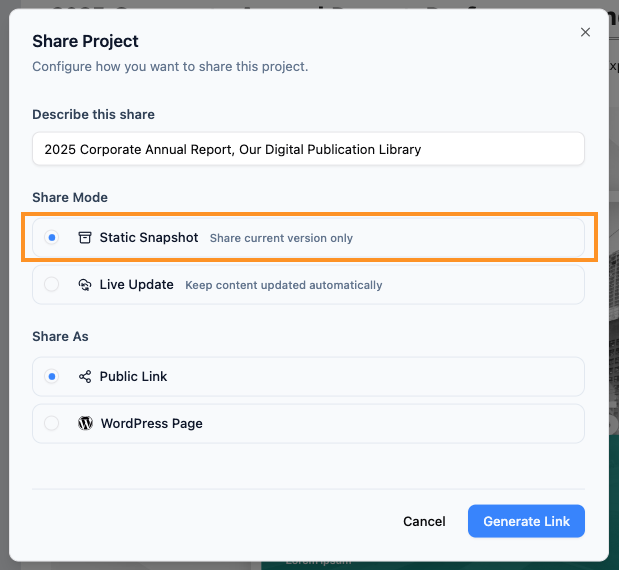
1. Static Snapshot: Freeze Time

Select Static sharing option

Static Snapshot is like taking a photograph of your pages at a specific moment. Once you generate the share link, that version of the content is “frozen.”

  • How it works: Even if you continue to edit the pages, add new diagrams, or change text in OpenDocs, the person viewing the shared link will only see the version that existed when you clicked “Share.”

  • Best for:

    • Project milestones (e.g., “Version 1.0”).

    • Archiving records for compliance or audits.

    • Sharing a “final” proposal that shouldn’t change during a review period.
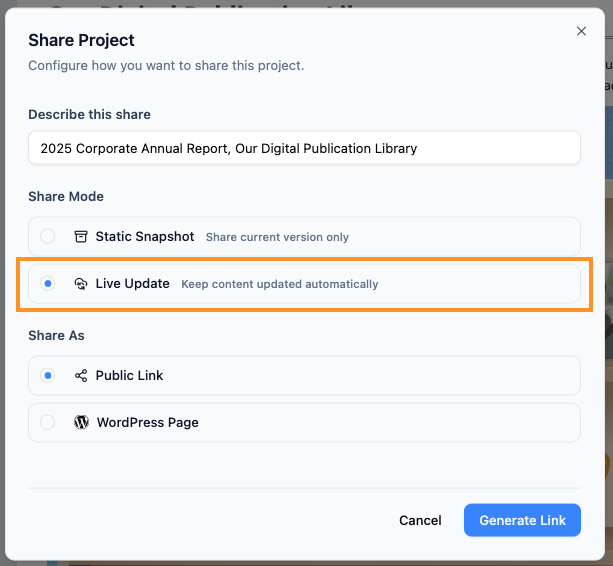
2. Live Update: Real-Time Sync

Select Live sharing option

Live Update share is a dynamic link. It acts as a window into your current working environment.

  • How it works: Any change you save in your knowledge management tool is instantly reflected in the shared link. Your readers will always see the most up-to-date information without you needing to send a new URL.

  • Best for:

    • Collaborative projects where information changes daily.

    • Internal “Knowledge Bases” or Wikis.

    • Technical documentation that must always reflect the latest software version.

Quick Comparison

Feature Static Snapshot Live Update
Content Changes Remains the same as when shared. Updates automatically with your edits.
Best Usage Milestones & Archiving. Ongoing Projects & Manuals.
Security Safe from accidental “work-in-progress” leaks. Requires care as edits are seen immediately.

How to Choose Your Mode

When you are in the Share Project dialog in OpenDocs, simply select the option that fits your needs before clicking the final Share button:

  1. Click Static Snapshot to “share current version only.”

  2. Click Live Update to “keep content updated automatically.”

Pro Tip: Not sure which to pick? Most teams use Live Update for internal manuals and Static Snapshot for client-facing deliverables.

Conclusion

Visual Paradigm OpenDocs represents a paradigm shift in how technical teams create, maintain, and share knowledge. By unifying AI-powered diagram generation, flexible editing modes, real-time synchronization, and intelligent sharing controls within a single platform, OpenDocs eliminates the friction that has long plagued documentation workflows. Engineering teams can now focus on solving problems rather than managing tools, while stakeholders gain confidence that they’re always viewing accurate, up-to-date information.

The platform’s dual approach to sharing—Static Snapshots for controlled deliverables and Live Updates for dynamic collaboration—provides the versatility needed across diverse project contexts. Meanwhile, the seamless integration between desktop modeling tools and cloud-based documentation ensures that visual assets and textual explanations remain perpetually aligned.

For organizations striving to accelerate development cycles, improve cross-functional alignment, and maintain rigorous documentation standards, OpenDocs offers more than just a tool—it delivers a cohesive knowledge ecosystem. As software systems grow increasingly complex, the ability to document them with equal parts speed, precision, and clarity becomes not just advantageous, but essential. OpenDocs positions teams to meet that challenge head-on, transforming documentation from a bureaucratic obligation into a strategic asset.


References

  1. OpenDocs – AI-Powered Knowledge Platform: Official feature overview of Visual Paradigm’s OpenDocs platform detailing core capabilities for unified documentation and visual modeling.
  2. OpenDocs | All-in-One Knowledge Base & Diagramming Tool: AI-powered documentation and modeling workspace product page highlighting integrated text and diagram creation.
  3. From Model to Manual: A Software Engineer’s Guide to Syncing Visual Paradigm Desktop Diagrams with OpenDocs: Technical guide on integrating desktop modeling tools with cloud-based OpenDocs documentation for seamless workflow synchronization.
  4. OpenDocs WYSIWYG Editor Update: Announcement of rich text editing capabilities and dual-mode workspace enhancements in OpenDocs.
  5. AI-Powered Data Flow Diagram Support in OpenDocs: New feature release enabling automated generation of Data Flow Diagrams from natural language descriptions.
  6. OpenDocs AI Mind Map Integration Update: Release notes for AI-generated mind mapping functionality to visualize ideas and project structures.
  7. OpenDocs AI Timeline Diagram Integration Update: Feature announcement for automated timeline creation to map project schedules and historical events.
  8. OpenDocs AI Concept Map Maker Update: Release details for AI-powered concept mapping tools to illustrate relationships between ideas and systems.
  9. AI Breakdown Structure Chart Maker for OpenDocs: New capability for generating hierarchical breakdown charts to organize project components and deliverables.
  10. AI Composite Structure Diagram Generator for OpenDocs: UML diagram automation feature release for modeling complex system architectures.
  11. AI Profile Diagram Generation with UML Support in OpenDocs: Advanced UML modeling feature announcement enabling customized diagram stereotypes and extensions.
  12. Visual Paradigm OpenDocs Real-Time Collaboration Update: Release notes on synchronous team editing features, conflict resolution, and structural synchronization.
  13. OpenDocs AI Knowledge Platform: Main product hub for the AI-powered documentation tool with access to tutorials, features, and getting started resources.
  14. AI Flowchart Generator Update for OpenDocs: Feature enhancement for automated flowchart creation to map processes, decisions, and workflows.
  15. OpenDocs Share History Audit Guide: Documentation on tracking shared content versions, audit logs, and stakeholder distribution history for compliance and transparency.

Turn every software project into a successful one.

We use cookies to offer you a better experience. By visiting our website, you agree to the use of cookies as described in our Cookie Policy.

OK