Visual Paradigm Desktop VP Online

The Complete Guide to the C4 Model for Software Architecture

“A way to create maps of your code, at various levels of detail, in the same way you would use something like Google Maps to zoom in and out of an area you are interested in.” — Simon Brown, Creator of the C4 Model

Introduction: Why Most Architecture Diagrams Fail

The Communication Problem in Software Teams

Ask someone in construction to communicate a building’s architecture, and you’ll receive site plans, floor plans, elevations, and cross-sections—all standardized, hierarchical, and purpose-built for their audience. Ask a software developer the same, and you’ll often get a confusing tangle of boxes, arrows, and unexplained acronyms.

Common diagramming failures include:

  • Inconsistent notation: Colors, shapes, and line styles change without explanation

  • Ambiguous elements: “Service,” “Module,” and “Component” used interchangeably

  • Missing relationships: Arrows without labels or directionality

  • Mixed abstraction levels: High-level business flows tangled with database schema details

  • Unexplained jargon: Acronyms and domain terms assumed to be universally understood

These problems compound when diagrams are viewed as a collection: inconsistent naming, unclear reading order, and no logical progression between views.

What Makes the C4 Model Different

The C4 Model, created by Simon Brown, addresses these challenges through three core principles :

  1. Simple: Easy to learn, developer-friendly, and notation-independent

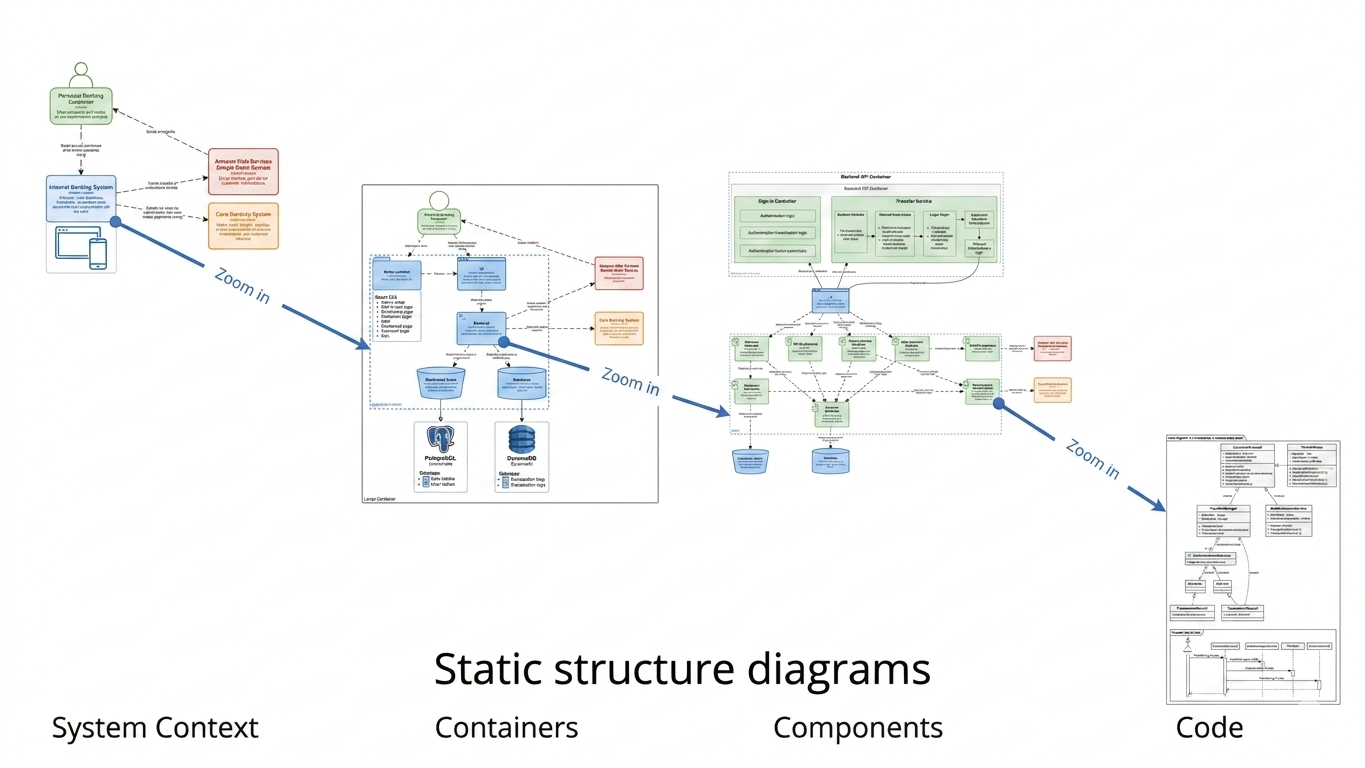
  2. Hierarchical: Four levels of abstraction that let you “zoom in” from big picture to code

  3. Practical: Tooling-agnostic and designed for real-world adoption, not theoretical purity

Unlike UML or ArchiMate, the C4 Model doesn’t require certification or complex tooling. It’s a lightweight framework that helps teams communicate architecture effectively—whether designing new systems or documenting legacy codebases.


What is the C4 Model?

Origin and Core Idea

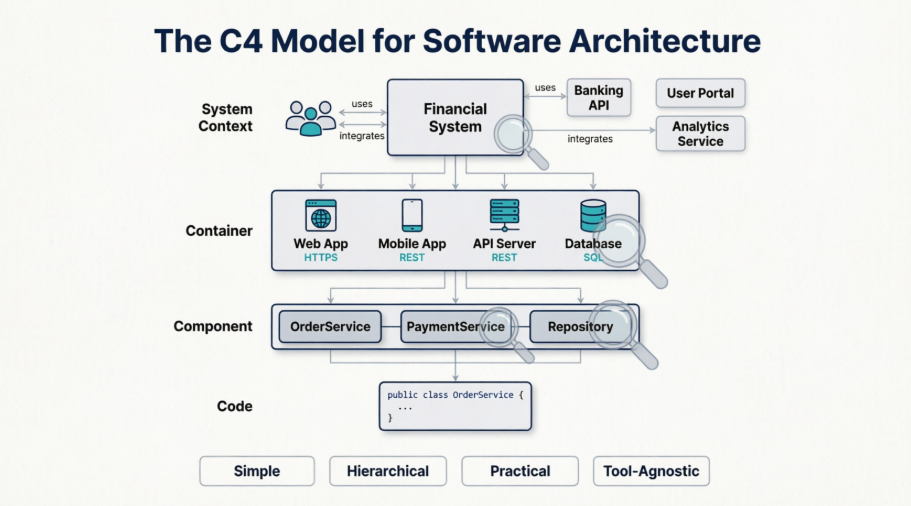
The C4 Model was developed by software architect Simon Brown to bridge the gap between high-level architecture discussions and implementation details. The name “C4” refers to the four hierarchical levels of abstraction:
  • Context

  • Container

  • Component

  • Code

Key Principles

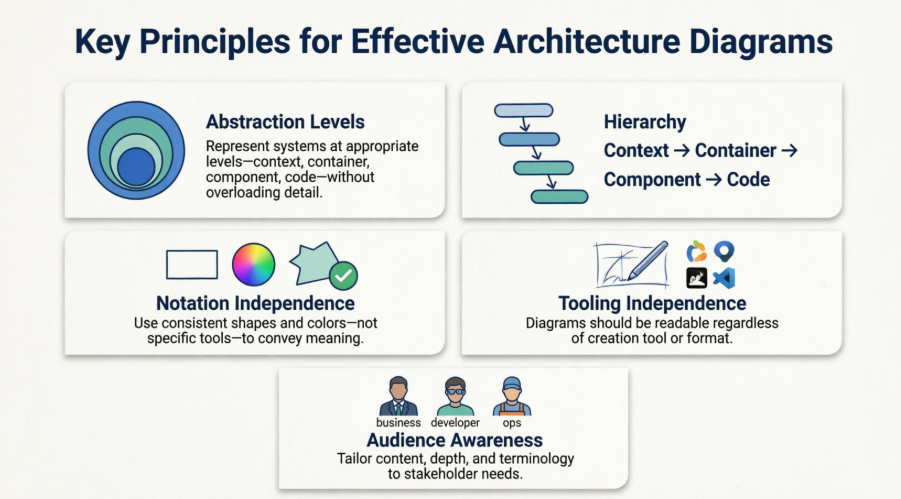
Principle Description
Abstraction Levels Each diagram focuses on a single level of detail; never mix levels
Hierarchy Diagrams nest logically: Context → Container → Component → Code
Notation Independence Use rectangles, colors, or icons that work for your team—consistency matters more than standard symbols
Tooling Independence Create diagrams with Visual Paradigm Desktop / Online, draw.io, PlantUML, or pen and paper
Audience Awareness Tailor each diagram to its intended readers (executives, developers, ops, etc.)

C4 vs. Traditional Approaches

Approach Strengths Limitations C4 Advantage
UML Formal, comprehensive, tool-supported Steep learning curve, often over-engineered Simpler, focused on communication over completeness
Ad-hoc diagrams Fast, flexible Inconsistent, ambiguous, hard to maintain Structured hierarchy with clear purpose per diagram
ArchiMate Enterprise-scale, standardized Complex, business-IT alignment focus Developer-friendly, implementation-focused
DDD Context Maps Excellent for bounded contexts Doesn’t address technical decomposition Complements DDD; C4 handles technical visualization

The Four Levels of Abstraction: A Quick Overview

Think of the C4 Model like Google Maps:
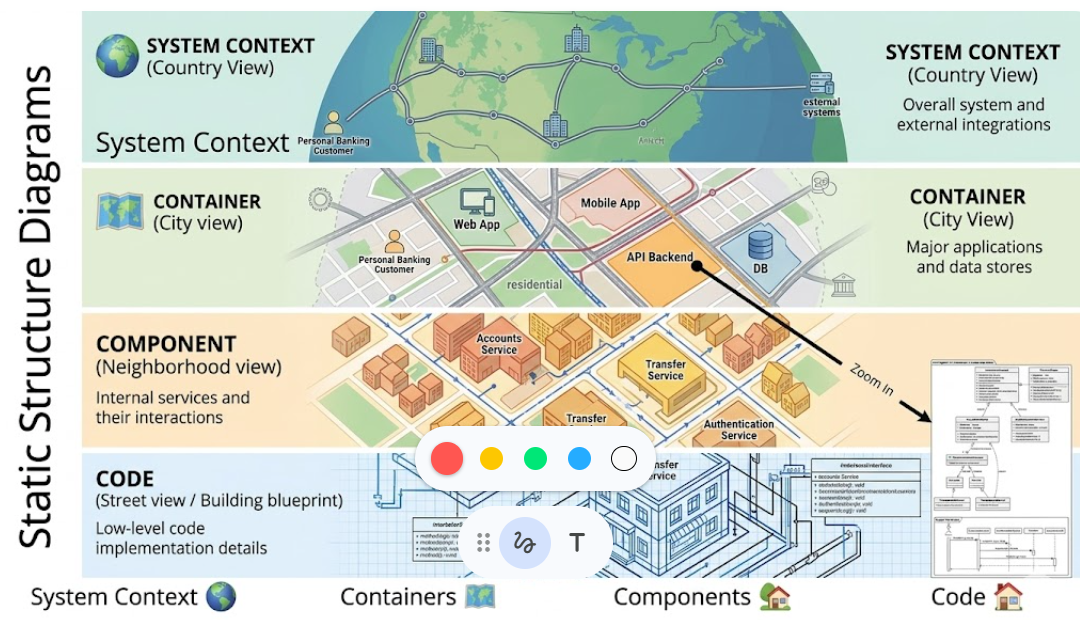
🌍 System Context (Country view)
   ↓
🗺️ Container (City view)
   ↓
🏘️ Component (Neighborhood view)
   ↓
🏠 Code (Street view / Building blueprint)

Each level answers different questions for different audiences. You don’t need all four for every system—most teams get 80% of the value from Levels 1 and 2 .


Level 1: System Context Diagram — The Big Picture

Purpose and Audience

  • Audience: Everyone—technical and non-technical stakeholders, product owners, executives, new team members

  • Goal: Show where your software system fits in the world

  • Question answered“What is this system, and who uses it?”

What to Include (and What to Leave Out)

✅ Include:

  • Your software system (center stage)

  • People/users (actors, roles, personas)

  • External systems your system depends on or integrates with (payment gateways, legacy systems, third-party APIs)

  • High-level interactions (e.g., “Submits order,” “Sends notification”)

❌ Exclude:

  • Technologies, protocols, or infrastructure details

  • Internal components or data flows

  • Deployment topology

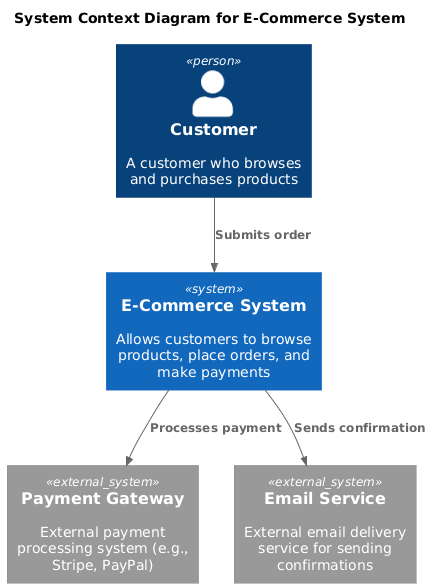
Practical Example: E-Commerce Platform

[Customer] → (Submits order) → [E-Commerce System] ← (Processes payment) ← [Payment Gateway]
                                      ↓
                              (Sends confirmation)
                                      ↓
                               [Email Service]

Common Pitfalls

  • Too much detail: Adding databases or microservices belongs in Level 2

  • Vague actors: “User” is less helpful than “Registered Customer” or “Support Agent”

  • Missing external dependencies: Forgetting critical integrations creates blind spots

Tips for Non-Technical Stakeholders

  • Use plain language for relationship labels (“Places order” vs. “HTTP POST /orders”)

  • Color-code by trust boundary (internal vs. external systems)

  • Keep the diagram to <15 elements for readability


Level 2: Container Diagram — High-Level Technical Building Blocks

What is a “Container”?

In C4 terminology, a container is a separately deployable unit that executes code or stores data. Examples:

  • Web application (React SPA)

  • Mobile app (iOS/Android)

  • Server-side application (Spring Boot API)

  • Database (PostgreSQL, MongoDB)

  • File system, blob storage, or message queue

  • Microservice (if independently deployable)

⚠️ Not a Docker container: C4 “containers” are logical deployment units, not necessarily containerized infrastructure.

How It Bridges Context and Internals

The Container Diagram zooms into your system from Level 1, revealing:

  • The major technical building blocks

  • How they communicate (protocols: HTTPS, gRPC, messaging)

  • Key technology choices (helpful for onboarding and architecture reviews)

Real-World Examples

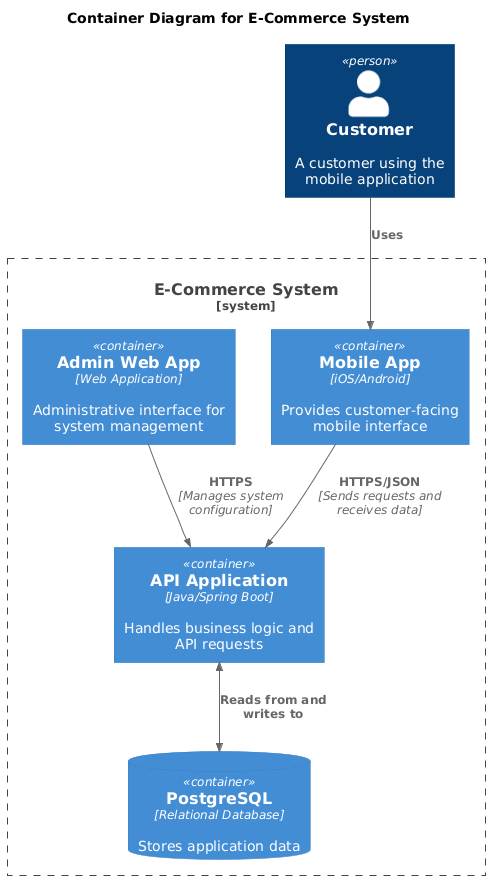
Web + Mobile + API + Database Setup:

[Customer] → [Mobile App] → (HTTPS/JSON) → [API Application] ↔ [PostgreSQL]
                              ↑
                      [Admin Web App] → (HTTPS)

Cloud-Native Microservices:
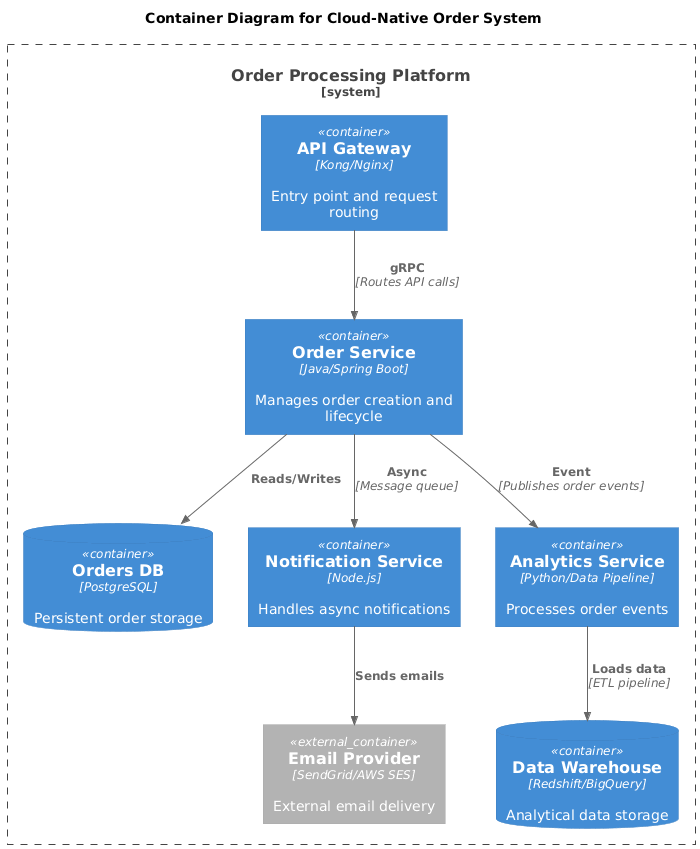
[API Gateway] → (gRPC) → [Order Service] ↔ [Orders DB]
                      → (Async) → [Notification Service] ↔ [Email Provider]
                      → (Event) → [Analytics Service] → [Data Warehouse]

Deployment vs. Logical Containers

Logical Container Deployment Reality
“API Application” May run as 10 Kubernetes pods
“Database” Could be a managed RDS instance with read replicas
“Message Queue” Might be Amazon SQS, Kafka cluster, or RabbitMQ

💡 Tip: Keep deployment details for Level 4 or separate deployment diagrams. Level 2 focuses on what runs, not where.


Level 3: Component Diagram — Inside the Containers

Defining Components Clearly

component is a grouping of related functionality encapsulated behind a well-defined interface. Think:

  • A module, library, or package

  • A service layer, repository, or controller

  • A business capability (e.g., “Order Validation,” “Payment Processing”)

✅ Good component names: OrderServicePaymentValidatorUserRepository
❌ Vague names: UtilsHelperBusinessLogic

When and Why to Create Component Diagrams

Create Level 3 diagrams when:

  • Onboarding developers to a complex container

  • Planning refactoring or modularization

  • Documenting public APIs or extension points

  • Conducting threat modeling or security reviews

Skip them when:

  • The container is simple (<5 logical parts)

  • The team has strong shared understanding

  • Documentation would become outdated faster than it provides value

Best Practices for Readability and Scope

  1. One container per diagram: Don’t show components from multiple containers

  2. Limit to 5–15 components: More becomes overwhelming; consider sub-components or separate diagrams

  3. Show interfaces, not implementations: Focus on what a component does, not how

  4. Use consistent naming: Align with your codebase (packages, namespaces, modules)

Examples

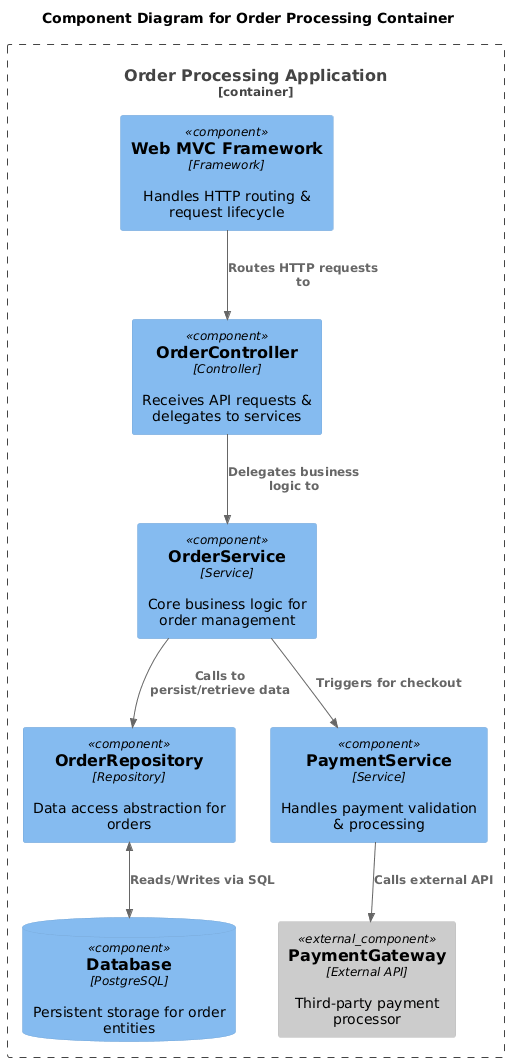
Monolithic Application:

[Web MVC Framework]
   ↓
[OrderController] → [OrderService] → [OrderRepository] ↔ [Database]
                      ↓
              [PaymentService] → [PaymentGateway]

Microservice Container:
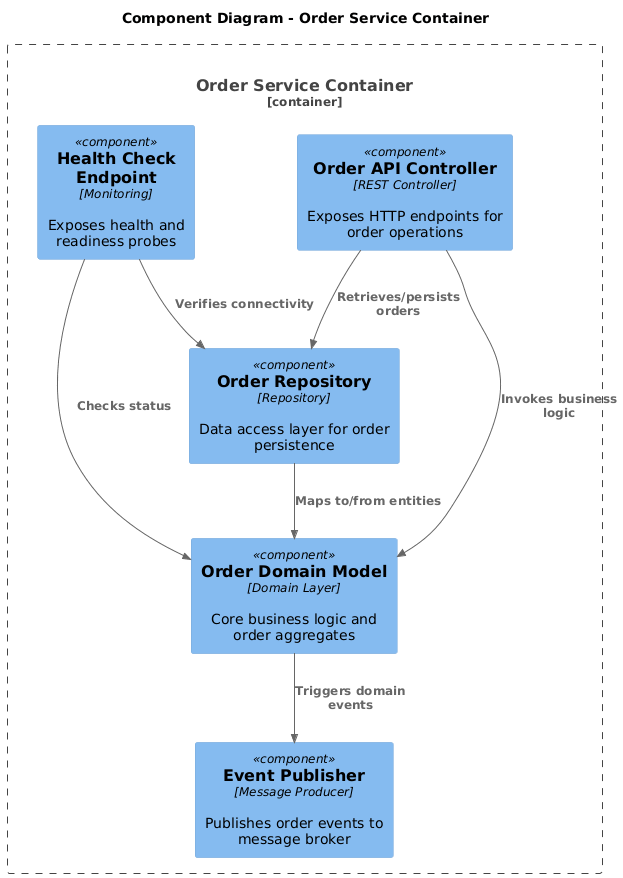
[Order Service Container]
├─ [Order API Controller]
├─ [Order Domain Model]
├─ [Order Repository]
├─ [Event Publisher]
└─ [Health Check Endpoint]

Level 4: Code Diagram — Zooming into Implementation

When to Use Code-Level Diagrams

Level 4 diagrams (e.g., UML class diagrams, ERDs, sequence diagrams) are optional and situational. Use them to:

  • Document complex algorithms or design patterns

  • Clarify inheritance hierarchies or interface contracts

  • Visualize database schemas for critical entities

  • Support detailed design reviews or knowledge transfer

Alternatives to Full Code Diagrams

Often, well-structured code + automated documentation is sufficient:

  • IDE navigation: Modern IDEs provide excellent code exploration

  • Swagger/OpenAPI: Auto-generated API docs

  • Entity-Relationship Diagrams: For database design

  • Sequence diagrams: For critical runtime flows

Keeping It Lightweight and Useful

  • Generate diagrams from code where possible (Structurizr, PlantUML, Mermaid)

  • Focus on why a design decision was made, not just what exists

  • Treat Level 4 as living documentation: automate updates via CI/CD

💡 Rule of thumb: If you wouldn’t show it in a 15-minute architecture review, it probably doesn’t belong in Level 4.


Supporting Diagrams

The core C4 levels handle static structure. These supplementary views address dynamics and operations:

System Landscape Diagram

  • Shows multiple software systems and their relationships across an organization

  • Useful for enterprise architecture, portfolio planning, or integration roadmaps

  • Example: “How do our 12 internal systems interact with Salesforce and SAP?”

Dynamic (Runtime) Diagrams

  • Sequence or flow diagrams showing how containers/components collaborate at runtime

  • Answer: “What happens when a user clicks ‘Checkout’?”

  • Best used sparingly for complex or critical workflows

Deployment Diagrams

  • Map software artifacts to infrastructure: servers, clusters, regions, networks

  • Essential for DevOps, SRE, and security teams

  • Can be C4-style (logical) or infrastructure-as-code (Terraform, CloudFormation)

These diagrams complement the core C4 views—they don’t replace them.


Creating Effective C4 Diagrams: Practical Tips & Best Practices

Notation, Styling, and Consistency

  • Shapes: Rectangles for systems/containers; cylinders for databases (optional)

  • Colors: Use sparingly—e.g., green for internal, blue for external, red for high-risk

  • Line styles: Solid for sync calls, dashed for async/events

  • Legends: Always include one if using non-standard notation

  • Labels: Every relationship needs a verb phrase: “Sends email,” not just an arrow

Tools and Tooling Options

Tool Best For C4 Support Notes
Structurizr Teams wanting “diagrams as code” Native, opinionated DSL-based, model-driven, auto-generates views
draw.io / diagrams.net Quick sketches, collaborative editing Manual, flexible Free, web-based, great for Level 1–2
PlantUML / Mermaid Developers who prefer text-based diagrams Via templates Version-control friendly, integrates with docs
Miro / Lucidchart Workshops, brainstorming, non-technical audiences Manual Excellent for collaboration, less suited for living docs
IcePanel Interactive, explorable architecture maps C4-focused Commercial, great for stakeholder demos

💡 Pro tip: Start with draw.io or Miro for adoption; migrate to Structurizr or PlantUML as diagrams become critical documentation.

Common Mistakes and How to Avoid Them

Mistake Solution
Mixing abstraction levels in one diagram Create separate diagrams; link them hierarchically
Overloading diagrams with detail Follow the “5-second rule”: Can someone grasp the purpose in 5 seconds?
Letting diagrams rot Assign ownership; integrate updates into sprint rituals
Ignoring the audience Create multiple views of the same model (e.g., exec summary vs. dev deep-dive)
Using tools that create friction Choose the simplest tool that meets your needs

Managing Cognitive Load

  • Limit elements: ≤15 per diagram for readability

  • Group related items: Use boundaries or color to show modules/domains

  • Progressive disclosure: Link from Level 1 → 2 → 3; don’t show everything at once

  • White space is your friend: Crowded diagrams discourage engagement


Real-World Examples and Case Studies

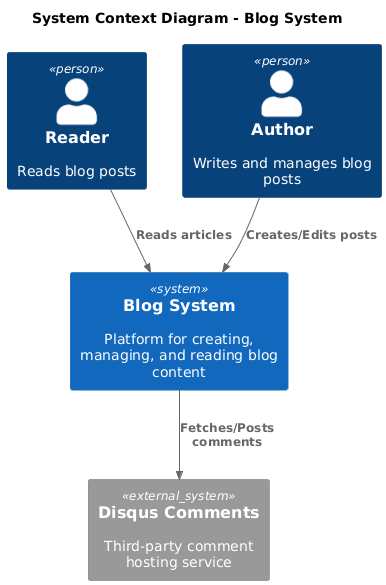
Example 1: Simple Web Application (Blog Platform)

Level 1: Context


[Reader] → [Blog System] ← [Author]
                     ↓
              [External: Disqus Comments]

Level 2: Containers
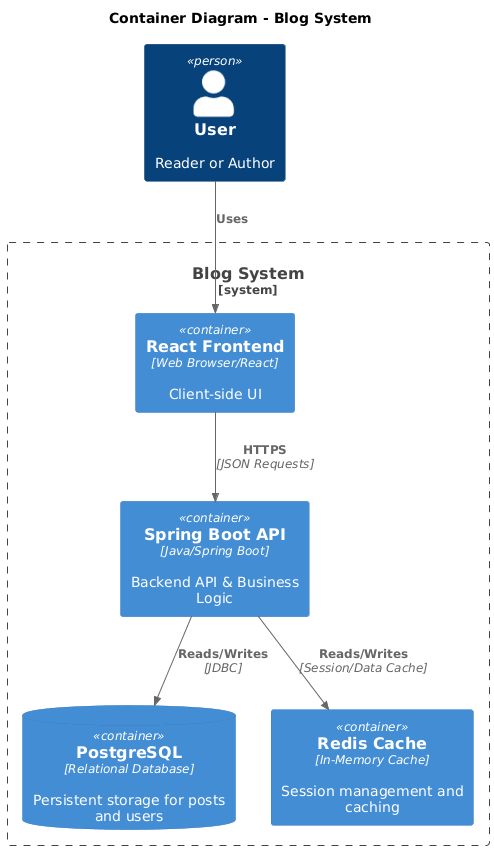
[Blog System]
├─ [React Frontend] ↔ (HTTPS) ↔ [Spring Boot API] ↔ [PostgreSQL]
└─ [Redis Cache] (for session management)

Level 3: Component (API Container)
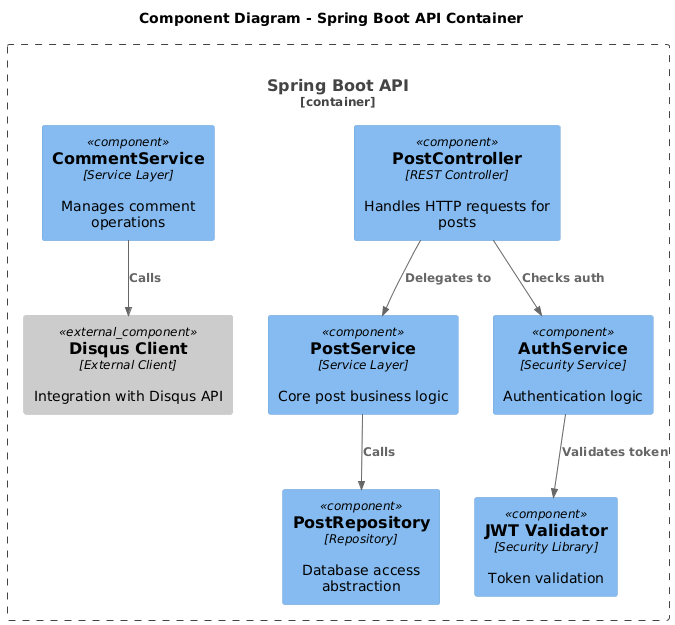
 

[Spring Boot API]
├─ [PostController] → [PostService] → [PostRepository]
├─ [CommentService] → [Disqus Client]
└─ [AuthService] → [JWT Validator]

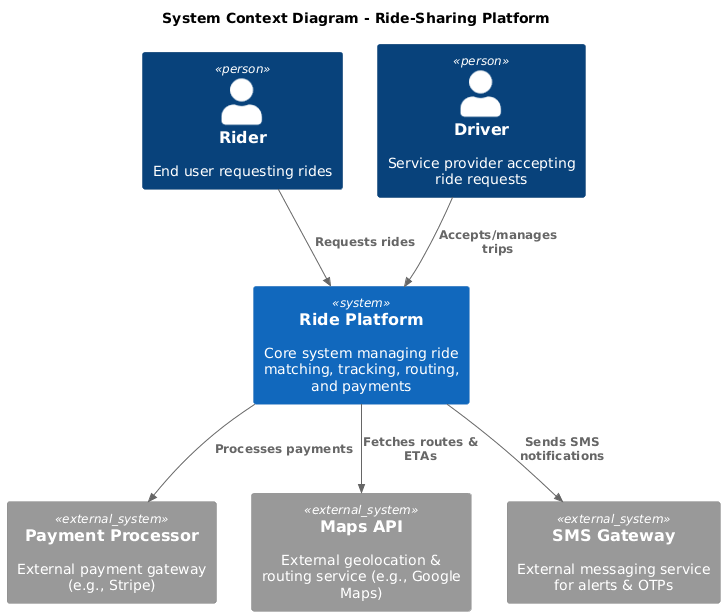
Example 2: Microservices / Distributed System (Ride-Sharing)

Level 1: Context

[Rider] → [Ride Platform] ← [Driver]
                     ↓
            [Payment Processor] [Maps API] [SMS Gateway]

Level 2: Containers
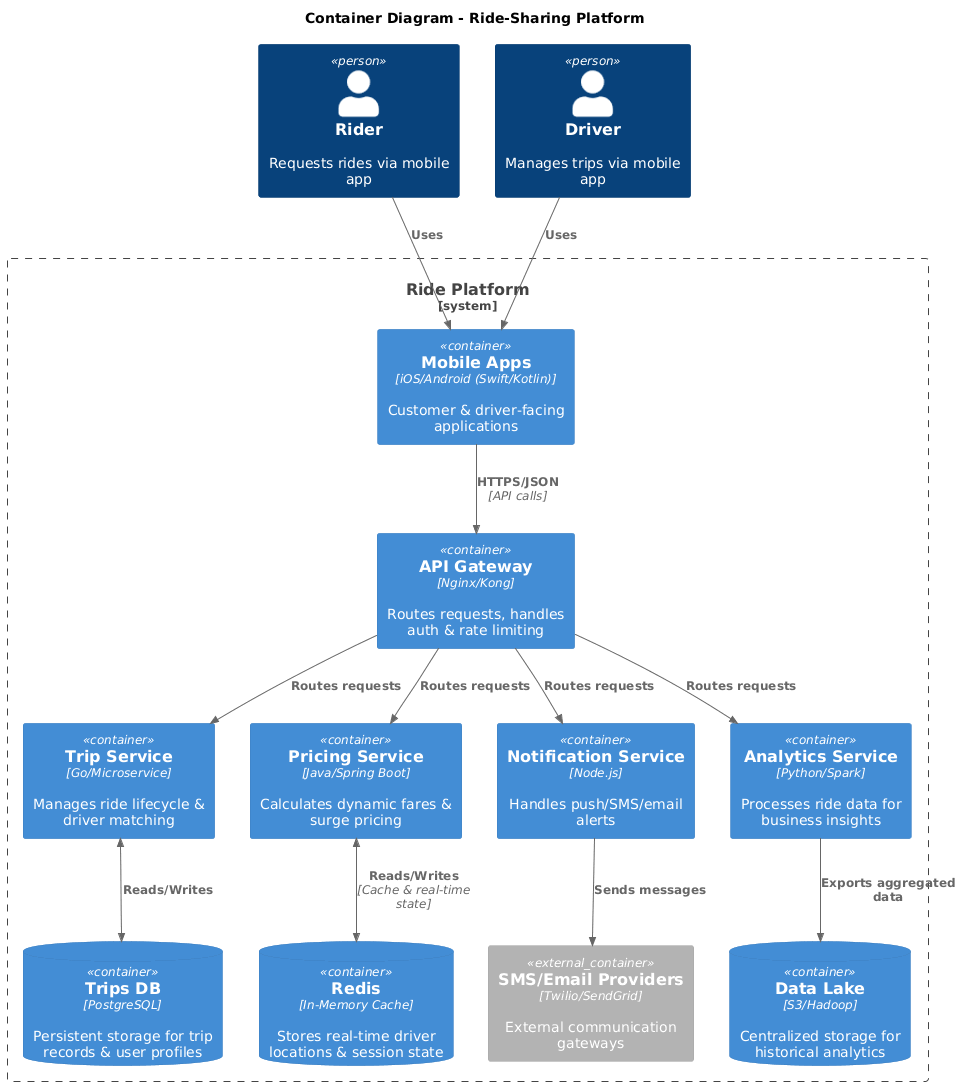
[Ride Platform]
├─ [Mobile Apps] (iOS/Android)
├─ [API Gateway]
├─ [Trip Service] ↔ [Trips DB]
├─ [Pricing Service] ↔ [Redis]
├─ [Notification Service] → [SMS/Email Providers]
└─ [Analytics Service] → [Data Lake]

Key insight: Each service is a container; internal components (Level 3) are only documented for complex services like Pricing.

Example 3: Enterprise Integration (Banking System)

Before C4: 50-page architecture document with inconsistent diagrams, unclear ownership, and outdated technology references.

After C4:

  • Level 1: Clear view of customer-facing apps, core banking, and regulatory systems

  • Level 2: Container map showing legacy mainframe adapters vs. new cloud services

  • Level 3: Component diagrams only for high-risk areas (fraud detection, compliance)

Result: 60% faster onboarding, clearer risk assessments, and actionable modernization roadmap.


How to Adopt C4 in Your Team

Getting Started: Lightweight Adoption

  1. Run a 90-minute workshop: Pick one system; collaboratively draft a Level 1 diagram

  2. Start with Level 1 only: Get stakeholder buy-in before adding complexity

  3. Use familiar tools: Begin with draw.io or whiteboards; avoid tooling debates early

  4. Document the “why”: Capture decisions alongside diagrams (ADR-style)

Keeping Diagrams Living and Up-to-Date

  • Assign ownership: One person per diagram (rotating is fine)

  • Integrate with rituals: Review/update diagrams during sprint planning or architecture syncs

  • Automate where possible: Use Structurizr or PlantUML to generate from code/model

  • Version control: Store diagrams alongside code (e.g., /docs/architecture/)

Integration with Agile Processes

Agile Ceremony C4 Integration
Sprint Planning Reference Level 2/3 diagrams when estimating complex stories
Backlog Refinement Use Context diagrams to clarify scope and dependencies
Retrospectives Update diagrams if architecture evolved unexpectedly
Onboarding New hires review Level 1–2 diagrams in first week

Who Should Own the Diagrams?

  • Level 1: Product Manager + Tech Lead (business + technical alignment)

  • Level 2: System Architect or Senior Engineer

  • Level 3: Component owners or feature team leads

  • Level 4: Individual developers (as needed)

💡 Golden rule: The team that builds the system should maintain its diagrams.


Benefits, Limitations, and When to Use (or Skip) C4

Proven Advantages

✅ Improved communication: Shared visual language across roles
✅ Faster onboarding: New engineers understand system boundaries quickly
✅ Better architecture reviews: Clear abstractions highlight risks and trade-offs
✅ Living documentation: Diagrams evolve with the codebase
✅ Tool flexibility: No vendor lock-in; adapt to your stack

When Other Approaches Might Be Better

❌ Highly regulated domains: If formal modeling (e.g., SysML) is mandated
❌ Pure research/exploration: Early discovery may need more fluid, non-hierarchical sketches
❌ Tiny systems: A single-container app may only need Level 1
❌ Teams resistant to documentation: Start with informal sketches; introduce structure gradually

Scaling C4 for Large or Complex Systems

  • Modularize diagrams: One Context diagram per bounded context or product area

  • Use views: Structurizr lets you create filtered perspectives from a single model

  • Layer supporting diagrams: Add deployment or dynamic views only where valuable

  • Establish governance: Lightweight review process for diagram changes in large orgs


Conclusion: Better Communication, Better Architecture

Key Takeaways

  1. Start simple: A single, well-crafted System Context diagram delivers immediate value

  2. Respect abstraction: Never mix levels; let each diagram answer one clear question

  3. Design for your audience: Executives need Context; developers need Containers and Components

  4. Keep it living: Diagrams that aren’t maintained become liabilities

  5. Tooling follows purpose: Choose the simplest tool that enables collaboration and clarity

Call to Action: Start with One Context Diagram Today

You don’t need permission, certification, or a new tool. Grab a whiteboard, gather your team, and answer:

“What is our system, who uses it, and what external systems does it depend on?”

Sketch it. Share it. Iterate. That’s the C4 Model in action.


Optional Deep Dives

C4 Model vs. Other Modeling Techniques

Technique Best Used When… Complements C4 By…
ArchiMate Enterprise architecture, business-IT alignment Providing business capability maps that feed into C4 Context
UML Detailed design, formal specifications Supplying Level 4 code diagrams or sequence flows
DDD Complex domain modeling, bounded contexts Defining component boundaries within C4 Containers
Event Storming Discovering domain events and workflows Informing dynamic/runtime C4 diagrams

Advanced Topics

C4 as Code: Tools like Structurizr let you define your architecture model in a DSL, then auto-generate diagrams. Benefits:

  • Version control friendly

  • Single source of truth

  • Automated consistency checks

Automated Diagram Generation:

  • Extract Container/Component structures from code (limited; use cautiously)

  • Generate Level 4 diagrams from source (e.g., PlantUML class diagrams)

  • Sync with CI/CD to flag architecture drift

Versioning Diagrams:

  • Tag diagrams with system version (e.g., “v2.3 Architecture”)

  • Archive deprecated views; link to changelog

  • Use Git history to track architectural evolution

Resources & Further Reading

🔗 Officialc4model.com — Creator’s guide, examples, and FAQ
📚 BookSoftware Architecture for Developers by Simon Brown
🛠️ Tools:


“The goal isn’t perfect diagrams. The goal is better conversations about architecture.”
— Adapted from Simon Brown

Start small. Stay consistent. Keep communicating. 🗺️✨

Turn every software project into a successful one.

We use cookies to offer you a better experience. By visiting our website, you agree to the use of cookies as described in our Cookie Policy.

OK